



A Claude Code hooks plugin that draws one bar per conversation turn above the prompt, letting you hover for a turn summary or click to jump to it.
✳︎ turn-tides
└─ Make every conversation easier
Claude Code mods, plugins, skills, hooks, status lines and MCP servers. Browse community builds with original sources and L0–L3 permission levels.
116 projectsA Claude Code hooks plugin that draws one bar per conversation turn above the prompt, letting you hover for a turn summary or click to jump to it.
I built a Claude Code mod that shows context usage and estimated cost in my session. Mods let you add your own UI and change how Claude Code behaves. Being able to shape my coding tool around my workflow is pretty cool. https://t.co/zC3iFnWmwN

The author built optimAIzr with Claude Code, leveraging new mod support to embed into the workflow, displaying per-turn cost and 5-hour budget, switching Opus→Sonnet based on savings, and showing real-time burn rate, savings, and cache hit rate.
BazaarLink is an OpenAI-compatible AI API gateway: one key for 140+ AI models, pay as you go, with budget limits.
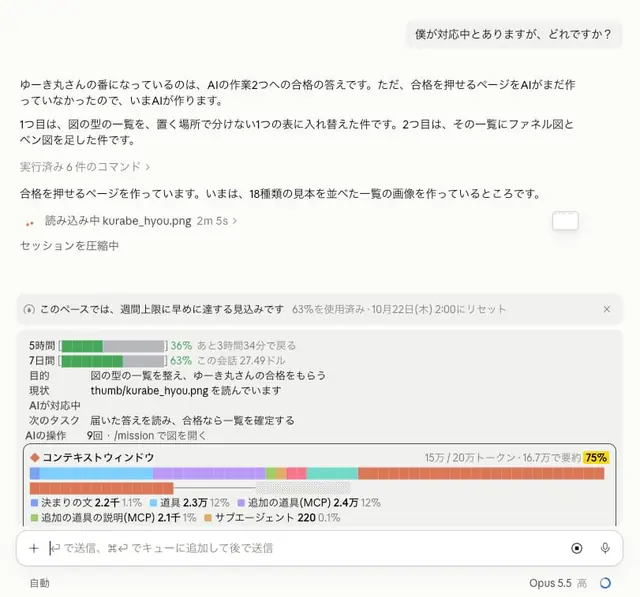
bazaarlink.aiVisit sponsor ↗In a Claude Code Mod, I displayed session task progress💡 For now, is this kind of information enough?🤔 ・Purpose and goals ・Current status (whether the AI is handling it or it's your turn) ・Next task ・Usage and remaining context window Including the design (this color lol) I don't like it, so I'll keep modifying it😂 https://t.co/pxUVIU4J6N

Claude Code plugin "ember" that narrates what Claude is doing in the spinner line, shows whose move it is above the prompt, tracks subagents, chimes on completion or pending questions, and adds an animated flame pane.
Claude Code Mods could be made just by asking Claude. Mods is a new feature announced on 10/1 that lets you plug your own features into Claude Code. For example, you can ask like this: "Create a Mod that shows horizontal bars above the input field for how full the conversation is, the 5-hour window, and the weekly window. Make it yellow when it exceeds 70%, and red when it exceeds 90%." By that same evening, the bars are showing above the input field. What features would you like to add to your own Claude Code?