alex2481kobe@alex2481kobe
alex2481kobe/claude-mods/tree/main/plugins/peek
Claude Code plugin that displays images generated or found by Claude directly in the terminal: true pixel rendering in kitty and Ghostty, and color block previews in other terminals.
alex2481kobe/claude-mods/tree/main/plugins/peek
peek embeds images directly below Claude's tool call bar, eliminating the need to open a browser or phone. It renders true images in Ghostty or kitty via the kitty graphics protocol (first copying the image as PNG to $TMPDIR/peek/), and in other terminals (Apple Terminal, iTerm2, WezTerm, VS Code Terminal, tmux) it generates a color block preview of approximately 160x96 pixels using half-block characters ▀ with a self-mapped 256-color palette and light dithering; Claude Code Desktop and mobile apps only display the toolbar. Requirements include Claude Code with mod support (tested on 2.1.287) and macOS (using the built-in sips for image conversion). Installation is via /plugin marketplace add alex2481kobe/claude-mods and /plugin install peek@claude-mods. You can ask Claude to call the show tool using natural language, or manually display an image with /peek ~/Desktop/screenshot.png. The implementation includes $.tool.register to register the show tool, a prompt.compose hook to supplement system prompts, and a ui.render hook to draw below the toolbar, generating block previews using CIE Lab nearest color and quarter-intensity Floyd-Steinberg dithering. Limitations include rougher block previews, slight dithering texture in flat areas, block previews always used in tmux, macOS-only support, and each displayed image leaving a PNG copy in $TMPDIR/peek/.
Check the author's README for the marketplace and plugin name first. Commands may change as the repository evolves.
claude plugin marketplace add alex2481kobe/claude-mods
claude plugin install peek@claude-mods
Images in the terminal. When Claude makes, downloads, captures or finds an image you should look at, it shows it to you inline, under its tool call, without you opening a browser or your phone.
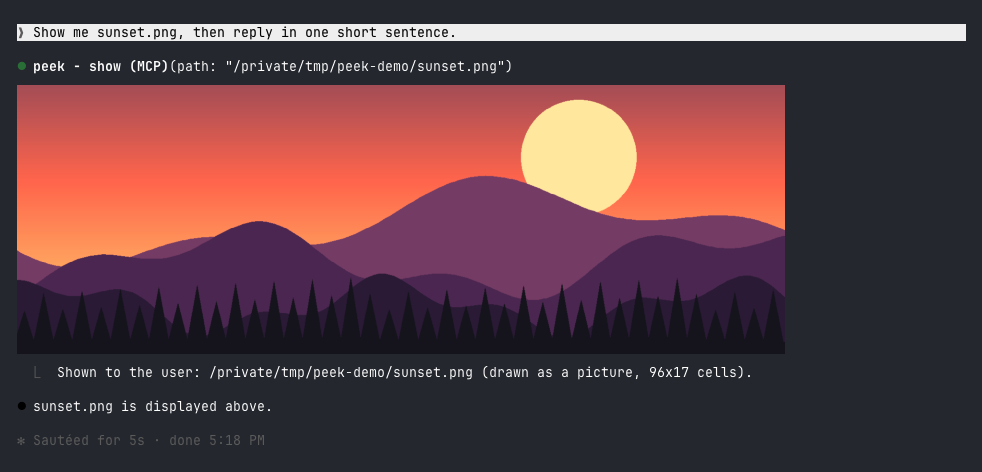
In Ghostty or kitty it is the real picture:
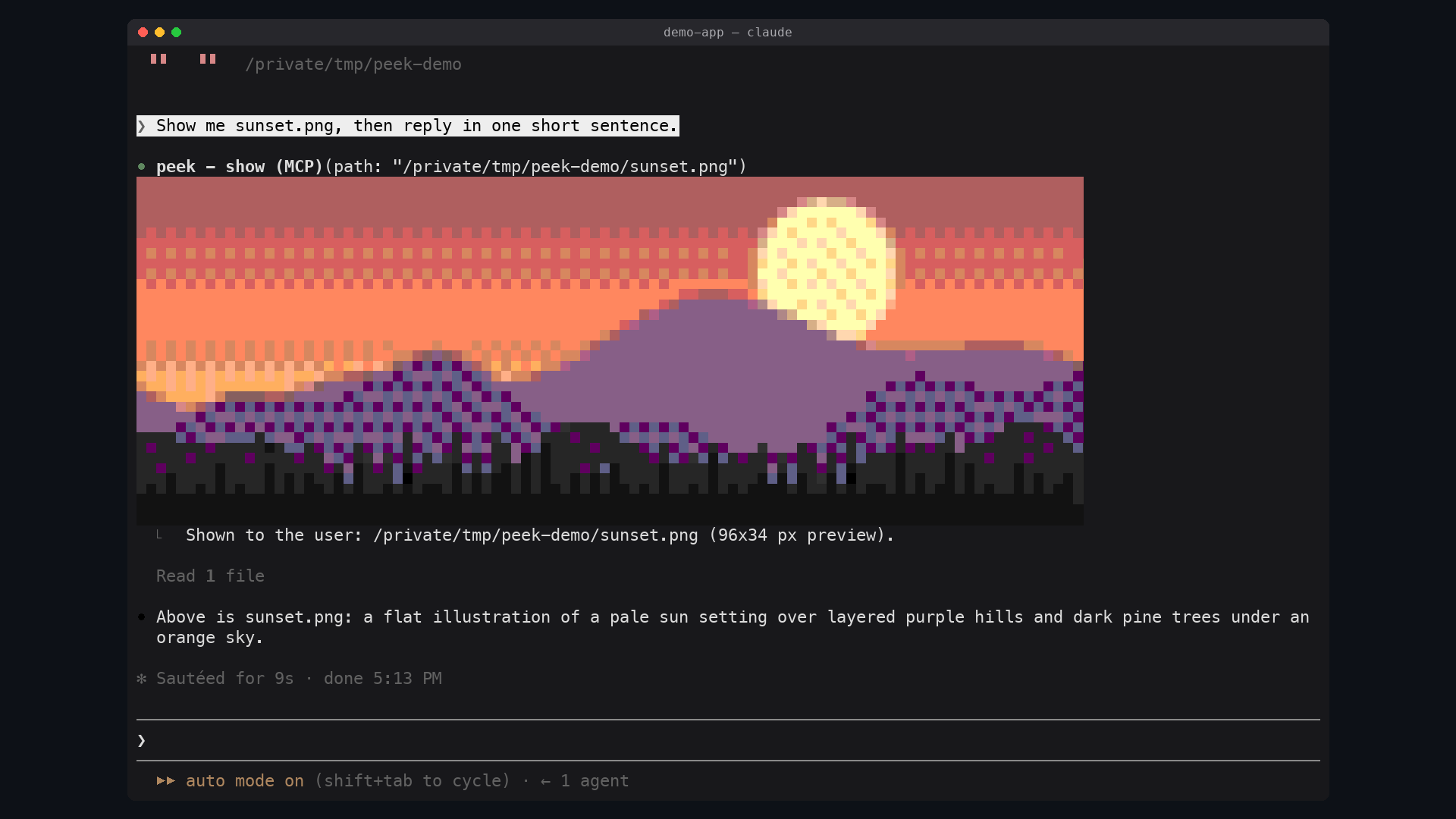
In other terminals it is a colored-block preview:
| Terminal | What peek draws | | --- | --- | | Ghostty, kitty | The real picture, in pixels | | Apple Terminal, iTerm2, WezTerm, VS Code's terminal, anything inside tmux | A colored-block preview, about 160x96 pixels at most | | Claude Code Desktop, the mobile app | Nothing: the tool row only |
The reason is what a terminal can draw. Every terminal draws text: a grid of cells, each one character with a text and a background color. A real picture needs the terminal to implement a graphics protocol, a way for a program to hand it pixels. Claude Code draws a mod's pictures through the kitty graphics protocol, which kitty and Ghostty implement. Apple Terminal implements none, and Claude Code does not promise pictures in the others.
Elsewhere peek fakes the picture with text: each cell is an upper half block
▀ whose text color paints one pixel and whose background paints the one
below it, so a cell holds two pixels. Claude Code draws these in the 256-color
palette even where the terminal has more, so peek picks the palette colors
itself, by how close they look, and lightly dithers between them.
sips, which ships with it/plugin marketplace add alex2481kobe/claude-mods
/plugin install peek@claude-mods
Ask for an image the way you would anyway ("show me the screenshot", "make a
chart of this and let me see it"). Claude calls the show tool on its own.
You can also show one yourself:
/peek ~/Desktop/screenshot.png
Any format macOS opens works: PNG, JPEG, HEIC, GIF, TIFF, BMP.
$.tool.register adds the show tool (mcp__peek__show). Claude Code may
defer a plugin's tool, which hides its description until it is loaded, so a
prompt.compose hook also adds a short section to the system prompt: to let
you see an image, call show. Reading an image shows it only to Claude.TERM_PROGRAM=ghostty, or KITTY_WINDOW_ID set) the
picture is an Image element over a PNG copy of the image in
$TMPDIR/peek/. The terminal reads that file itself at every redraw, and
Claude Code refuses a file on a network or device path, so the copy keeps the
picture working when the original moves or lives on a mounted volume.sips scales the image and writes an uncompressed BMP, which peek
decodes, fits to the 256-color palette (nearest in CIE Lab, then
Floyd-Steinberg at a quarter strength) and draws as a Raster of half
blocks.ui.render hook on the tool's row, and on /peek's output row, draws the
picture under it.The dither strength was measured, not guessed: on live captures of a 256-color terminal, a quarter strength cut the error you see at a glance by 8-22% against no dithering, without the checkerboard that stronger dithering leaves in this palette.
$TMPDIR/peek/,
which macOS clears with the rest of the temporary folder.claude plugin validate plugins/peek
claude plugin test plugins/peek
claude --plugin-dir plugins/peek
Is this your project? Add this badge to your README or website. It links back to this page.


A status bar for the Claude desktop app. It draws above your prompt and shows session quality, context fill, cache countdown, and your 5-hour and weekly limits, with Clawd acting out what the session is doing.

A Claude Code mod that opens a live pane showing the main agent, its subagents, every tool call and a code map of the files they touch.

A Claude Code mod that renders thumbnails of pasted images above the prompt and image buttons under sent prompts, with a zoom side pane, for kitty-graphics terminals.
A macOS Claude Code desktop mod that surfaces pending agent questions above the prompt, lets users answer with one click, queues decisions, and tracks session activity.

A Claude Code mod adding a progress bar above the prompt and a live subagent panel (/agents-info) with model, task progress, context, cost and time estimates.
 ▶ ♫
lot-map is a Claude Code mod that renders a live map in a pane beside the chat, pulsing from the agent to stations like Files, Shell, Network and Agents on every tool call.