



A dim line under each Claude reply that shows how much of your current session's usage limit is used, and how much the turn that just ended spent:
✳︎ turn-usage
└─ Make every conversation easier
Claude Code mods, plugins, skills, hooks, status lines and MCP servers. Browse community builds with original sources and L0–L3 permission levels.
22 projectsA dim line under each Claude reply that shows how much of your current session's usage limit is used, and how much the turn that just ended spent:
A band above the Claude Code prompt showing how much of your plan you've used and what the session costs.
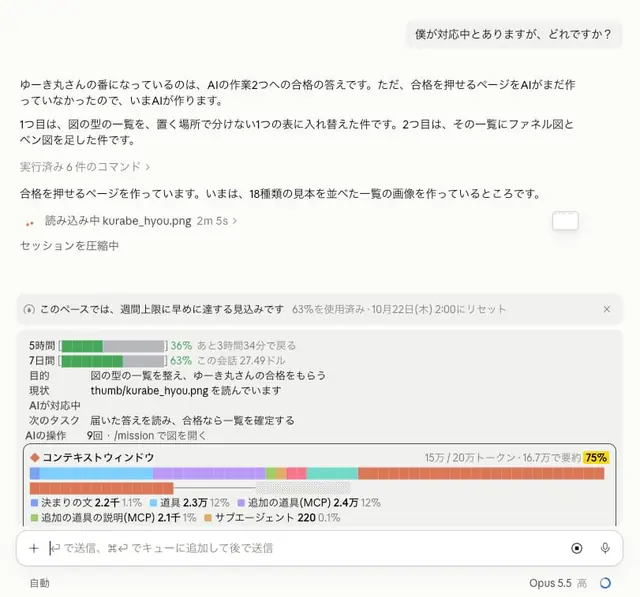
In a Claude Code Mod, I displayed session task progress💡 For now, is this kind of information enough?🤔 ・Purpose and goals ・Current status (whether the AI is handling it or it's your turn) ・Next task ・Usage and remaining context window Including the design (this color lol) I don't like it, so I'll keep modifying it😂 https://t.co/pxUVIU4J6N

A fuel gauge above the prompt: how much of your Claude plan is left in each window, and when it refills.
Track what your AI coding tools cost
syrtis.nyanako.comVisit sponsor ↗A Claude Code mod that always shows current-session and weekly usage rates as circular gauges and the time until reset above the input field.
Reddit shares two small Claude Code plugins: UsageBar shows usage, weekly limit, and context usage in the footer; QuickSkill (operated with /fav) lets you toggle commonly used plugins at the bottom, using claude plugin enable/disable without restart.
Always shows the 5-hour, weekly and context usage above the Claude Code prompt

A Claude Code status line plugin showing plan usage, reset countdowns, session tokens, cost and live tokens per second, with verified manifest and hooks.
Draws your plan usage limits as bars above the prompt, one colour per window, flagging when you are using a window faster than its clock. Toggle with /usage-bar.