
Davron2004@Davron2004
Davron2004/slash-coverage
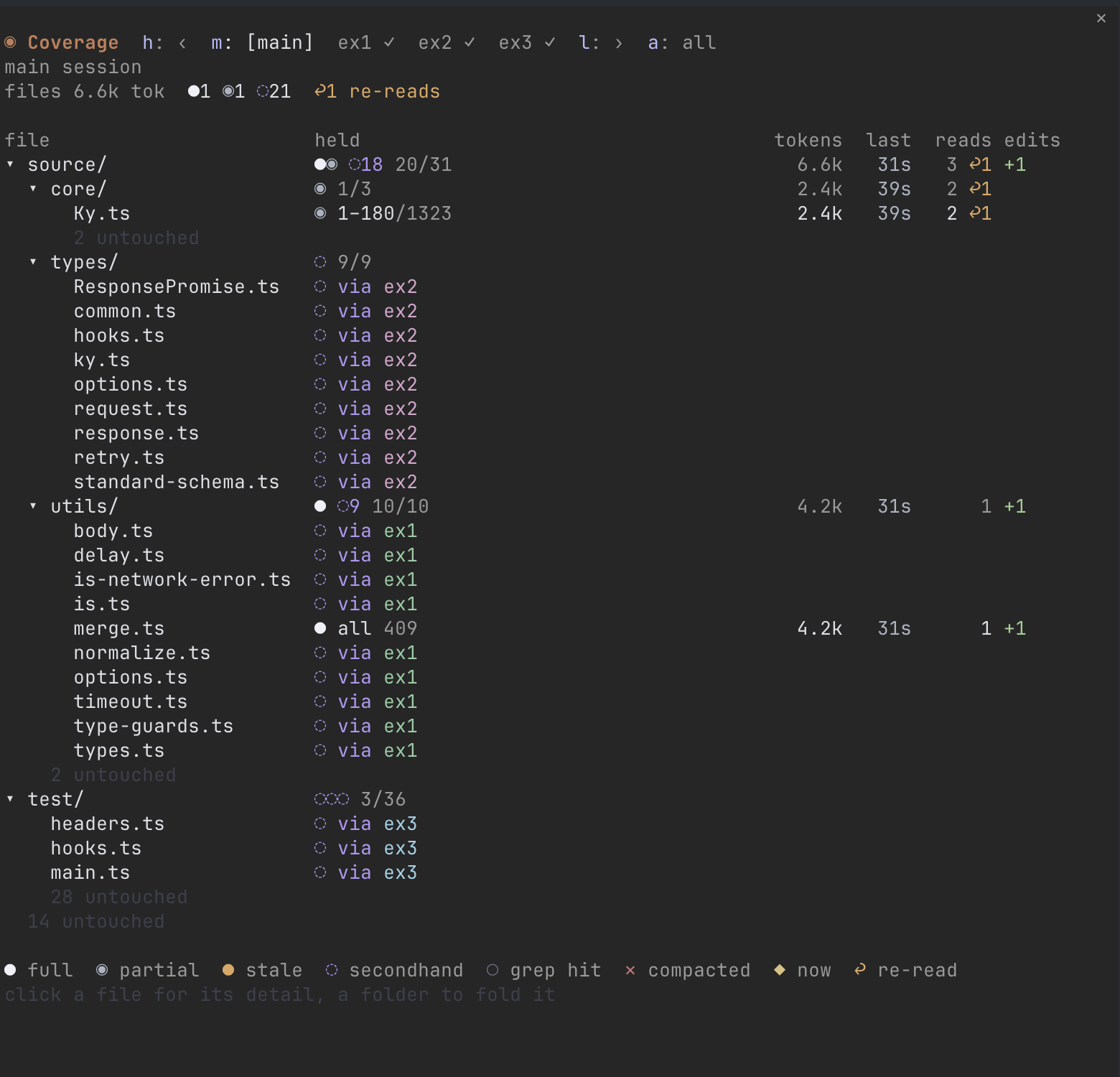
A Claude Code mod that shows which files each agent has in its context, and how much of each.
Davron2004/slash-coverage
slash-coverage keeps subagent context visible: for the main session and every subagent, which files it holds in full, which only in part (and which lines), which it never read itself but a subagent it spawned did, which copies went stale after an edit, and what each one costs in tokens. Every value comes from tool calls Claude Code already makes (Read, Edit, Write, Grep, Glob, and parsed shell reads), with per-agent logs persisted next to the chat transcript so the grid survives a restart. Install via /plugin install slash-coverage --marketplace Davron2004/slash-coverage.
Check the author's README for the marketplace and plugin name first. Commands may change as the repository evolves.
claude plugin marketplace add Davron2004/slash-coverage
claude plugin install slash-coverage
A Claude Code mod that shows which files each agent has in its context, and how much of each.
When Claude spawns subagents, the files they read go into their contexts, not the main session's. slash-coverage keeps that visible: for the main session and every subagent, which files it holds in full, which only in part (and which lines), which it never read itself but a subagent it spawned did, which copies went stale after an edit, and what each one costs in tokens.
In a Claude Code terminal session:
/plugin install slash-coverage --marketplace Davron2004/slash-coverage
Answer y to add the marketplace, then pick a scope. In a fullscreen terminal at least 144 columns wide the pane opens on the right when a session starts; in a narrower one, /coverage opens it. /coverage also hides it. Ctrl+X then Tab gives the pane the keyboard, so its keys below work.
slash-coverage is built on Claude Code's mod API (function hooks), which is early access and changes between versions. It was built against Claude Code 2.1.292.
Pick an agent in the row at the top, and every column describes that agent:
| Column | Shows |
| --- | --- |
| held | What's in its context: ● all, the line ranges it read (◉ 1–180/1323), ● stale ✎main when another agent edited the file after it read it, ◌ via ex1 when only a subagent it spawned read it, ○ grep hit, or ✕ compacted |
| tokens | What the file's tool results cost its context |
| last | Time since it last read, searched or edited the file |
| reads | Read calls, with ↩n for reads of lines it already held |
| edits | Lines it added and removed |
| Glyph | Means |
| --- | --- |
| ● | The whole file, current |
| ◉ | Some of its lines |
| ● (orange) | Read before another agent edited it |
| ◌ | This agent never read it, but a subagent it spawned did |
| ○ | Named in a search, listing or line count, never opened |
| ✕ | Read, then dropped by compaction |
| ◆ | The file an agent is working on right now |
Rows are the files the picked agent knows: its own, and those a subagent it spawned read. So main lists everything, and a subagent lists only what it touched. In all, rows are every file any agent touched. Untouched files fold into one "N untouched" line per folder. A folder's row sums what's inside it, strongest first: short runs as glyphs, longer ones counted, ●● ◉ ◌14 ○○○ 20/31. Click a file for what every agent knows of it, and a folder to fold it.
| Key | Does |
| --- | --- |
| h / l | Step to the previous or next agent, in the order they were spawned. The row scrolls; ‹ 3 and 5 › count the agents off screen |
| m | Main session |
| a | All agents side by side |
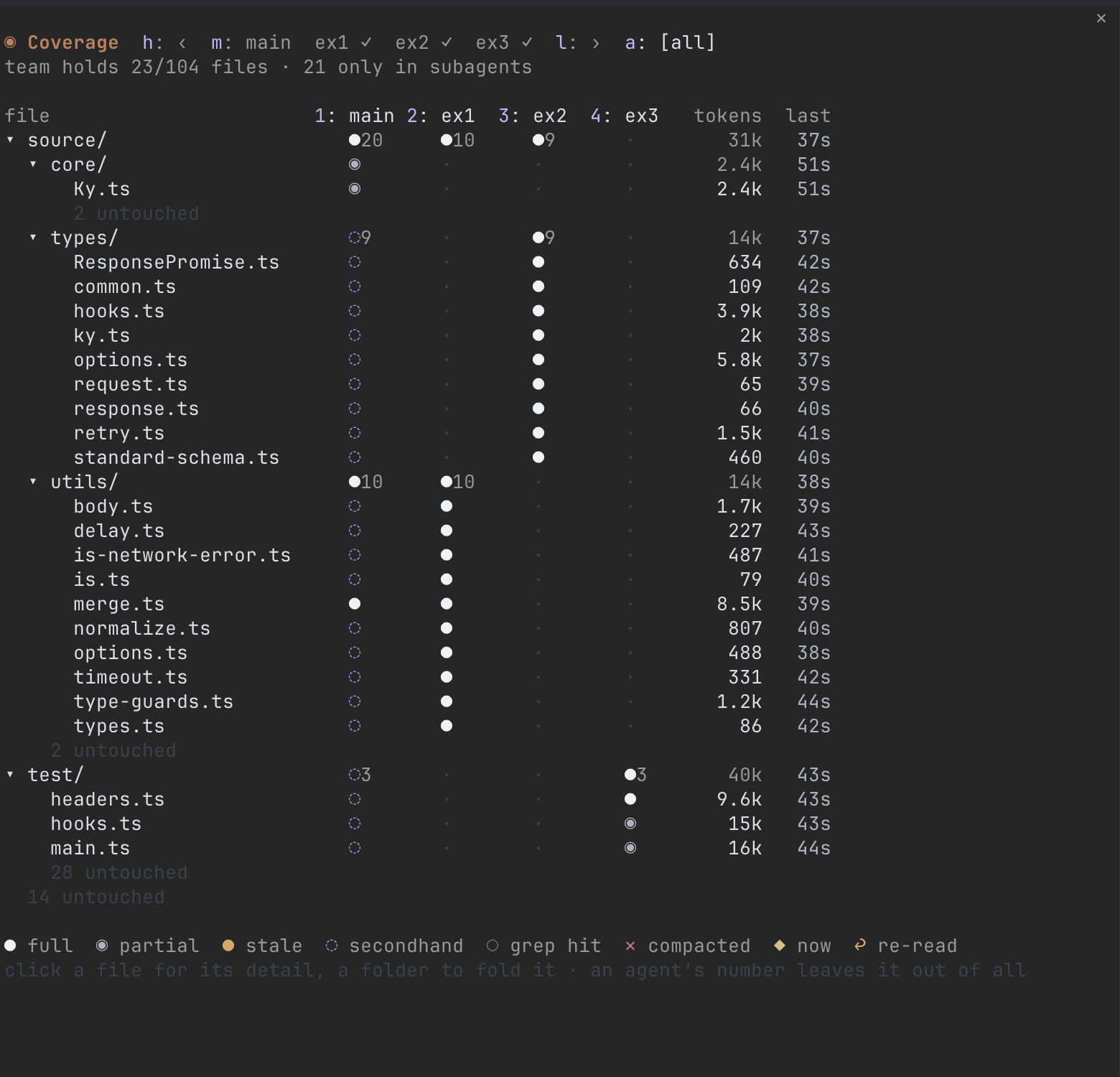
a puts one narrow column per agent next to the file tree, then the team's tokens and last touch. It shows what no single agent's view can: two subagents paying for the same file, and folders no agent covered.
Each agent's header is a numbered toggle. Press its number (2 for 2: ex1) to leave that agent out of the view, as if it never ran. Its column goes and the others close up. It waits under the grid in a "left out" line, as ⊘ex1: click it to bring it back, or press 0 to bring back every agent left out. So you can see what your backend agents know without the UI agent's reads mixed in.
Every value comes from tool calls Claude Code already makes, and nothing asks an agent to report anything:
grep, rg, wc), give search hits. A path only counts when it starts a line of the output, so a file merely mentioned inside another file's content doesn't.for loops, with cds followed and globs expanded. Only commands that print file content count as reads, so python3 x.py or a heredoc's code never does, and output sent to a file doesn't either. cat, nl, head, tail, sed -n 'A,Bp' and awk 'NR>=A && NR<=B' give exact lines, through pipes too (cat -n f | sed -n 10,20p is lines 10–20). When Claude Code kept only a preview of a long output, only the lines in the preview count. git status after each command catches files a command changed.git worktree list) map onto the repo's own paths, so a subagent working in ../app-feature or .claude/worktrees/x fills in the same rows as main.◌) is structural: a subagent you spawned read the file. What its report said about the file isn't tracked.slash-coverage keeps a log per agent of what it read, searched and edited, and saves it in the chat's own folder next to the transcript: ~/.claude/projects/<project>/<chat id>/slash-coverage/main.json, plus one file per subagent. Resuming the chat (--resume, --continue) replays the logs in time order and the grid comes back as it was, stale copies included. Claude Code deletes a chat's folder along with its transcript, so the logs go with it. /coverage clear empties them.
CLAUDE.md, never pass through a tool call, so they don't show.sed '/re/,/re/p', a script, xargs) holds unknown lines, so it shows as partial.git clone https://github.com/Davron2004/slash-coverage
claude --plugin-dir ./slash-coverage # run a session with it; saving a file reloads it
cd slash-coverage
claude plugin validate .
claude plugin test .
tsc -p . # after the first load, which lays the API's types in .claude-plugin/types
hooks/knowledge.ts turns tool events into levels, hooks/events.ts holds the event log and its replay, hooks/paths.ts reads shell commands and their output, and hooks/register.tsx wires them to Claude Code and draws the pane.
MIT

thimble thimble's analysis guidance in a plain Claude Code session, as a [mod](https://code.claude.com/docs/en/plugins/mods/overview).

A Claude Code mod that fingerprints the working tree and remembers which tests passed and failed on the same code, so the model re-runs a flaky test instead of changing working code.

Claude Code mod that records tool calls like a blackbox: replays recent actions before errors or denials via /blackbox, and masks tokens and passwords in the log.