
choiyounggi@choiyounggi
choiyounggi/groundwork/tree/main/plugins/session-progress
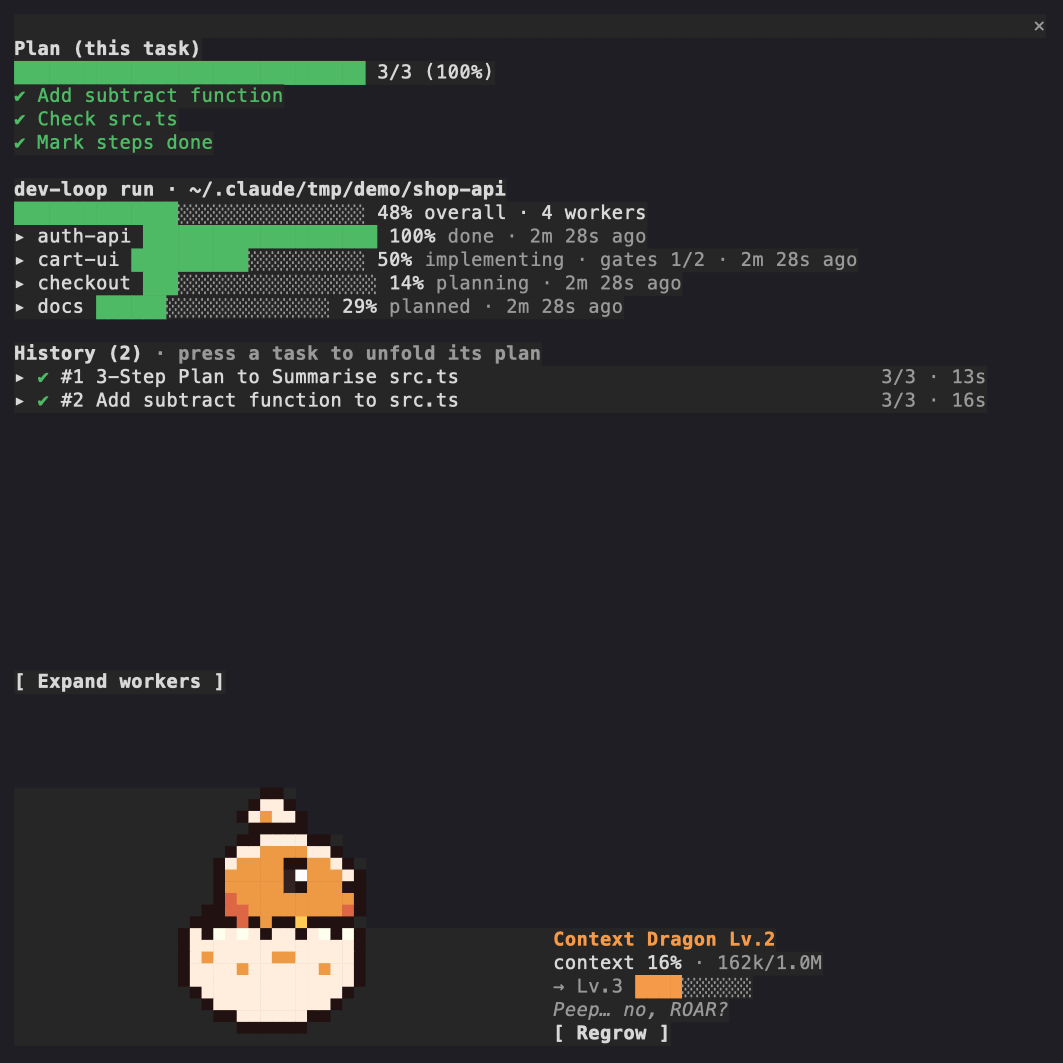
A Claude Code mod (function hooks) that draws a live terminal pane: a plan bar for the current request, a task history with steps and subagents, dev-loop run progress, and a pixel dragon that grows with your context window.
choiyounggi/groundwork/tree/main/plugins/session-progress
session-progress is a Claude Code mod built from in-process TypeScript function hooks rather than shell commands. Install via '/plugin marketplace add choiyounggi/groundwork' then '/plugin install session-progress@groundwork'; the pane opens automatically in wide terminals and can be reopened with /progress.
Features: a plan bar that follows TodoWrite/TaskCreate or a built-in steps tool; a history of up to 200 tasks with steps, duration and started subagents, with short titles generated by a one-off Haiku call; live dev-loop orchestration progress read from .orchestration and gate ledgers; and a Context Dragon that passes through seven stages as context usage grows, with a Regrow button that triggers compaction. Configuration options (language, openPaneOnStart, reportSteps, summarizeTitles, showDragon) are stored in settings.json under pluginConfigs. The plugin only reads and never writes to your project.
Check the author's README for the marketplace and plugin name first. Commands may change as the repository evolves.
claude plugin marketplace add choiyounggi/groundwork
claude plugin install session-progress@groundwork
English | 한국어
See what your Claude Code session is doing, without scrolling the transcript. A plan bar for the current request, a history of every task with its steps and subagents, the live progress of a dev-loop orchestration run, and a pixel dragon that grows with your context window, so you notice before it fills up.
It is a mod: a plugin of function hooks that draws its own pane in the terminal. It reads; it never writes to your project.
/plugin marketplace add choiyounggi/groundwork
/plugin install session-progress@groundwork
The pane opens on its own in a wide terminal (see openPaneOnStart);
/progress opens it any time.
Requires a Claude Code build with mod support. Verified on 2.1.296; the mod API moves between releases, so an older build may not load it.
A live session, captured from the terminal: the request's plan is done (3/3), the checkout holds a dev-loop run with four workers (written by dev-loop's own scripts for this demo), the history lists both tasks, and the context is at 16%, so the dragon has just hatched.
TodoWrite / TaskCreate when your session has them.
When it has neither, the plugin registers a small steps tool and asks the
model to report 2-7 steps per request (see reportSteps).summarizeTitles)..orchestration/graph.json, each task's .orchestration/status/<task>.json
together with the worker's own copy in its worktree (merged the way
collect-status.sh merges them, so a worker shows its progress before the
coordinator collects it), and the gate ledgers in each worker's
.dev-loop/gates/. While a worker builds (under plan_ready, as dev-loop
writes it), the gates it has passed move its percent; it counts the ledgers
written so far, so it is approximate. Worker sessions and repos without a run
show nothing here. Without dev-loop the section never appears.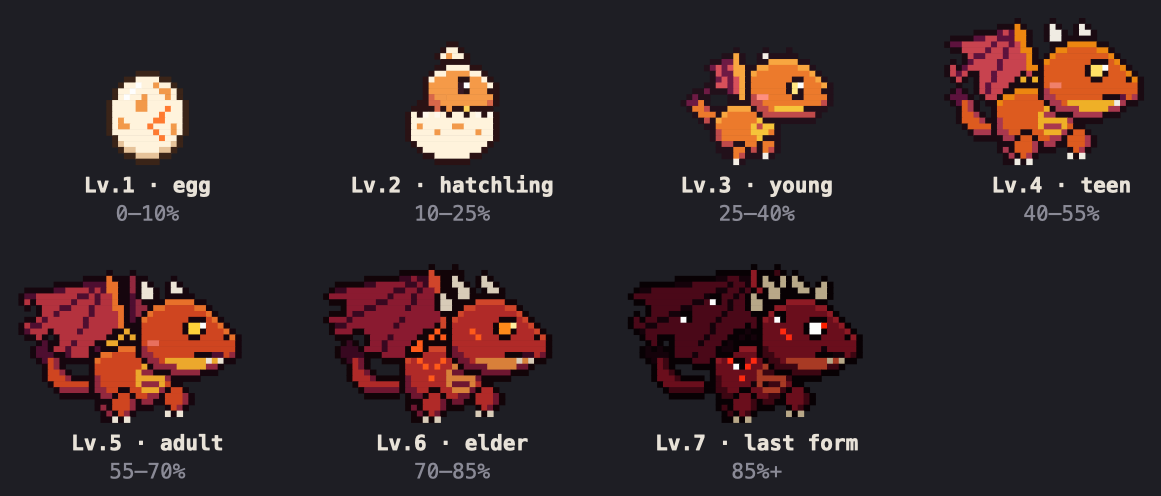
session-progress is a mod: a plugin whose hooks are TypeScript functions the
engine calls in-process (hooks/hooks.json names register.tsx), not shell
commands. Every part of the pane is one of those hooks:
| Feature | What it hooks or calls |
|---|---|
| The pane and the band above the prompt | ui.render on Pane and AbovePrompt, opened with $.ui.open; ui.open, ui.close and ui.scroll for its own scrolling list |
| The dragon | one Raster (two pixels per cell as half blocks), repainted by $.ui.blit on a 140 ms timer while the pane is open |
| Plan bar | tool.call on TodoWrite / TaskCreate / TaskUpdate, or a steps tool of its own from $.tool.register |
| Step guide | a section added in prompt.compose, with prompt.submit context as the fallback |
| Task history | turn.start / turn.complete, subagents from $.agent.list, short titles from $.model.complete (Haiku) |
| dev-loop run | $.fs reads of .orchestration/, the workers' copies under .worktrees/, and their .dev-loop/gates/ |
| Context and Regrow | session.measure for usage, $.session.compact for the button |
| State | $.state atoms, so a hot reload keeps the history |
/config lists these under session-progress; they are stored in
settings.json under pluginConfigs.
| Option | Default | What it does |
|---|---|---|
| language | auto | auto follows Claude Code's language setting, then the locale (LC_ALL, else LANG); en or ko pins it. |
| openPaneOnStart | true | Open the pane when an interactive session starts. Off: only /progress opens it. |
| reportSteps | true | In sessions without TodoWrite / TaskCreate, register the steps tool and add its one-paragraph guide to the system prompt. |
| summarizeTitles | true | Shorten long prompts into history titles with a Haiku call (60 tokens out, at most one at a time). |
| showDragon | true | Draw the Context Dragon. Off: the pane shows a one-line context gauge and the dragon's animation never runs. |
The step guide is added to the system prompt. If something in your setup keeps plugins out of the system prompt, the guide rides on each prompt's context instead; the model reads it, you never see it.
With the pane closed, only slow polls run: subagents every 2 s, a dev-loop run
every 5 s, and a title queue every 1.5 s (when summarizeTitles is on). With the
pane open, the dragon ticks every 140 ms but repaints only when its frame
changes, and the history spinner runs only while a task does. Measured on a
14-core Mac with the pane open and the session idle, the plugin adds about 2.5%
of one core over a session without it, most of it the dragon's tick;
showDragon: false turns that tick off.
claude plugin validate plugins/session-progress
claude plugin test plugins/session-progress
# the dev-loop fixture is generated from dev-loop's own scripts:
bash plugins/session-progress/scripts/dev-loop-fixture.sh <dev-loop checkout> <scratch dir> \
  > plugins/session-progress/tests/fixtures/dev-loop-run.ts
CI regenerates that fixture against the dev-loop version pinned in
.claude-plugin/marketplace.json and fails when it differs, so a dev-loop
release that changes the status format turns this job red on the next run after
the pin moves.

Documentation generation, drift detection, and API docs automation plugin that also acts as a function-hook guard refusing doc writes or worker dispatch containing secrets.
Repowise ships Lens, a Claude Code mod that visualizes your indexed codebase in real time—files light up as Claude searches, reads and edits them, and importers/reverse dependencies highlight too. It includes a Flow tab showing impacted files and covering tests, plus a review row with health changes and a button to run suggested tests.


A status bar for the Claude desktop app. It draws above your prompt and shows session quality, context fill, cache countdown, and your 5-hour and weekly limits, with Clawd acting out what the session is doing.