
joshuatonga@joshuatonga
joshuatonga/mini-claude-mods/tree/main/model-pick
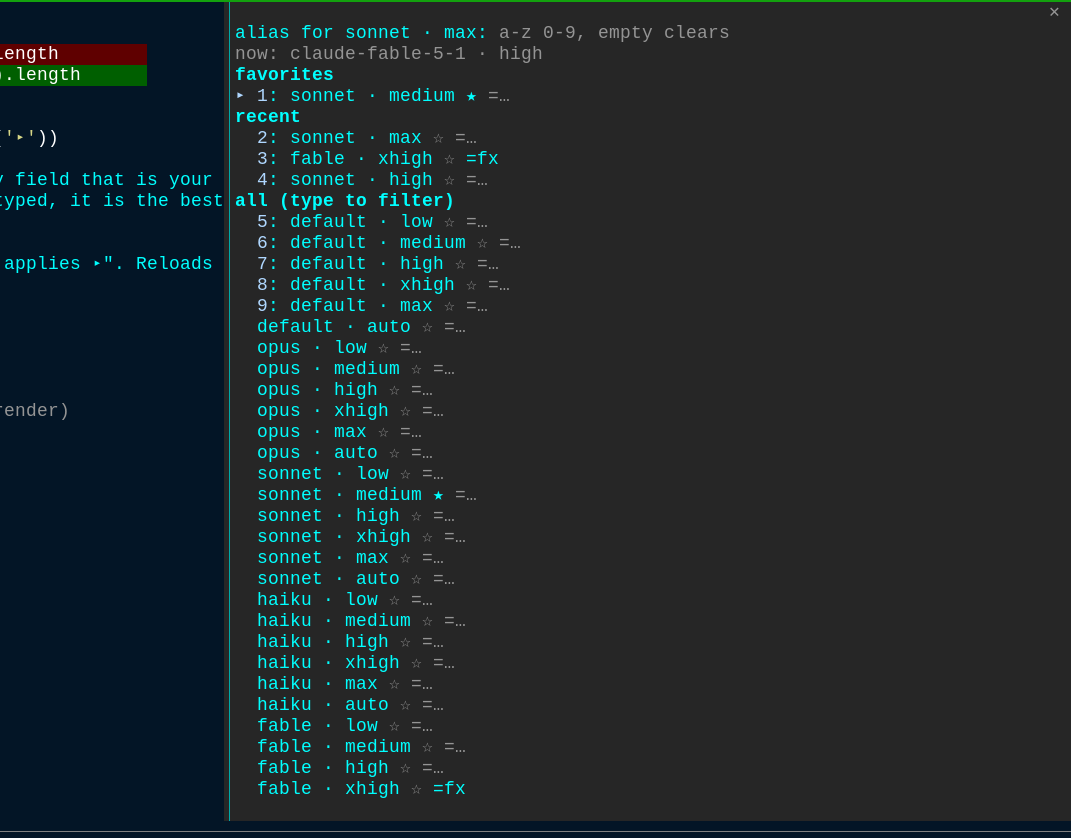
A Claude Code function-hooks plugin that lets you fuzzy-pick a model and effort combo in one pane, with favorites, aliases and recents.
joshuatonga/mini-claude-mods/tree/main/model-pick
model-pick adds a /pick command to Claude Code that opens a fuzzy-search pane for switching both model and effort in one step. Type a few letters plus Enter to apply a combo (e.g. 'op hi' for opus · high), star favorites, assign short aliases, and keep the last 5 picks one keystroke away. It supports models like default, opus, sonnet, haiku, fable, opusplan (plus [1m] variants) and efforts low through max and auto, automatically including model ids from your settings' availableModels allowlist and default model. Install via '/plugin install model-pick --marketplace joshuatonga/mini-claude-mods', requires Claude Code 2.1.292+, and optionally binds to a keybinding such as Alt+M to open the pane.
Check the author's README for the marketplace and plugin name first. Commands may change as the repository evolves.
claude plugin marketplace add joshuatonga/mini-claude-mods
claude plugin install model-pick
Switch Claude Code's model and effort in one go, from a fuzzy-search pane. Type a few letters, press Enter. Favorite the combos you use most, give them short aliases, and the last 5 picks stay one keystroke away.
In any Claude Code session:
/plugin install model-pick --marketplace joshuatonga/mini-claude-mods
Answer y to add the marketplace, then pick a scope (user is fine). That is
all: /pick works in that session right away and in every session after.
Already added the marketplace? Then it is just:
/plugin install model-pick@mini-claude-mods
Needs Claude Code 2.1.292 or newer (the mod is a function-hooks plugin).
Open the picker with /pick. The cursor lands in the search field.
| Type | Then | Result |
| --- | --- | --- |
| op hi | Enter | switches to opus · high (runs /model opus, then /effort high) |
| nothing | Enter | applies the first row: your first favorite, else the newest recent |
| *son max | Enter | stars / unstars sonnet · max as a favorite |
| =fx fable xhigh | Enter | gives fable · xhigh the alias fx |
| fx | Enter | applies the aliased combo (an alias always beats a fuzzy match) |
| 3 | Enter | applies row 3 of the list |
| op hi 2 | Enter | applies the 2nd match for op hi |
| | Esc | closes the pane |
The ▸ marks the row Enter will apply. The numbers 1: to 9: are row
numbers: type one (alone, or after your query) to move ▸ to that row. They
also work as hotkeys once Tab moves the focus off the search field.
Each row has three buttons: the combo itself, ☆ / ★ to toggle favorite,
and =… to type an alias for that row. Tab reaches them; Enter presses.
With an empty search the pane lists favorites first, then the 5 most recent picks, then every combo.
Claude Code keybindings can run a slash command. Add this to
~/.claude/keybindings.json (run /keybindings to create the file) and
Alt+M (Option+M on macOS) opens the picker:
{
  "bindings": [
    { "context": "Chat", "bindings": { "meta+m": "command:pick" } }
  ]
}
Any chord works, for example "ctrl+x m". The binding takes no arguments,
so it always opens the pane; aliases are for the pane or /pick <alias>.
/pick fx          applies the alias fx
/pick son max     applies the best fuzzy match
If Claude Code asks you to confirm the model switch and you decline, nothing changes and nothing is recorded: the toast says "not applied".
Favorites, aliases and recents are saved in the plugin's store and survive restarts.
Models: default, opus, sonnet, haiku, fable, opusplan, and their
[1m] variants. Efforts: low, medium, high, xhigh, max, auto.
A model your account cannot use is still listed; picking it makes /model
answer "Kept model as …" and the mod reports "not applied".
Model ids your settings name are added automatically: the availableModels
allowlist and your default model in settings.json. That covers Bedrock and
Vertex ids and any alias newer than this list. Nothing to configure.
git clone [email protected]:joshuatonga/mini-claude-mods.git
claude --plugin-dir ./mini-claude-mods/model-pick     # load it for one session; edits hot-reload
claude plugin validate ./mini-claude-mods/model-pick
claude plugin test ./mini-claude-mods/model-pick
Layout:
hooks/register.tsx — the hooks module: the /pick command, the pane, the apply logichooks/fuzzy.ts — the matcher and the combo listtypes/index.d.ts — the plugin's state contracttests/ — run with claude plugin test
Cache-aware /loop workers and CronCreate background automation. Substrate plugin for every recurring task in the ruflo family.

claude-reflect as a Claude Code mod: a model check on each short prompt finds reusable corrections (any language); a band above the prompt saves them to CLAUDE.md on one press


Early: crit inside Claude Code. Comment on the conversation, your diff or a file in a pane, send the review to Claude, and read Claude's replies in threads.