anerco@anerco
Anerco/effort-cycle-mod
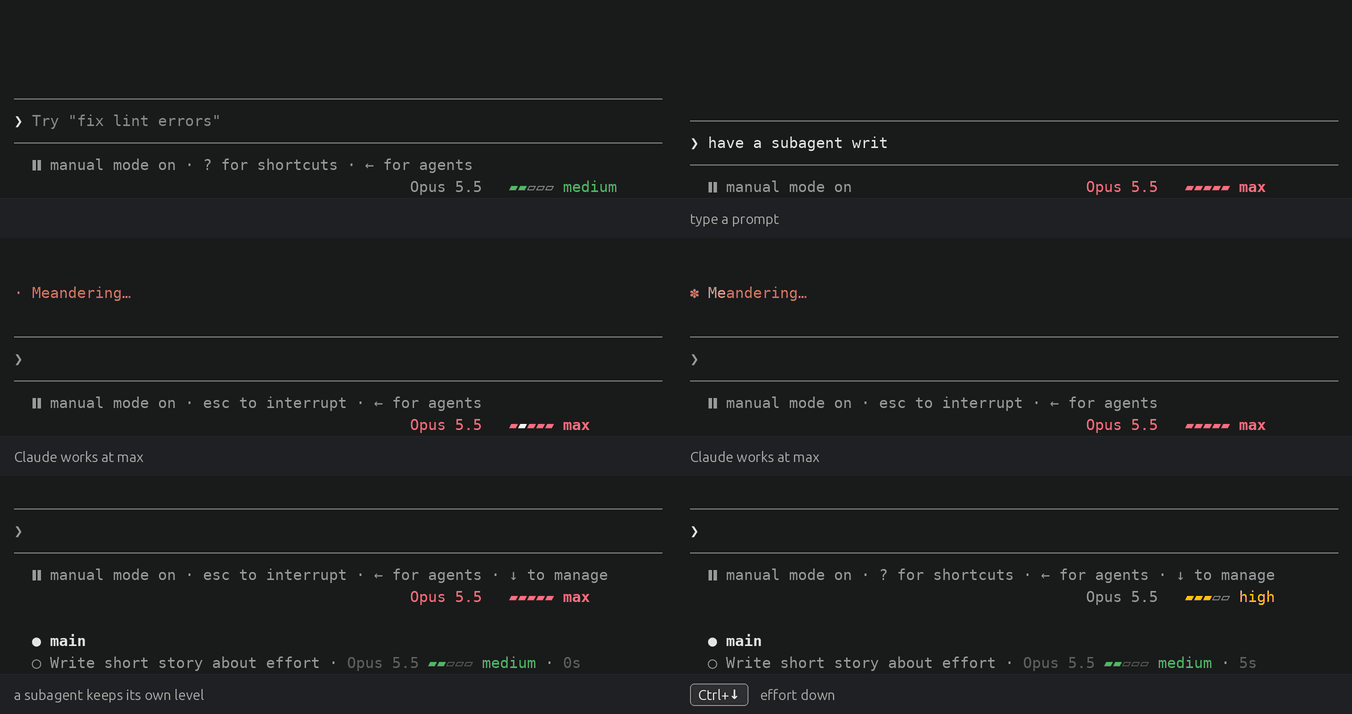
Per-agent effort levels for Claude Code: step them from the keyboard, see them at a glance.
Anerco/effort-cycle-mod
effort-cycle lets you change Claude Code's effort level per agent. Ctrl+↑ and Ctrl+↓ step the level (low, medium, high, xhigh, max) for the main thread or the subagent in view, shown as a colored meter in the footer with clickable ‹ › on hover and per-subagent rows in the tasks list. Includes /config toggles, settings saved under pluginConfigs, and no telemetry or network requests.
Check the author's README for the marketplace and plugin name first. Commands may change as the repository evolves.
claude plugin marketplace add Anerco/effort-cycle-mod
claude plugin install effort-cycle@anerco
Per-agent effort levels for Claude Code: step them from the keyboard, see them at a glance.
Opus 5.5 ▰▰▰▱▱ high./config toggles choose which levels the keys step through./plugin marketplace add Anerco/plugins
/plugin install effort-cycle@anerco
There is nothing to bind: the keys work right away. The tasks list's rows need
python3 on your PATH (on macOS, from xcode-select --install or Homebrew).
macOS: Ctrl+↑ and Ctrl+↓ are Mission Control's shortcuts by default. Use
Option+↑ and Option+↓ instead, with your terminal set to send Option as Meta
(Terminal.app: Use Option as Meta key; iTerm2: Left Option key set to
Esc+; Ghostty: macos-option-as-alt = true).
Updates: in /plugin, choose Marketplaces → anerco → Enable auto-update.
Or run claude plugin update effort-cycle@anerco and restart Claude Code.
Built and tested against Claude Code 2.1.291. effort-cycle is a mod (a plugin of function hooks), an early-access API that changes between releases.
| Control | What it does |
| --- | --- |
| Ctrl+↑ | One level up for the agent in view, stopping at max |
| Ctrl+↓ | One level down, stopping at low |
| ‹ and › in the footer | Point at the footer's label, then click ‹ to step down or › to step up |
| /effort, Alt+P | Claude Code's own controls still work, and take over from the plugin's pick |
The agent in view is the main thread, or the subagent whose transcript you opened from the tasks list. A pick lasts for the session. The footer shows the agent's model and level, led by its type in a subagent's transcript:
Opus 5.5   ▰▰▰▱▱ high                 main thread
Opus 5.5 ‹ ▰▰▰▱▱ high   ›             pointer on the label
Explore · Opus 5.5   ▰▰▱▱▱ medium     a subagent's transcript
The colors follow your theme, from gray at low to red at max. At max the model's name turns red too, and a light sweeps the bar while Claude works. Each Agent call in the transcript gets a line with its agent's level.
Each subagent's row in the tasks list under the prompt shows its model and level, in the footer's colors:
◯ Fix the parser · Opus 5.5 ▰▰▰▱▱ high · Reading the failing test · 53m 11s · ↓ 499.8k tokens
◯ Find the config · Sonnet 5.5 ▰▰▱▱▱ medium · Searching settings · 2m 4s · ↓ 31.2k tokens
The rows take no clicks; open a subagent's transcript to step it. Claude Code redraws them every five seconds, or in about 0.4 s with Tasks list rows: update at once on (Settings).
The main thread starts at the level Claude Code gives its model:
CLAUDE_CODE_EFFORT_LEVEL if it is set, else a level your settings save for
the model (as /effort and Alt+P save one), else the model's default: medium
on Opus 5.5 and Sonnet 5.5, xhigh on Opus 4.7, high on the rest.
A subagent starts at its definition's effort, else the main thread's level.
Its meter is empty (—) until its first model request says which, a moment
after it starts; a press before then shows wait.
The plugin adds these toggles to /config:
| Toggle | Default | What it does | | --- | --- | --- | | Effort keys: include low | on | The keys and ‹ › step through low | | Effort keys: include medium | on | … through medium | | Effort keys: include high | on | … through high | | Effort keys: include xhigh | on | … through xhigh | | Effort keys: include max | on | … through max | | Tasks list rows: update at once | off | Rows follow a change in about 0.4 s, not up to 5 s |
A level that is off is skipped for every model. Update at once narrows the
terminal by one column and back on each change, so the right edge flickers
briefly; it needs python3 (details).
The values are saved in ~/.claude/settings.json under pluginConfigs.
/effort and Alt+P do.— until its first model request. One started before
the plugin loaded shows no model either, until its next request.set -g mouse on. Without them, use the keys./diff lists
more than eight files they scroll it instead; close it to step again.
Rebinding app:diffFileListUp and app:diffFileListDown moves them too.python3. A subagentStatusLine in your
own settings replaces the plugin's. On Windows they show only where Claude
Code runs commands through Git Bash.See docs/how-it-works.md for what the plugin hooks, the tasks list's row files, Remote Control and development.
No telemetry, no network requests. effort-cycle reads your settings,
CLAUDE_CODE_EFFORT_LEVEL and the session's model and agents, and keeps levels
in the session. For the tasks list it writes subagent levels under
~/.claude/subagent-rows/sessions/ (deleted after a week) and sets one variable,
EFFORT_CYCLE_ROWS.

Cache-aware /loop workers and CronCreate background automation. Substrate plugin for every recurring task in the ruflo family.
universal-modder is an MIT-licensed Claude Code plugin that can identify game engines, read real code, build mods, generate assets with fal, test in-game, and produce showcase videos.

claude-reflect as a Claude Code mod: a model check on each short prompt finds reusable corrections (any language); a band above the prompt saves them to CLAUDE.md on one press
