
agentic-workbench@agentic-workbench
agentic-workbench/agent-quick-menu
Provides a unified quick menu for Claude Code: displays commands and settings from various plugins, as well as Claude Code's own /config settings, in the session panel and prompt bar. It is collapsible, favorite-able, filterable, and editable in place.
agentic-workbench/agent-quick-menu
agent-quick-menu adds a unified menu panel (/menu to open) and a shortcut bar above the prompt bar in Claude Code sessions. Each plugin that provides a .claude-plugin/quick-menu.json gets a collapsible section, with its commands shown as buttons and settings presented as a label/value table; Claude Code's own /config settings are also listed in a separate section. Command buttons display the actual slash command that will be executed; built-in or other plugin commands require a second confirmation within 5 seconds, and menu files are treated as untrusted input. Setting rows can be edited directly: booleans as toggles, options as button rows, text and numbers open input boxes with save/cancel support. Any row can be favorited with ☆; favorites are pinned at the top of the panel and appear in the prompt bar shortcut bar, triggerable via keyboard shortcuts. The top filter box searches across sections by name and description; sections can be expanded/collapsed all at once and persist across sessions. Distinctions: no global hotkey, VS Code chat panel is not supported, Windows is untested; it only executes the corresponding command when you press the button, does not upload data, and does not read credentials.
Check the author's README for the marketplace and plugin name first. Commands may change as the repository evolves.
/plugin marketplace add agentic-workbench/agent-quick-menu
/plugin install agent-quick-menu@agent-quick-menu
/reload-plugins
/config settings get one too..claude-plugin/quick-menu.json; no code, no dependency.Claude Code 2.1.287 or newer, in the terminal or the Desktop Code tab, on macOS or Linux. The VS Code chat panel is not supported. Windows paths (USERPROFILE, ; in CLAUDE_CODE_PLUGIN_DIRS) are read, but the menu is untested there.
In a Claude Code session:
/plugin marketplace add agentic-workbench/agent-quick-menu
/plugin install agent-quick-menu@agent-quick-menu
/reload-plugins
Or from a shell:
claude plugin marketplace add agentic-workbench/agent-quick-menu
claude plugin install agent-quick-menu@agent-quick-menu
Then run /reload-plugins in a running session.
/menu opens the pane. /menu refresh discovers plugin menus again.≣ menu ▸ │ Pull Status … (hotkey m while the band is focused, then your favourites). The button toggles: it closes the menu when it is open (▾) and opens it when closed (▸); /menu always opens or focuses it. With bandHotkeys on, own-plugin commands read 1 Pull 3 Status, the digit being the place in the pinned list.ctrl+x tab focuses the band.bandHotkeys setting on (default off) and an empty prompt, 1 to 9 press the pinned commands of this plugin only, numbered by their position in the pinned list (a gap keeps the other numbers). Other plugins' commands and setting favourites carry no digit. Digits do not arm while the band scrolls, and another mod's same hotkey may win.☆ / ★ on any row adds or removes a favourite. Favourites are listed first in the pane.▸ / ▾). Favourites start open, every other section folded. Expand all (e) and Collapse all (c) sit on the top line; the state is kept across sessions. The pane closes with Claude Code's own ×, Escape or ctrl+x x. With no favourites yet, the pane says to press ☆ on a row.filter…) matches setting labels, keys and descriptions and command names and labels, case-insensitive, across every section. Sections without a match are hidden, matching ones open while a filter is set, and the counts follow.● (on) or gray ○ (off) with the plain word on / off; a choice opens an inline row of option buttons (● current, ○ other), one editor open at a time; text and number rows show value ✎ and open an Input with ✓ save and ✕ cancel. Cancel is the button: Escape does not cancel the edit (it closes the pane). Commands and settings show a dim italic description after ·.ask in its menu entry opens that same editor when pressed, in the pane or from a band favourite (which opens the pane at its row), with the default typed in and ✓ run / ✕ cancel. Enter or ✓ run runs /command <args> <input>; the row hint reads /command <args> …. The confirm-twice of a built-in or another plugin's command applies to ✓ run. See docs/convention.md.Close button, since the engine draws no close mark there) instead.[-] at the end of the band (drawn by Claude Code, or ctrl+x ctrl+a) folds the band..claude-plugin/quick-menu.json: its commands one per line (button, then the /command args hint) and its settings (userConfig) as an aligned label/value table. A setting's description (userConfig description) follows its value dimmed, clipped to the pane width and dropped when under 8 cells remain; the filter matches it too.--plugin-dir whose root is not known (see Limitations): its registered commands, and a dim line saying to set CLAUDE_CODE_PLUGIN_DIRS.userConfig rows.managed) is set by managed policy and cannot be changed here.Slash commands it runs, and when. Only when you press a button or a band favourite, and only the command that row shows: /<command> <args> from a plugin's quick-menu.json. Built-in commands and other plugins' commands need a second press within 5 seconds. When you change a setting row it runs /config <key>=<value>, then reads the row back through $.config.list() to judge whether the write took. It runs nothing on its own.
What it sets. Only the /config rows you change in the pane. It sets no environment variables. It keeps favourites and folded sections in Claude Code's plugin store.
What it reads. Your settings (enabledPlugins), the plugin registry installed_plugins.json under CLAUDE_CONFIG_DIR or ~/.claude, the environment variables CLAUDE_CONFIG_DIR, HOME, USERPROFILE and CLAUDE_CODE_PLUGIN_DIRS, each plugin's .claude-plugin/quick-menu.json, the .claude-plugin/plugin.json of the folders in CLAUDE_CODE_PLUGIN_DIRS, the list of commands Claude Code offers, and the rows /config shows. It sends nothing over the network and reads no credentials.
Its hooks.
ui.render on AbovePrompt: adds its own row and keeps every other mod's band beneath it.ui.render on its Pane: draws the menu.command.run, matched to /menu only: answers /menu and /menu refresh itself. It never sees, changes or blocks any other command, including the ones it runs for you.plugin.register: reads the name, root and provenance of each plugin as it loads, to find the quick-menu.json of plugins loaded with --plugin-dir. It passes every registration on unchanged and never alters or blocks a plugin, its settings, instructions, hooks or tool descriptions.ui.close: observed only, to redraw the band's menu button when the pane closes. It passes every close on unchanged.session.start: registers /menu, loads favourites and folds, and starts discovery.Add .claude-plugin/quick-menu.json to your plugin:
{
  "$schema": "https://raw.githubusercontent.com/agentic-workbench/agent-quick-menu/main/schema/quick-menu.schema.json",
  "version": 1,
  "commands": [
    { "command": "my-plugin:status", "label": "Status", "description": "Show the plugin's state" },
    { "command": "my-plugin:deploy", "label": "Deploy to…", "ask": { "placeholder": "environment", "default": "staging" } }
  ],
  "settings": ["verbose"]
}
That's it: commands become buttons, ask prompts for an argument first, and settings lists which of your userConfig fields to show (omit it to show all). Without agent-quick-menu installed the file is never read. The full format, limits and versioning promise are in docs/convention.md.
--plugin-dir plugin's root is only learned when its hooks module loads after this one (plugin.register; kept across a reload of the menu); a plugin without one, or loaded earlier, is listed from $.command.list() with its commands only. Set CLAUDE_CODE_PLUGIN_DIRS to the same folder to read its quick-menu.json. A --plugin-dir copy shadows an installed copy of the same plugin. The menu reads its own file from its own folder.session.start and on /menu refresh (which toasts the counts when it is done), so /menu answers at once./config are not shown here.Releases follow semantic versioning: version in plugin.json is the release, tagged as v<version> and listed in CHANGELOG.md. Claude Code updates an install when that version changes, so installs from main get each release.
make check                 # JSON check, claude plugin validate + test, and tsc --noEmit (tsc from PATH, else via npx)
claude --plugin-dir .      # try the plugin from this checkout
See CONTRIBUTING.md for branches, commits and tests, and the Code of Conduct.
See PRIVACY.md: the plugin collects and sends nothing.
Report vulnerabilities privately, see SECURITY.md.
MIT, see LICENSE.
Is this your project? Add this badge to your README or website. It links back to this page.


CodeCraft is a Minecraft-style Claude Code HUD plugin: hearts represent remaining context, armor represents safety nets like tests/commits/pushes, the XP bar only rewards verified work, conversations look like game chat, and there are 60 achievements saved across sessions.


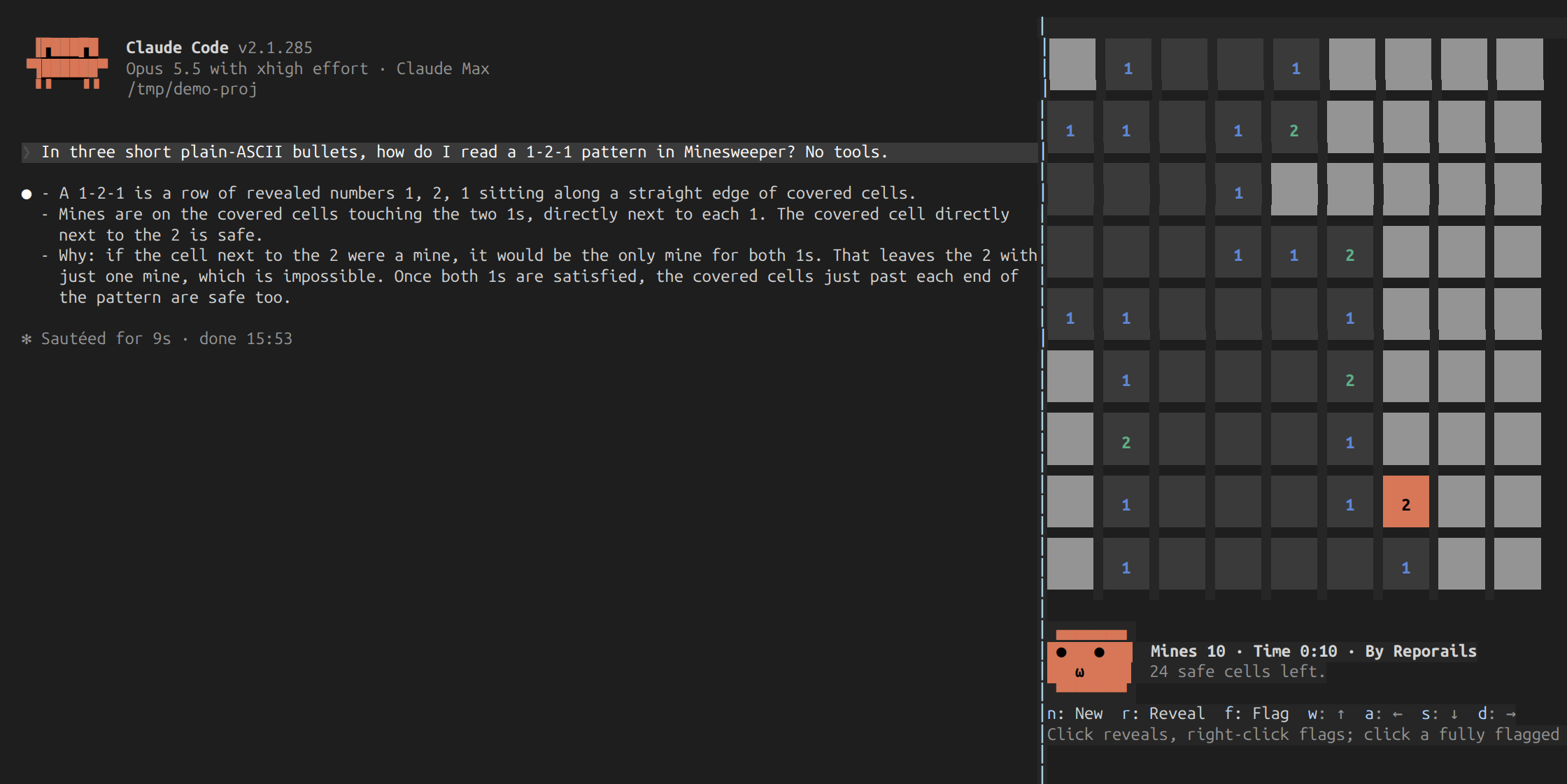
A Claude Code plugin mod that runs Minesweeper in the session side panel: play with mouse or keyboard while waiting for Claude to work, with a timer, best times, and an expressive face that watches the board and peeks at the conversation.

A Claude Code plugin that shows whether localvoxtral is connected to the session, places dictated text into the prompt box, displays dictation above the prompt, and ends a turn on a spoken stop phrase. Requires a Claude Code build that loads hooks modules.

Show short vocabulary hints in the session interface.

Blurs PDPA personal data (Thai ID, phone, email, card, account, IP, secrets...) in the transcript; hover to reveal. /pdpa-blur toggles.
An open-source Claude Code Mod that allows customizing color schemes and fonts, and adds a usage meter, cache countdown, sports scores, stock ticker, and prompt tools like Tidy, Prune, and Gaslighting.
