
omeraltinova@omeraltinova
omeraltinova/claude-usage-footer/tree/main/plugins/usage-footer
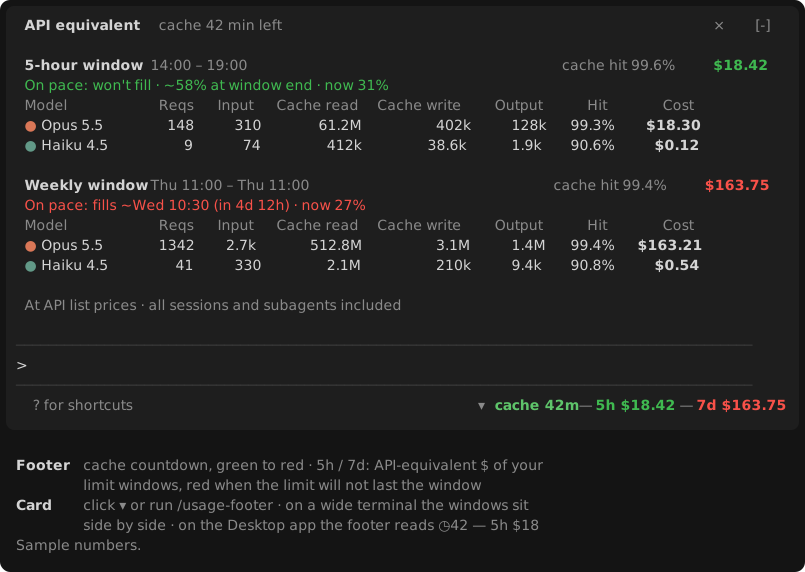
A Claude Code mod that displays prompt cache countdown and API-equivalent cost for your 5-hour and weekly limit windows in the footer under the prompt, with a clickable per-model token and cost breakdown card.
omeraltinova/claude-usage-footer/tree/main/plugins/usage-footer
usage-footer is a Claude Code plugin that puts usage information beside the model name under the prompt. The footer shows a prompt cache countdown (color-graded from green to red) plus the API-list-price cost of requests in your current 5-hour and weekly limit windows, colored by pace (red if the limit would fill before reset, yellow at 85–100%, green otherwise). Clicking ▾ or running /usage-footer opens a card above the prompt with, per window: when the limit fills at the current pace or where it ends, total cost, cache hit rate, and a per-model row of requests, input, cache read, cache write, output, hit rate and cost.
It works on your account's own windows (starting one window-length before the reported reset time). Costs are computed from local transcripts in ~/.claude/projects, including subagents, across all sessions on the machine, deduplicated per request and priced at API list prices (not subscription charges). A small Node.js script scans transcripts incrementally at the end of each turn and every 5 minutes, taking tens of milliseconds, with nothing running inside the model's request stream.
Requirements: Claude Code v2.1.287 or later (terminal or Desktop Code tab) and Node.js on PATH or in standard install locations on macOS, Linux and Windows.
Install: claude plugin marketplace add omeraltinova/claude-usage-footer claude plugin install usage-footer@claude-usage-footer
Then start a new session or run /reload-plugins. Licensed under MIT.
Check the author's README for the marketplace and plugin name first. Commands may change as the repository evolves.
claude plugin marketplace add omeraltinova/claude-usage-footer
claude plugin install usage-footer
A Claude Code mod that puts your usage where you look anyway: beside the model name under the prompt.
▾ ◷42 — 5h $82 — 7d $115
F $…).The 5h and 7d values are colored by pace: red if, at the pace so far, the limit fills before the window resets; yellow if it ends the window at 85–100%; green otherwise.
Click ▾ (or run /usage-footer) for a card above the prompt with, per window:
~/.claude/projects, including subagents), across every session on this machine, deduplicated per request and priced at API list prices. It is not what a subscription charges.node on PATH, then in the usual install locations on macOS (Homebrew), Linux and Windows.claude plugin marketplace add omeraltinova/claude-usage-footer
claude plugin install usage-footer@claude-usage-footer
Then start a new session, or run /reload-plugins in an open one.
plugins/usage-footer/scripts/usage-scan.mjs, PRICES) and need updating when Anthropic's prices change.MIT

Documentation generation, drift detection, and API docs automation plugin that also acts as a function-hook guard refusing doc writes or worker dispatch containing secrets.

A status bar for the Claude desktop app. It draws above your prompt and shows session quality, context fill, cache countdown, and your 5-hour and weekly limits, with Clawd acting out what the session is doing.

A Claude Code plugin mod providing a /databricks-pane that presents Databricks workspace, Unity Catalog, compute, jobs, pipelines, apps and dashboards as a tree following the databricks CLI, with live highlights, profile switching, and CLI argument copy.
