
hoobnn@hoobnn
hoobnn/hoobnn-agent-mods/tree/main/claude-code/ts-band
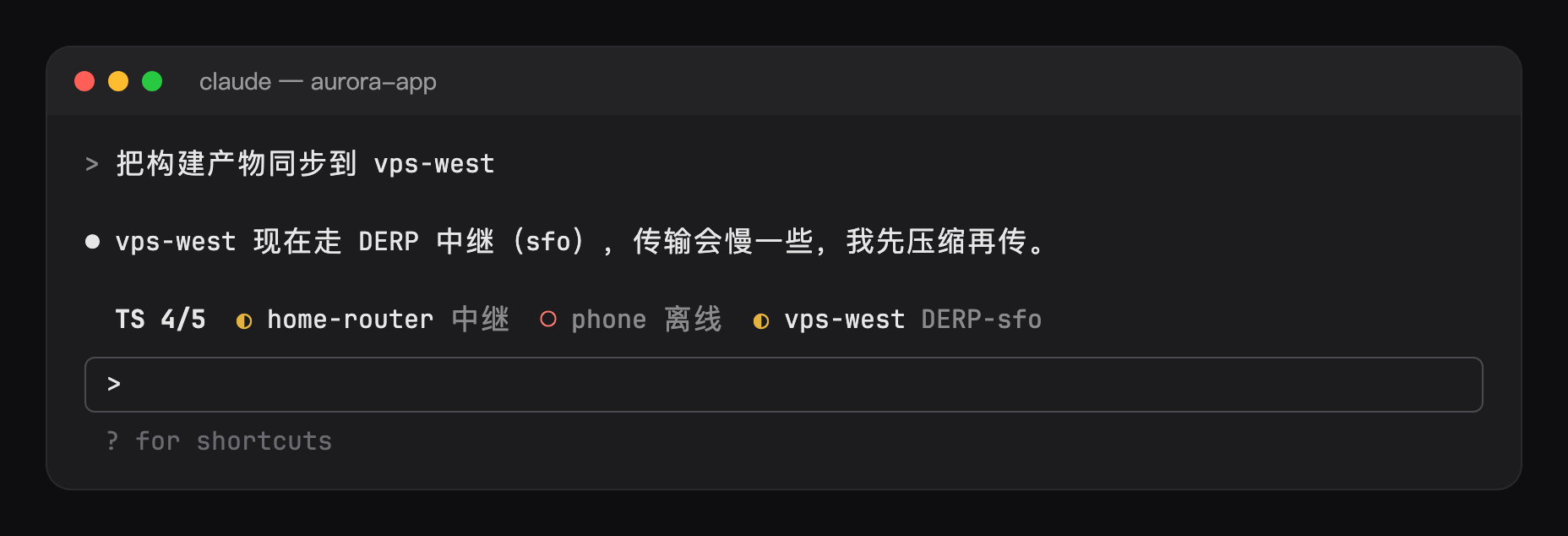
ts-band: Tailscale node status in a band above the prompt, with a toast when a node comes online or goes offline
hoobnn/hoobnn-agent-mods/tree/main/claude-code/ts-band
Simplified Chinese · English
Show the connection status of each node in your Tailscale network above the input box. When all nodes are direct, it takes up only a small marker; it lists nodes only when some are relayed or offline. Before Claude deploys to or syncs files with a remote machine, take a quick look at whether the link is healthy.

TS ● 4/4 direct.◐ yellow means relayed or DERP (the DERP region is shown, e.g. DERP-sfo), ○ red means offline.tailscale status --json once a minute; after Claude runs tailscale up, down, set, switch, login, or logout, it refreshes immediately.claude -p or the SDK.First install Tailscale and make sure the tailscale command is available (the CLI bundled with the macOS app is also found), then:
claude plugin marketplace add hoobnn/hoobnn-agent-mods
claude plugin install ts-band@hoobnn-agent-mods
/ts: toggle show/hide; /ts off and /ts on set it directly. This setting is written back to /config and persists in later sessions.Modify them in /config, or write them in pluginConfigs in ~/.claude/settings.json:
| Option | Effect | Default |
| --- | --- | --- |
| visible | Show the bar (this is what /ts changes) | On |
| nodes | Show only these nodes, in the order entered; host=name can change the display name, e.g. nas=home, dev-box, vps-west=US West. Leave empty to show all; the online count and notifications are also calculated only from the selected nodes | Empty |
| hideOffline | Don't list offline nodes in the bar (they still count toward the online count) | Off |
| tailscalePath | Path to the tailscale command; when empty, it searches PATH, Homebrew, and the macOS app in order | Empty |
| intervalSeconds | Seconds between reads (at least 10) | 60 |
| language | UI language: auto, en, zh-Hans, zh-Hant, ja, ko, es, fr, de, pt-BR, ru | auto |
When language is auto, it follows Claude Code's language setting and then the system locale, in that order, and uses English if neither is available.
hoobnn-agent-mods also includes a status bar HUD (hud), a task progress bar (todo-bar), a turn receipt (receipt), a running animation and pet (spinner), and hitokoto (hitokoto), which can be used together.
hooks/register.tsx: hooks (language at session start, /ts and periodic reads, commands, and the bar).hooks/config.ts: options, read once into a typed Config.hooks/parse.ts: parses tailscale status --json into nodes and the nodes option into filter rules.hooks/i18n.ts: text for each language.hooks/kit/: a copy of claude-code/kit; after changing the source files, run scripts/sync-kit.sh.Check the author's README for the marketplace and plugin name first. Commands may change as the repository evolves.
claude plugin marketplace add hoobnn/hoobnn-agent-mods
claude plugin install ts-band@hoobnn-agent-mods
简体中文 · English
在输入框上方显示 Tailscale 组网里各节点的连接状态。全部直连时只占一个小标记;有节点走中继或掉线时才把它们列出来。让 Claude 往远程机器部署、同步文件之前,先看一眼链路是否正常。
TS ● 4/4 直连。◐ 黄色表示走中继或 DERP(会标出 DERP 区域,如 DERP-sfo),○ 红色表示离线。tailscale status --json;Claude 执行 tailscale up、down、set、switch、login、logout 后立即刷新。claude -p 和 SDK 里不运行。先装好 Tailscale,确保 tailscale 命令可用(macOS 应用自带的 CLI 也能找到),然后:
claude plugin marketplace add hoobnn/hoobnn-agent-mods
claude plugin install ts-band@hoobnn-agent-mods
/ts:切换显示和隐藏;/ts off、/ts on 直接设定。这个设置会写回 /config,以后的会话也会沿用。在 /config 里修改,或写在 ~/.claude/settings.json 的 pluginConfigs 里:
| 选项 | 作用 | 默认 |
| --- | --- | --- |
| visible | 显示横条(/ts 改的就是它) | 开 |
| nodes | 只显示这些节点,按填写顺序排列;host=名字 可以改显示名,如 nas=家里, dev-box, vps-west=美西。留空显示全部,在线数和提醒也只按选中的节点算 | 空 |
| hideOffline | 横条里不列离线节点(在线数仍然计入) | 关 |
| tailscalePath | tailscale 命令的路径;留空时依次在 PATH、Homebrew 和 macOS 应用里找 | 空 |
| intervalSeconds | 两次读取之间的秒数(至少 10) | 60 |
| language | 界面语言:auto、en、zh-Hans、zh-Hant、ja、ko、es、fr、de、pt-BR、ru | auto |
language 为 auto 时,依次跟随 Claude Code 的 language 设置和系统语言环境,都没有时用英语。
hoobnn-agent-mods 里还有状态栏 HUD(hud)、任务进度条(todo-bar)、回合回执(receipt)、运行动画和宠物(spinner)和一言(hitokoto),可以搭配使用。
hooks/register.tsx:钩子(会话开始时的语言、/ts 和定时读取,命令和横条)。hooks/config.ts:选项,一次性读成类型化的 Config。hooks/parse.ts:把 tailscale status --json 解析成节点,把 nodes 选项解析成筛选规则。hooks/i18n.ts:各语言文案。hooks/kit/:claude-code/kit 的副本;改源文件后运行 scripts/sync-kit.sh。Is this your project? Add this badge to your README or website. It links back to this page.

The author integrates Xcode into Claude Code: builds, runs, tests, console, and SwiftUI previews are shown in a panel next to the chat.


Claude Code plugin that shows pasted images, last-reply media/links, and a copy button above the prompt, using Python/FFmpeg for media prep and auto-fetching HTTP(S) media in supported terminals.

The author says they ported 'npx RuFlo' to the new Claude Code Mod system, inspired by a 1990 Wildcat BBS they ran. The post explains that a mod is a Claude Code plugin whose hooks module exports register(on, options); hooks attach middleware to engine events and can watch, rewrite or answer them. It provides installation commands and a GitHub link, while noting that the GitHub manifest and hooks module have not been verified.
 ▶ ♫
This open source project cleanyourtv is currently trending. The gist of this thread: @pungkyper tried to debloat his home Android TV so it’s clean like Apple TV. From photo 1 it looks like he’s using Claude Code - so the AI handles it via ADB, told to choose which apps to keep (YouTube, Netflix, Spotify etc.) and which to remove. The result is in photo 2 - the launcher becomes super clean & personalized: - Good afternoon, big clock - There’s the Fajr - Isha prayer schedule + countdown "Ashar 54 minutes left" - Only 5 apps: YouTube, Netflix, Spotify, Vidio, Red Bull TV He shares the flow from http://github.com/Gathin23/cleanyourtv , just provide the prompt + TV model number. In other comments, someone even uses Muse + VPS, just provide the GitHub link, the TV can be remote-controlled, mod the launcher, reinstall APK, all via chat.

Neural trading strategies powered by neural-trader (v2.7+): self-learning LSTM/Transformer/N-BEATS models, Rust/NAPI backtesting, 112+ MCP tools, swarm coordination, and portfolio optimization.

An optional mods companion for claude-seo. It runs inside Claude Code as a mod (a function-hook plugin), so it can enforce things a skill can only ask for.