
degterev@degterev
degterev/swiftui-preview-mod
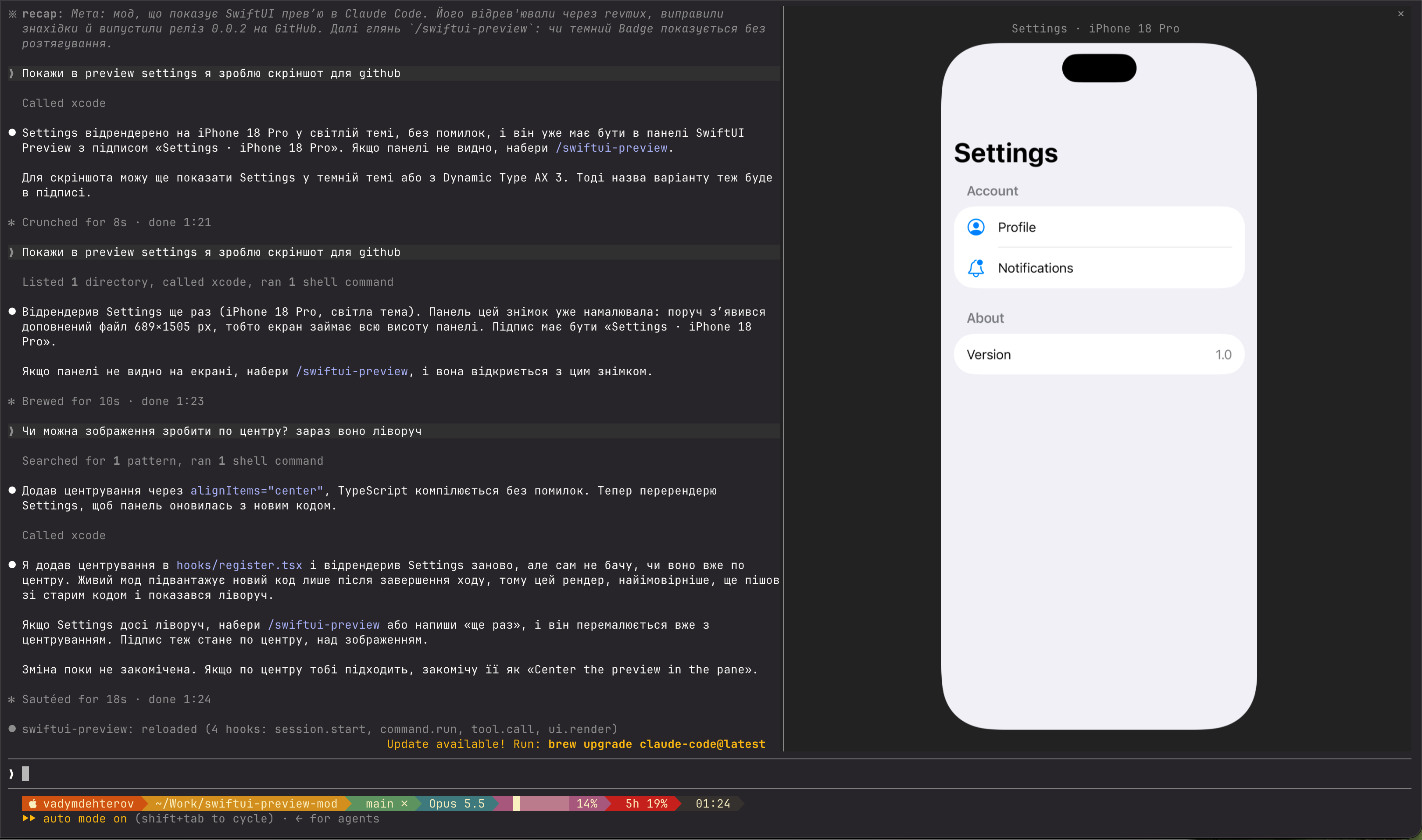
A Claude Code mod that shows SwiftUI previews right in the terminal, rendered by Xcode itself.
degterev/swiftui-preview-mod
Claude calls Xcode's RenderPreview MCP tool on a #Preview; the mod shows the snapshot in a SwiftUI Preview pane with variants like dark mode, Dynamic Type and orientation. Requires macOS with Xcode 27, MCP enabled, the project open in Xcode, and an image-capable terminal such as Ghostty or kitty.
Check the author's README for the marketplace and plugin name first. Commands may change as the repository evolves.
claude plugin marketplace add degterev/swiftui-preview-mod
claude plugin install swiftui-preview@swiftui-preview
A Claude Code mod that shows SwiftUI previews right in the terminal, rendered by Xcode itself.
Claude calls Xcode's RenderPreview MCP tool on a #Preview; the mod shows the snapshot in a
SwiftUI Preview pane — components 1:1 in points like Xcode's canvas at 100%, whole screens
fit to the pane. Variants (dark mode, Dynamic Type, orientation), localizations and
#Preview(arguments:) come from RenderPreview itself.
sudo xcrun mcp-server enable)claude mcp add xcode -s user -- xcrun mcpbridge
then, at a Claude Code prompt:
/plugin install swiftui-preview --marketplace degterev/swiftui-preview-mod
Answer y to add the marketplace, then pick a scope.
Ask Claude in plain words; if the file has no #Preview, Claude adds one.
The pane opens with each render, labelled with the preview, device and variant
(Settings · iPhone 18 Pro · Dark Appearance). When the terminal is too narrow to place it,
a toast says so; /swiftui-preview reopens the pane with the last render.
[ − ] [ 100% ] [ + ] beside the label zoom from 50% to 400%; click the percentage to reset.
With the pane focused (click it), i zooms in, o out, 0 resets. Zoomed in, the picture can
outgrow the pane's height, which scrolls, but never its width. The terminal passes no pinch to
apps, so a trackpad scrolls the pane but does not zoom it.
claude plugin validate .
claude plugin test .
MIT

Neural trading strategies powered by neural-trader (v2.7+): self-learning LSTM/Transformer/N-BEATS models, Rust/NAPI backtesting, 112+ MCP tools, swarm coordination, and portfolio optimization.

The author says they ported 'npx RuFlo' to the new Claude Code Mod system, inspired by a 1990 Wildcat BBS they ran. The post explains that a mod is a Claude Code plugin whose hooks module exports register(on, options); hooks attach middleware to engine events and can watch, rewrite or answer them. It provides installation commands and a GitHub link, while noting that the GitHub manifest and hooks module have not been verified.
 ▶ ♫
▶ ♫
An optional mods companion for claude-seo. It runs inside Claude Code as a mod (a function-hook plugin), so it can enforce things a skill can only ask for.