
victor-falcon@victor-falcon
victor-falcon/claude-status-bar

A Claude Code mod that adds a colored status line under the prompt, with the engine's own hint line (`? for shortcuts`, `esc to interrupt`…):
victor-falcon/claude-status-bar
A Claude Code mod that adds a colored status line under the prompt, with the
engine's own hint line (? for shortcuts, esc to interrupt…):

| Segment | What it shows | Color |
| --- | --- | --- |
| Branch | Current branch, or the short SHA on a detached HEAD | Branch icon colored |
| Diff | Lines added and removed against the merge base with the default branch, uncommitted work included | +N green, -N red |
| Pull request | The branch's PR number and state, as #42 (Open), linked to the PR. The state is Merged, Closed, Draft or Open | Purple, red, gray, green |
| CI | Passed checks out of the total, with an icon for all passed, any failed, or still running | Passed count green when all passed, red when any failed |
| Usage | Your plan's 5-hour session usage and weekly usage | Orange from 65%, red from 75% (whichever window is fuller) |
Segments with nothing to show are left out: outside a git repository there is no git part, without a PR there is no PR or CI part, and off a Claude subscription there is no usage part.
git, and the GitHub CLI (gh) logged in for the PR and CI segments.claude plugin marketplace add victor-falcon/claude-status-bar
claude plugin install status-bar@claude-status-bar
Start a new session, or run /reload-plugins in a running one.
If you had a statusLine command in your settings, you can remove it: this mod replaces it.
gh pr, git push, git checkout or git switch run by
Claude.Every section can be switched off and every icon changed from /config, where each option is a row. Claude Code
stores them in settings.json under pluginConfigs, and the mod reloads as soon as one changes.

| Option | Default | What it does |
| --- | --- | --- |
| showBranch | true | Show the branch |
| showDiff | true | Show the lines added and removed (off, the mod skips git diff) |
| showPullRequest | true | Show the pull request number, linked, and its state |
| showChecks | true | Show the CI checks (with the pull request off too, the mod never calls gh) |
| showUsage | true | Show the plan usage |
| iconBranch | Nerd Font branch | Drawn before the branch name |
| iconDiff | none | Drawn before the added and removed lines |
| iconPullRequest | Nerd Font GitHub | Drawn before the pull request number |
| iconChecksPassed | Nerd Font check | Drawn before the checks when every one passed |
| iconChecksFailed | Nerd Font cross | Drawn before the checks when any failed |
| iconChecksPending | Nerd Font hourglass | Drawn before the checks while some are still running |
| iconUsage | none | Drawn before the plan usage |
Icons are used as written, spaces included. Leave one empty for its default, or write none to draw no icon. The
dialog Claude Code opens on install shows every icon field empty, as it never fills a text field with its default:
save it as it is to keep the default icons.
Default icons, colors and thresholds are constants at the top of hooks/format.ts (DEFAULT_ICONS,
COLOR_*, PULL_REQUEST_COLORS, USAGE_WARNING_PERCENT, USAGE_CRITICAL_PERCENT). Colors are a Claude Code theme
key or a raw color (green, #ff8700).
To run your own copy, clone this repository and load it from disk instead of installing it:
claude --plugin-dir /path/to/claude-status-bar
or, for every session, set CLAUDE_CODE_PLUGIN_DIRS to that path in the env block of ~/.claude/settings.json. The
folder is watched, so saving a file reloads the mod.
claude plugin validate .
claude plugin test .
Check the author's README for the marketplace and plugin name first. Commands may change as the repository evolves.
claude plugin marketplace add victor-falcon/claude-status-bar
claude plugin install status-bar
A Claude Code mod that adds a colored status line under the prompt, with the
engine's own hint line (? for shortcuts, esc to interrupt…):
| Segment | What it shows | Color |
| --- | --- | --- |
| Branch | Current branch, or the short SHA on a detached HEAD | Branch icon colored |
| Diff | Lines added and removed against the merge base with the default branch, uncommitted work included | +N green, -N red |
| Pull request | The branch's PR number and state, as #42 (Open), linked to the PR. The state is Merged, Closed, Draft or Open | Purple, red, gray, green |
| CI | Passed checks out of the total, with an icon for all passed, any failed, or still running | Passed count green when all passed, red when any failed |
| Usage | Your plan's 5-hour session usage and weekly usage | Orange from 65%, red from 75% (whichever window is fuller) |
Segments with nothing to show are left out: outside a git repository there is no git part, without a PR there is no PR or CI part, and off a Claude subscription there is no usage part.
git, and the GitHub CLI (gh) logged in for the PR and CI segments.claude plugin marketplace add victor-falcon/claude-status-bar
claude plugin install status-bar@claude-status-bar
Start a new session, or run /reload-plugins in a running one.
If you had a statusLine command in your settings, you can remove it: this mod replaces it.
gh pr, git push, git checkout or git switch run by
Claude.Every section can be switched off and every icon changed from /config, where each option is a row. Claude Code
stores them in settings.json under pluginConfigs, and the mod reloads as soon as one changes.
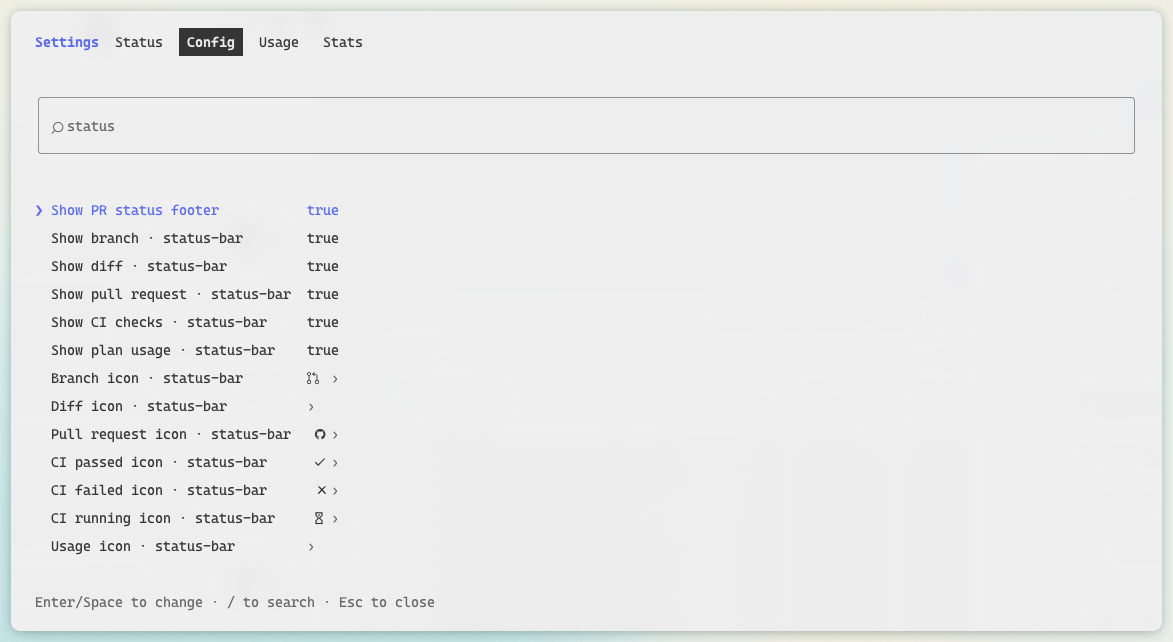
| Option | Default | What it does |
| --- | --- | --- |
| showBranch | true | Show the branch |
| showDiff | true | Show the lines added and removed (off, the mod skips git diff) |
| showPullRequest | true | Show the pull request number, linked, and its state |
| showChecks | true | Show the CI checks (with the pull request off too, the mod never calls gh) |
| showUsage | true | Show the plan usage |
| iconBranch | Nerd Font branch | Drawn before the branch name |
| iconDiff | none | Drawn before the added and removed lines |
| iconPullRequest | Nerd Font GitHub | Drawn before the pull request number |
| iconChecksPassed | Nerd Font check | Drawn before the checks when every one passed |
| iconChecksFailed | Nerd Font cross | Drawn before the checks when any failed |
| iconChecksPending | Nerd Font hourglass | Drawn before the checks while some are still running |
| iconUsage | none | Drawn before the plan usage |
Icons are used as written, spaces included. Leave one empty for its default, or write none to draw no icon. The
dialog Claude Code opens on install shows every icon field empty, as it never fills a text field with its default:
save it as it is to keep the default icons.
Default icons, colors and thresholds are constants at the top of hooks/format.ts (DEFAULT_ICONS,
COLOR_*, PULL_REQUEST_COLORS, USAGE_WARNING_PERCENT, USAGE_CRITICAL_PERCENT). Colors are a Claude Code theme
key or a raw color (green, #ff8700).
To run your own copy, clone this repository and load it from disk instead of installing it:
claude --plugin-dir /path/to/claude-status-bar
or, for every session, set CLAUDE_CODE_PLUGIN_DIRS to that path in the env block of ~/.claude/settings.json. The
folder is watched, so saving a file reloads the mod.
claude plugin validate .
claude plugin test .

Documentation generation, drift detection, and API docs automation plugin that also acts as a function-hook guard refusing doc writes or worker dispatch containing secrets.

A status bar for the Claude desktop app. It draws above your prompt and shows session quality, context fill, cache countdown, and your 5-hour and weekly limits, with Clawd acting out what the session is doing.

A Claude Code plugin mod providing a /databricks-pane that presents Databricks workspace, Unity Catalog, compute, jobs, pipelines, apps and dashboards as a tree following the databricks CLI, with live highlights, profile switching, and CLI argument copy.
