
dukechain2333@dukechain2333
dukechain2333/starfleet-panel/tree/main/plugin
dukechain2333/starfleet-panel/tree/main/plugin
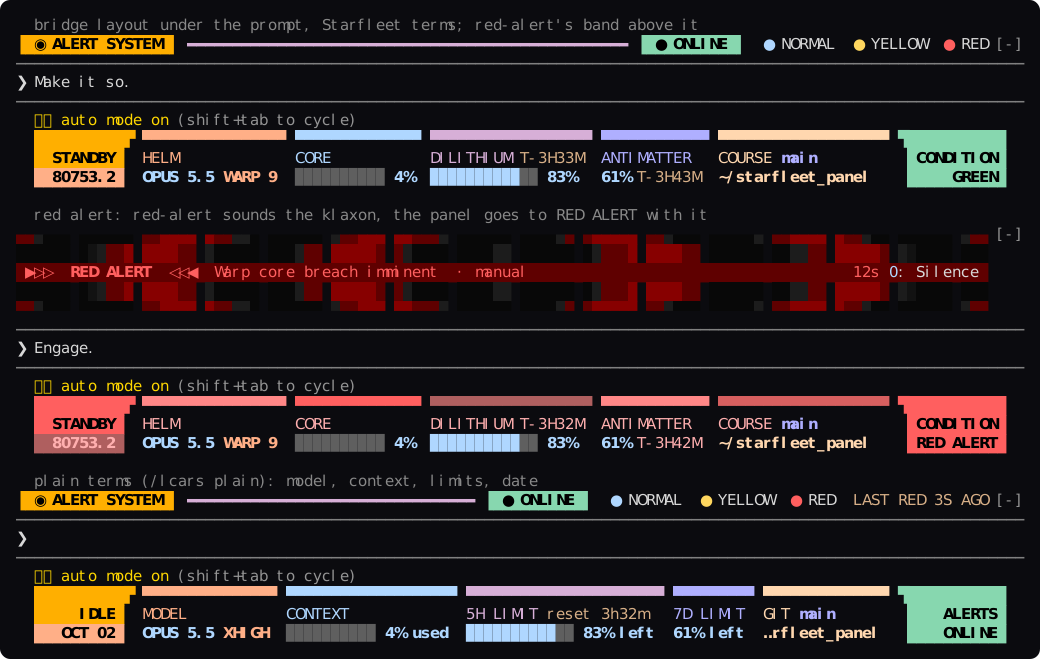
An LCARS status panel for Claude Code. The readouts that usually sit under the prompt (model, effort, context window, rate limits, directory, git branch) are drawn as an ops console from The Next Generation: elbows at both ends, a header bar cut into one colored segment per readout, the labels under their segments and the values under the labels. It's built to sit beside red-alert. When red-alert sounds the klaxon, the panel goes to RED ALERT with it.

Every readout has a Starfleet name and a plain one, and you pick which the
panel uses: /lcars plain or /lcars starfleet (saved, like the
Terminology row in /config). The plain terms read as an ordinary status
line: the date instead of the stardate, CONTEXT 42% used,
5H LIMIT 72% left, ALERTS ONLINE.
| Starfleet term | Plain term | What it shows |
| --- | --- | --- |
| STANDBY / ENGAGED | IDLE / WORKING | the sidebar's upper block: whether Claude is working |
| stardate | date (OCT 02) | the sidebar's lower block; the stardate is TNG's broadcast reckoning: 41000 when the show began in 1987, a thousand units a year |
| HELM | MODEL | the model (OPUS 5.5) and reasoning effort as a warp factor: low IMPULSE, medium WARP 5, high WARP 7, xhigh WARP 9, max WARP 9.6 |
| CORE | CONTEXT | context window used (42%; plain 42% used), with a segmented meter |
| DILITHIUM | 5H LIMIT | the 5-hour limit: how much is left (plain 72% left), a meter, and the time to the reset (T-2H14M; plain reset 2h14m) |
| ANTIMATTER | 7D LIMIT | the 7-day limit: how much is left and the time to the reset |
| COURSE / SECTOR | GIT / DIR | the git branch (or @<sha> when detached) over the working directory, ~ for home; SECTOR outside a repository |
| ENV | ENV | the active conda env (not base) or virtualenv, on wide terminals |
| ENERGY | COST | the session's cost, on wide terminals (off by default) |
| CREW | USER | user@host, on wide terminals (can be turned off) |
| CONDITION | ALERTS | the end block: red-alert's state, GREEN (plain ONLINE), MUTED, OFFLINE or the alert; without red-alert, SHIP TIME (plain TIME) over the clock |
Readings turn yellow at 60% used and red at 80%. These are the thresholds of
the classic statusLine script the panel replaces. The 5-hour and 7-day
limits appear once Claude Code has a reading for them: on a Pro or Max
subscription, after the first response.
Install both and they share one console: red-alert's band above the prompt and this panel below it, in the same LCARS palette.
| red-alert's state | The panel |
| --- | --- |
| online | the end block reads CONDITION / GREEN |
| muted | CONDITION / MUTED |
| offline | CONDITION / OFFLINE |
| an alert is up | the whole frame turns the alert's reds and the end block reads RED ALERT (or the level's title) |
| a red or yellow alert animating | the state block and the end block blink with the klaxon, then hold steady until you silence or dismiss the alert (0, red-alert's key) |
| not installed | the end block keeps SHIP TIME; everything else works the same |
The mods don't conflict because each one draws, binds and stores only what it owns:
| | red-alert | starfleet-panel |
| --- | --- | --- |
| Draws | the band above the prompt, the /alert console, its tool's row | the hint line under the prompt, nothing else |
| Command | /alert | /lcars |
| Tools and system prompt | the alert tool and a short alert policy | none |
| Keys | 0 silences; band items via ctrl+x tab | none: no buttons, no hotkeys |
| State | its own | its own; reads red-alert's link and active, never writes them |
The panel learns of a new alert the moment red-alert records it. It does this
with an observe-only hook on red-alert's state, which passes every value
through exactly as red-alert wrote it. Set followRedAlert to false to
ignore red-alert altogether.
git clone https://github.com/dukechain2333/starfleet-panel.git
cd starfleet-panel
./install.sh
This copies the mod to ~/.claude/skills/starfleet-panel. Start a new
Claude Code session and it loads as starfleet-panel@skills-dir. Use
./install.sh --link to symlink the checkout instead while you work on it,
and ./uninstall.sh to remove it.
The repository is also a plugin marketplace:
claude plugin marketplace add dukechain2333/starfleet-panel
claude plugin install starfleet-panel@starfleet-panel
Retire your statusLine command. If ~/.claude/settings.json has a
statusLine entry, its line keeps drawing above the panel and you see the
same figures twice. Remove the entry to let the panel take over. The panel
tells you once, the installer reminds you, and /lcars mentions it while
one is set.
Requirements: Claude Code with mod support (function-hook plugins; built and
tested on 2.1.288), and a terminal with true color and a monospace font that
has the block elements (▄ ▀ ▌ ▗). Any modern terminal font does.
The panel needs nothing from you. It refreshes the context window and limits every 2 seconds. It re-reads the directory, branch, env and settings after every turn and every 30 seconds.
Layouts: bridge, the three-row ops console (the default);
compact, one row in the style of red-alert's idle strip; off, only
Claude Code's own hint line. Bridge falls back to compact on terminals
narrower than 64 columns and in the desktop app.
/lcars prints a full status report. It lists every reading beside
what its Starfleet name stands for, which makes it a legend too:
LCARS STATUS REPORT · STARDATE 80753.1 · 22:32

HELM        (model, effort)      OPUS 5.5 · xhigh effort (warp 9)
CORE        (context window)     4% used · 43K of 1M tokens
DILITHIUM   (5-hour limit)       95% left · resets in 4h18m
ANTIMATTER  (7-day limit)        63% left · resets in 4h28m
ENERGY      (session cost)       $0.35
SECTOR      (working directory)  ~/starfleet_panel
COURSE      (git branch)         main
ENV         (python env)         none
CONDITION   (red-alert)          condition green
/lcars plain | starfleet switches the terms, and keeps the choice
for new sessions.
/lcars bridge | compact | off switches the layout for this session.
/lcars reset goes back to the setting.
Set these in /config (or claude plugin configure starfleet-panel):
| Setting | Default | |
| --- | --- | --- |
| layout | bridge | bridge, compact or off |
| labels (Terminology) | starfleet | starfleet (HELM, CORE, DILITHIUM, stardate…) or plain (MODEL, CONTEXT, 5H LIMIT, date…); /lcars plain and /lcars starfleet set it too |
| showCost | false | add the ENERGY column (the session's cost) on wide terminals |
| showUserHost | true | add the CREW column (user@host) on wide terminals |
| followRedAlert | true | show red-alert's condition and repaint with its alerts |
| refreshSeconds | 2 | how often the context window and limits are re-read |
The mod draws Claude Code's PromptHint site, the hint line under the
prompt. It returns its own rows together with the engine's line, so the mode
pill (⏵⏵ auto mode on) and hints such as esc to interrupt stay live
above the frame. Its figures come from $.session.usage() and
$.session.model(), which are free in-process calls. The effort is the one
each main-loop request was actually sent with, recorded by an observe-only
turn.step hook that leaves the response stream untouched. Before the first
request, the effort comes from your settings.
claude plugin validate plugin     # manifest and hooks, as the engine reads them
claude plugin test plugin         # the tests: layouts, red-alert states, /lcars
claude --plugin-dir plugin        # try it; saving a file reloads it
npx -p typescript tsc -p plugin   # type-check, once a session has loaded the mod
                                  # (it lays the types in plugin/.claude-plugin/types)
Layout: plugin/hooks/register.tsx (hooks, sensors, drawing),
plugin/hooks/panel.ts (the layouts and the report), plugin/hooks/lcars.ts
(palette and row fitting), plugin/hooks/readouts.ts (stardate, warp
factor, gauges, cell widths), plugin/types/index.d.ts (the state contract),
plugin/tests/.
docs/preview.svg comes from a real session. Capture it with
tmux capture-pane -e -p -t <session> > capture.ans, then convert it with
python3 docs/ansi2svg.py capture.ans docs/preview.svg --rows <first>-<last>.
The panel borrows the look of LCARS, the computer interface designed by Michael Okuda for Star Trek: The Next Generation. This is an unofficial fan project. Star Trek and its marks belong to their respective owners.
Check the author's README for the marketplace and plugin name first. Commands may change as the repository evolves.
claude plugin marketplace add dukechain2333/starfleet-panel
claude plugin install starfleet-panel
An LCARS status panel for Claude Code. The readouts that usually sit under the prompt (model, effort, context window, rate limits, directory, git branch) are drawn as an ops console from The Next Generation: elbows at both ends, a header bar cut into one colored segment per readout, the labels under their segments and the values under the labels. It's built to sit beside red-alert. When red-alert sounds the klaxon, the panel goes to RED ALERT with it.
Every readout has a Starfleet name and a plain one, and you pick which the
panel uses: /lcars plain or /lcars starfleet (saved, like the
Terminology row in /config). The plain terms read as an ordinary status
line: the date instead of the stardate, CONTEXT 42% used,
5H LIMIT 72% left, ALERTS ONLINE.
| Starfleet term | Plain term | What it shows |
| --- | --- | --- |
| STANDBY / ENGAGED | IDLE / WORKING | the sidebar's upper block: whether Claude is working |
| stardate | date (OCT 02) | the sidebar's lower block; the stardate is TNG's broadcast reckoning: 41000 when the show began in 1987, a thousand units a year |
| HELM | MODEL | the model (OPUS 5.5) and reasoning effort as a warp factor: low IMPULSE, medium WARP 5, high WARP 7, xhigh WARP 9, max WARP 9.6 |
| CORE | CONTEXT | context window used (42%; plain 42% used), with a segmented meter |
| DILITHIUM | 5H LIMIT | the 5-hour limit: how much is left (plain 72% left), a meter, and the time to the reset (T-2H14M; plain reset 2h14m) |
| ANTIMATTER | 7D LIMIT | the 7-day limit: how much is left and the time to the reset |
| COURSE / SECTOR | GIT / DIR | the git branch (or @<sha> when detached) over the working directory, ~ for home; SECTOR outside a repository |
| ENV | ENV | the active conda env (not base) or virtualenv, on wide terminals |
| ENERGY | COST | the session's cost, on wide terminals (off by default) |
| CREW | USER | user@host, on wide terminals (can be turned off) |
| CONDITION | ALERTS | the end block: red-alert's state, GREEN (plain ONLINE), MUTED, OFFLINE or the alert; without red-alert, SHIP TIME (plain TIME) over the clock |
Readings turn yellow at 60% used and red at 80%. These are the thresholds of
the classic statusLine script the panel replaces. The 5-hour and 7-day
limits appear once Claude Code has a reading for them: on a Pro or Max
subscription, after the first response.
Install both and they share one console: red-alert's band above the prompt and this panel below it, in the same LCARS palette.
| red-alert's state | The panel |
| --- | --- |
| online | the end block reads CONDITION / GREEN |
| muted | CONDITION / MUTED |
| offline | CONDITION / OFFLINE |
| an alert is up | the whole frame turns the alert's reds and the end block reads RED ALERT (or the level's title) |
| a red or yellow alert animating | the state block and the end block blink with the klaxon, then hold steady until you silence or dismiss the alert (0, red-alert's key) |
| not installed | the end block keeps SHIP TIME; everything else works the same |
The mods don't conflict because each one draws, binds and stores only what it owns:
| | red-alert | starfleet-panel |
| --- | --- | --- |
| Draws | the band above the prompt, the /alert console, its tool's row | the hint line under the prompt, nothing else |
| Command | /alert | /lcars |
| Tools and system prompt | the alert tool and a short alert policy | none |
| Keys | 0 silences; band items via ctrl+x tab | none: no buttons, no hotkeys |
| State | its own | its own; reads red-alert's link and active, never writes them |
The panel learns of a new alert the moment red-alert records it. It does this
with an observe-only hook on red-alert's state, which passes every value
through exactly as red-alert wrote it. Set followRedAlert to false to
ignore red-alert altogether.
git clone https://github.com/dukechain2333/starfleet-panel.git
cd starfleet-panel
./install.sh
This copies the mod to ~/.claude/skills/starfleet-panel. Start a new
Claude Code session and it loads as starfleet-panel@skills-dir. Use
./install.sh --link to symlink the checkout instead while you work on it,
and ./uninstall.sh to remove it.
The repository is also a plugin marketplace:
claude plugin marketplace add dukechain2333/starfleet-panel
claude plugin install starfleet-panel@starfleet-panel
Retire your statusLine command. If ~/.claude/settings.json has a
statusLine entry, its line keeps drawing above the panel and you see the
same figures twice. Remove the entry to let the panel take over. The panel
tells you once, the installer reminds you, and /lcars mentions it while
one is set.
Requirements: Claude Code with mod support (function-hook plugins; built and
tested on 2.1.288), and a terminal with true color and a monospace font that
has the block elements (▄ ▀ ▌ ▗). Any modern terminal font does.
The panel needs nothing from you. It refreshes the context window and limits every 2 seconds. It re-reads the directory, branch, env and settings after every turn and every 30 seconds.
Layouts: bridge, the three-row ops console (the default);
compact, one row in the style of red-alert's idle strip; off, only
Claude Code's own hint line. Bridge falls back to compact on terminals
narrower than 64 columns and in the desktop app.
/lcars prints a full status report. It lists every reading beside
what its Starfleet name stands for, which makes it a legend too:
LCARS STATUS REPORT · STARDATE 80753.1 · 22:32

HELM        (model, effort)      OPUS 5.5 · xhigh effort (warp 9)
CORE        (context window)     4% used · 43K of 1M tokens
DILITHIUM   (5-hour limit)       95% left · resets in 4h18m
ANTIMATTER  (7-day limit)        63% left · resets in 4h28m
ENERGY      (session cost)       $0.35
SECTOR      (working directory)  ~/starfleet_panel
COURSE      (git branch)         main
ENV         (python env)         none
CONDITION   (red-alert)          condition green
/lcars plain | starfleet switches the terms, and keeps the choice
for new sessions.
/lcars bridge | compact | off switches the layout for this session.
/lcars reset goes back to the setting.
Set these in /config (or claude plugin configure starfleet-panel):
| Setting | Default | |
| --- | --- | --- |
| layout | bridge | bridge, compact or off |
| labels (Terminology) | starfleet | starfleet (HELM, CORE, DILITHIUM, stardate…) or plain (MODEL, CONTEXT, 5H LIMIT, date…); /lcars plain and /lcars starfleet set it too |
| showCost | false | add the ENERGY column (the session's cost) on wide terminals |
| showUserHost | true | add the CREW column (user@host) on wide terminals |
| followRedAlert | true | show red-alert's condition and repaint with its alerts |
| refreshSeconds | 2 | how often the context window and limits are re-read |
The mod draws Claude Code's PromptHint site, the hint line under the
prompt. It returns its own rows together with the engine's line, so the mode
pill (⏵⏵ auto mode on) and hints such as esc to interrupt stay live
above the frame. Its figures come from $.session.usage() and
$.session.model(), which are free in-process calls. The effort is the one
each main-loop request was actually sent with, recorded by an observe-only
turn.step hook that leaves the response stream untouched. Before the first
request, the effort comes from your settings.
claude plugin validate plugin     # manifest and hooks, as the engine reads them
claude plugin test plugin         # the tests: layouts, red-alert states, /lcars
claude --plugin-dir plugin        # try it; saving a file reloads it
npx -p typescript tsc -p plugin   # type-check, once a session has loaded the mod
                                  # (it lays the types in plugin/.claude-plugin/types)
Layout: plugin/hooks/register.tsx (hooks, sensors, drawing),
plugin/hooks/panel.ts (the layouts and the report), plugin/hooks/lcars.ts
(palette and row fitting), plugin/hooks/readouts.ts (stardate, warp
factor, gauges, cell widths), plugin/types/index.d.ts (the state contract),
plugin/tests/.
docs/preview.svg comes from a real session. Capture it with
tmux capture-pane -e -p -t <session> > capture.ans, then convert it with
python3 docs/ansi2svg.py capture.ans docs/preview.svg --rows <first>-<last>.
The panel borrows the look of LCARS, the computer interface designed by Michael Okuda for Star Trek: The Next Generation. This is an unofficial fan project. Star Trek and its marks belong to their respective owners.

Documentation generation, drift detection, and API docs automation plugin that also acts as a function-hook guard refusing doc writes or worker dispatch containing secrets.

A status bar for the Claude desktop app. It draws above your prompt and shows session quality, context fill, cache countdown, and your 5-hour and weekly limits, with Clawd acting out what the session is doing.

A Claude Code plugin mod providing a /databricks-pane that presents Databricks workspace, Unity Catalog, compute, jobs, pipelines, apps and dashboards as a tree following the databricks CLI, with live highlights, profile switching, and CLI argument copy.
