
Turbo-Thorschten@Turbo-Thorschten
Turbo-Thorschten/shell-highlight
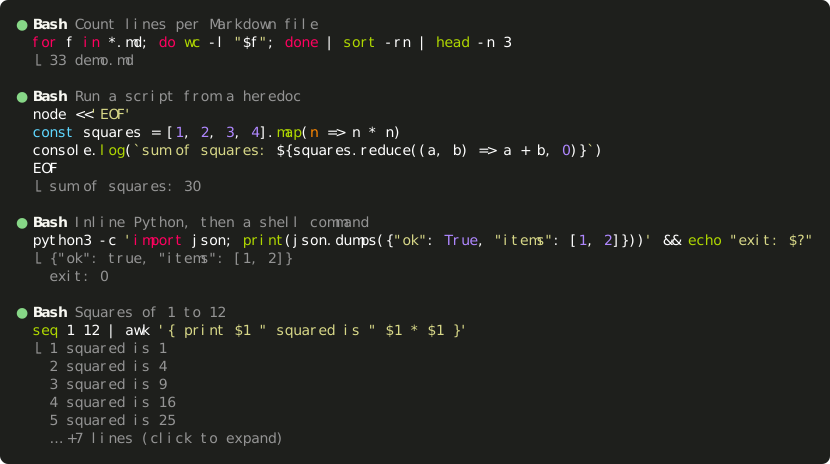
A Claude Code mod that draws `Bash` and `PowerShell` tool calls with syntax-highlighted commands.
Turbo-Thorschten/shell-highlight
A Claude Code mod that renders Bash and PowerShell tool calls with syntax-highlighted commands.
It colours each shell call using Claude Code's own highlighter, detects embedded languages (JavaScript/TypeScript, Python, Ruby, Perl, PHP, SQL, bash, PowerShell, batch) in heredocs, here-strings and quoted arguments, and shows the first lines of output under each call. Runs of calls are folded by default and expand with one click; hover highlights a single call; status dots show running, succeeded, failed or interrupted states. Requires Claude Code 2.1.287 or newer. Install by cloning the repo and running claude --plugin-dir ./shell-highlight, or by adding the folder to CLAUDE_CODE_PLUGIN_DIRS. The mod keeps no state, reads no files, starts no processes and makes no network calls.
Check the author's README for the marketplace and plugin name first. Commands may change as the repository evolves.
claude plugin marketplace add Turbo-Thorschten/shell-highlight
claude plugin install shell-highlight
A Claude Code mod that draws Bash and PowerShell tool calls with syntax-highlighted commands.
Claude Code prints a shell command in one colour and folds a run of them into a count line (Ran 4 shell commands). This mod draws each call as its command, coloured by Claude Code's own highlighter, with the first lines of its output underneath.
Highlighted commands. Bash calls are coloured as bash, PowerShell calls as PowerShell.
Embedded languages. A script handed to an interpreter is coloured in its own language, whether it sits in a heredoc, a PowerShell here-string or a quoted argument:
| Written as | Coloured as |
| --- | --- |
| node -e '…', node <<'EOF', bun, deno, tsx | JavaScript / TypeScript |
| python -c '…', python3 <<'EOF', py | Python |
| ruby -e, perl -e, php -r | Ruby, Perl, PHP |
| psql, sqlite3, mysql with a heredoc | SQL |
| bash -c '…', sh -c, zsh -ic '…' | bash |
| pwsh -Command '…', powershell -c | PowerShell |
| cmd /c "…" | batch |
| cat > script.py <<'EOF', @'…'@ \| Set-Content data.json | by the file's extension |
Folded by default, one click to unfold. A call shows up to 10 lines of its command and 5 lines of its output, then … +N lines (click to expand). A click anywhere on the run of calls unfolds every command and every line of output; a second click folds them again.
Hover per call. The pointer lights up the description and output of the call under it, not the whole run.
Wrapping that keeps the colours. An inline script wider than the terminal is wrapped at a space outside string literals, so every wrapped line is still highlighted. Wide characters (CJK, emoji) count as two cells.
Status at a glance. The dot is dim while a call runs, green when it succeeded, red when it failed or was interrupted. A running call says Running…, an interrupted one Interrupted, a silent one (no output).
Clean output. Colour codes and control characters are removed from the output; in a command they are shown as visible symbols (␛).
Everything else stays native. Other tools keep Claude Code's rows. A run that mixes shell calls with other tools keeps its count line (Read 1 file, ran 2 shell commands) above the shell calls and unfolds into the engine's own rows.
| View | Command | Output |
| --- | --- | --- |
| Fullscreen transcript, folded | this mod | this mod, 5 lines |
| Fullscreen transcript, unfolded by a click | this mod | this mod, all lines |
| Detailed transcript (ctrl+o) | this mod | Claude Code, all lines (this mod for a run unfolded before) |
| Classic (non-fullscreen) transcript | this mod | Claude Code, folded, ctrl+o to expand |
The fold belongs to Claude Code: a click unfolds the run of consecutive calls it sits in, and the state lasts as long as Claude Code keeps it.
Claude Code 2.1.287 or newer, the first version with mods (function hooks). The mods API is early access and may change between releases.
git clone https://github.com/Turbo-Thorschten/shell-highlight.git
claude --plugin-dir ./shell-highlight
To load it in every session, name the folder in CLAUDE_CODE_PLUGIN_DIRS, either in your environment or in the env block of ~/.claude/settings.json:
{
  "env": {
    "CLAUDE_CODE_PLUGIN_DIRS": "~/path/to/shell-highlight"
  }
}
The variable is a list. To keep other mods, append the folder with your platform's path-list separator: ; on Windows, : on Linux and macOS.
Open /plugin to check: the header reads N mods active · shell-highlight, ….
Two files: hooks/text.ts splits a command into pieces and their languages, and hooks/register.ts draws them from three ui.render hooks.
ToolGroup, a run of calls. Folded, the hook draws each shell call itself. Unfolded, it hands the run to Claude Code, which draws every call as a row.ToolUse, one row. For a shell call the hook draws the highlighted command. A row of an unfolded run also draws its output, because Claude Code draws none there.ToolResult, the result block under a row. Left to Claude Code, except where the row already drew the output.The mod changes how rows are drawn and nothing else: the command that runs, its permission prompt and its result are untouched. It keeps no state, reads no files, starts no processes and makes no network calls. claude plugin validate reports one engine call, $.ui.resolve.
It runs next to other mods. For a shell row it returns its own drawing, so a mod loaded beneath it does not draw that row.
Every behaviour above was checked on a real screen, on Claude Code 2.1.287:
Bash and PowerShell toolsctrl+o transcript, a running, a failed, an interrupted and a not yet approved call, 3,000 lines of output, a second mod loaded alongsideclaude plugin test runs 57 tests of the splitting, wrapping and drawing on the terminal and desktop surfaces.
claude plugin validate .    # what the module hooks and calls, and anything the engine would refuse
claude plugin test .        # runs tests/*.test.ts
npx -p typescript tsc -p .  # type-check; needs .claude-plugin/types/, which Claude Code writes when it loads the mod

Documentation generation, drift detection, and API docs automation plugin that also acts as a function-hook guard refusing doc writes or worker dispatch containing secrets.

A status bar for the Claude desktop app. It draws above your prompt and shows session quality, context fill, cache countdown, and your 5-hour and weekly limits, with Clawd acting out what the session is doing.

A Claude Code plugin mod providing a /databricks-pane that presents Databricks workspace, Unity Catalog, compute, jobs, pipelines, apps and dashboards as a tree following the databricks CLI, with live highlights, profile switching, and CLI argument copy.
