
Chrisutina@Chrisutina
Chrisutina/claude-progress-band
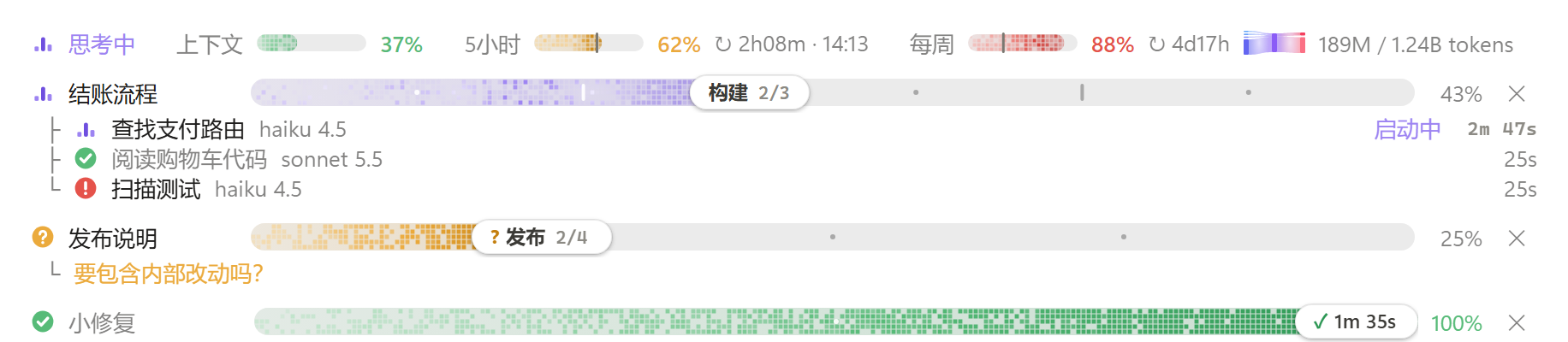
A Claude Code mod that shows context, 5-hour and weekly usage above the prompt, along with aurora progress bars for Claude's staged tasks and subagents. The UI text can be Chinese or English.
Chrisutina/claude-progress-band
Band above the Claude Code prompt: context, 5-hour and weekly usage with the week's tokens, plus live aurora progress bars for Claude's tasks and their subagents. Features usage meters with green/amber/red levels and reset countdowns, a session/week token Sankey, a quota alert at 85% of the 5-hour window, an aurora task progress bar with stages and steps, subagent rows with model and effort, light/dark theme support, reduced-motion handling, a terminal text fallback, and Chinese (default) or English UI. Requires Claude Code v2.1.286 or later; install via /plugin marketplace add Chrisutina/claude-progress-band, /plugin install progress-band@progress-band, /reload-plugins. No network, file access or processes; state stored in plugin storage. MIT licensed, verified against 30 tests on Claude Code 2.1.288.
Check the author's README for the marketplace and plugin name first. Commands may change as the repository evolves.
claude plugin marketplace add Chrisutina/claude-progress-band
claude plugin install progress-band
Claude Code 模组:在输入框上方的频段里,实时显示上下文 / 5 小时 / 每周用量,以及 Claude 把任务拆成阶段和步骤后的极光进度条和它的子代理。界面文字可选中文或英文。
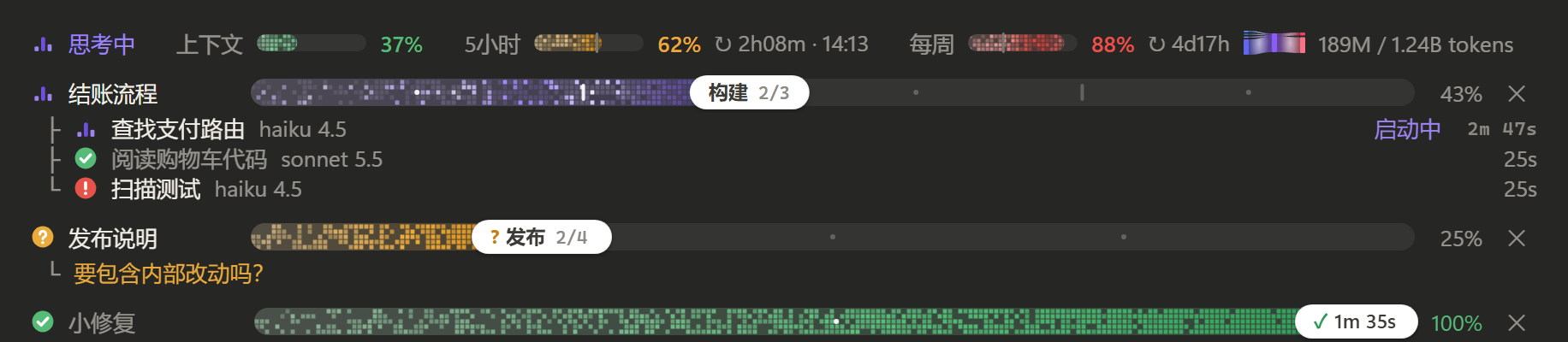
<sub>预览为中文界面的静态截图,还是 0.3 的像素样式;实际使用时极光在管道里流动,状态图标里的电子绕核转。</sub>
用量
当前状态(和用量表同一排,排在最前)
任务进度条
子代理
适配
需要 Claude Code v2.1.286 或更新(桌面版 Code 标签页或终端均可)。如果在 v2.1.286 上模组没有加载,设置环境变量 CLAUDE_CODE_ENABLE_FUNCTION_HOOKS=1(可以写进 ~/.claude/settings.json 的 env)后重启。
仓库名是 claude-progress-band,插件名和 marketplace 名均为 progress-band。
在 Claude Code 里依次运行:
/plugin marketplace add Chrisutina/claude-progress-band
/plugin install progress-band@progress-band
/reload-plugins
不安装、直接从本地目录加载:
claude --plugin-dir /path/to/claude-progress-band
Windows PowerShell 示例:
claude --plugin-dir "D:\Plugins\claude-progress-band"
桌面版没有命令行参数可用时,把目录的绝对路径写进 ~/.claude/settings.json 的 env.CLAUDE_CODE_PLUGIN_DIRS。
模组和 Claude Code 同权限运行、没有沙箱。安装前请先看一遍
hooks/register.tsx。
界面文字默认中文,可切换成英文(en)。给 Claude 看的规则和工具返回本来就是英文,不受影响。
/config,把 progress-band 的 Language 改成 en,模组会自动重载。/config:在 ~/.claude/settings.json 里加下面这段,然后新开会话或运行 /reload-plugins。{
"pluginConfigs": {
"progress-band@progress-band": { "options": { "language": "en" } }
}
}
用 --plugin-dir 或 CLAUDE_CODE_PLUGIN_DIRS 从本地目录加载时,键名换成 progress-band。
plan_progress,并在系统提示词里加一小段规则:需要多于约 3 次编辑或命令的任务,Claude 先建一条进度条,之后用短操作推进,例如 {id, next:true}、{id, done:[...], active:"..."}、{id, failed:"...", note}、{id, state:"needs_input", note}。名字不存在的步骤会被拒绝,并返回该进度条的步骤列表。克隆仓库后直接运行 Claude Code 自带的验证和测试,不需要 npm install 或单独构建:
git clone https://github.com/Chrisutina/claude-progress-band.git
cd claude-progress-band
claude plugin validate .
claude plugin validate .claude-plugin/plugin.json
claude plugin test .
第一条验证 marketplace;第二条验证插件清单、hooks 和状态类型。测试覆盖进度操作、会话恢复、并发保存、用量统计、额度提醒、英文界面以及桌面 / 终端渲染边界;本次发布在 Windows、Claude Code 2.1.288 上通过 30 项测试。
模组从这个目录加载一次之后,Claude Code 会写出 .claude-plugin/types/(已加入 .gitignore),tsconfig.json 会用到它;也可以在会话里运行 /plugin-types 生成类型。
生成类型用于编辑器提示,不随仓库发布;运行上述测试无需先生成它们。仓库中的 types/index.d.ts 是插件自身的状态类型,需要保留。
A Claude Code mod. The band above the prompt shows context, 5-hour and weekly usage (with the week's tokens), and a live aurora progress bar for each task Claude splits into stages and steps, with its subagents listed under it. The band speaks Chinese (default) or English: set language to en, see Language below.
<sub>The screenshots above show the Chinese UI, frozen, still in the 0.3 pixel look; in use, aurora light flows down the pipes and electrons circle in the state icons.</sub>
Features
Install (Claude Code v2.1.286 or later; if the mod does not load on v2.1.286, set CLAUDE_CODE_ENABLE_FUNCTION_HOOKS=1 and restart):
The repository is claude-progress-band; the plugin and marketplace are both named progress-band.
/plugin marketplace add Chrisutina/claude-progress-band
/plugin install progress-band@progress-band
/reload-plugins
To load it from a local folder instead, run claude --plugin-dir /path/to/claude-progress-band, or, in the desktop app, put the folder's absolute path in env.CLAUDE_CODE_PLUGIN_DIRS of ~/.claude/settings.json.
The band's words are Chinese by default. What Claude reads (the rules, tool results) is English either way.
/config and set progress-band's Language to en; the mod reloads by itself./config): add this to ~/.claude/settings.json, then start a new session or run /reload-plugins.{
"pluginConfigs": {
"progress-band@progress-band": { "options": { "language": "en" } }
}
}
When the mod loads from a local folder (--plugin-dir or CLAUDE_CODE_PLUGIN_DIRS), the key is progress-band.
Development (no separate build or npm install):
git clone https://github.com/Chrisutina/claude-progress-band.git
cd claude-progress-band
claude plugin validate .
claude plugin validate .claude-plugin/plugin.json
claude plugin test .
Release verification: 30 tests passed on Windows with Claude Code 2.1.288, the quota alert and the English UI included. Generated .claude-plugin/types/ files support editor types and are ignored by Git; the test runner does not require them. The plugin's own types/index.d.ts is included.
The desktop UI has been used on Windows. Terminal rendering and the English UI have automated tests and screenshot checks; macOS, VS Code and mobile have not been tested manually. The mods API is early and may change with Claude Code updates.
How it works
plan_progress tool and adds a short rule to the system prompt, so Claude creates a bar for multi-step work and moves it with short ops.The task-progress logic and the self-running clock are adapted from zycck/claude-mods plan-progress (MIT). The usage-meter idea comes from HolyGrail/claude-mods; its code is not reused.
License: MIT

Documentation generation, drift detection, and API docs automation plugin that also acts as a function-hook guard refusing doc writes or worker dispatch containing secrets.

A status bar for the Claude desktop app. It draws above your prompt and shows session quality, context fill, cache countdown, and your 5-hour and weekly limits, with Clawd acting out what the session is doing.

A Claude Code plugin mod providing a /databricks-pane that presents Databricks workspace, Unity Catalog, compute, jobs, pipelines, apps and dashboards as a tree following the databricks CLI, with live highlights, profile switching, and CLI argument copy.
