
NahumLitvin@NahumLitvin
NahumLitvin/prismantis
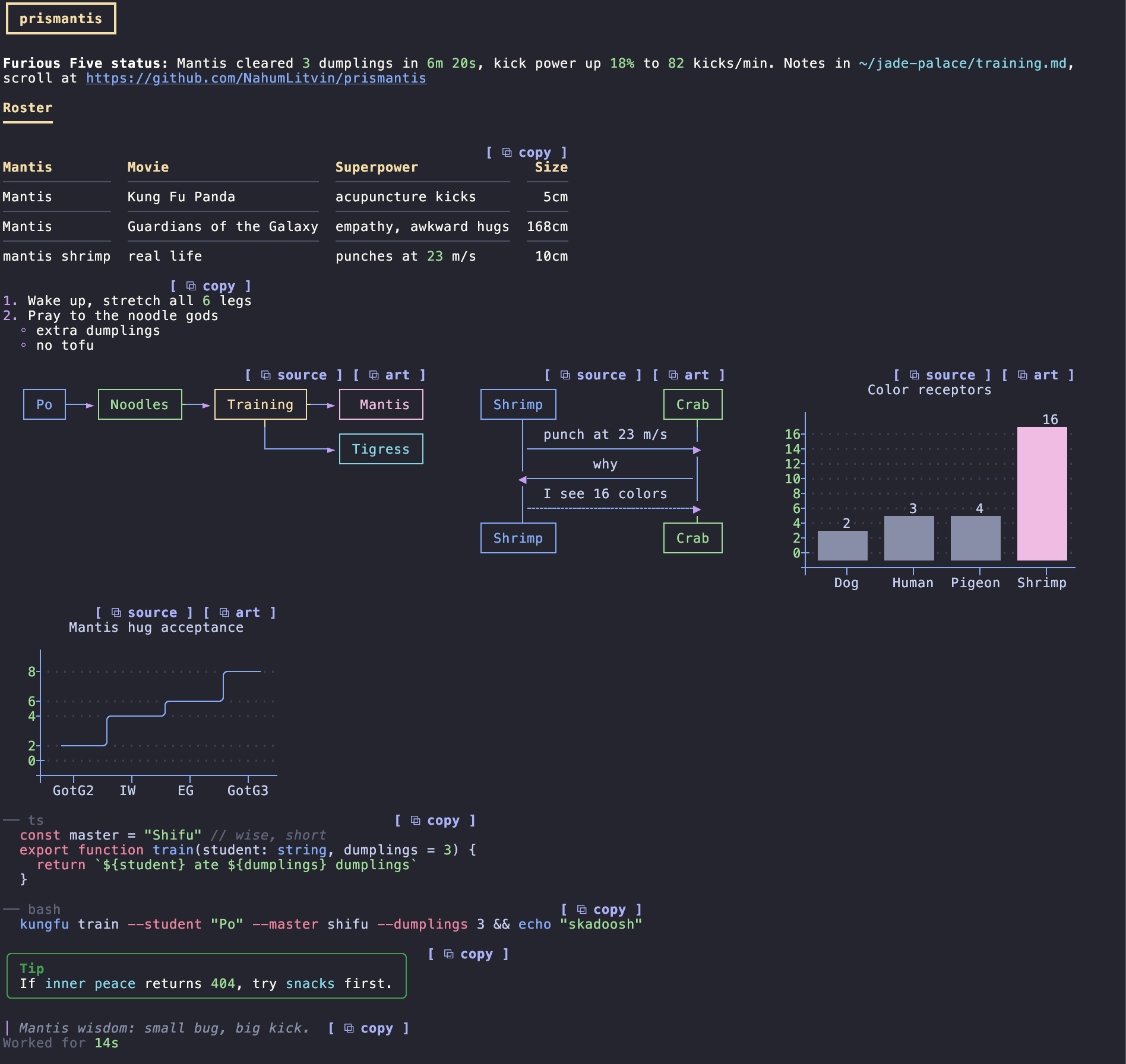
Colorful, themeable rendering for Claude Code replies: tables, headings, code, numbers, paths and links.
NahumLitvin/prismantis
A Claude Code mod that redraws replies with 15 themes: styled tables, headings, lists, quotes, Prism-highlighted code, mermaid diagrams and charts, copy buttons, colored tool rows, numbers, paths and links. Includes right-to-left support, slash-command output styling and per-token color configuration. Installable through the Claude Code plugin marketplace.
Check the author's README for the marketplace and plugin name first. Commands may change as the repository evolves.
claude plugin marketplace add NahumLitvin/prismantis
claude plugin install prismantis

Sees 16 colors. Your terminal only had 8.
Colorful, themeable replies for Claude Code: tables, code, diagrams, charts and tool calls, in 15 themes, with copy buttons on everything.
| Feature | What you get |
| --- | --- |
| Themes | /prismantis theme <name> switches on the spot. 15 MIT palettes (Catppuccin, Dracula, Nord, Tokyo Night, Gruvbox, Rosé Pine, Everforest, GitHub, One Dark, Solarized) plus 20 color slots you can override |
| Tables | colored headers, rules, column alignment, colored numbers, sized to the terminal |
| Code | a language header and copy button, Prism highlighting in 24 languages, shell lines colored like a prompt |
| Diagrams and charts | flowcharts, sequence, state, class and ER diagrams, bar and line charts, one color per box, participant and bar |
| Layout | back-to-back tables and diagrams sit side by side and wrap on narrow terminals |
| Copy buttons | [ ⧉ copy ] on code, tables, lists and quotes, plus ⧉ art on tables and diagrams for pasting into Slack |
| Tool rows | Ran gh pr view 12, Read ~/src/app.ts, groups summed up as Ran 3 commands, read 2 files, with status dots |
| Turn footer | ✻ Baked for 6m 20s with the duration in the number color |
| Slash commands | command output (/cost, /context, plugin commands) gets the same tables and code styling |
| Diagram hints | a short model-only note on each prompt so Claude reaches for diagrams and charts when they help |
| Text | bold, italic, strikethrough, inline code, links, versions, durations, percentages and paths in their own colors |
| Headings, lists, quotes | 4 heading styles, nested lists, task lists, quotes with an accent bar |
| Right to left | Hebrew and Arabic read right to left, right aligned, with bullets, quote bars and table columns mirrored, in Warp, kitty, Apple Terminal and more |
Try it: ask Claude to print docs/demo.md verbatim as its whole reply. Every feature is in there.
Requires Claude Code 2.1.287 or later.
/plugin marketplace add NahumLitvin/prismantis
/plugin install prismantis@prismantis
To update, run claude plugin marketplace update prismantis && claude plugin update prismantis@prismantis, then /reload in every open session. A session keeps the version it loaded until it reloads.
Tested in the terminal on macOS; CI runs the tests on macOS, Linux and Windows. The desktop app, VS Code and mobile should work through the same mod API but have not been checked by hand yet. Turn it off any time in /plugin, and Claude Code's own renderer comes back. Press ctrl+o on a reply to see the original.
It's a Claude Code mod in plain TypeScript. It bundles two MIT libraries, beautiful-mermaid for diagrams and Prism for highlighting. It makes no network calls, reads no files and runs no commands. It redraws text already on your screen and, with diagramHints on, attaches a short model-only note to your prompts.
Dark: catppuccin-mocha (default), dracula, nord, tokyo-night, gruvbox-dark, rose-pine, everforest, github-dark, one-dark, solarized-dark.
Light: catppuccin-latte, gruvbox-light, rose-pine-dawn, github-light, solarized-light.
Switch on the spot with /prismantis theme nord, or run /prismantis for the help screen with every theme. mono uses no color, only bold and dim. Every palette is MIT licensed and credited in THIRD_PARTY_NOTICES.md.
Header cells take the tableHeader color, and every cell sits in a box with a double line under the header (tableStyle: box, or rules, grid and minimal for lighter looks), and :---:/---: alignment is honored. Numbers inside cells are colored like everywhere else. Columns shrink to fit the terminal.
Code blocks get a header row with the language on the left and a copy button on the right, and the code sits indented below with no frame, so selecting it with the mouse copies only the code.
bash, sh, zsh, unlabeled) color the command word, --flags, quoted strings and # comments, and restart after |, && and ;.Code blocks tagged mermaid draw as colored text art:
graph LR, graph TD, decisions), sequence, state, class and ER diagramsxychart-beta, sized to the terminal widthDiagrams too wide for the window, or over 80 lines, stay as code. mermaidAscii swaps box-drawing characters for + - |. Pie charts are not supported.
When tables and diagrams follow each other, they share a row and wrap to the next line once the terminal runs out of width. A wide terminal shows a table, a flowchart and two charts side by side.
[ ⧉ copy ], drawn in Claude Code's accent color, sits on code blocks, tables, lists and quotes and puts the raw markdown on your clipboard. Quotes copy without their > markers, ready to paste as a message. Diagrams get two: ⧉ source copies the mermaid code and ⧉ art copies the drawn art, ready to paste into a chat code block. Tables get ⧉ art too: a plain boxed table that reads right in Slack, where pasted markdown does not. Replies end with ⧉ copy reply, which copies the reply as Claude wrote it (one-line English narration gets none). Use it for Hebrew and Arabic: selecting right-to-left text on screen copies the letters in the order they are drawn, not the order they are read. Press ctrl+x then tab to move focus onto the buttons and Enter to copy; that works in every terminal. Clicking works where the terminal passes clicks through (fullscreen mode does); terminals with copy-on-select, such as Warp, may grab the word "copy" instead.
Each tool call draws as one line: a bold verb and its target, Ran with a colored shell command, Read and Edited with the path. The dot is green when done, hollow while running and red on failure. Output still draws below. Collapsed groups draw one line too, Ran 3 commands, read 2 files · last: npm test, with a red count when any call failed. Expand a group (ctrl+o or --verbose) and its calls draw with Claude Code's own rows, inline output included.
The line that closes a turn keeps Claude Code's word and colors the duration: ✻ Baked for 6m 20s. Terminal only, since that's the only surface that draws it.
Output from slash commands, built-in or from other plugins, is parsed as markdown and drawn like a reply, copy buttons included. Errors keep Claude Code's own red line.
Claude rarely writes a chart unless it knows the terminal can draw one. With diagramHints on (the default), prismantis attaches a short note to each prompt you type, read by the model and never shown, saying tables, alerts, code, mermaid diagrams and xychart-beta charts render here and to use one when a numeric series or a flow is easier to see than read. It also asks for commands in fenced blocks, since only those get a copy button. It costs about 190 tokens per prompt. It's off whenever mermaid is off, and skipped for headless claude -p runs and background notifications. Claude Code doesn't let installed plugins edit the system prompt (its built-in sec-default policy keeps that for the organization), so the note rides along with your prompt instead.
Bold, italic, ~~strikethrough~~, inline code, links (with their URL dimmed beside them) and bare URLs. Numbers, versions (v2.14.0), durations (250ms, 3h), sizes (16Gi) and percentages (99.9%) take the number color, and paths like ~/src/app.ts the path color.
headingStyle picks banner (the default: a box around H1, a heavy rule under H2), bold, underline or uppercase. Terminals have one font size, so headings stand out through style and color. Lists keep their numbers and nest with • and ◦. Quotes get an accent bar, and GitHub alerts (> [!NOTE], [!TIP], [!IMPORTANT], [!WARNING], [!CAUTION]) draw as colored boxes. Single-series bar charts print each value above its bar and color the tallest one.
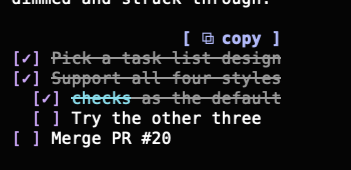
Task lists draw as [ ] and [✓], with done items dimmed and struck through. taskStyle switches to ticks (○ ✓), box (□ ✓) or progress, which adds a done-count bar above each list.
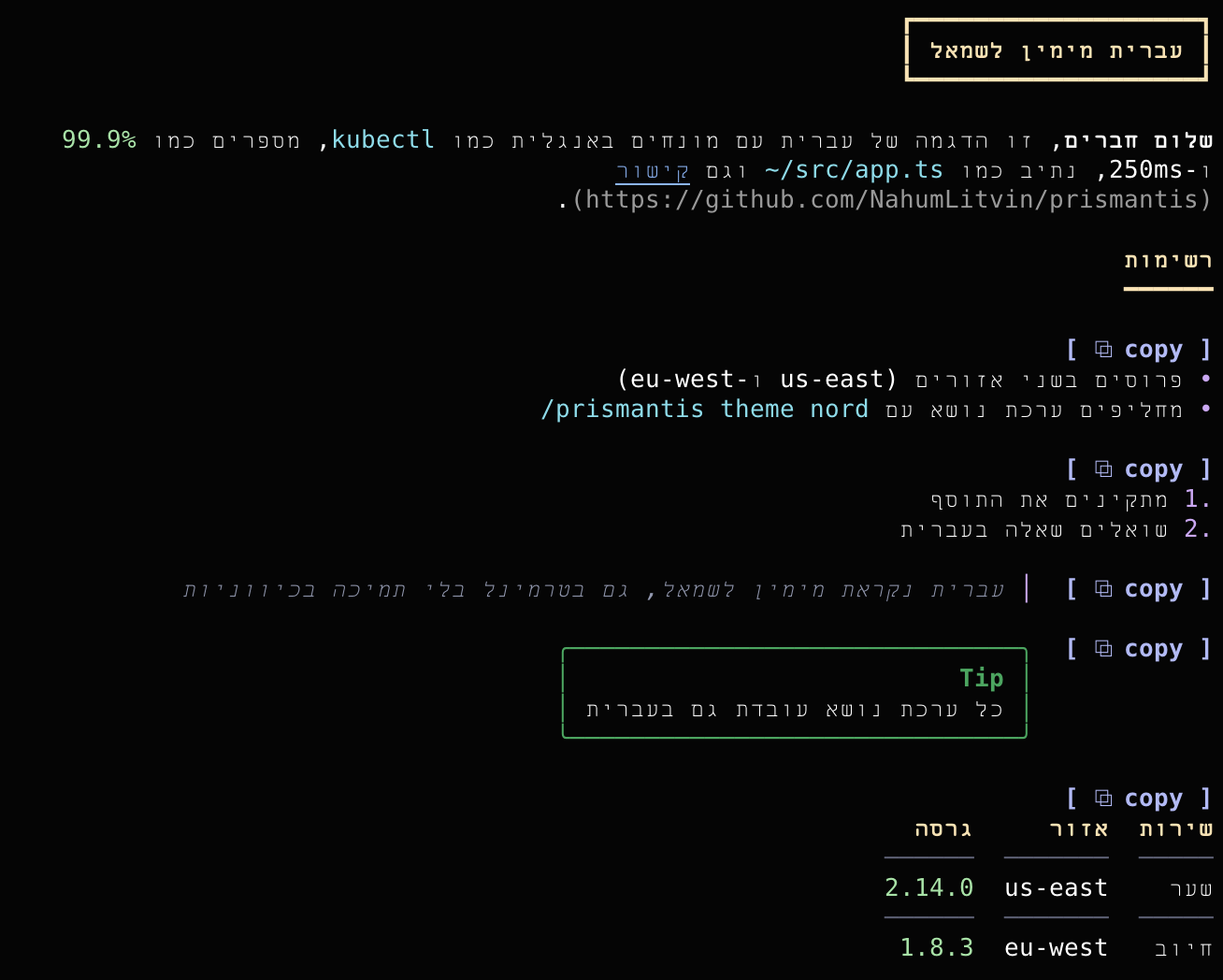
Hebrew and Arabic blocks are right aligned, with bullets, numbers and quote bars on the right and table columns mirrored, while code, numbers, paths and links stay left to right inside them. Terminals differ in how they treat right-to-left letters, so prismantis detects yours and sends the letters the way it needs them. /prismantis demo-rtl shows every element, and the rtl option forces a terminal's handling or turns it off.
Open /config and look for the prismantis rows, or set values in ~/.claude/settings.json:
{
  "pluginConfigs": {
    "prismantis": {
      "theme": "tokyo-night",
      "tableStyle": "grid",
      "headingStyle": "banner",
      "tableHeaderColor": "#ffcc00",
      "numberColor": "cyan"
    }
  }
}
| Option | Values | Default |
| --- | --- | --- |
| enabled | true, false | true |
| theme | see Themes | catppuccin-mocha |
| tableStyle | box, rules, grid, minimal | box |
| taskStyle | checks ([ ] [✓], done struck through), ticks (○ ✓), box (□ ✓), progress (ticks with a done-count bar) | checks |
| headingStyle | banner, bold, underline, uppercase | banner |
| highlightNumbers | true, false | true |
| highlightPaths | true, false | true |
| toolRows | true, false | true |
| copyButtons | true, false | true |
| diagramHints | true, false | true |
| rtl | auto, a terminal (warp, kitty, apple-terminal, iterm, ghostty, wezterm, vscode, alacritty, windows-terminal, gnome, konsole), off | auto |
| mermaid | true, false | true |
| mermaidAscii | true, false | false |
| <token>Color | any color, see below | theme |
A color is hex (#a6e3a1, #fc0), rgb(166,227,161), ansi256(114) or a name (green, cyanBright). Values that don't parse are ignored. Every token has a <token>Color option and a row in /config:
| Token | Colors |
| --- | --- |
| accent | reply bullet, H3+ headings, quote bar, running tool dots |
| heading | H1 and H2 |
| strong | bold text |
| emphasis | italic text, variables, attribute names |
| inlineCode | inline code |
| codeText | code block text |
| codeCommand | shell commands, functions, class names, keys |
| codeFlag | --flags, keywords, failures |
| codeString | strings |
| codeComment | comments, the code block's language label |
| link | links, URLs, properties, tags |
| path | file paths, regexes |
| number | numbers, versions, durations, done dots |
| quote | quote text |
| rule | rules, chart gridlines |
| tableHeader | table header cells |
| tableRule | table rules |
| bullet | list bullets and numbers |
| diagram | diagram lines |
| diagramText | diagram labels |
codeText.Planned features are on the roadmap board, one issue each. Give an issue a 👍 to vote for it, or open one for what you miss.
git clone https://github.com/NahumLitvin/prismantis
claude --plugin-dir ./prismantis
Edits hot-reload in that session. Before a PR run claude plugin validate . and claude plugin test ., and print docs/demo.md to check the look. npm --prefix scripts run bench times a full render of the demo reply, so speed claims can be checked on any machine. CI also type-checks, rebuilds the vendored bundles byte for byte and installs from a clean config. See CONTRIBUTING.md.
Built by Nahum Litvin, who writes about running untrusted code in production at catchkill9.dev.
MIT. Bundled third-party code is listed in THIRD_PARTY_NOTICES.md.

Documentation generation, drift detection, and API docs automation plugin that also acts as a function-hook guard refusing doc writes or worker dispatch containing secrets.

A status bar for the Claude desktop app. It draws above your prompt and shows session quality, context fill, cache countdown, and your 5-hour and weekly limits, with Clawd acting out what the session is doing.

A Claude Code plugin mod providing a /databricks-pane that presents Databricks workspace, Unity Catalog, compute, jobs, pipelines, apps and dashboards as a tree following the databricks CLI, with live highlights, profile switching, and CLI argument copy.
