
OneWave-AI@OneWave-AI
OneWave-AI/claude-code-mods/tree/main/launch-codes
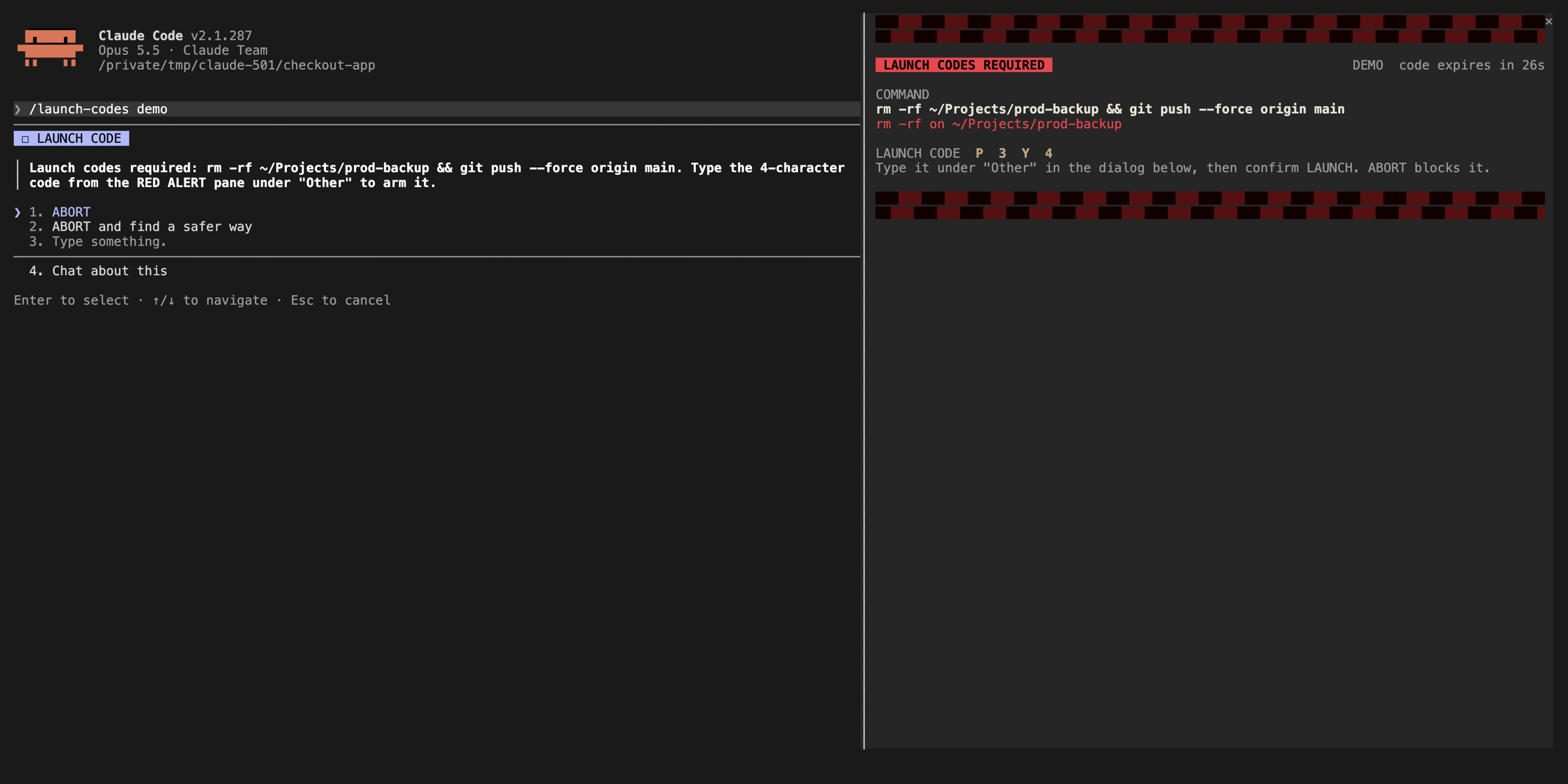
Require a one-time confirmation code for dangerous commands to prevent accidental execution.
OneWave-AI/claude-code-mods/tree/main/launch-codes
Require a one-time confirmation code for dangerous commands to prevent accidental execution.
This project is maintained by a community author. See the original README below for features, version requirements and configuration. This site provides permission scan results; inspect the source and external dependencies before installing.
Check the author's README for the marketplace and plugin name first. Commands may change as the repository evolves.
claude plugin marketplace add OneWave-AI/claude-code-mods
claude plugin install launch-codes@claude-code-mods
Dangerous Bash commands need launch codes: red alert pane, siren, a code to arm and a LAUNCH to fire.
Hooks tool.call on Bash and classifies the command before it runs: risky rm -rf, git push --force, git reset --hard, DROP/TRUNCATE through a live SQL client, supabase db reset, vercel --prod, chmod -R 777, and downloaded scripts piped into a shell. A match opens a red-alert pane with a siren and a one-time code. Type the code to arm, press LAUNCH to fire. Anything else is denied and Claude is told why. /launch-codes test <command> shows the verdict without running anything.
It is strict. It blocked one of our own cleanup commands while we were putting this repo together, which is the point.
In a Claude Code session (2.1.287 or later):
/plugin marketplace add OneWave-AI/claude-code-mods
/plugin install launch-codes@claude-code-mods
Or load this folder for one session: claude --plugin-dir ./launch-codes
| Mod | Network | Runs processes | Files | Calls a model | Sends data anywhere | | --- | --- | --- | --- | --- | --- | | launch-codes | No | No | No | No | No |
Run claude plugin validate ./launch-codes to list every event it hooks and every call it makes. See the repository README for the full security notes.
Part of claude-code-mods by OneWave AI. MIT licensed.
Is this your project? Add this badge to your README or website. It links back to this page.


A Claude Code plugin that masks secrets, personal details, and business figures on screen and keeps private files closed while you record, with /rec, /rec strict, /rec off, and /rec config commands.

pii-guard Mod (Claude Mods frontend)

Keeps secrets, email addresses and IP addresses out of the session transcript: swaps each one for a stable placeholder on the way in, and puts the real value back on the way into a tool call

A Claude Code guard mod that denies Edit, Write and NotebookEdit on secret locations (dotenv files, private keys, ~/.ssh, ~/.aws, ~/.gnupg, pass store) and on content carrying a credential shape, including passwords inside URLs. It also denies Bash writes to those paths and Bash reads that would print them. Ships with its own tests.

A Claude Code mod that watches Edit/Write edits to GitHub Actions workflows and, when a step is pinned to a moving ref (tag or branch), tells the model the commit SHA to write instead; an optional deny mode blocks git commit, push and merge until refs are pinned.

A Baselane Claude Code guard that asks before a command prints environment variables, echoes a sensitive variable, or sends local data to a remote host.