kurapan@kurapan
janzd/claude-translate-output
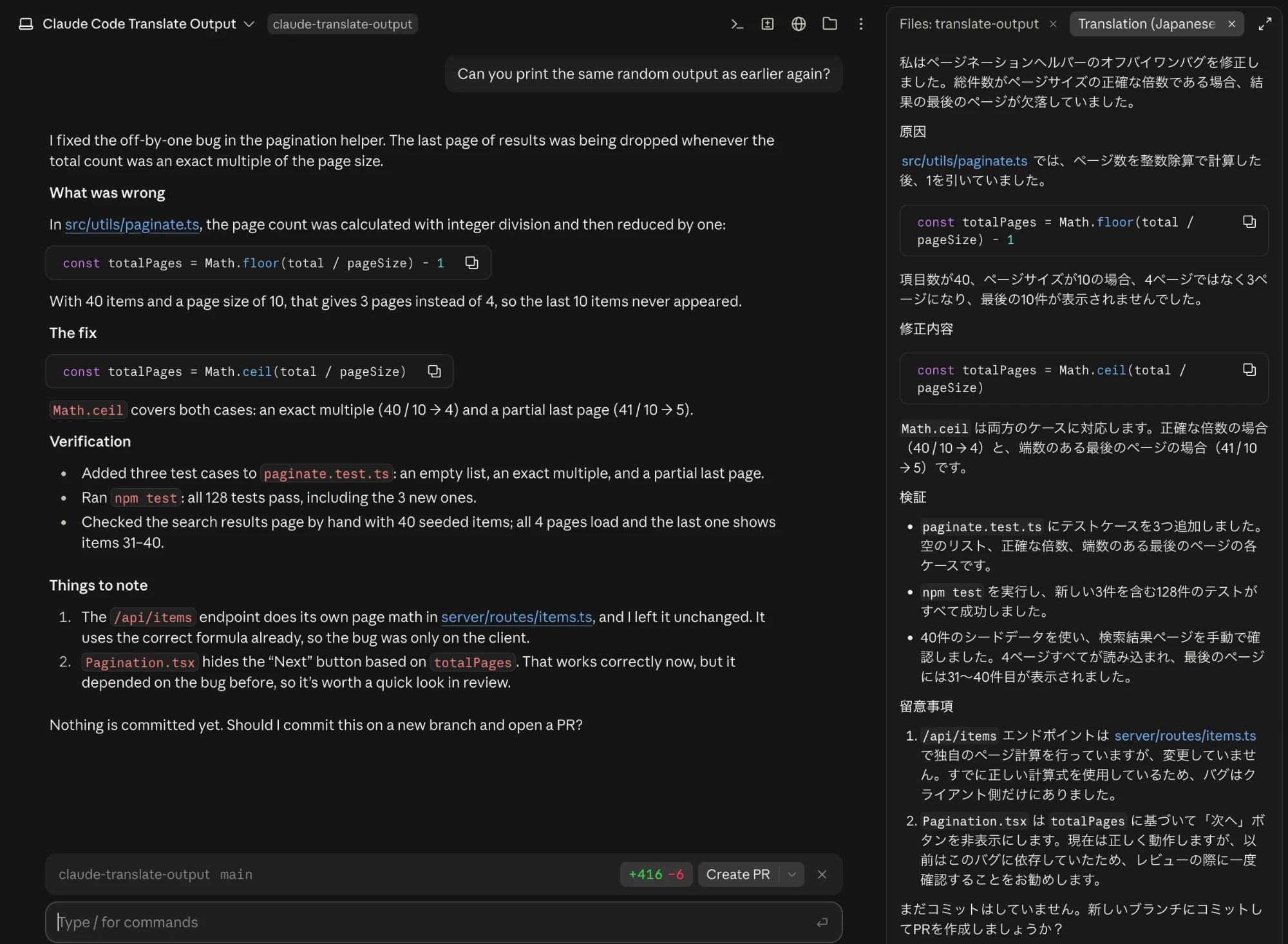
A Claude Code mod that translates the final conversation output into a chosen language and displays it in a side panel, defaulting to Haiku on low effort.
janzd/claude-translate-output
After talking with a friend of mine, I got an idea for a Claude Code mod that helps you practice a language you study while working in Claude Code. Basically, it translates the final output in the conversation, translates it into a language you set when you turn the mod on, and shows it in a side panel. Haiku on low effort is the default for translation, but you can set any model and effort. https://github.com/janzd/claude-translate-output
Check the author's README for the marketplace and plugin name first. Commands may change as the repository evolves.
claude plugin marketplace add janzd/claude-translate-output
claude plugin install translate-output@claude-translate-output
A Claude Code mod that translates the agent's final answer of each turn into a language you choose and shows the translation in a side pane. Intermediate output (tool calls, progress messages, subagent reports) is not translated, and the original answer is left untouched: the translation is display-only and never enters the conversation context.
In a Claude Code terminal session:
/plugin install translate-output --marketplace janzd/claude-translate-output
Answer y to add the marketplace, then pick a scope (user scope makes it
available in every session, including the desktop app's Code tab).
/translate <language>   turn on, translating final answers into <language>
/translate              show the current language and reopen the pane
/translate off          turn off
/translate model <name> translate with <name> (haiku, sonnet, opus or a model id)
/translate model        show the model in use
/translate effort <level> set effort: low, medium, high, xhigh or max
/translate effort       show the effort in use
The language is free text and is passed to the model as written, so real
languages (Japanese, Spanish, Esperanto), constructed ones (Quenya) and
styles (pirate English, Shakespearean English) all work. The chosen language
is remembered across sessions until you run /translate off.
After each turn the pane titled Translation (<language>) shows the
translation; the status line reads Translating to <language>… while it runs.
turn.complete and takes the turn's final visible answer, skipping
subagent turns, interrupted turns and errors.haiku by default) via $.model.complete
(a separate, history-free call on the session's own credentials), asking it to
keep Markdown, code blocks, file paths, commands and identifiers unchanged.ui.render hook.To trade speed for quality (useful for less common languages), run
/translate model sonnet. The model, like the language, is remembered across
sessions. If the model name isn't recognized, the pane shows the error.
/translate effort <level> sets how hard the model thinks (low by default);
higher levels may help with literary styles or long technical answers, at the
cost of speed.
claude plugin validate .
claude plugin test .
To run it from a local checkout instead of installing it:
claude --plugin-dir /path/to/claude-translate-output
| Path | Purpose |
| --- | --- |
| .claude-plugin/plugin.json | Plugin manifest |
| .claude-plugin/marketplace.json | Makes this repository a plugin marketplace |
| hooks/hooks.json | Points at the hooks module |
| hooks/register.tsx | The mod: /translate command, turn.complete hook, pane |
| hooks/register.test.tsx | Tests run by claude plugin test |
| types/index.d.ts | Type contract for the mod's session state |

The author says they ported 'npx RuFlo' to the new Claude Code Mod system, inspired by a 1990 Wildcat BBS they ran. The post explains that a mod is a Claude Code plugin whose hooks module exports register(on, options); hooks attach middleware to engine events and can watch, rewrite or answer them. It provides installation commands and a GitHub link, while noting that the GitHub manifest and hooks module have not been verified.
 ▶ ♫
▶ ♫
Neural trading strategies powered by neural-trader (v2.7+): self-learning LSTM/Transformer/N-BEATS models, Rust/NAPI backtesting, 112+ MCP tools, swarm coordination, and portfolio optimization.

An optional mods companion for claude-seo. It runs inside Claude Code as a mod (a function-hook plugin), so it can enforce things a skill can only ask for.