ClaudeModsClaude Code mod directory
☰
● 0 online · Views 0 times
+ Submit a project
← Back to projects
X posts · Multi-agent orchestration / Development & debugging / Dashboards & HUD / Workflows & CI

Claude Code Search Efficiency Meter — Claude Code plugin · ClaudeMods

Report this workIs this your work? Claim it

Explore this Claude Code plugin on ClaudeMods and review its source and permissions. The author built their first Claude Code Mod: a meter showing how easily Claude finds things in the codebase, with a button to make the next search faster.

JJJ Englert@JJEnglert

1/

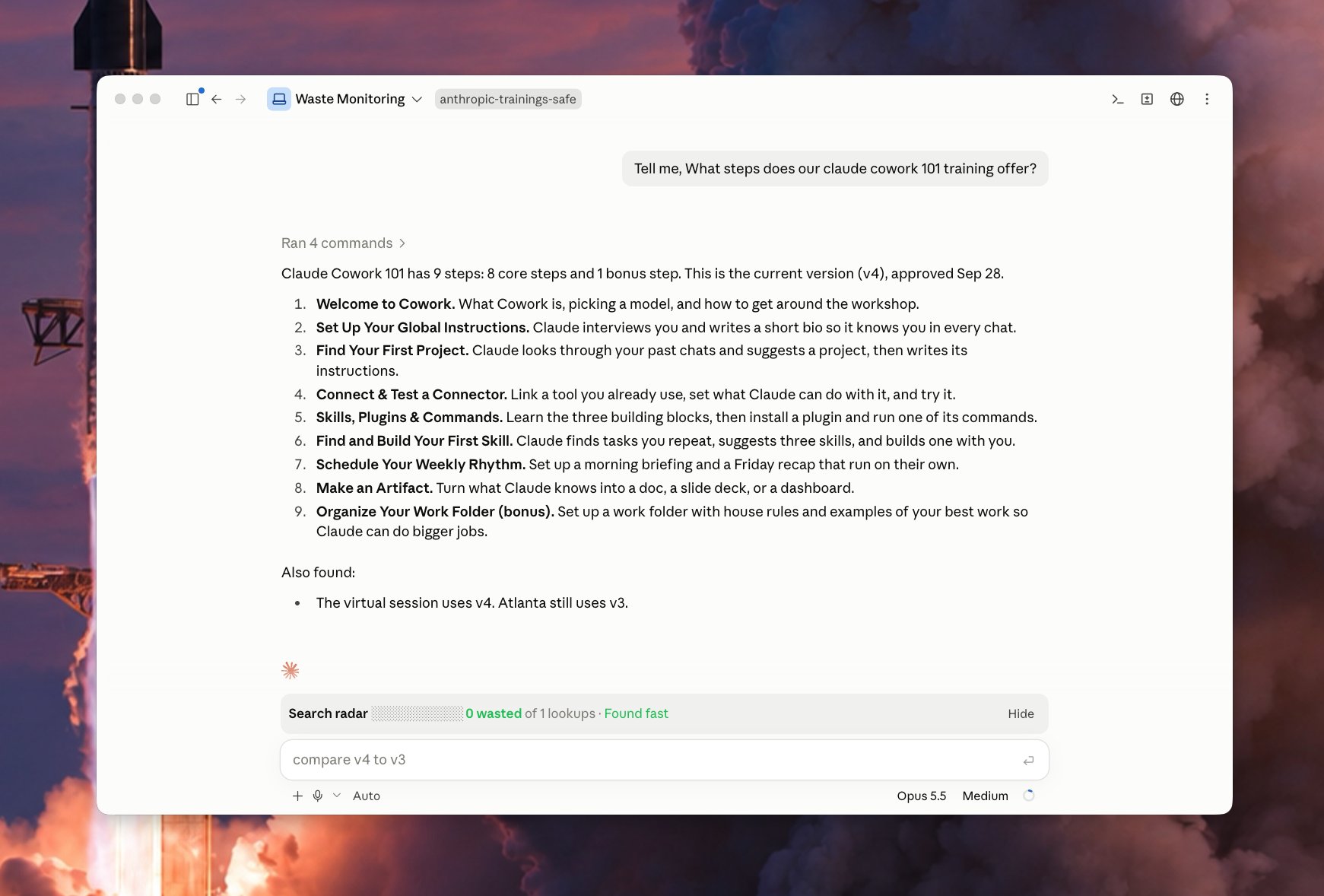
I just built my first Claude Code Mod! 🔥 I built a meter that shows how easily Claude finds things in my code. It comes with a button that makes the next search faster. What it does Every time you ask Claude something, the bar watches Claude look through your files. It counts the wasted searches: a) searches that found nothing b) the same search done twice c) files Claude opened but didn't need Green means Claude found it fast. Yellow means some waste. Red means Claude got lost. It also tells you which folder caused the most trouble. The fix button Click Patch the waste and a helper Claude starts in the background. It writes a short note in your project that says "the thing you need is here." Next time, Claude reads that note and goes straight to the right spot. The helper only writes notes. It never changes your code. It works on its own, so your main chat stays clean. Why it matters Think of your codebase as a library. The bar shows when Claude wandered the shelves. The button adds a sign to the shelf, so the next visit is quick. Over time, the bar shows which parts of your code need better notes.

Original post image1
Translated

About this mod

The author released their first Claude Code Mod: a real-time meter that, on each question, observes Claude traversing files and counts three types of wasted searches—searches that find nothing, the same search run repeatedly, and files opened but not needed. Green means fast location, yellow means waste, red means Claude is lost, and it points out which folder is the most troublesome. There is also a "Patch the waste" button; clicking it starts a helper Claude in the background that only writes short hints like "what you need is here" into the project, never modifies code, and runs independently without affecting the main conversation. Over time, the meter can show which code areas need better comments.

Installation

See the original source for installation instructions.

Original text / README

I just built my first Claude Code Mod! 🔥

I built a meter that shows how easily Claude finds things in my code. It comes with a button that makes the next search faster.

What it does

Every time you ask Claude something, the bar watches Claude look through your files. It counts the wasted searches: a) searches that found nothing b) the same search done twice c) files Claude opened but didn't need

Green means Claude found it fast.

Yellow means some waste.

Red means Claude got lost.

It also tells you which folder caused the most trouble.

The fix button

Click Patch the waste and a helper Claude starts in the background.

It writes a short note in your project that says "the thing you need is here."

Next time, Claude reads that note and goes straight to the right spot.

The helper only writes notes. It never changes your code.

It works on its own, so your main chat stays clean.

Why it matters

Think of your codebase as a library. The bar shows when Claude wandered the shelves.

The button adds a sign to the shelf, so the next visit is quick.

Over time, the bar shows which parts of your code need better notes.
View original source ↗

Similar projects

