
sTomerG@sTomerG
sTomerG/agent-kit/tree/main/plugins/crab-cam
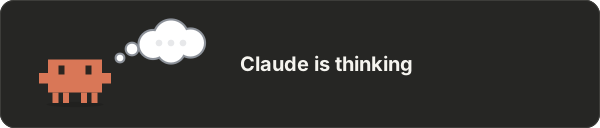
A Claude Code mod that shows a crab above the prompt acting out what Claude is doing, with a shell meter for context window and rate-limit usage.
sTomerG/agent-kit/tree/main/plugins/crab-cam
crab-cam is a Claude Code plugin (distributed via the sTomerG/agent-kit marketplace) that renders a small animated crab above the prompt to reflect Claude's current activity, in both the terminal and the desktop app. Scenes cover thinking, reading, writing code, searching, web browsing, running commands, tests, git, package installs, subagents, plan mode, skills, designing, memory edits, permission prompts, background tasks, compaction, errors and idle. A shell meter beside it shows context window usage (ribs), the 5-hour rate limit (five pearls) and the weekly rate limit (seven smaller pearls), with red highlighting above 85%. Commands include /crab-cam to toggle the crab, /crab-cam demo, /crab-cam meter, /crab-cam details and /crab-cam commands. Requires Claude Code v2.1.287+; install with claude plugin marketplace add sTomerG/agent-kit then claude plugin install crab-cam@agent-kit. Unofficial community project, not affiliated with Anthropic.
Check the author's README for the marketplace and plugin name first. Commands may change as the repository evolves.
claude plugin marketplace add sTomerG/agent-kit
claude plugin install crab-cam
A Claude Code mod: a small crab above the prompt acts out what Claude is doing, in the terminal and in the desktop app. Beside it, a shell shows how full the context window is and how much of your rate limits is used.
Optimised for the Claude Code desktop app.
claude plugin marketplace add sTomerG/agent-kit
claude plugin install crab-cam@agent-kit
Requires Claude Code v2.1.287 or later; tested with v2.1.288.
To get new versions, run claude plugin update crab-cam@agent-kit, or enable auto-update for the marketplace under /plugin → Marketplaces.
| Command | What it does |
| :- | :- |
| /crab-cam | Hide or show the crab |
| /crab-cam demo | Play every scene, three seconds each |
| /crab-cam meter | Hide or show the shell meter |
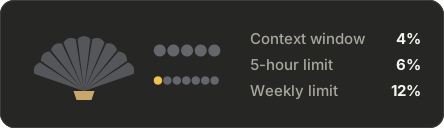
| /crab-cam details | Show or hide the meter's readings in figures beside the shell |
| /crab-cam commands | Show commands as typed, or go back to the description of what they do |
The scene follows the tool Claude calls. A shell command is read for what it does, so cat shows reading and cd repo && git status shows git.
| Scene | Shown when |
| :- | :- |
| thinking, writing a reply | Claude reasons or writes text |
| reading | Read, or cat, head, tail, sed -n, jq in a shell |
| writing code | Edit, Write, or sed -i, cat > file in a shell |
| searching | Grep, Glob, or grep, rg, find, ls in a shell |
| browsing the web | WebFetch, WebSearch, browser tools, curl, wget |
| running a command | any other shell command |
| running tests | pytest, vitest, jest, npm test, cargo test and the like |
| working with git | git and gh, also further on in a chain such as make build && git status |
| installing packages | npm install, pip install, uv add, brew install and the like |
| putting helpers to work | subagents and workflows, during the turn and while they run on after it; the line under it says how many are at work and what they are doing, such as 3 helpers: 2 reading, 1 running tests |
| making a plan | plan mode and task lists |
| loading a skill | Skill |
| writing text | an edit to a text file: .md, .txt, .rst, README, CHANGELOG and the like |
| designing | an edit to a stylesheet or an .svg, a design or Figma tool, a design or diagramming skill, the start of an artifact, and an edit to an .html page later in that same turn |
| remembering something | an edit to CLAUDE.md, MEMORY.md or a memory file |
| sharing something | artifacts and files sent to you |
| a question for you, waiting for permission | Claude asks, or a permission dialog is open |
| waiting on a background task | Claude polls a background command or timer, or the turn ended with a command still running |
| using a tool | any other tool |
| tidying up its memory | the conversation is compacted |
| oops | a tool call failed, or an API error or refusal ended the turn |
| done, resting | the turn ended |
Work inside a subagent is not shown; the crab stays on "putting helpers to work" until the helper returns.
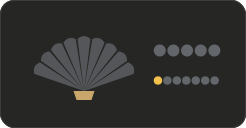
The shell fills as things are used:
The last two units of a gauge turn red above 85%. The pearls are left out on accounts without rate-limit windows.
The meter comes in two forms, and /crab-cam meter hides it altogether:
| Default | With details (/crab-cam details) |
| :- | :- |
|  |
|  |
|
claude --plugin-dir ./plugins/crab-cam   # load from disk, reload on save
claude plugin test plugins/crab-cam      # run the tests
claude plugin validate plugins/crab-cam  # check the manifest and hooks
npx tsx plugins/crab-cam/scripts/make-demo.mts  # redraw the animations in assets/
The editor types under .claude-plugin/types/ are generated and not committed. Claude Code writes them for your version when it loads the mod with --plugin-dir.
An unofficial community project, not affiliated with or endorsed by Anthropic.

Documentation generation, drift detection, and API docs automation plugin that also acts as a function-hook guard refusing doc writes or worker dispatch containing secrets.

A status bar for the Claude desktop app. It draws above your prompt and shows session quality, context fill, cache countdown, and your 5-hour and weekly limits, with Clawd acting out what the session is doing.

A Claude Code plugin mod providing a /databricks-pane that presents Databricks workspace, Unity Catalog, compute, jobs, pipelines, apps and dashboards as a tree following the databricks CLI, with live highlights, profile switching, and CLI argument copy.
