
cjavdev@cjavdev
cjavdev/mods/tree/main/context-meter
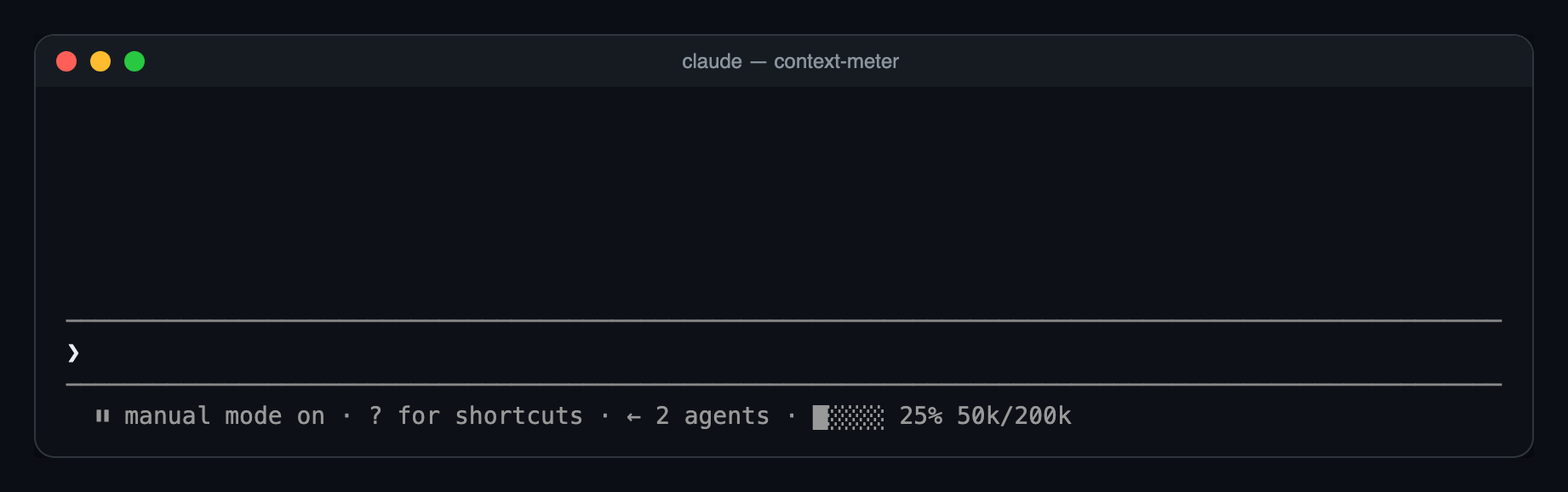
A Claude Code mod that shows how full your context window is, as a tiny meter in the bar under the prompt.
cjavdev/mods/tree/main/context-meter
context-meter is a Claude Code plugin that renders a small meter in the prompt hint bar showing context window usage: five cells, the used percentage (matching the status line's used_percentage) and the token counts. It refreshes on session start, tool call completion, session.measure and a 3-second timer, so it catches model switches, /compact and /clear. It requires Claude Code 2.1.287+, is installed via --plugin-dir or CLAUDE_CODE_PLUGIN_DIRS, and can be toggled with the enabled option in /config.
Check the author's README for the marketplace and plugin name first. Commands may change as the repository evolves.
claude plugin marketplace add cjavdev/mods
claude plugin install context-meter
A Claude Code mod that shows how full your context window is, as a tiny meter in the bar under the prompt. You can see a /compact coming before it happens.
⏵⏵ auto mode on · ████░ 76% 152k/200k
used_percentage.49k/1M.Nothing shows until the first response of a session, or the first one after /compact or /clear, because there's no reading yet.
You need Claude Code 2.1.287 or newer.
git clone https://github.com/cjavdev/mods.git ~/mods
claude --plugin-dir ~/mods/context-meter
To load it in every session, add the folder to CLAUDE_CODE_PLUGIN_DIRS in the env block of ~/.claude/settings.json (separate several folders with :):
{ "env": { "CLAUDE_CODE_PLUGIN_DIRS": "~/mods/context-meter" } }
It shares the bar with cache-shot-clock: the meter comes first, then the clock.
In /config, or under pluginConfigs["context-meter"].options in settings:
| Option | Default | |
| --- | --- | --- |
| enabled | true | Turns the meter off without unloading the mod. |
Near the top, Claude Code shows its own warning, such as 93% context used, while the meter reads 84%. Claude Code measures against the auto-compact threshold, which is a little below the full window. context-meter measures against the full window. As a result, auto-compact usually fires while the meter reads around 85–90%.
The mod is one hooks module, hooks/register.tsx:
$.session.usage() reads the window's fill. The plain call doesn't count tokens, so it costs nothing.$.state, declared in types/index.d.ts). The bar redraws whenever the reading changes.session.measure fires; the engine pushes it after each turn/compact or /clear between turnsui.render hook on the PromptHint component adds the meter as the hint line's tail. The terminal draws that line dim, so the meter has no color of its own. Other surfaces don't draw the tail yet.The bar and token formatting are pure functions in hooks/meter.ts.
claude plugin validate ~/mods/context-meter   # manifest and hooks check
claude plugin test ~/mods/context-meter       # runs tests/*.test.tsx
The screenshot is a real capture of Claude Code running the mod in tmux (tmux capture-pane -p -e), turned into a page with scripts/ansi2html.py and screenshotted.

Documentation generation, drift detection, and API docs automation plugin that also acts as a function-hook guard refusing doc writes or worker dispatch containing secrets.

A status bar for the Claude desktop app. It draws above your prompt and shows session quality, context fill, cache countdown, and your 5-hour and weekly limits, with Clawd acting out what the session is doing.

A Claude Code plugin mod providing a /databricks-pane that presents Databricks workspace, Unity Catalog, compute, jobs, pipelines, apps and dashboards as a tree following the databricks CLI, with live highlights, profile switching, and CLI argument copy.
