
segfaultlab@segfaultlab
segfaultlab/clawd-hud

A pixel-art usage HUD for the Claude Code desktop Code page, showing context, limits, spend, and animated pixel Clawd status.
segfaultlab/clawd-hud
clawd-hud is a Claude Code desktop mod that shows a pixel-art usage band above the input box on the Code page, with a pixel Clawd that acts according to Claude's state.
Features:
Details:
Install:
claude plugin marketplace add segfaultlab/clawd-hud
claude plugin install clawd-hud@clawd-hud
After installation, start a new desktop session. Enable automatic updates, or run marketplace/plugin update manually.
For local development, use claude --plugin-dir /path/to/clawd-hud, run tests with claude plugin test ., and regenerate the README preview with node scripts/preview.ts.
Check the author's README for the marketplace and plugin name first. Commands may change as the repository evolves.
claude plugin marketplace add segfaultlab/clawd-hud
claude plugin install clawd-hud
Claude Code 桌面端的 mod:在 Code 页面的输入框上方显示一行像素风用量条,带一只会跟着状态做动作的像素 Clawd。
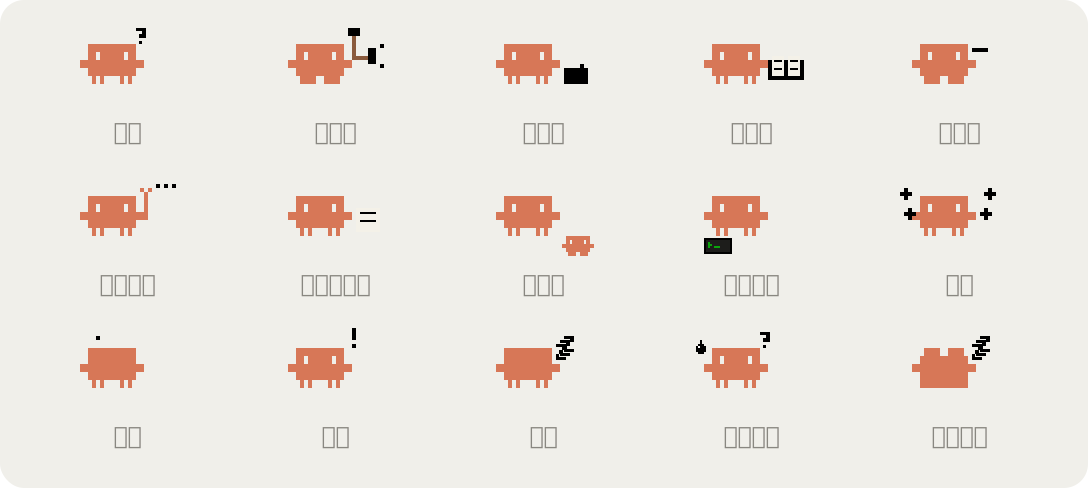
?、调用工具敲锤子、写文件拿笔写字、读文件和搜索捧书看(读完想下一步时也继续捧着)、等你批准时举手、压缩上下文揉纸团、子代理干活时脚边跟着小 Clawd、有后台命令时脚边亮着小终端、写回复飘字、出错晕倒、中断摔倒、空闲睡觉、额度快用完时冒汗发抖、用完躺平只在本地读取 Claude Code 已有的用量数据,不额外消耗 token。
只在桌面端的 Code 页面显示,用 SVG 绘制。终端里的 Claude Code 不显示横条,也不弹额度提醒。
claude plugin marketplace add segfaultlab/clawd-hud
claude plugin install clawd-hud@clawd-hud
装好后在桌面端新开一个会话就生效。
建议打开自动更新:在终端里运行 claude,输入 /plugin,进入 Marketplaces,选中 clawd-hud,打开自动更新。之后有新版本时 Claude Code 会自己拉取,重启会话后生效。
不开自动更新的话,手动执行:
claude plugin marketplace update clawd-hud
claude plugin update clawd-hud@clawd-hud
5h 和 wk 两条来自订阅账号的额度数据,用 API key 登录时只显示 ctx。
改代码时直接加载源码目录,不用安装:
claude --plugin-dir /path/to/clawd-hud
这时先在 /plugin 里停用已安装的 clawd-hud,否则会出现两条横条。终端里不显示横条,改完用 claude plugin test . 跑测试,用下面的脚本看效果图。
插件没有写版本号,每次提交到 GitHub 都算一个新版本。
改了画图代码后重新生成 README 里的图:
node scripts/preview.ts
hooks/register.tsx:事件钩子,读取用量、跟踪状态hooks/draw.ts:生成横条的 SVG(像素 Clawd、进度条、动画)types/index.d.ts:mod 保存的状态类型scripts/preview.ts:生成 docs/ 下的效果图tests/band.test.tsx:桌面端能画出横条、终端不画的测试,用 claude plugin test . 运行
Documentation generation, drift detection, and API docs automation plugin that also acts as a function-hook guard refusing doc writes or worker dispatch containing secrets.

A status bar for the Claude desktop app. It draws above your prompt and shows session quality, context fill, cache countdown, and your 5-hour and weekly limits, with Clawd acting out what the session is doing.

A Claude Code plugin mod providing a /databricks-pane that presents Databricks workspace, Unity Catalog, compute, jobs, pipelines, apps and dashboards as a tree following the databricks CLI, with live highlights, profile switching, and CLI argument copy.
