Comprehensive_Act158@Comprehensive_Act158
peeratop02/attention-sounds
A Reddit user shares attention-sound, a Claude Code plugin that plays a configurable sound when Claude needs your input, useful when running tasks in the background. Installation is via /plugin install attention-sounds --marketplace peeratop02/attention-sounds, with the repository at https://github.com/peeratop02/attention-sounds.
peeratop02/attention-sounds
The user describes often delegating a task to Claude, backgrounding it, and then forgetting about it for long periods. The mod plays a sound of your choice when Claude requires attention, so you can work on other things meanwhile. It is installed in the Claude app or terminal with /plugin install attention-sounds --marketplace peeratop02/attention-sounds, and the source is on GitHub at https://github.com/peeratop02/attention-sounds.
Check the author's README for the marketplace and plugin name first. Commands may change as the repository evolves.
claude plugin marketplace add peeratop02/attention-sounds
claude plugin install attention-sounds@peeratop02
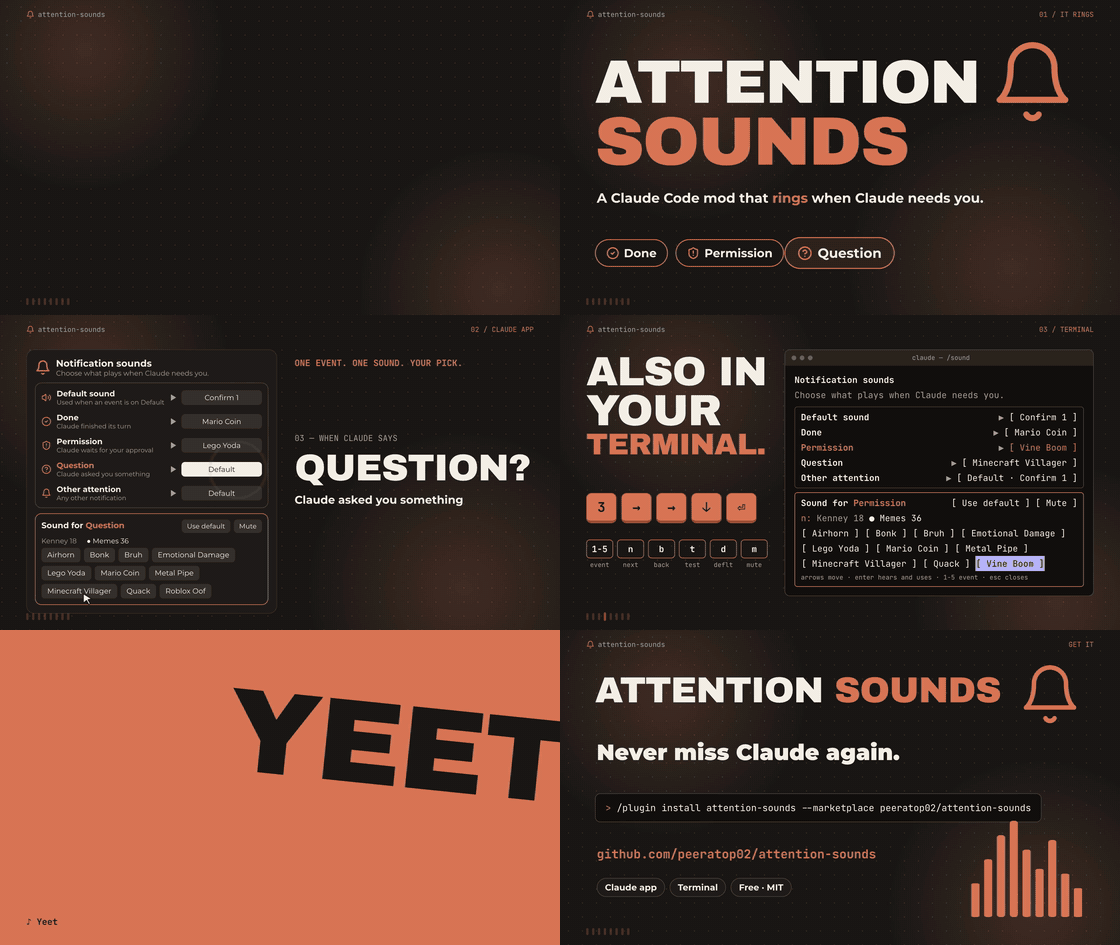
▶ Watch the 36-second showcase with sound (the preview above is silent)
A Claude Code mod that plays a sound when Claude needs you, so you can do other things while it works.
| Event | Rings when |
| --- | --- |
| done | Claude finished its turn |
| permission | Claude waits for a permission answer |
| question | Claude asks you a question |
| attention | any other notification |
Each event can use its own sound, follow the default sound, or be muted. Picks are kept across sessions.
At the prompt of a terminal claude session:
/plugin install attention-sounds --marketplace peeratop02/attention-sounds
Answer y to add the marketplace, then pick a scope. Installed at the user scope, it also loads in the desktop app's Code tab.
/sound                      open the sound panel (or list picks)
/sound <event> <name>       use that sound for the event
/sound <event> default      follow the default sound
/sound <event> off          mute the event
/sound sound <name>         change the default sound
/sound test <name|event>    hear a sound, or what an event plays now
/sound info                 the manual and every sound name
In the desktop app, /sound opens a panel: pick an event, pick a library, click a sound to hear it and use it.
In the terminal the panel takes the keyboard:
| Key | Does |
| --- | --- |
| arrows / Tab | move between sounds and buttons |
| Enter | hear the sound and use it |
| 1-5 | choose the event to edit (default, done, permission, question, attention) |
| n / b | next / previous library |
| t | test what the event plays now |
| d / m | follow the default / mute |
| Esc | close |
claude plugin update attention-sounds@peeratop02
Then /reload-plugins in a running session, or start a new one.
Ships with 18 interface sounds from Kenney (CC0), trimmed and re-encoded.
/sound info. It prints the mod's sounds folder (Sounds folder: ...).Mine/. Each folder shows up as a library in the panel..m4a, .mp3, .wav, .aiff or .caf. The file name without its extension is the sound's name (Vine Boom.mp3 becomes Vine Boom)./sound again. No restart needed.Good sources: /System/Library/Sounds on macOS, Kenney and freesound for free packs, any soundboard site for memes.
Short clips that start at once work best. To cut silence from both ends and even out the volume with ffmpeg:
ffmpeg -i in.mp3 -af "silenceremove=start_periods=1:start_threshold=-45dB,areverse,silenceremove=start_periods=1:start_threshold=-50dB,areverse,loudnorm" "Mine/My Sound.m4a"
A plugin update replaces the installed folder, so keep a copy of your own sounds somewhere else.
claude plugin validate .
claude plugin test .
Code: MIT. Bundled sounds: CC0, by Kenney.

Two Cuelume sounds for Claude Code: ready when a long turn ends, attention when a permission prompt waits.

A Claude Code mod that collects what is waiting on you in a session: the agent's questions, issues Claude noted, and your PRs' checks and reviews. It shows them above the prompt and in the `/inbox` pane, along with where the session stands.

Bring incoming alerts into the session interface to reduce window switching.