
LorcanChinnock@LorcanChinnock
LorcanChinnock/claude-desk-neighbours/tree/main/plugins/your-serve
LorcanChinnock/claude-desk-neighbours/tree/main/plugins/your-serve
当 Claude 在等你回应时提醒你,这样长篇回答底部的问题不会被漏掉。

/plugin install your-serve@claude-desk-neighbours
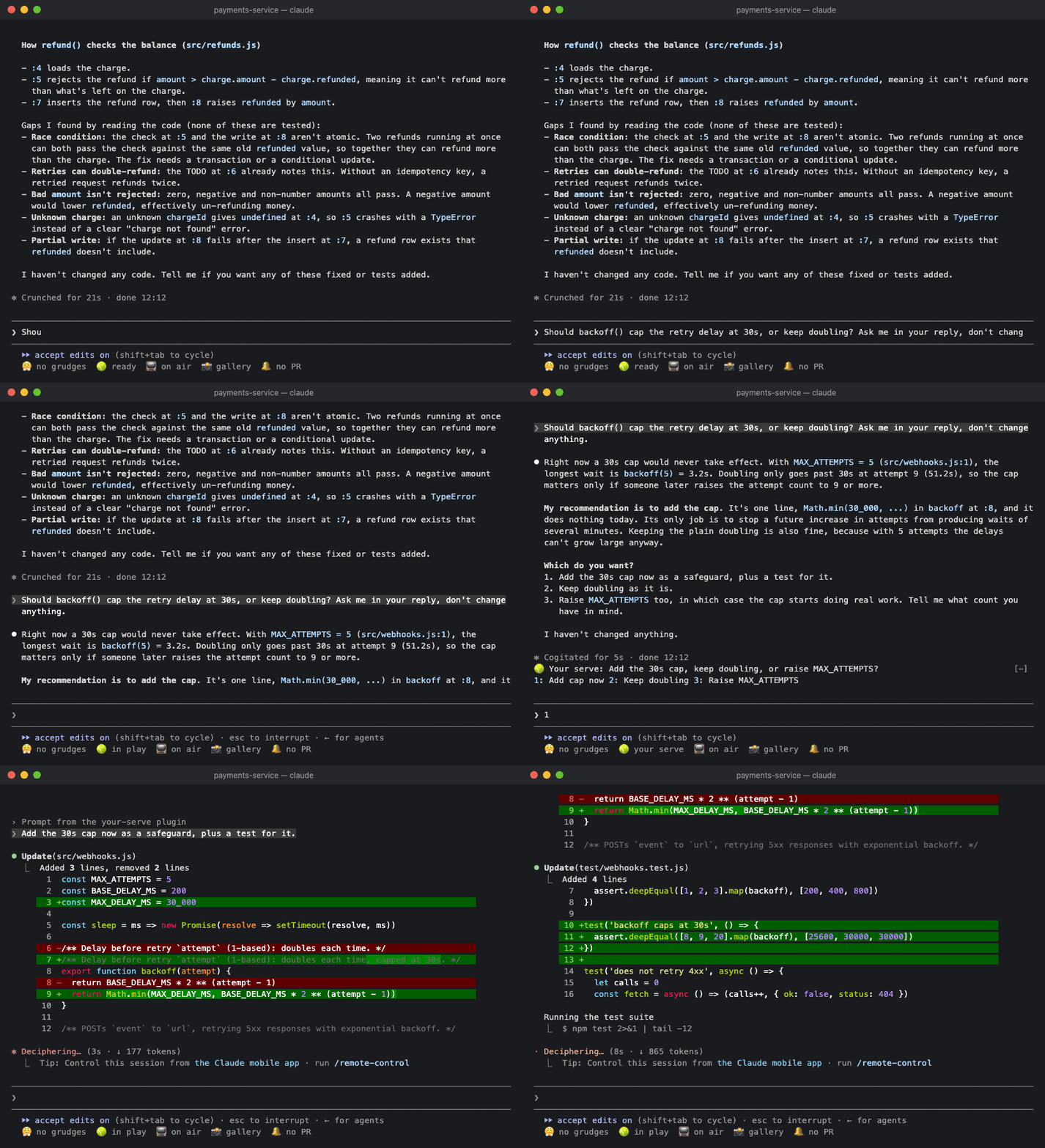
当一次工作阶次以问题、选项选择,或“should I also…”结束时,问题会显示在状态带的第一行:
🎾 Your serve: 保留旧缓存还是丢弃? 1: 保留 2: 丢弃 3: 其他
按下答案后,会把自然的回复(“Drop the old cache.”)直接发给 Claude。你可以在空提示词中输入对应数字,也可以点击按钮。如果你已经开始输入,回复会接在草稿末尾,让你继续编辑后发送。如果没有明确选项,就只显示问题。无论哪种情况,它都会一直保留到你发送提示词为止。没有提出问题的答案不会产生任何内容,子代理的工作阶次会被忽略。
如果 Claude 一次提出多个问题,会按顺序逐个显示,不管有多少个:
🎾 Your serve (2/3): 新的超时应该设为多少? 1: 30s 2: 60s other skip
每个答案都会带你进入下一个问题。最后一个问题完成后,所有答案会作为一条回复发给 Claude:
1. 保留旧缓存还是丢弃?Drop the old cache.
2. 新的超时应该设为多少?Make it 30 seconds.
3. 要加入重试吗?Yes, add a retry.
如果没有合适的答案,点击 other 并输入自己的内容。按 Enter 会用你输入的内容回答问题并继续,效果与按下某个答案相同。如果跳过问题,或在空的 other 中按 Enter,问题会保持未回答状态,回复也会进入提示词而不是发送出去;你可以先输入答案,再发送。你必须点击 other 和 skip(或用 Tab 移到它们),因为 3 之后的数字属于其他 Desk Neighbours。移动版应用无法显示文字输入框,因此那里只能使用 skip。
内容不会被截断。如果问题和答案无法放在同一行,答案会换到下一行。只有 3 个答案会显示为按钮。其他情况请使用 other;只有一个问题时,也可以直接在提示词中输入。
Your Serve 会读取 Claude 回复中的文字,因此不会显示 Claude 通过自己的问题选择器提出的问题。反正那个选择器已经在你面前了。
如果一次工作阶次超过 1 分钟,你还会收到 🎾 Claude needs a decision 提示,以防你暂时离开了。
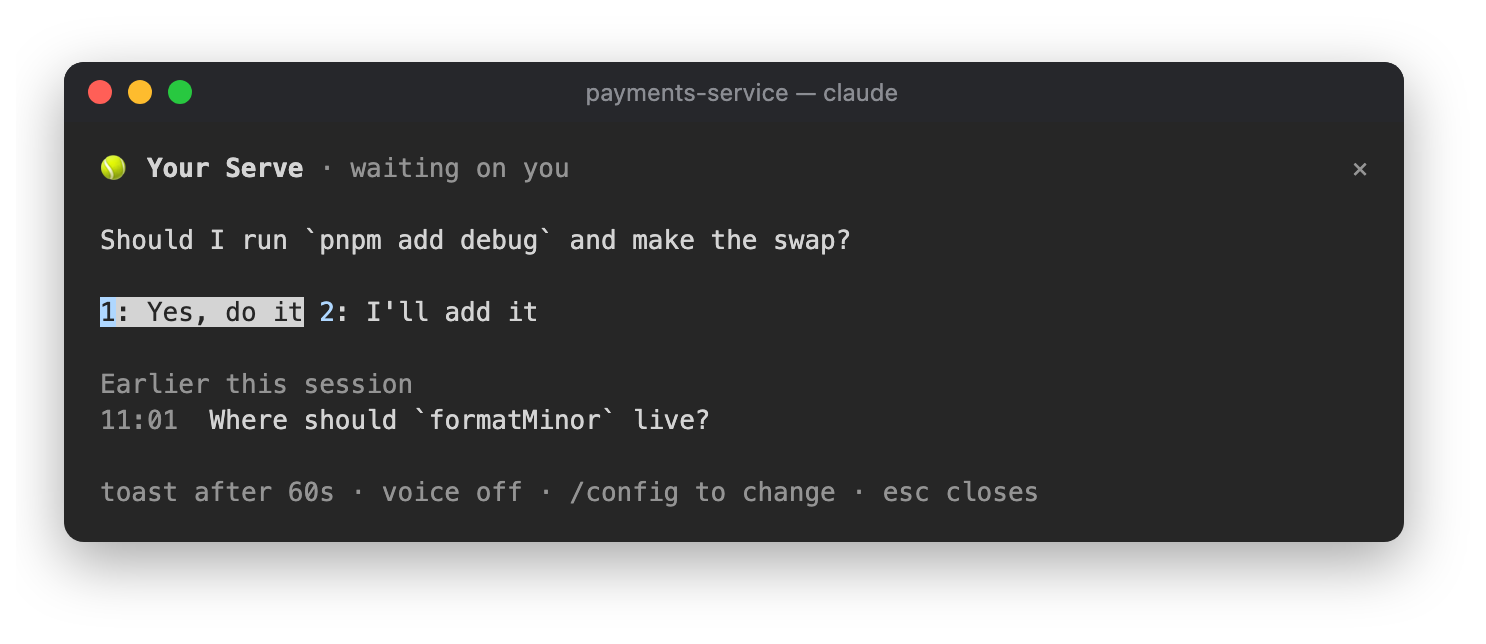
点击状态行中的 🎾 ready,或运行 /your-serve,即可查看正在等待你回答的问题和答案,还能看到 Claude 在本次工作阶次更早之前提出的问题。

| 设置 | 默认值 | |---|---| | 需要你回应的工作阶次超过多少秒后显示提示 | 60 | | 同时朗读提示(macOS) | off |
Haiku 只会识别以问号结尾、包含选项列表,或措辞本身像问题的答案。它会找出每个问题,以及每个问题最多 3 个答案。
请先查看作者 README 确认 marketplace 和插件名称;命令可能随仓库结构改变。
claude plugin marketplace add LorcanChinnock/claude-desk-neighbours
claude plugin install your-serve
Lets you know when Claude is waiting on you, so you don't miss the question at the bottom of a long answer.
/plugin install your-serve@claude-desk-neighbours
When a turn ends with a question, a choice between options, or a "should I also…", it shows up on the top line of the band:
🎾 Your serve: Keep the old cache or drop it? 1: Keep 2: Drop 3: Something else
Press an answer and a natural-sounding reply ("Drop the old cache.") goes straight to Claude. You can type its digit into an empty prompt or click it. If you've already started typing, the reply goes on the end of your draft instead, for you to finish and send. If there aren't any clear options, you just get the question. Either way it stays put until you send a prompt. Answers that don't ask anything produce nothing, and subagent turns are ignored.
If Claude asks several things at once, you get them one at a time, however many there are:
🎾 Your serve (2/3): What should the new timeout be? 1: 30s 2: 60s other skip
Each answer takes you to the next question. After the last one, they all go to Claude as a single reply:
1. Keep the old cache or drop it? Drop the old cache.
2. What should the new timeout be? Make it 30 seconds.
3. Add a retry? Yes, add a retry.
If none of the answers fit, click other and type your own. Enter answers the question with what you typed and
moves on, the same as pressing an answer. If you skip a question, or press Enter on an empty other, it's left
unanswered, and the replies go into your prompt instead of being sent, so you can type that answer before
sending. You have to click other and
skip (or reach them with Tab) because the digits after 3 belong to the other Desk Neighbours. The mobile app
can't show a text field, so there you only get skip.
Nothing gets cut off. If the question and its answers don't fit on one line, the answers wrap onto the next one.
Only three answers get buttons. For anything else, use other, or with a single question just type it in the
prompt.
Your Serve reads the text of Claude's answer, so it won't show questions Claude asks through its own question picker. You've already got the picker in front of you anyway.
If the turn took longer than a minute, you'll also get a 🎾 Claude needs a decision toast in case you'd
wandered off.
Click 🎾 ready in the status row, or run /your-serve, to see the question waiting on you with its answers,
plus the questions Claude asked earlier in the session.
| Setting | Default | |---|---| | Toast when a turn that needs you took longer than (seconds) | 60 | | Also say it out loud (macOS) | off |
Haiku only sees answers that end with a question mark, a list of options or something phrased as a question. It picks out every question and up to three answers for each one.

Ruflo 记忆系统的基底层插件:AgentDB 控制器桥接(15 个 agentdb_* MCP 工具)、RuVector ONNX 嵌入(10 个 embeddings_* 工具,包括 RaBitQ 32x 量化)和 WASM HNSW 模式路由器(3 个 ruvllm_hnsw_* 工具)。作为 mod(ADR-445):可选的安全召回会进入提示,写入守卫会把机密排除在记忆之外,还提供 /agentdb 和控制台显示的状态文件。

构建、格式化、优化和审查交互式 Power BI 报表,并提供一个遵循 pbir CLI 的报表面板,显示 Claude 读取和修改的内容。


在提示列上方、状态行和 toast 中显示未读 AMP 消息,并可唤醒空闲的 Claude Code 工作階段来读取。需要 Claude Code 2.1.287 或更高版本。
