
simplecore-inc@simplecore-inc
simplecore-inc/claude-mods/tree/main/mods/workspace
simplecore-inc/claude-mods/tree/main/mods/workspace




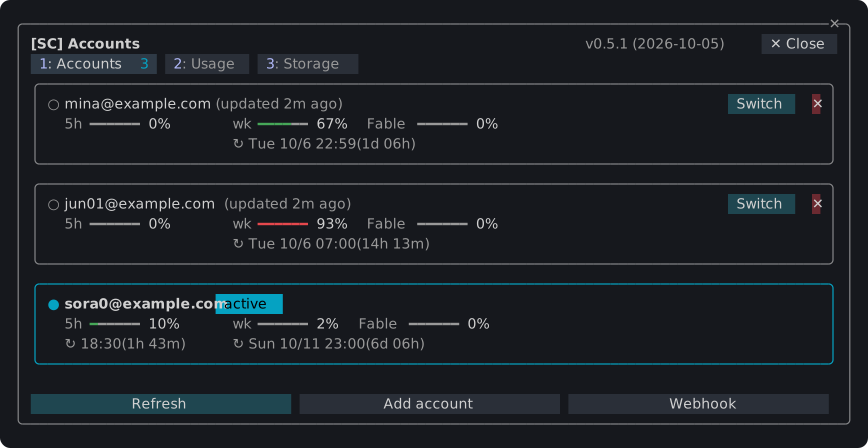
为 Claude Code 开发的插件,在终端中添加窗格、状态栏和斜线命令:在多个 Claude 账户间切换,监控它们的使用限额和令牌用量,查看并清理 Claude Code 在机器上保存的内容,以及在一个窗格中统一管理 agent、工作树、检查点、diff 和内存文件。只需安装一个插件 sc,就能获得全部功能。
/sc:accounts

~/.claude 按类别和项目的占用空间,以及通过输入验证词清理闲置会话。/sc:workspace
任何无法撤销的操作会先在对话框中询问;按 Esc 取消。
claude plugin marketplace add simplecore-inc/claude-mods
claude plugin install sc@simplecore-mods
sc 会同时安装 sc-accounts 和 sc-workspace。插件为用户安装,因此在每个会话中都会运行。在已打开的会话中运行 /reload-plugins。
要使用本地克隆,可将其文件夹添加为市场:
git clone https://github.com/simplecore-inc/claude-mods.git
claude plugin marketplace add ./claude-mods
claude plugin install sc@simplecore-mods
claude plugin marketplace update simplecore-mods
claude plugin update sc@simplecore-mods
claude plugin update sc-accounts@simplecore-mods
claude plugin update sc-workspace@simplecore-mods
然后在每个打开的会话中运行 /reload-plugins。对于本地克隆,在克隆中执行 git pull 和 /reload-plugins 即可:从文件夹市场获取的插件从该文件夹读取。
claude plugin uninstall sc@simplecore-mods
claude plugin prune
claude plugin marketplace remove simplecore-mods
prune 会移除 sc-accounts 和 sc-workspace,这两个是作为 sc 的依赖项安装的;如果你自己安装了它们,请按名称卸载。marketplace remove 仅在你不再从该市场安装时才需要。
这些 mod 会留下一些数据,你可以手动删除:
| 内容 | 位置 |
| --- | --- |
| 已保存的登录信息 | macOS:服务为 account-switch 的钥匙串项目。其他系统:~/.claude/account-switch/ |
| Webhook 令牌 | macOS:服务为 sc-webhook 的钥匙串项目。其他系统:~/.claude/sc-accounts/webhook-token |
| Webhook 模板 | ~/.claude/sc-accounts/ |
| 设置、账户索引、笔记、检查点列表 | ~/.claude/plugins/store/sc-*.json |
| 检查点 | 在每个仓库中:refs/sc/ 下的引用和文件 .git/sc-snapshot-*.index |
~/.claude 是设置 CLAUDE_CONFIG_DIR 时的值。要删除仓库的检查点:
git for-each-ref --format='%(refname)' refs/sc/ | xargs -n 1 git update-ref -d
rm -f "$(git rev-parse --git-dir)"/sc-snapshot-*.index
当前登录的账户会继续登录;只有已保存的副本会被清除。
Mod 显示英文,当 Claude Code 的 language 设置为韩文时显示韩文;其他任何语言都会回退到英文。没有该设置时,按此顺序使用 LC_ALL、LC_MESSAGES 和 LANG。
开发 mod 涵盖布局、引擎强制的规则、检查和发布方式。
请先查看作者 README 确认 marketplace 和插件名称;命令可能随仓库结构改变。
claude plugin marketplace add simplecore-inc/claude-mods
claude plugin install sc-workspace
Plugins for Claude Code that add panes, a status band and slash commands to the terminal: switch between several Claude accounts, watch their usage limits and token use, see and clean up what Claude Code keeps on the machine, and keep agents, worktrees, checkpoints, diffs and memory files in one pane. Install one plugin, sc, and you get them all.
/sc:accounts

~/.claude holds by kind and project, and a cleanup of idle sessions confirmed by typing a word./sc:workspace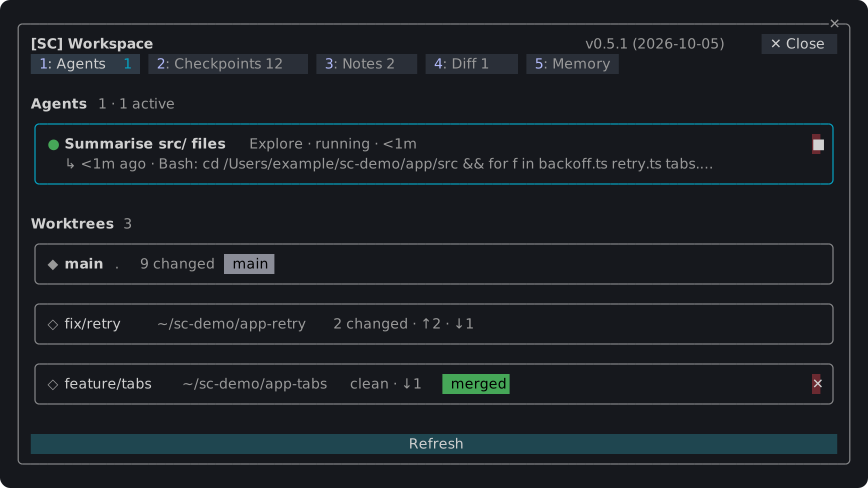
Anything that cannot be taken back asks in a dialog first; Esc cancels.
claude plugin marketplace add simplecore-inc/claude-mods
claude plugin install sc@simplecore-mods
sc installs sc-accounts and sc-workspace with it. The plugins are installed for your user, so they run in every session. Run /reload-plugins in a session that was already open.
To use a local clone instead, add its folder as the marketplace:
git clone https://github.com/simplecore-inc/claude-mods.git
claude plugin marketplace add ./claude-mods
claude plugin install sc@simplecore-mods
claude plugin marketplace update simplecore-mods
claude plugin update sc@simplecore-mods
claude plugin update sc-accounts@simplecore-mods
claude plugin update sc-workspace@simplecore-mods
Then run /reload-plugins in each open session. With a local clone, git pull in the clone and /reload-plugins are enough: a plugin from a folder marketplace is read from that folder.
claude plugin uninstall sc@simplecore-mods
claude plugin prune
claude plugin marketplace remove simplecore-mods
prune removes sc-accounts and sc-workspace, which were installed as dependencies of sc; uninstall them by name instead if you installed them yourself. marketplace remove is only needed when you will not install from it again.
The mods leave some data behind, which you can delete by hand:
| What | Where |
| --- | --- |
| Saved logins | macOS: keychain items of the service account-switch. Elsewhere: ~/.claude/account-switch/ |
| Webhook token | macOS: the keychain item of the service sc-webhook. Elsewhere: ~/.claude/sc-accounts/webhook-token |
| Webhook template | ~/.claude/sc-accounts/ |
| Settings, account index, notes, checkpoint lists | ~/.claude/plugins/store/sc-*.json |
| Checkpoints | in each repository: the refs under refs/sc/ and the files .git/sc-snapshot-*.index |
~/.claude is CLAUDE_CONFIG_DIR when that is set. To delete a repository's checkpoints:
git for-each-ref --format='%(refname)' refs/sc/ | xargs -n 1 git update-ref -d
rm -f "$(git rev-parse --git-dir)"/sc-snapshot-*.index
The account you are logged in with stays logged in; only the saved copies go.
The mods show English, and Korean where Claude Code's language setting is Korean; any other language falls back to English. Without that setting, LC_ALL, LC_MESSAGES and LANG decide, in that order.
Developing a mod covers the layout, the rules the engine enforces, the checks and how to release.

Ruflo 记忆系统的基底层插件:AgentDB 控制器桥接(15 个 agentdb_* MCP 工具)、RuVector ONNX 嵌入(10 个 embeddings_* 工具,包括 RaBitQ 32x 量化)和 WASM HNSW 模式路由器(3 个 ruvllm_hnsw_* 工具)。作为 mod(ADR-445):可选的安全召回会进入提示,写入守卫会把机密排除在记忆之外,还提供 /agentdb 和控制台显示的状态文件。

构建、格式化、优化和审查交互式 Power BI 报表,并提供一个遵循 pbir CLI 的报表面板,显示 Claude 读取和修改的内容。


在提示列上方、状态行和 toast 中显示未读 AMP 消息,并可唤醒空闲的 Claude Code 工作階段来读取。需要 Claude Code 2.1.287 或更高版本。

