
JeongJaeSoon@JeongJaeSoon
JeongJaeSoon/hintvim/tree/main/plugin
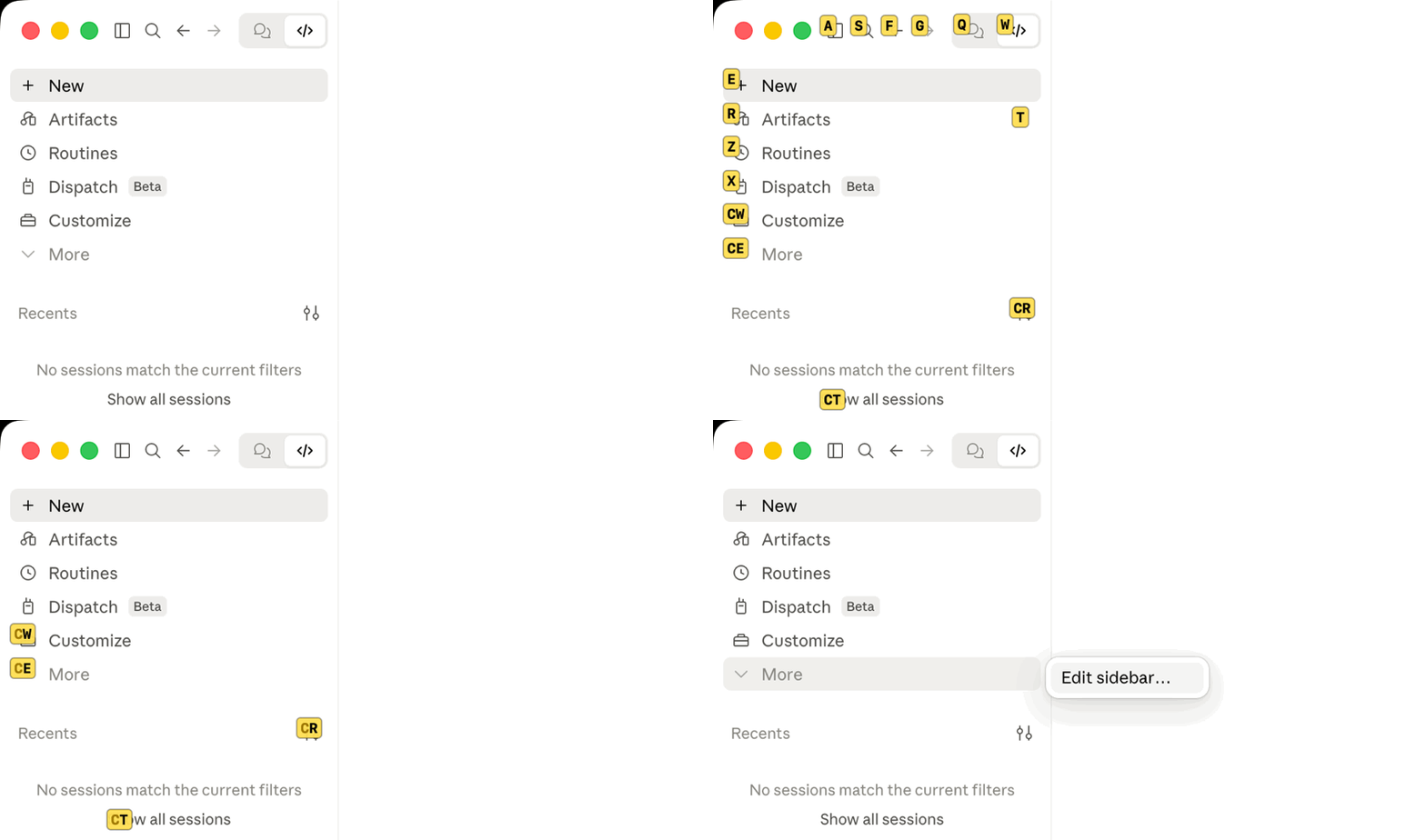
在 Claude Desktop 应用上提供 Vimium 风格提示:`/hintvim` 或 Ctrl+;。需要 macOS 上的 hintvim 应用。
JeongJaeSoon/hintvim/tree/main/plugin
适用于 Claude Desktop 应用 的 Vimium 风格键盘提示。
按
Ctrl+;,输入标签,该按钮就会被按下。
hintvim 是一个小型 macOS 菜单栏应用。按 Ctrl+; 后,它会为 Claude 窗口中通过辅助功能暴露的最多 169 个可见控件加上标签:侧边栏、标题栏、模型和模式菜单,以及每条消息的按钮。输入标签,就会按下对应元素。不需要鼠标。

Ctrl+;            →  在可访问的按钮、链接和输入框上显示标签
type "sf"         →  按下对应元素
j / k / d / u     →  滚动
Esc               →  离开
hintvim 是非官方的社区项目。它与 Anthropic 没有任何关联,也未得到 Anthropic 的认可或赞助。“Claude”是 Anthropic, PBC 的商标。
Claude Desktop 提供了不少快捷键(Cmd+K、Cmd+1…9、Cmd+Shift+F),但没有绑定快捷键的内容仍然需要鼠标:工作目录标签、模型和模式菜单,以及每条消息的操作。提示模式为这些控件加上标签,不必为每个控件准备一个快捷键。
需要 macOS 13 或更高版本,以及 Claude Desktop。
brew install jeongjaesoon/tap/hintvim && hintvim setup
然后在 系统设置 → 隐私与安全性 → 辅助功能 中启用 hintvim。应用第一次启动时 macOS 会询问权限。完成后,点入 Claude 并按 Ctrl+; 即可。
这个 formula 会在你的 Mac 上从源代码构建应用,因此不需要 Developer ID,Gatekeeper 也不会阻止它。Homebrew 已经要求安装本次构建使用的 Command Line Tools。
hintvim setup 会修改什么Setup 具有幂等性,会将每一步记录到 ~/Library/Logs/hintvim/setup.log,而 hintvim uninstall 会还原这些修改。
~/Library/LaunchAgents/io.github.jeongjaesoon.hintvim.plist,并启动应用。这就是 Ctrl+; 所需的全部内容。claude plugin marketplace add JeongJaeSoon/hintvim 和 claude plugin install hintvim@hintvim。它会为 Desktop 的 Code 分页提供 /hintvim 指令。"CLAUDE_CODE_ENABLE_FUNCTION_HOOKS": "1" 加到 ~/.claude/settings.json 的 env 中。旧版本只有在此开关后才会载入外挂 mod;从 2.1.287 起默认载入,并忽略这个开关。Setup 会记录自己添加了开关,并在 Desktop 使用 2.1.287 或更高版本后移除它;不会触碰你自行设置的开关。如果要让 ~/.claude 保持不变,请运行 hintvim setup --app-only:这样会得到 Ctrl+; 和菜单栏图标,但不会安装外挂、开关或 /hintvim。
如果从 Claude 的外挂管理器开始,请添加 marketplace 并安装外挂(在终端中执行,或在 Desktop 的 Code 分页中选择 + → Plugins → Add plugin):
claude plugin marketplace add JeongJaeSoon/hintvim
claude plugin install hintvim@hintvim
然后在新的 Code 工作阶段中运行 /hintvim:setup。Claude 会替你安装应用:有 Homebrew 就使用 Homebrew,没有就从源代码构建,然后运行 hintvim setup。单独的外挂无法完成提示模式:工作原理会解释为什么需要应用。
点入 Claude 窗口并按 Ctrl+;。
| 按键 | 操作 |
|---|---|
| Ctrl+; | 显示或隐藏标签。只有 Claude 位于最前面时才会占用它,因此其他应用仍可使用这个组合键。 |
| a s f g q w e r t z x c v | 输入标签。对应元素会被按下;如果是文字栏位,则会获得焦点。 |
| j / k | 向下 / 向上滚动一点,然后重新标记 |
| d / u | 向下 / 向上滚动半页,然后重新标记 |
| Delete | 撤销一个已输入的字母;如果还没有输入,则离开 |
| Esc | 离开 |
| Cmd + 任意按键 | 离开,同时快捷键仍然有效(Cmd+Tab、Cmd+W) |
显示标签时,按键会交给 hintvim,绝不会传到 Claude,因此不会有内容泄漏到提示框。切换到其他应用会结束提示模式。窗口移动或调整大小时,标签会跟随窗口。窗口的关闭、最小化和全屏按钮不会获得标签,因此输入错误不会关闭窗口。
字母按 US(ANSI)键盘布局的实体位置读取,因此即使开启韩文或日文输入源,标签也能工作。使用 Dvorak 或 AZERTY 时,请按 QWERTY 对应位置的键。
菜单栏图标(键盘)会显示提示,显示辅助功能是否获准,并退出应用。
Ctrl+; 和菜单栏只需要应用本身。在 Desktop Code 分页的 Local 工作阶段中(或终端中的 claude),外挂会增加:
/hintvim:与 Ctrl+; 相同。如果缺少应用,会说明安装方式。/hintvim-palette:包含六个操作的面板(复制上一条回复、上一个代码块、工作目录或工作阶段 id;显示上下文使用量;压缩)。在 Desktop 中点击即可;它们的字母快捷键仅在终端中有效。/hintvim:setup 和 /hintvim:doctor:用于安装应用或查明提示没有出现原因的技能。Desktop 的提示框会在任意一个指令下方打印 /hintvim isn't a command here.,因为它只认识内置指令。该指令仍会运行。
brew upgrade hintvim && hintvim setup
hintvim 在 1.0.0 之前叫 claude-vimium。brew upgrade 会将 claude-vimium 安装迁移到 hintvim,随后 hintvim setup 会移除 claude-vimium 的登录项目、外挂、状态和辅助功能条目。
Setup 会重启应用,让新版本运行。由于应用是在你的 Mac 上签名的(临时签名),而不是使用 Developer ID,macOS 会将每个升级后的构建视为新应用:旧的辅助功能条目仍显示为开启,但不再适用。在辅助功能列表中使用 − 移除 hintvim,然后在系统询问时再次允许它。能够在升级之间保留权限的签名并经过公证的构建,正在 #4 中追踪。
Claude Desktop 更新时不需要重新设置任何内容。应用通过 macOS 处理 Desktop 的窗口,外挂会继续安装在 ~/.claude 中,登录项目也会重新检查 mod 开关。
hintvim uninstall && brew uninstall hintvim
uninstall 会移除登录项目、外挂及其 marketplace、由 setup 添加的 mod 开关,以及应用的状态和日志。它还会尝试对应用运行 tccutil reset Accessibility。如果失败,它会告诉你自行从辅助功能列表中移除 hintvim。
运行 hintvim doctor,或在 Code 工作阶段中运行 /hintvim:doctor。Doctor 会检查应用、登录项目、辅助功能权限、提示模式在 Claude 窗口中能看到多少元素、外挂和 mod 开关。每一行失败信息都会说明修复方式。
| 现象 | 修复 |
|---|---|
| Ctrl+; 没有显示任何内容 | Claude 必须位于最前面。如果你关闭了最后一个窗口,Ctrl+; 会重新打开它;如果没有窗口回来,请点击 Dock 中的 Claude。然后运行 hintvim doctor。 |
| 辅助功能已开启但没有反应 | 该条目属于旧构建。使用 − 移除,然后执行 hintvim stop && hintvim start,在系统询问时再次允许。 |
| brew untap jeongjaesoon/tap 拒绝执行 | 该 tap 中还有你已安装的其他 formula。保持 tap 不变即可;brew uninstall hintvim 已经足够。 |
| /hintvim 未知 | mod 只会在 setup 之后启动的工作阶段中载入,而且只在 Local 工作阶段中载入。启动新的工作阶段。仍然缺少时:hintvim doctor 会说明 mod 是否能够载入。Anthropic 可以远程关闭已安装的 mod,此时 /hintvim 会消失,直到 Anthropic 重新开启;Ctrl+; 仍能工作,因为应用不依赖外挂。 |
| | 测试结果 | |---|---| | macOS | 26.5(Apple silicon)。应用构建为通用版本,目标为 macOS 13。 | | Claude Desktop | 2.7032.0,内置 Claude Code 2.1.280(mod 开关已开启) | | Claude Code | 2.1.287(终端,默认开启 mod) | | 输入源 | US English、Korean |
hint 模式通过辅助功能角色而不是 class 名称查找元素(应用的 class 名称经过哈希处理,且每次发布都会变化),因此 Claude Desktop 更新很少影响它。大型 UI 重构可能会影响。若更新后标签不再出现,请附上 hintvim doctor 的版本信息提交 issue。
Claude Desktop ── Code session ──▶ hintvim plugin (a Claude Code mod)
                                      │ /hintvim → open hintvim://toggle
                                      ▼
Ctrl+; ──────────────────────────▶ hintvim app (menu bar, starts at login)
                                      │ macOS Accessibility API
                                      ▼
                         labels over the whole Claude window
单独的外挂无法实现提示模式。Claude Code mod 挂接的是 Claude Code 引擎,而不是窗口:它们只能在引擎自己的位置(面板、提示框上方的栏位、工具列)绘制,因此无法触及应用的侧边栏和标题栏。mod 也无法注册全局按键。Button 快捷键只有一个字母,而且只有在 mod 自己的面板拥有焦点时有效;在 Desktop 中,点击面板不会让键盘焦点从提示框移开。
macOS 的辅助功能 API 可以看到窗口。通过 AXManualAccessibility 请求后,Chromium 会暴露 Claude 窗口的完整树,包括网页内容和 chrome;AXPress 会触发与点击相同的处理器。因此工作分成:
app/ 是菜单栏应用:用于 Ctrl+; 的 Carbon 快捷键、在可见滚动区域内裁剪可点击角色的辅助功能遍历、绘制标签的透明面板,以及在标签显示时接管按键的事件 tap。它只需要辅助功能权限,不需要输入监控。plugin/ 是选用的 mod。它通过 hintvim:// URL scheme 连接到应用;如果应用没有运行,该 scheme 也会启动应用。bin/hintvim 负责设置、检查和移除周边的一切。mod 是最初的计划,外挂也是其中一部分。但 mod 无法完成这项工作:
Ctrl+;。/hintvim 就会消失。向窗口注入脚本也行不通:窗口渲染远程 claude.ai,应用是拒绝调试器和注入式库的强化二进制,使用远程调试标志启动时还会退出。辅助功能 API 从应用外部工作,因此 Desktop 更新或关闭 mod 开关都不会影响 Ctrl+;。
DevTools 片段 可以在窗口内的网页上提供相同的提示模式(不包括侧边栏或标题栏),并带有设置和帮助面板。它不需要权限,也不需要安装任何东西,但每次应用重启后都要再次运行。页面也解释了为什么无法将片段永久安装到 Claude Desktop 中。
请先查看作者 README 确认 marketplace 和插件名称;命令可能随仓库结构改变。
claude plugin marketplace add JeongJaeSoon/hintvim
claude plugin install hintvim
Vimium-style keyboard hints for the Claude desktop app.
Press
Ctrl+;, type a label, and that button is pressed.
hintvim is a small macOS menu bar app. Press Ctrl+; to label up to 169 visible controls exposed through Accessibility in the Claude window: the sidebar, the title bar, the model and mode menus, each message's buttons. Type the label and that element is pressed. No mouse.
Ctrl+;            →  labels appear on accessible buttons, links, and inputs
type "sf"         →  that element is pressed
j / k / d / u     →  scroll
Esc               →  leave
hintvim is an unofficial community project. It is not affiliated with, endorsed by, or sponsored by Anthropic. "Claude" is a trademark of Anthropic, PBC.
Claude Desktop ships plenty of shortcuts (Cmd+K, Cmd+1…9, Cmd+Shift+F), but anything without a binding needs the mouse: the working-directory pill, the model and mode menus, per-message actions. Hint mode labels these controls without a shortcut per control.
Requires macOS 13 or later and Claude Desktop.
brew install jeongjaesoon/tap/hintvim && hintvim setup
Then turn on hintvim in System Settings → Privacy & Security → Accessibility. macOS asks the first time the app starts. That's it: click into Claude and press Ctrl+;.
The formula builds the app from source on your Mac, so it needs no Developer ID and Gatekeeper does not stop it. Homebrew already requires the Command Line Tools this build uses.
hintvim setup changesSetup is idempotent, logs each step to ~/Library/Logs/hintvim/setup.log, and hintvim uninstall reverts all of it.
~/Library/LaunchAgents/io.github.jeongjaesoon.hintvim.plist, and starts the app. This is all Ctrl+; needs.claude plugin marketplace add JeongJaeSoon/hintvim and claude plugin install hintvim@hintvim. It gives Desktop's Code tab the /hintvim command."CLAUDE_CODE_ENABLE_FUNCTION_HOOKS": "1" to env in ~/.claude/settings.json, after a backup. Older releases load plugin mods only behind this switch; from 2.1.287 they load by default and ignore it. Setup records that it added the switch, removes it once Desktop is on 2.1.287 or later, and never touches a switch you set yourself.To keep ~/.claude untouched, run hintvim setup --app-only: you get Ctrl+; and the menu bar icon, without the plugin, the switch, or /hintvim.
If you start from Claude's plugin manager, add the marketplace and install the plugin (in a terminal, or + → Plugins → Add plugin in Desktop's Code tab):
claude plugin marketplace add JeongJaeSoon/hintvim
claude plugin install hintvim@hintvim
Then, in a new Code session, run /hintvim:setup. Claude installs the app for you, with Homebrew if you have it or by building from source if you don't, and runs hintvim setup. The plugin alone can't do hint mode: How it works explains why it needs the app.
Click into the Claude window and press Ctrl+;.
| Key | Action |
|---|---|
| Ctrl+; | Show or hide the labels. Claimed only while Claude is the frontmost app, so other apps keep the chord. |
| a s f g q w e r t z x c v | Type a label. The element is pressed, or focused if it's a text field. |
| j / k | Scroll down / up a little, then relabel |
| d / u | Scroll down / up half a page, then relabel |
| Delete | Undo one typed letter, or leave if nothing is typed |
| Esc | Leave |
| Cmd + anything | Leave, and the shortcut still works (Cmd+Tab, Cmd+W) |
While labels show, keys go to hintvim and never reach Claude, so nothing leaks into the prompt. Switching to another app ends hint mode. Labels follow the window when it moves or resizes. The window's close, minimize and full-screen buttons get no label, so a typo can't close the window.
Letters are read by physical position on a US (ANSI) layout, so labels work with a Korean or Japanese input source on. With Dvorak or AZERTY, type the key in the QWERTY position.
The menu bar icon (a keyboard) shows hints, shows whether Accessibility is allowed, and quits the app.
Ctrl+; and the menu bar need only the app. In a Local session of Desktop's Code tab (or in claude in a terminal), the plugin adds:
/hintvim: the same as Ctrl+;. If the app is missing, it says how to install it./hintvim-palette: a pane of six actions (copy the last reply, the last code block, the working directory or the session id; show context usage; compact). In Desktop you click them; their letter hotkeys only work in the terminal./hintvim:setup and /hintvim:doctor: skills that install the app or find out why hints don't appear.Desktop's prompt box prints /hintvim isn't a command here. under either command because it only knows built-in commands. The command still runs.
brew upgrade hintvim && hintvim setup
hintvim was called claude-vimium before 1.0.0. brew upgrade moves a claude-vimium install to hintvim, and hintvim setup then removes claude-vimium's login item, plugin, state and Accessibility entry.
Setup restarts the app so the new version runs. Because the app is signed on your Mac (ad hoc) rather than with a Developer ID, macOS treats each upgraded build as a new app: the old Accessibility entry still shows as on but no longer applies. Remove hintvim with − in the Accessibility list, then allow it again when asked. A signed and notarized build that keeps the permission across upgrades is tracked in #4.
When Claude Desktop updates, nothing needs redoing. The app works on Desktop's window through macOS, the plugin stays installed in ~/.claude, and the login item re-checks the mods switch.
hintvim uninstall && brew uninstall hintvim
uninstall removes the login item, the plugin and its marketplace, the mods switch if setup added it, and the app's state and logs. It also tries tccutil reset Accessibility for the app. If that fails, it tells you to remove hintvim from the Accessibility list yourself.
Run hintvim doctor, or /hintvim:doctor in a Code session. Doctor checks the app, the login item, the Accessibility permission, how many elements hint mode can see in Claude's window, the plugin, and the mods switch. Each failing line names its fix.
| Symptom | Fix |
|---|---|
| Ctrl+; shows nothing | Claude must be the frontmost app. If you closed its last window, Ctrl+; reopens it; if no window comes back, click Claude in the Dock. Then run hintvim doctor. |
| Accessibility is on but nothing happens | The entry belongs to an older build. Remove it with −, then hintvim stop && hintvim start and allow it again. |
| brew untap jeongjaesoon/tap refuses | The tap holds other formulae you have installed. Leave it tapped; brew uninstall hintvim is enough. |
| /hintvim is unknown | The mod loads only in a session started after setup, and only in Local sessions. Start a new one. Still missing: hintvim doctor says whether mods can load. Anthropic can turn installed mods off remotely, and then /hintvim is gone until they turn them back on; Ctrl+; keeps working, since the app does not depend on the plugin. |
| | Tested | |---|---| | macOS | 26.5 (Apple silicon). The app is built universal and targets macOS 13. | | Claude Desktop | 2.7032.0, bundling Claude Code 2.1.280 (mods switch on) | | Claude Code | 2.1.287 (terminal, mods on by default) | | Input sources | US English, Korean |
Hint mode finds elements by their Accessibility roles, not by class names (the app's are hashed and change every release), so a Claude Desktop update rarely affects it. A large UI redesign could. Please open an issue with the versions from hintvim doctor if labels stop appearing after an update.
Claude Desktop ── Code session ──▶ hintvim plugin (a Claude Code mod)
                                      │ /hintvim → open hintvim://toggle
                                      ▼
Ctrl+; ──────────────────────────▶ hintvim app (menu bar, starts at login)
                                      │ macOS Accessibility API
                                      ▼
                         labels over the whole Claude window
A plugin alone can't do hint mode. Claude Code mods hook the Claude Code engine, not the window: they draw only in the engine's own places (panes, the band above the prompt, tool rows), so the app's sidebar and title bar are out of reach. A mod can't register a global key either. A Button hotkey is one letter, and only while the mod's own pane has the focus, and in Desktop clicking a pane doesn't take the keyboard from the prompt box.
macOS's Accessibility API can see the window. Asked through AXManualAccessibility, Chromium exposes the full tree of Claude's window, web content and chrome alike, and AXPress fires the same handlers a click would. So the work splits:
app/ is the menu bar app: a Carbon hotkey for Ctrl+;, an Accessibility walk over clickable roles clipped to visible scroll areas, a transparent panel that draws the labels, and an event tap that takes the keys while they show. It needs only the Accessibility permission, not Input Monitoring.plugin/ is the optional mod. It reaches the app through the hintvim:// URL scheme, which also starts the app if it isn't running.bin/hintvim sets up, checks, and removes everything around them.Mods were the first plan, and the plugin is one. But a mod can't do this job:
Ctrl+;./hintvim disappears.Injecting a script into the window is closed too: the window renders remote claude.ai, the app is a hardened binary that refuses debuggers and injected libraries, and it quits when started with remote-debugging flags. The Accessibility API works from outside the app, so a Desktop update or a mods switch-off leaves Ctrl+; working.
A DevTools snippet gives the same hint mode over the web page inside the window (not its sidebar or title bar), with a settings and help panel. It needs no permissions and nothing installed, but you run it again after each app restart. The page also explains why the snippet can't be installed into Claude Desktop permanently.
make test                                  # Node, shell and Swift unit tests
make app                                   # build/Hintvim.app (universal)
claude plugin validate plugin              # what the mod hooks and calls
claude plugin test plugin                  # plugin/hooks/register.test.tsx
bin/hintvim run from the repository uses build/Hintvim.app, and HINTVIM_MARKETPLACE=$PWD bin/hintvim setup installs the plugin from your checkout. Every rebuild is a new app to macOS, so allow Accessibility again after each one.
See CONTRIBUTING.md for the manual checks a change to the app needs, and SECURITY.md to report a vulnerability. docs/superpowers/ holds the original design spec, plan, and research notes.
If hintvim saves you some clicks, you can sponsor its development.

Ruflo 记忆系统的基底层插件:AgentDB 控制器桥接(15 个 agentdb_* MCP 工具)、RuVector ONNX 嵌入(10 个 embeddings_* 工具,包括 RaBitQ 32x 量化)和 WASM HNSW 模式路由器(3 个 ruvllm_hnsw_* 工具)。作为 mod(ADR-445):可选的安全召回会进入提示,写入守卫会把机密排除在记忆之外,还提供 /agentdb 和控制台显示的状态文件。

构建、格式化、优化和审查交互式 Power BI 报表,并提供一个遵循 pbir CLI 的报表面板,显示 Claude 读取和修改的内容。


在提示列上方、状态行和 toast 中显示未读 AMP 消息,并可唤醒空闲的 Claude Code 工作階段来读取。需要 Claude Code 2.1.287 或更高版本。
