
KyongSik-Yoon@KyongSik-Yoon
KyongSik-Yoon/claude-mods/tree/main/desktop-look
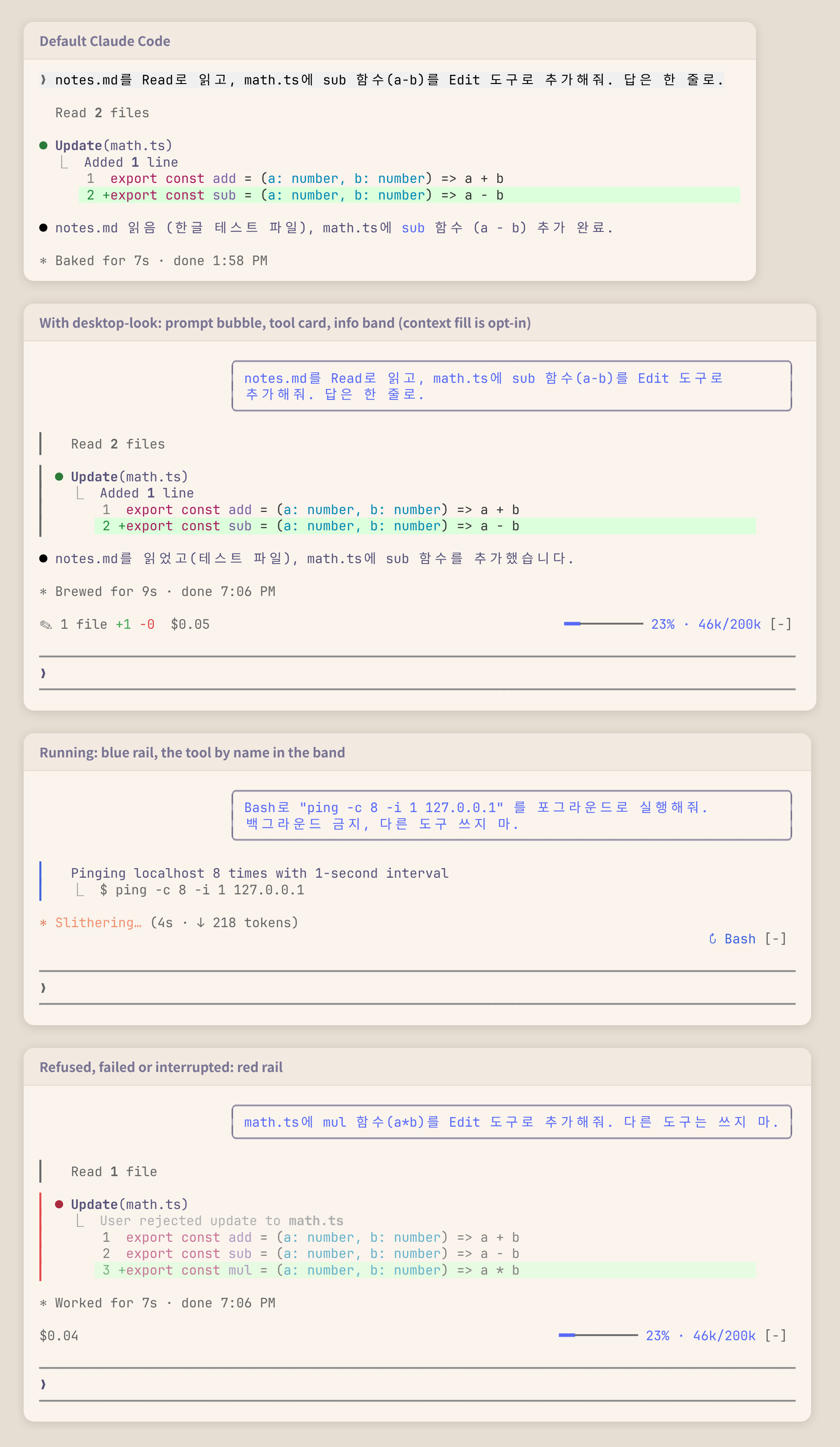
KyongSik-Yoon/claude-mods/tree/main/desktop-look
一个让终端记录更像桌面应用的 Claude Code mod。

✎ 2 files +7 -0)以及花费了多少($0.05);右侧显示正在运行的工具(↻ Read ×3, Grep,窄屏时为 ↻ 4 running);没有内容可显示时隐藏claude plugin marketplace add KyongSik-Yoon/claude-mods
claude plugin install desktop-look@kyongsik-mods
然后运行 /reload-plugins 或开始新的工作阶段。需要支持 mods 的 Claude Code 构建版本(已在 2.1.289、全屏以及浅色/深色主题下测试)。
无需设置。要修改某项,运行 /plugin configure desktop-look@kyongsik-mods(或打开 /config):
| 选项 | 默认值 | |
| --- | --- | --- |
| 气泡宽度 | 75% | 终端宽度的 60%、75% 或 90% |
| 信息栏 | 开启 | 提示列上方的信息栏 |
| 信息栏:模型 | 关闭 | 模型和 effort,用于不显示这些内容的状态行 |
| 信息栏:上下文 | 关闭 | 上下文填充;平稳时为蓝色,达到 300k token 或 70% 后为黄色,达到 500k token 或 90% 后为红色,以先到者为准 |
费用是 Claude Code 按 API 价格计算出的金额;使用订阅时,它不是实际向你收取的金额。
UserMessage(仅你自己的提示,不包括任务通知或其他工作阶段的消息)会以右对齐、带圆角边框的 Box 绘制。ToolUse、ToolGroup、ToolProgress 和 ToolResult 是分开的渲染位置,因此一条边框无法跨越它们。每个位置都会包装引擎自己的行(await next(e)),并添加一个绝对定位的单列轨道,使其延伸到该行的高度,同时跳过引擎开始工具行时插入的空行。isRunning、isErrored、isInterrupted 以及群组的调用。$.state 中数值的 AbovePrompt hook,由 tool.call(运行中的工具,以及每个 Edit 和 Write 结果补丁中的 +/- 行)、session.measure(费用、上下文)和 turn.step(模型)写入。新工作阶段(/clear)会重新开始累计;重新加载会保留累计值。claude plugin validate .
claude plugin test .
请先查看作者 README 确认 marketplace 和插件名称;命令可能随仓库结构改变。
claude plugin marketplace add KyongSik-Yoon/claude-mods
claude plugin install desktop-look
A Claude Code mod that makes the terminal transcript look more like the desktop app.
✎ 2 files +7 -0) and spent ($0.05) on the left, the tools running (↻ Read ×3, Grep, or ↻ 4 running when narrow) on the right; hidden when there is nothing to showclaude plugin marketplace add KyongSik-Yoon/claude-mods
claude plugin install desktop-look@kyongsik-mods
Then run /reload-plugins or start a new session. Requires a Claude Code build with mods support (tested on 2.1.289, fullscreen and light/dark themes).
No setup needed. To change one, run /plugin configure desktop-look@kyongsik-mods (or open /config):
| Option | Default | |
| --- | --- | --- |
| Bubble width | 75% | 60%, 75% or 90% of the terminal |
| Info band | on | The band above the prompt |
| Band: model | off | Model and effort, for a status line that does not show them |
| Band: context | off | Context fill, for a status line that does not show it: blue while calm, yellow from 300k tokens or 70%, red from 500k tokens or 90%, whichever comes first |
The cost is what Claude Code computes at API prices; on a subscription it is not what you are billed.
UserMessage (your own prompts only, not task notifications or other sessions' messages) is drawn as a right-aligned Box with a round border.ToolUse, ToolGroup, ToolProgress and ToolResult are separate render sites, so one border cannot span them. Each wraps the engine's own row (await next(e)) and adds an absolutely positioned one-column rail that stretches to the row's height, skipping the blank line the engine opens a tool row with.isRunning, isErrored, isInterrupted, and the calls of a group.AbovePrompt hook reading values in $.state, written by tool.call (tools running, and the +/- lines of each Edit and Write result's patch), session.measure (cost, context) and turn.step (model). A new session (/clear) starts the tally over; a reload keeps it.claude plugin validate .
claude plugin test .

Ruflo 记忆系统的基底层插件:AgentDB 控制器桥接(15 个 agentdb_* MCP 工具)、RuVector ONNX 嵌入(10 个 embeddings_* 工具,包括 RaBitQ 32x 量化)和 WASM HNSW 模式路由器(3 个 ruvllm_hnsw_* 工具)。作为 mod(ADR-445):可选的安全召回会进入提示,写入守卫会把机密排除在记忆之外,还提供 /agentdb 和控制台显示的状态文件。

构建、格式化、优化和审查交互式 Power BI 报表,并提供一个遵循 pbir CLI 的报表面板,显示 Claude 读取和修改的内容。


在提示列上方、状态行和 toast 中显示未读 AMP 消息,并可唤醒空闲的 Claude Code 工作階段来读取。需要 Claude Code 2.1.287 或更高版本。
