
LorcanChinnock@LorcanChinnock
LorcanChinnock/claude-desk-neighbours/tree/main/plugins/your-serve
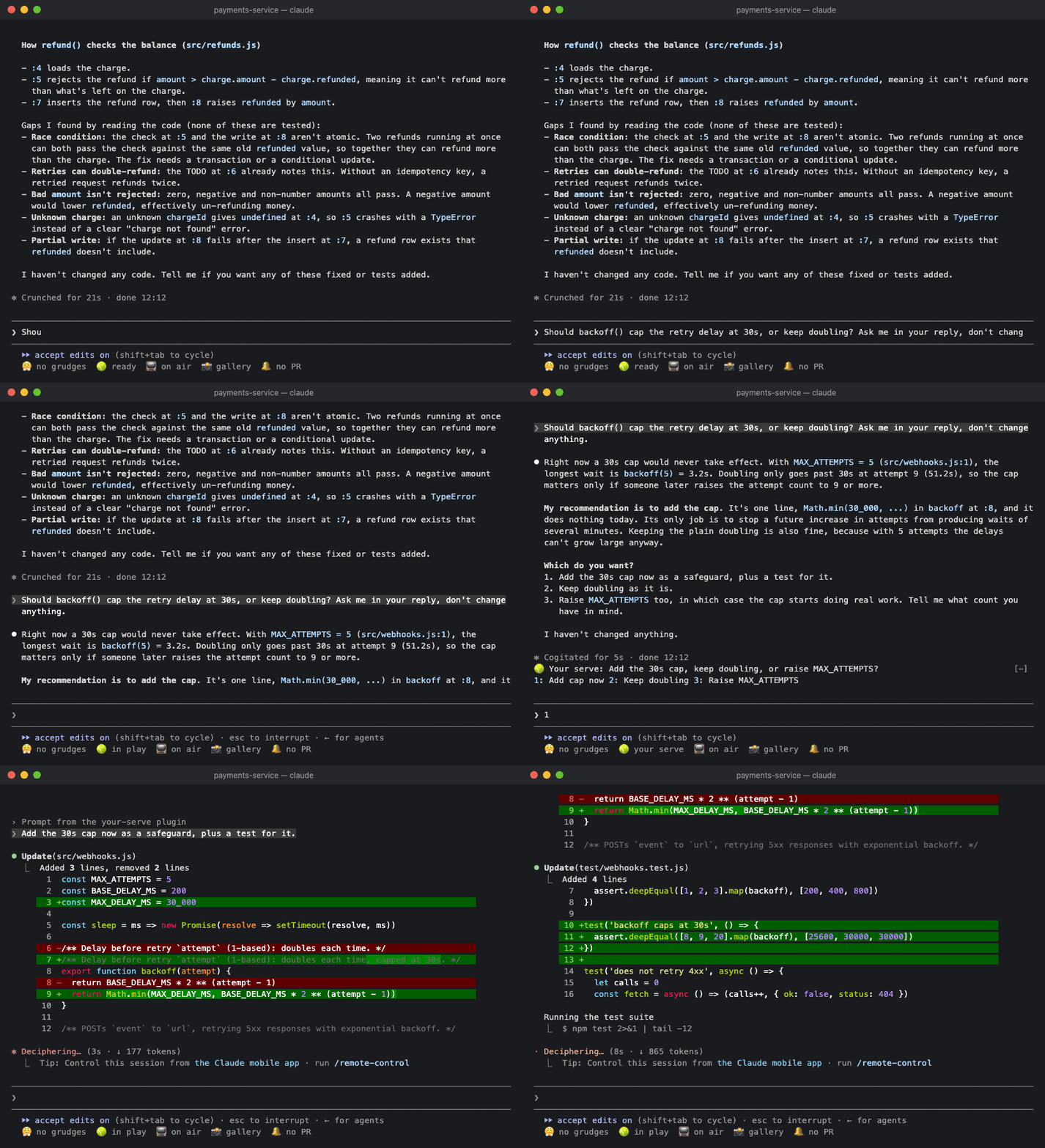
🎾 Tells you when Claude needs you: one line with the question it ended on, and its answers as buttons.
LorcanChinnock/claude-desk-neighbours/tree/main/plugins/your-serve
Lets you know when Claude is waiting on you, so you don't miss the question at the bottom of a long answer.

/plugin install your-serve@claude-desk-neighbours
When a turn ends with a question, a choice between options, or a "should I also…", it shows up on the top line of the band:
🎾 Your serve: Keep the old cache or drop it? 1: Keep 2: Drop 3: Something else
Press an answer and a natural-sounding reply ("Drop the old cache.") goes straight to Claude. You can type its digit into an empty prompt or click it. If you've already started typing, the reply goes on the end of your draft instead, for you to finish and send. If there aren't any clear options, you just get the question. Either way it stays put until you send a prompt. Answers that don't ask anything produce nothing, and subagent turns are ignored.
If Claude asks several things at once, you get them one at a time, however many there are:
🎾 Your serve (2/3): What should the new timeout be? 1: 30s 2: 60s other skip
Each answer takes you to the next question. After the last one, they all go to Claude as a single reply:
1. Keep the old cache or drop it? Drop the old cache.
2. What should the new timeout be? Make it 30 seconds.
3. Add a retry? Yes, add a retry.
If none of the answers fit, click other and type your own. Enter answers the question with what you typed and
moves on, the same as pressing an answer. If you skip a question, or press Enter on an empty other, it's left
unanswered, and the replies go into your prompt instead of being sent, so you can type that answer before
sending. You have to click other and
skip (or reach them with Tab) because the digits after 3 belong to the other Desk Neighbours. The mobile app
can't show a text field, so there you only get skip.
Nothing gets cut off. If the question and its answers don't fit on one line, the answers wrap onto the next one.
Only three answers get buttons. For anything else, use other, or with a single question just type it in the
prompt.
Your Serve reads the text of Claude's answer, so it won't show questions Claude asks through its own question picker. You've already got the picker in front of you anyway.
If the turn took longer than a minute, you'll also get a 🎾 Claude needs a decision toast in case you'd
wandered off.
Click 🎾 ready in the status row, or run /your-serve, to see the question waiting on you with its answers,
plus the questions Claude asked earlier in the session.

| Setting | Default | |---|---| | Toast when a turn that needs you took longer than (seconds) | 60 | | Also say it out loud (macOS) | off |
Haiku only sees answers that end with a question mark, a list of options or something phrased as a question. It picks out every question and up to three answers for each one.
Check the author's README for the marketplace and plugin name first. Commands may change as the repository evolves.
claude plugin marketplace add LorcanChinnock/claude-desk-neighbours
claude plugin install your-serve
Lets you know when Claude is waiting on you, so you don't miss the question at the bottom of a long answer.
/plugin install your-serve@claude-desk-neighbours
When a turn ends with a question, a choice between options, or a "should I also…", it shows up on the top line of the band:
🎾 Your serve: Keep the old cache or drop it? 1: Keep 2: Drop 3: Something else
Press an answer and a natural-sounding reply ("Drop the old cache.") goes straight to Claude. You can type its digit into an empty prompt or click it. If you've already started typing, the reply goes on the end of your draft instead, for you to finish and send. If there aren't any clear options, you just get the question. Either way it stays put until you send a prompt. Answers that don't ask anything produce nothing, and subagent turns are ignored.
If Claude asks several things at once, you get them one at a time, however many there are:
🎾 Your serve (2/3): What should the new timeout be? 1: 30s 2: 60s other skip
Each answer takes you to the next question. After the last one, they all go to Claude as a single reply:
1. Keep the old cache or drop it? Drop the old cache.
2. What should the new timeout be? Make it 30 seconds.
3. Add a retry? Yes, add a retry.
If none of the answers fit, click other and type your own. Enter answers the question with what you typed and
moves on, the same as pressing an answer. If you skip a question, or press Enter on an empty other, it's left
unanswered, and the replies go into your prompt instead of being sent, so you can type that answer before
sending. You have to click other and
skip (or reach them with Tab) because the digits after 3 belong to the other Desk Neighbours. The mobile app
can't show a text field, so there you only get skip.
Nothing gets cut off. If the question and its answers don't fit on one line, the answers wrap onto the next one.
Only three answers get buttons. For anything else, use other, or with a single question just type it in the
prompt.
Your Serve reads the text of Claude's answer, so it won't show questions Claude asks through its own question picker. You've already got the picker in front of you anyway.
If the turn took longer than a minute, you'll also get a 🎾 Claude needs a decision toast in case you'd
wandered off.
Click 🎾 ready in the status row, or run /your-serve, to see the question waiting on you with its answers,
plus the questions Claude asked earlier in the session.
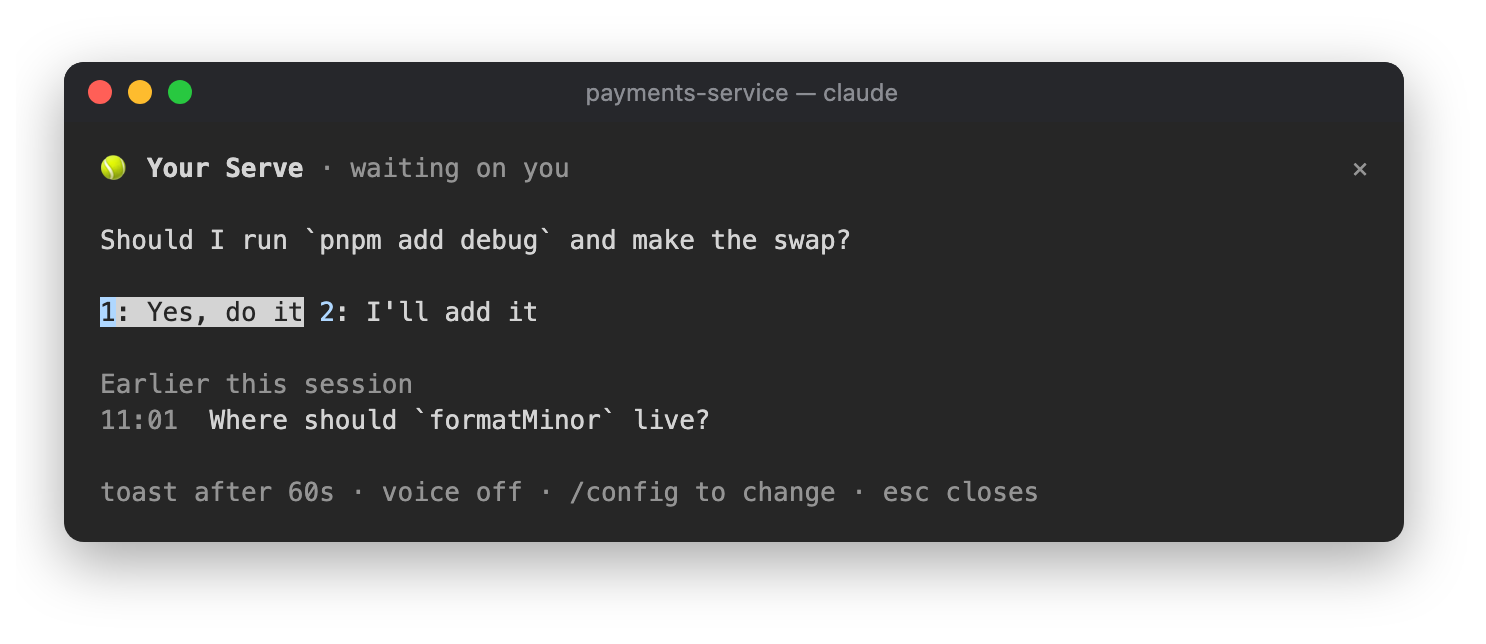
| Setting | Default | |---|---| | Toast when a turn that needs you took longer than (seconds) | 60 | | Also say it out loud (macOS) | off |
Haiku only sees answers that end with a question mark, a list of options or something phrased as a question. It picks out every question and up to three answers for each one.

Substrate plugin for Ruflo memory: AgentDB controller bridge (15 agentdb_* MCP tools), RuVector ONNX embeddings (10 embeddings_* tools incl. RaBitQ 32x quantization), and WASM HNSW pattern router (3 ruvllm_hnsw_* tools). As a mod (ADR-445): opt-in safe recall into the prompt, a write guard that keeps secrets out of memory, /agentdb, and a status file the console shows

Fabric Data App plugin in the data-goblin/power-bi-agentic-development Claude Code plugin marketplace, described as a pane that follows the rayfin CLI.


Shows unread AMP messages above the prompt, in the status line and as a toast, and can wake an idle Claude Code session to read them. Needs Claude Code 2.1.287 or later.
