
ohosgor@ohosgor
ohosgor/podside
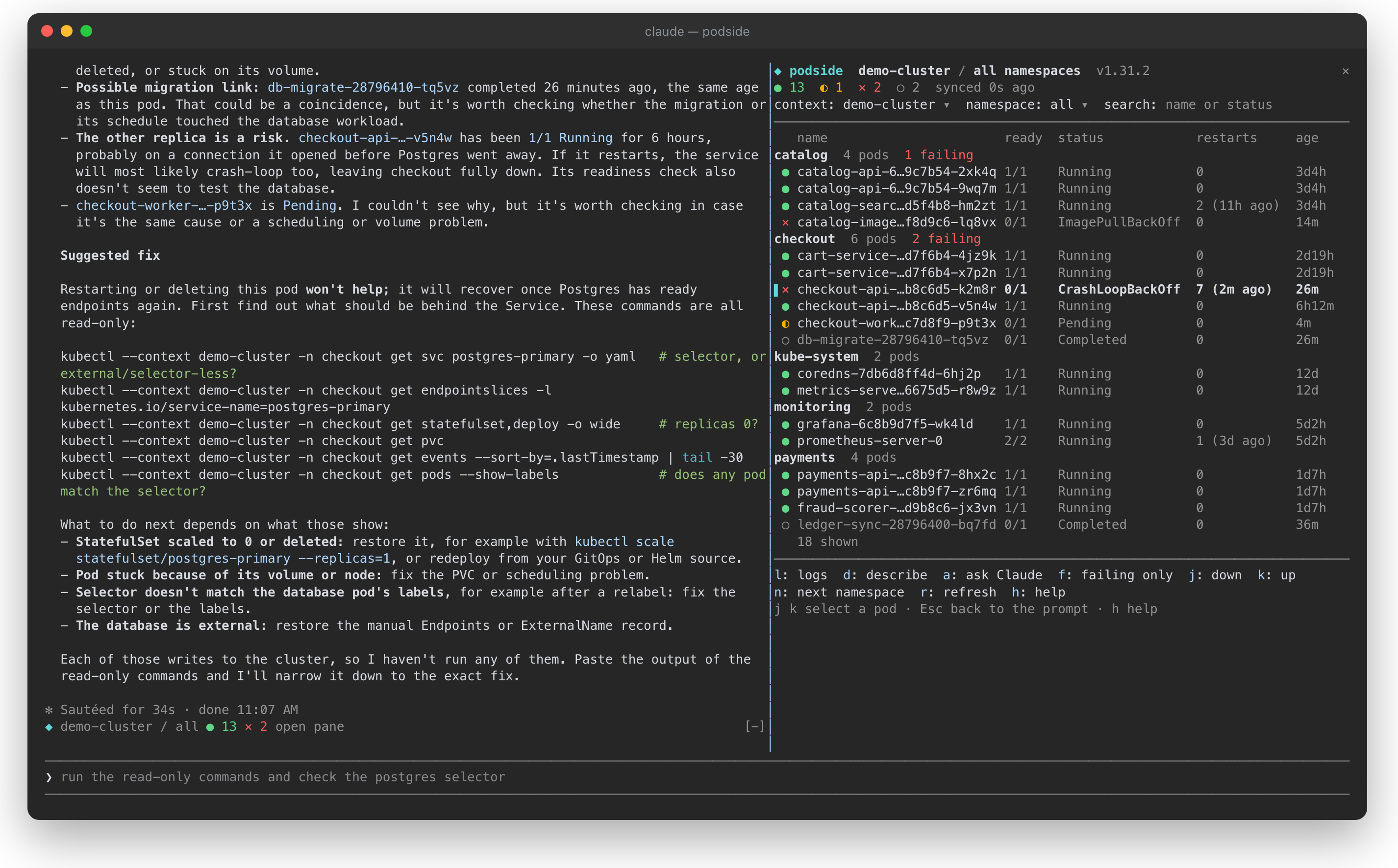
A k9s-style Kubernetes pod pane that lives beside Claude Code
ohosgor/podside
podside is a Claude Code mod that draws a live, namespace-grouped Kubernetes pod list beside your conversation. It shows pod health at a glance, lets you read logs and describe output with single keys, and can send the selected pod's describe output and recent logs to Claude for diagnosis via 'Ask Claude'. While the pane is open, the selected pod is attached as context to every prompt. It is read-only by design, running only kubectl get, logs, describe, version and config reads with your own kubeconfig, makes no other network requests, and stores only whether you hid the built-in help. Requires Claude Code v2.1.287+ and kubectl on your PATH; installable via /plugin marketplace add ohosgor/podside and /plugin install podside@podside.
Check the author's README for the marketplace and plugin name first. Commands may change as the repository evolves.
claude plugin marketplace add ohosgor/podside
claude plugin install podside
A Kubernetes pod pane that lives beside Claude Code.
podside is a Claude Code mod: it draws a live pod list next to your conversation, lets you read logs and describe output with one key, and tells Claude which pod you are looking at, so you can just ask "why is this pod failing?".
It is inspired by the keyboard-first flow of k9s, but it is a separate project with no affiliation to k9s.
<sub>A demo cluster. Pressing <code>a</code> on the crash-looping <code>checkout-api</code> pod sent its describe output and logs to Claude, which traced the crash to a database Service with no ready endpoints and suggested read-only commands to confirm it.</sub>
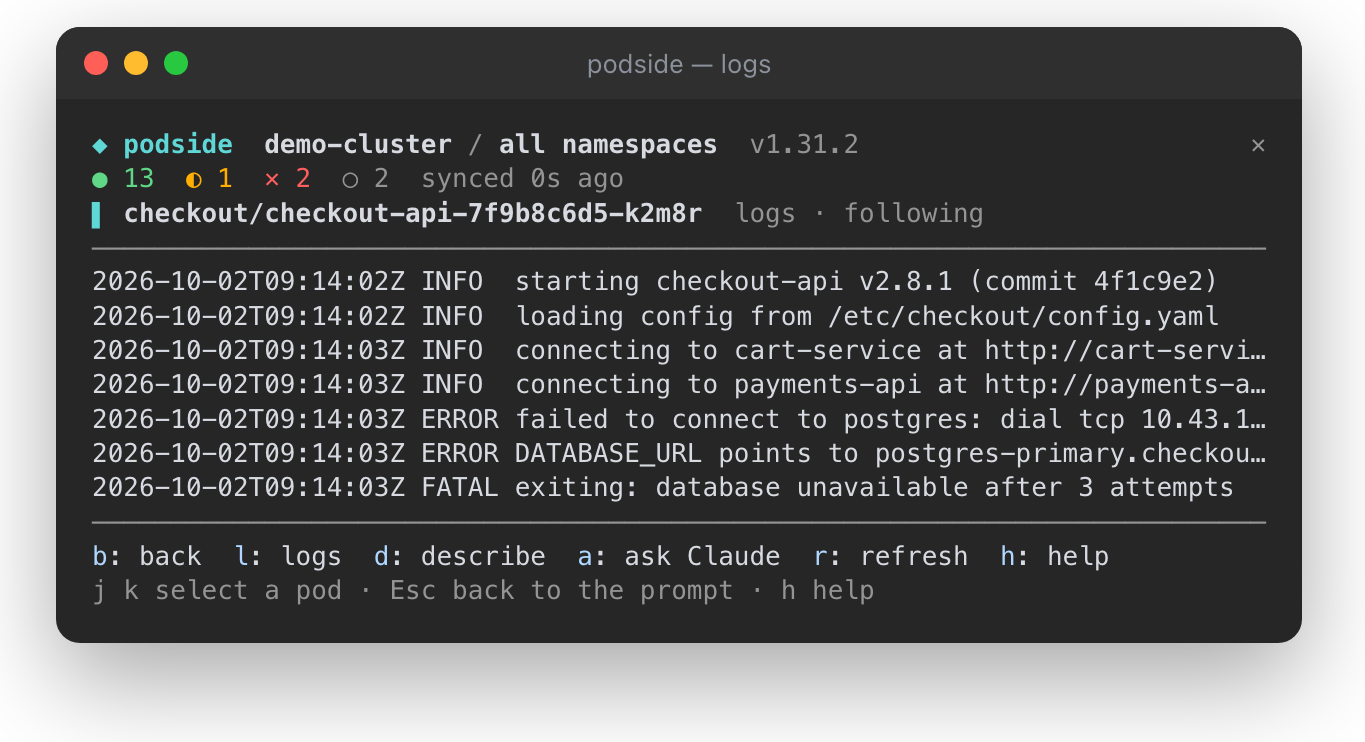
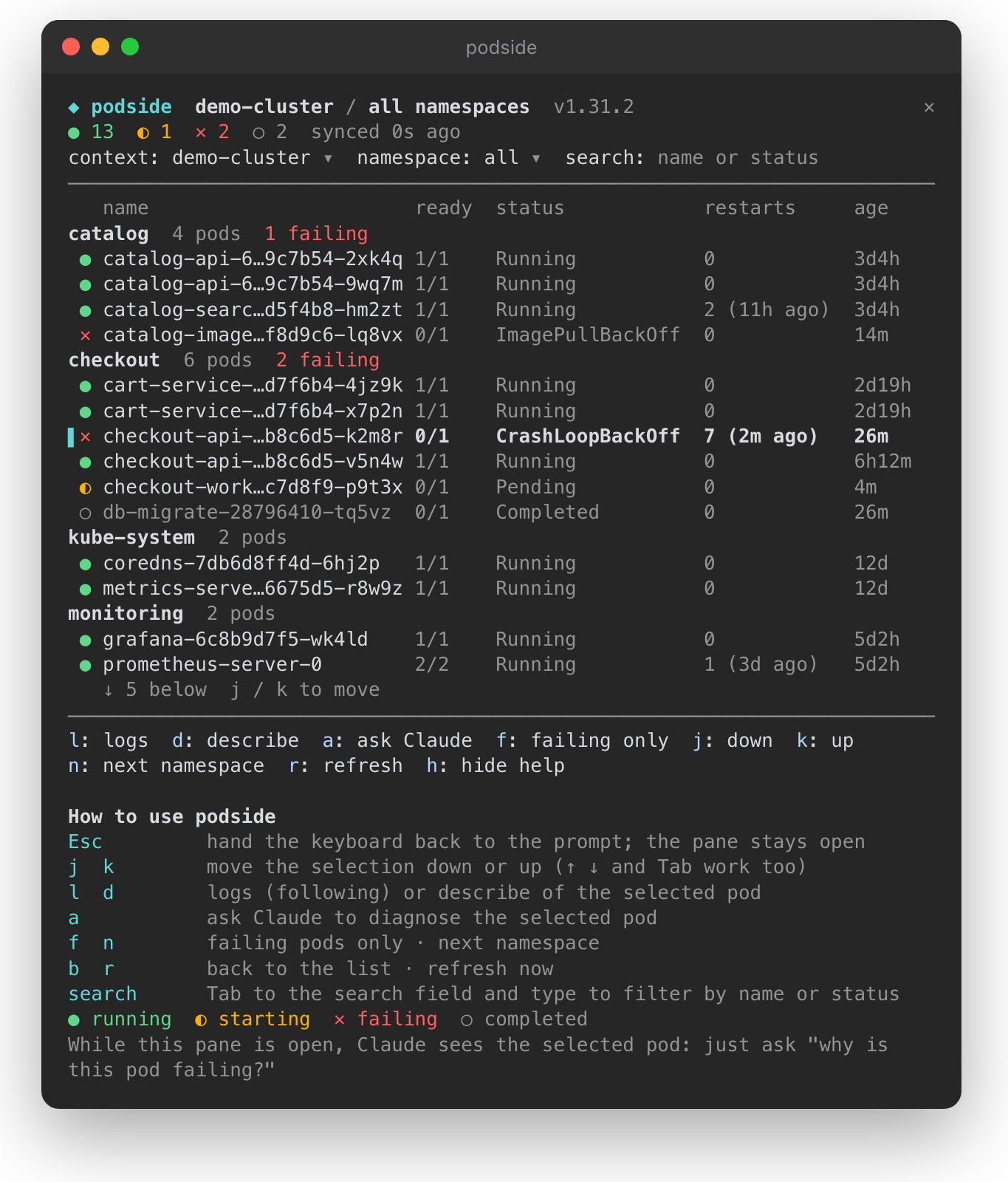
● running, ◐ starting, ✕ failing, ○ completed, with totals in the top bardescribe output and recent logs to Claude for a diagnosiskubectl get, logs, describe, version and config reads. It never writes to your cluster, and its context switcher passes --context instead of touching your kubeconfig.| Logs of the selected pod, following | The pane with its built-in help |
| --- | --- |
|  |
|  |
|
Requires Claude Code v2.1.287 or later and kubectl on your PATH.
/plugin marketplace add ohosgor/podside
/plugin install podside@podside
Or from your shell:
claude plugin marketplace add ohosgor/podside
claude plugin install podside@podside
/podside              # all namespaces
/podside my-namespace # one namespace
The pane takes the keyboard when it opens. Esc hands it back to the prompt; click the pane or press ctrl+x then Tab to return.
| Key | Action |
| --- | --- |
| j k | Move the selection down / up (↑ ↓ and Tab work too) |
| l | Logs of the selected pod |
| d | Describe the selected pod |
| a | Ask Claude about the selected pod |
| b | Back to the list |
| f | Toggle failing pods only |
| n | Next namespace |
| r | Refresh now |
| h | Show or hide the built-in help |
The context, namespace and search fields at the top are reachable with Tab. A short guide sits at the bottom of the pane on first use; h hides it and podside remembers that.
git clone https://github.com/ohosgor/podside
claude --plugin-dir ./podside   # hot-reloads on save
claude plugin validate ./podside
claude plugin test ./podside
The hooks module is hooks/register.tsx; its tests are in register.test.tsx and run against a stubbed kubectl.
A mod runs inside Claude Code with your permissions. podside's own calls are limited to the kubectl reads listed above, $.prompt.submit for "Ask Claude", and drawing its pane. You can list everything it hooks and calls without running it:
claude plugin validate .
kubectl, with your own kubeconfig: config get-contexts, config current-context, config view --minify, version, get ns, get pods, logs and describe pod. It talks to your cluster through kubectl and makes no other network requests.a, the pod's describe output and its last 120 log lines are sent as a prompt. Nothing is sent while the pane is closed or no pod is selected.h), in Claude Code's local plugin store. Pod data lives only in the session's memory.
Neural trading strategies powered by neural-trader (v2.7+): self-learning LSTM/Transformer/N-BEATS models, Rust/NAPI backtesting, 112+ MCP tools, swarm coordination, and portfolio optimization.

An optional mods companion for claude-seo. It runs inside Claude Code as a mod (a function-hook plugin), so it can enforce things a skill can only ask for.

Repowise Plugin for Claude Code — provides five layers of code intelligence: Graph, Git, Docs, Decisions, and Code Health. It gives Claude architecture, ownership, hotspots, and defect risk through MCP tools, slash commands, and automatic skills. It also includes Lens, a Claude Code mod with spinner hints, margin notes, change review, and a /lens panel.