
r3al1tym@r3al1tym
r3al1tym/isobar
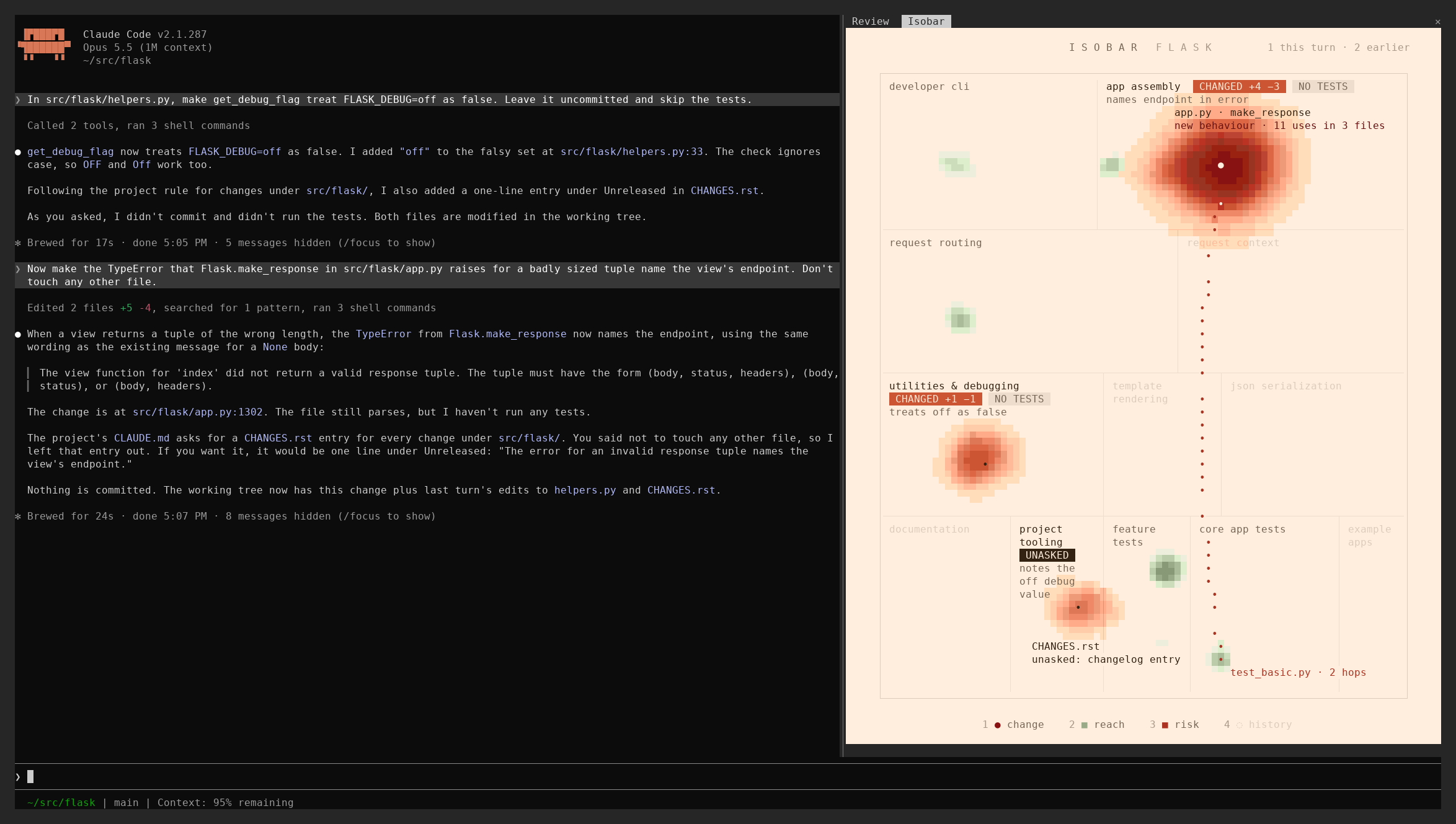
A weather map for every change your agent makes, from a broad refactor to a one-line fix. See where it landed, what it did there and what else it reaches, on a map of your repo that stays the same from session to session.
r3al1tym/isobar
isobar is a Claude Code mod that docks a pane beside the conversation, reading like a weather radar: a red storm on changed code, captions on what each change did, and green rain on code that uses it. It reads the uncommitted diff against HEAD declaration by declaration, builds an import graph for JavaScript/TypeScript/Python, and renders a stable per-repository basemap. Installation via claude plugin marketplace add r3al1tym/isobar and claude plugin install isobar@isobar; requires Claude Code 2.1.287+, an interactive terminal session, and git.
Check the author's README for the marketplace and plugin name first. Commands may change as the repository evolves.
claude plugin marketplace add r3al1tym/isobar
claude plugin install isobar




A weather map for every change your agent makes, from a broad refactor to a one-line fix. See where it landed, what it did there and what else it reaches, on a map of your repo that stays the same from session to session.
isobar is a Claude Code mod (a plugin built on Claude Code's early-access function hooks, which let it draw its own pane) that docks a pane beside the conversation. Read it like a weather radar: a red storm on the code that changed, a few words under each changed region on what the change did there, and green rain on the code that uses it. You see the shape of a change before you read its diff, and a part you did not expect it to reach stands out at once. Read the diff for the lines; read the pane for where they landed and what they touch.
The change is everything uncommitted against HEAD, your own edits included, plus files created during the session; on a clean tree, the last commit.
Watch it work in a 26-second film: isobar.mp4.
The rain is selective. Across 300 recent commits in six public repositories, the median commit rains on 0 to 12 files where marking every importer within three hops would mark 59 to 352, and it still covers 88 to 98 percent of the files a language server (TypeScript's findReferences, or jedi for Python) says use the change. Accuracy has the precision and the misses.
You need Claude Code 2.1.287 or later, run interactively in a terminal, inside a git repository.
claude plugin marketplace add r3al1tym/isobar
claude plugin install isobar@isobar
claude session in your repository. A session that was already running does not load the mod./isobar opens the pane and focuses it, so its number keys toggle layers. A pane that opened by itself leaves focus on the prompt: press ctrl+x then Tab, or click it, to focus it. Esc returns focus to the prompt.To hand the setup to your coding agent, paste the prompt below. An agent reading this page should follow AGENTS.md: checks, settings, verification and troubleshooting, each with exact commands and expected output.
Set up the isobar Claude Code plugin by following https://raw.githubusercontent.com/r3al1tym/isobar/main/AGENTS.md. Ask me before changing any setting, verify the install, then tell me how to open the pane.
smallModel (Sonnet by default) reads the diff of each changed region and captions it under the region's name in 2 to 4 words, such as names endpoint in error and treats off as false in the picture above. The caption is the diff's own account, written without your requests, so you can set it against what you meant.new behaviour · 11 uses in 3 files.smallModel (Sonnet by default) compares your requests with the turn's diff. An edit nobody asked for carries UNASKED and a few words on what it did.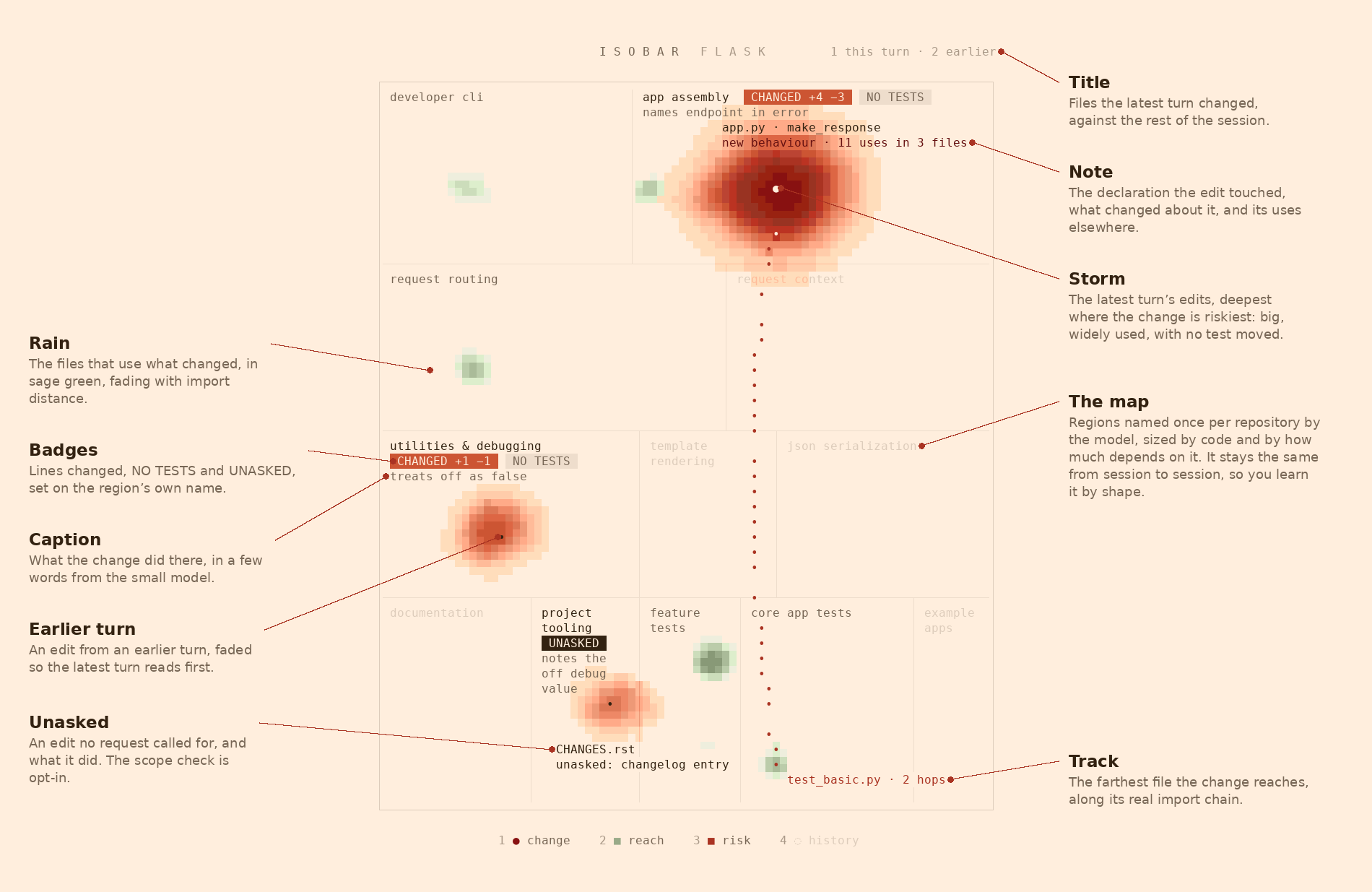
1 this turn · 2 earlier), or last commit <hash> when nothing is uncommitted.CHANGED +a −d, NO TESTS when source code changed what it does and no test moved with it, UNASKED when the scope check flagged an edit, and, with history on (key 4), EXPECTED on a region where a dashed ring marks a file history says should have changed. A changed test counts when it imports the file, shares its name, or its new lines name what the edit touched or introduced, such as a new config key.new signature or new behaviour with its uses (11 uses in 3 files, or no uses elsewhere), comments only, imports only, new file, or, for a file isobar reads whole, how many files depend on it. The line turns red when the edit reaches other files and no test moved with it.file · N hops. A file is named by as much of its path as tells it apart from the others on the pane: sansio/app.py beside flask/app.py.unasked: changelog entry./isobar opens and focuses the pane, or closes it when it is open. /isobar map redraws the basemap.With the pane focused, these keys work:
1 change: the eye on each edited file.2 reach: the green rain and the dotted track.3 risk: the red storm.4 history: dashed rings on files that usually change with these and did not; off at first.p submits a prompt as you: Claude reads the import chain to the farthest file and runs its tests if it has any. In a repository you do not trust, ask that question yourself (SECURITY.md).m redraws the basemap.Every repository gets its own map:
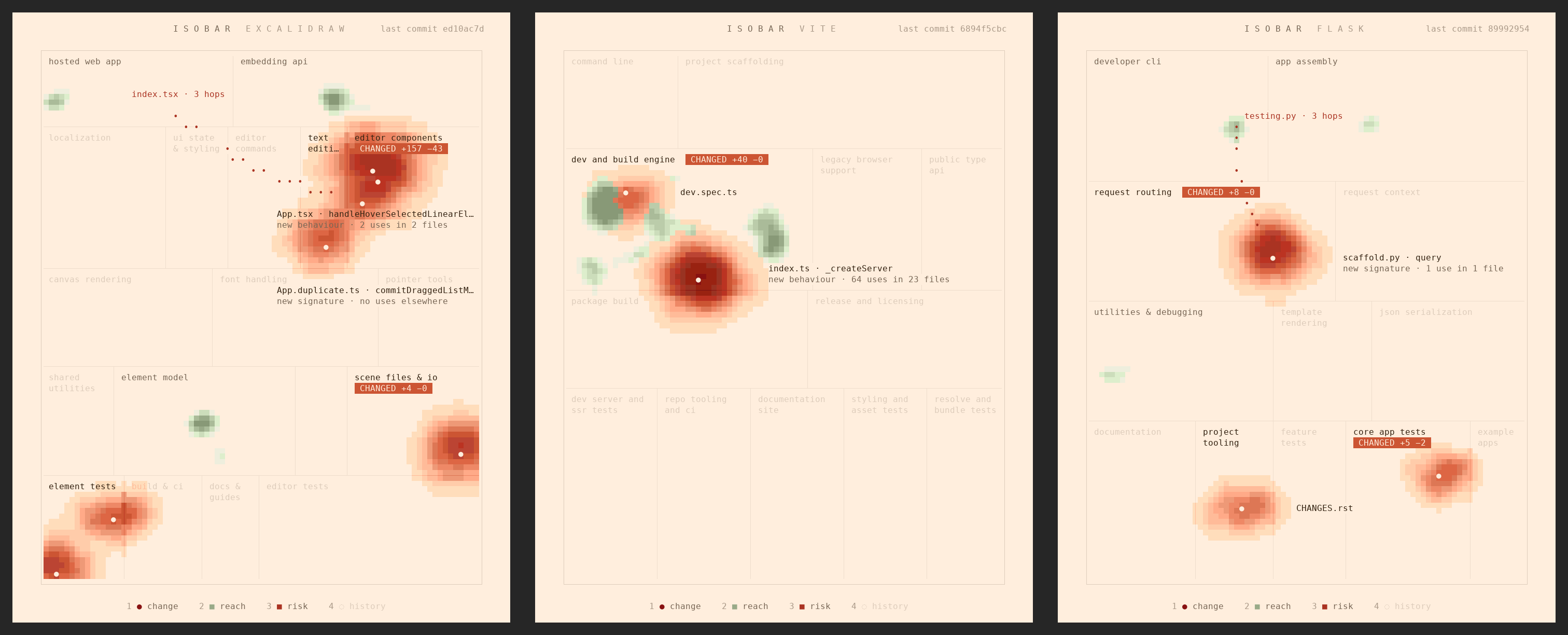
claude --version; run claude update if it is older. Function hooks are an early-access surface, and this release is checked on 2.1.287.claude -p and Agent SDK sessions./isobar, it opens by itself from 110 columns, until you close it by hand. Inside tmux, Claude Code's main-screen layout places the pane above the prompt; elsewhere its fullscreen layout docks it beside the conversation from 110 columns.Languages other than JavaScript, TypeScript and Python get their edits, history and the map, but no rain.
Pick one method. Each loads isobar under its own plugin id, with its own settings and its own kept maps. Paths below use ~/.claude; if you set CLAUDE_CONFIG_DIR, Claude Code reads that folder instead.
Marketplace (isobar@isobar): the two commands in Quick start. Every setting has a default, so a notice that options are not set yet needs no action.
A clone, in every session (isobar@skills-dir). Claude Code reloads it when you save a file. Running it needs no pnpm install. An installed isobar@isobar takes precedence over the clone even when disabled, so uninstall it first.
claude plugin uninstall isobar@isobar   # only if you installed from the marketplace
git clone https://github.com/r3al1tym/isobar ~/src/isobar
mkdir -p "${CLAUDE_CONFIG_DIR:-$HOME/.claude}/skills"
ln -sfn ~/src/isobar "${CLAUDE_CONFIG_DIR:-$HOME/.claude}/skills/isobar"
One session only (isobar@inline): claude --plugin-dir ~/src/isobar, on a clone made with the git clone line above.
claude plugin list
claude plugin details isobar@isobar | head -1
The first lists isobar among any other plugins:
  ❯ isobar@isobar
    Version: 0.3.0
    Scope: user
    Status: ✔ enabled
The second prints isobar 0.3.0. A linked clone is listed under Skills-directory plugins as isobar@skills-dir, with Status: ✔ loaded.
claude plugin details lists Hooks (0) for any function-hook mod; that is expected. claude -p never runs isobar, so the last check is yours: start a new interactive session, ask for an edit, and look for the pane. AGENTS.md has the full check.
To give a team one shared map, commit it as .isobar/map.json. To draw one, run pnpm install once in a clone of isobar, then, from the clone and with absolute paths:
mkdir -p /path/to/repo/.isobar
pnpm preview --repo /path/to/repo --build model --map /path/to/repo/.isobar/map.json
It names the regions with claude -p on Opus (--model picks another) and writes the map first, then renders out/preview.png in the clone. The render needs python3 with Pillow and any monospace font; if it fails, the map is still written. The tool needs Node 20.11 or later and pnpm. When claude -p gives no usable answer, it writes nothing and exits 1. Commit .isobar/map.json.
claude plugin marketplace update isobar && claude plugin update isobar@isobar, then restart Claude Code. A clone updates with git -C ~/src/isobar pull. 0.3.0 renamed scopeModel to smallModel and moved its default from haiku to sonnet; if you had set scopeModel, set smallModel to the same value (CHANGELOG.md).claude plugin uninstall isobar@isobar && claude plugin marketplace remove isobar, or rm "${CLAUDE_CONFIG_DIR:-$HOME/.claude}/skills/isobar" for a linked clone (it removes the link and keeps the clone). For --plugin-dir, start sessions without the flag.~/.claude/plugins/store/isobar_*.json after an uninstall. Delete those files to forget every map, or run /isobar map to redraw one repository's. A committed .isobar/map.json belongs to the team; leave it in place./isobar, and check that panel is not command.colors under Settings.gist is off, the turn is still running, or your account cannot use smallModel.Every message the pane can show, with its cause and fix: AGENTS.md § 10.
Set these with /plugin configure isobar@isobar in Claude Code, at install with claude plugin install isobar@isobar --config scope=on, or from a shell with echo '{"scope":"on"}' | claude plugin configure isobar@isobar --values-stdin. A change applies when Claude Code restarts. claude plugin configure isobar@isobar --json reads them back under inputs, where a blank smallModel or mapModel means its default. If you installed from a clone, configure isobar@skills-dir instead of isobar@isobar.
| Setting | Values | What it does |
| --- | --- | --- |
| gist | on (default), off | Ask smallModel to caption what the change does in each region, whenever a changed region has no caption and no turn is running: once a turn ends, at session start, and on the last commit when nothing is uncommitted. |
| scope | off (default), on | After each turn that changes files and ends with an answer, ask smallModel which changes your requests never called for. A turn you interrupt is not checked. |
| smallModel | sonnet (default), any model alias or id | The model the gist and the scope check ask. |
| mapModel | empty (default), any model alias or id | The model that names the basemap's regions, once per repository; empty uses the model the session runs on. |
| ground | paper (default), night, auto | Warm paper, the terminal's near-black, or whichever matches your Claude Code theme. |
| colors | auto (default), truecolor, 256 | How many colours the terminal paints. On Linux, auto reads it from the environment Claude Code started in; elsewhere it assumes 24-bit unless inside tmux or Apple's Terminal, so set 256 if the paper looks yellow. |
| panel | auto (default), command | Open the pane once the repository has uncommitted changes (at session start or on the session's first edit), or only on /isobar. |
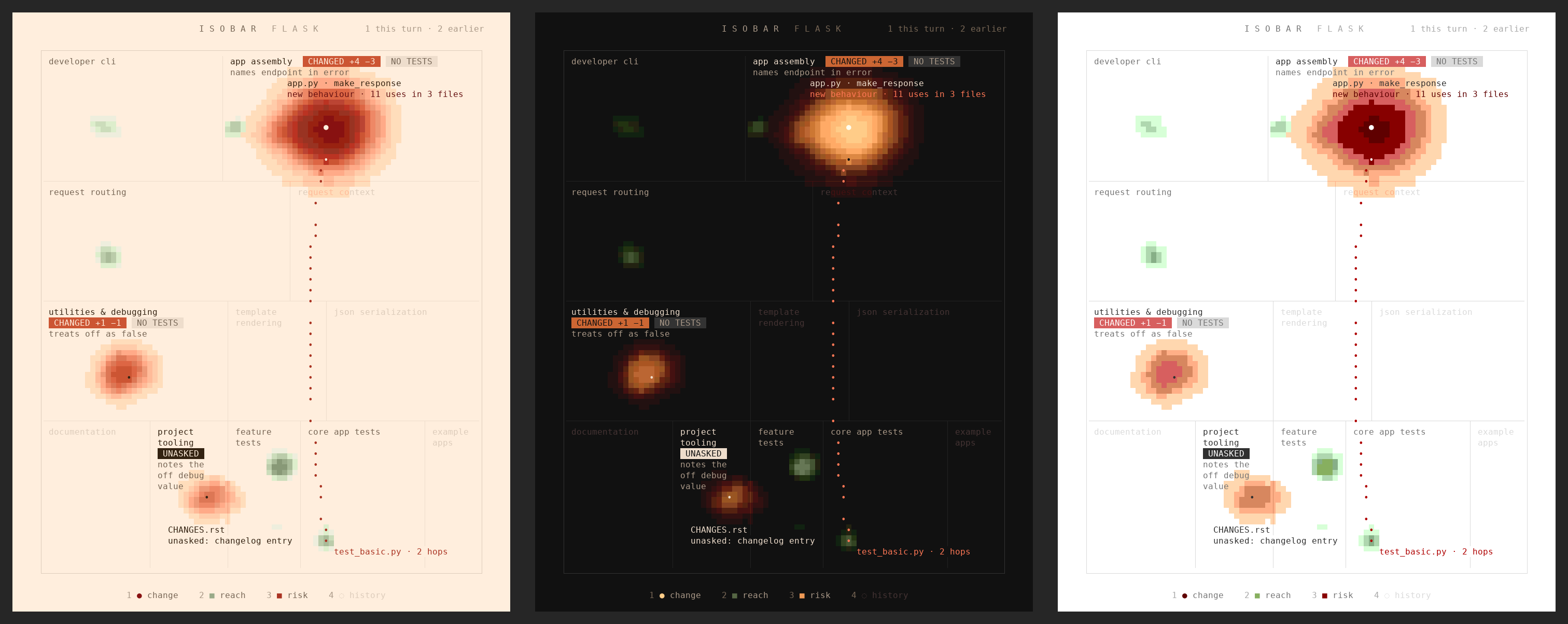
On the night ground the storm burns up from red through amber, and the rain stays sage.
The warm paper needs 24-bit colour. Claude Code paints 24-bit where COLORTERM=truecolor is set (and in kitty, Ghostty and iTerm) and never inside tmux; everywhere else it paints xterm's 256 colours, where the cream would turn yellow, so isobar switches to white paper and xterm's own colours there. Inside tmux, leave colors on auto: forcing truecolor turns the cream yellow. Windows Terminal draws 24-bit but never sets COLORTERM; add export COLORTERM=truecolor to your shell profile to get the paper.
tsconfig, jsconfig, package.json and pnpm-workspace.yaml files that say where imports point. Commits that touch more than 40 files are dropped as bulk moves.index probing, tsconfig paths and baseUrl, workspace packages by name, package.json #imports, and Python 3's absolute and relative modules, multi-line imports included. Imports of outside packages are left out.git diff -U0), your own edits included, and each changed file before and after are read into declarations: functions, classes, methods, fields, types and constants. A declaration whose header changed has a new signature; one whose code changed otherwise has a new behaviour; one whose code is the same changed only comments. New untracked files count too: those Claude wrote with the Write tool, and any that appeared after the session first read the repository. With nothing uncommitted, the last commit. Before the first commit, the change is read against an empty tree.git grep -w finds the files that depend on a changed file, at any import distance, and name a touched declaration, or, for a private one, a function in the same file that calls it. Those are the rain. A file isobar cannot read by declaration (another language, a new or deleted file, module-level code, a file over 20,000 lines, or any past the first 40 changed files) rains on every importer, three hops out.git hash-object, which stores nothing), so isobar knows which turn last changed each one.smallModel carries each changed region's name and blurb, its files with their added and deleted line counts and touched declarations, and up to 400 lines of their diff in all, split evenly across the files with at least 12 each until the 400 run out. It asks for a caption of 2 to 4 words per region. Your requests stay out of it. A caption holds until its region's change changes; while a turn runs, the last caption stays.smallModel carries your last four requests and, for each file the turn changed, its whole uncommitted diff against HEAD (earlier turns' and your own edits to it included), capped at 400 lines (60 per file). It asks which changes no request called for. A flag holds until the file changes again.mapModel, to group them into at most 20 regions in 3 to 6 bands, from where work enters down to the foundations. Every file lands in exactly one region. When the model's answer is unusable, the folders themselves become the regions for that session, the frame says folders only · /isobar map retries, and the next session asks again. A region's area grows with the square root of its lines of code and with how many files outside it import it, on a scale of 1 to 10. The map is kept in Claude Code's plugin store (~/.claude/plugins/store/), per install and per repository path, and new files join a region already there (a tracked file the region its imports point to, a file just created its folder's region), so new files never grow or move the frame.Refreshes run when a session or turn starts, when a turn ends (with gist or scope on), and 500 ms after Claude's last edit or shell command (Edit, Write, MultiEdit, NotebookEdit, Bash), one at a time.
One refresh at each repository's latest commit, median of 5 after a warm-up, on a laptop (Intel Core Ultra 7 265H, WSL2). A refresh is the facts from git, the change read by declaration, the weather and the drawing; bench/results.md times each part.
| Repository | Text files | One refresh | | --- | --: | --: | | express | 211 | 33 ms | | flask | 230 | 67 ms | | excalidraw | 1,018 | 298 ms | | vite | 2,736 | 107 ms | | django | 5,675 | 437 ms | | VS Code | 19,547 | 1.8 s |
The import graph and the rain are measured against outside tools on six public repositories, the frame on three by redrawing it, and history by backtest; bench/ reproduces it and bench/results.md breaks it down.
from pkg import submodule also runs pkg/__init__.py, and the compiler cannot resolve a workspace package without installed node_modules.findReferences and jedi. The rain covers 88 to 98 percent of the files that reference a changed declaration, or a function in the same file that calls a changed private one. Of the files it rains on, 47 to 86 percent are such files, and 25 percent on VS Code, where a common member name such as setActive matches declarations of the same name elsewhere.claude -p and Agent SDK sessions never run it. Sessions that the desktop app or VS Code start on their own are untested.UNASKED as a prompt to look, and its absence as no proof of anything.claude plugin validate --strict . and claude plugin test . on Claude Code 2.1.287 and on the latest release.isobar reads git and draws a pane; it writes nothing to your repository and makes no network calls of its own. Its model calls go through Claude Code's own model access, so every call counts against your Claude Code usage.
mapModel), carries file and folder paths, their sizes and up to four imported file names per file, never file contents.smallModel call at session start (once the repository has a map) and one after each turn that changes files, whether or not the pane is open. It sends each changed region's name, its paths with their added and deleted line counts and touched declaration names, and up to 400 lines of their diff, which is file contents; it never sends your requests. Set gist to off to stop it.smallModel call after each turn that changes files and ends with an answer. It carries your last four requests and, for each file the turn changed, its uncommitted diff, up to 400 lines in all.SECURITY.md has the details and the threat model.
See CONTRIBUTING.md for the development loop, the preview tool and the rules the picture keeps. AGENTS.md is the setup guide for a person's coding agent. bench/ reproduces every number above on public repositories. docs/design.md tells how the design came about. The project follows a Code of Conduct.
MIT © r3al1tym.

Neural trading strategies powered by neural-trader (v2.7+): self-learning LSTM/Transformer/N-BEATS models, Rust/NAPI backtesting, 112+ MCP tools, swarm coordination, and portfolio optimization.

An optional mods companion for claude-seo. It runs inside Claude Code as a mod (a function-hook plugin), so it can enforce things a skill can only ask for.

Repowise Plugin for Claude Code — provides five layers of code intelligence: Graph, Git, Docs, Decisions, and Code Health. It gives Claude architecture, ownership, hotspots, and defect risk through MCP tools, slash commands, and automatic skills. It also includes Lens, a Claude Code mod with spinner hints, margin notes, change review, and a /lens panel.