
mikhin@mikhin
mikhin/claude-iphone-cam
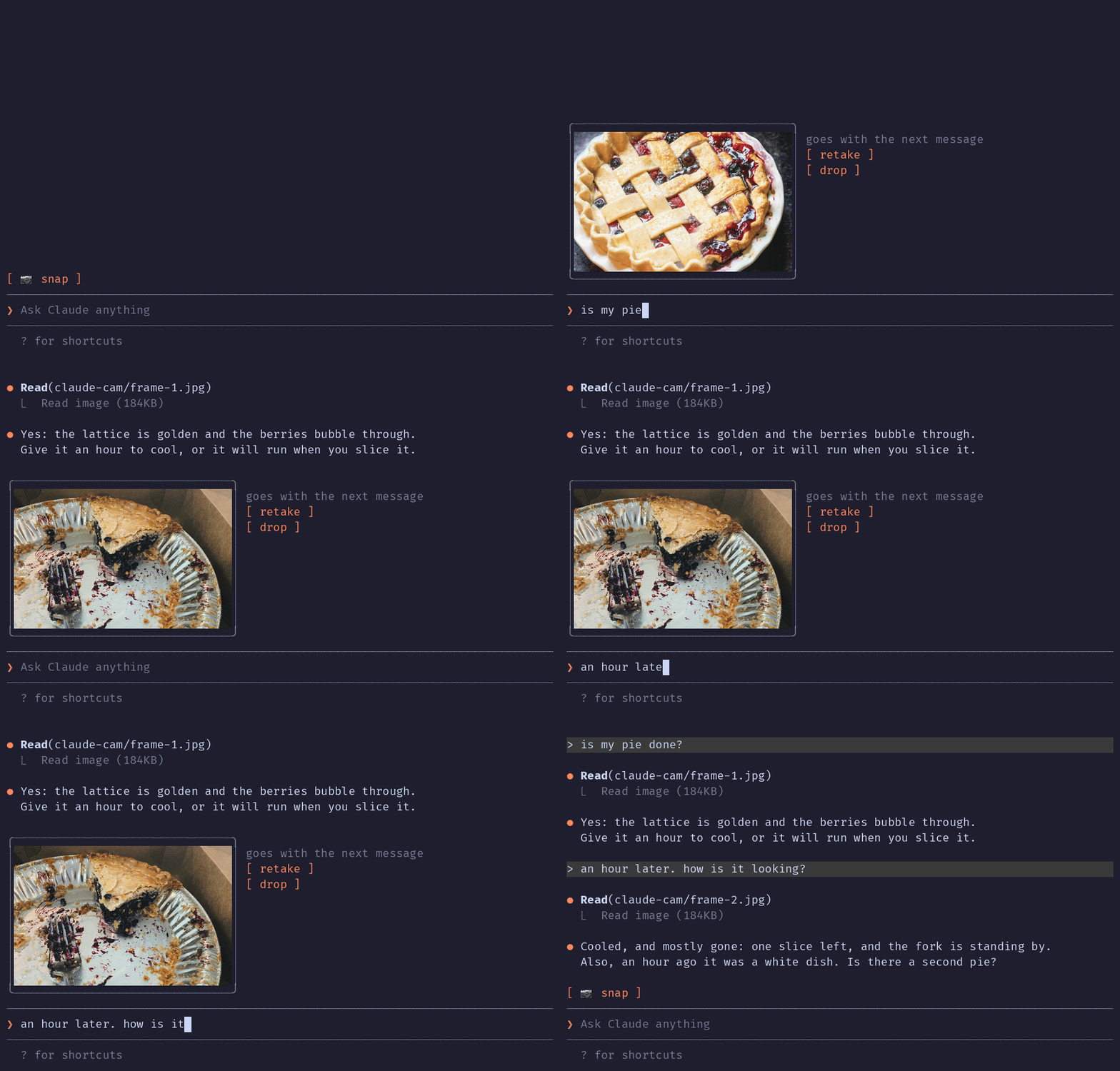
A Claude Code mod that grabs a frame from your iPhone via Continuity Camera and attaches it to your next message.
mikhin/claude-iphone-cam
Claude iPhone Cam adds a 📷 snap button above the Claude Code prompt. Pressing it uses ffmpeg/avfoundation to capture one frame from the iPhone camera (exposed as a Mac webcam through Continuity Camera), shows a thumbnail with retake/drop controls, and on send a prompt.submit hook appends the JPEG path so Claude reads the image as part of the conversation. Installed via /plugin marketplace add mikhin/claude-iphone-cam, /plugin install iphone-cam, /reload-plugins. Requires macOS Ventura+, iOS 16+, iPhone XR or newer, ffmpeg, and the same Apple ID on both devices. The mod runs ffmpeg locally to list devices and capture frames, writes frame-<n>.jpg/png into $TMPDIR/claude-cam/, and opens no network connections.
Check the author's README for the marketplace and plugin name first. Commands may change as the repository evolves.
claude plugin marketplace add mikhin/claude-iphone-cam
claude plugin install iphone-cam
A Claude Code mod that lets Claude see what your iPhone camera sees. Press 📷 snap above the prompt, check the thumbnail, type your question, send.
The terminal in the demo is drawn, the pies are real: photos by Joe Dumas and Debby Hudson on Unsplash. The demo and its build script live in the demo branch, so installing the plugin doesn't download them.
No AirDrop, no Telegram-to-yourself, no saving files. The iPhone is already a Mac webcam through Continuity Camera; this mod grabs one frame from it.
Inside Claude Code, run:
/plugin marketplace add mikhin/claude-iphone-cam
/plugin install iphone-cam
/reload-plugins
ffmpeg (brew install ffmpeg)[ 📷 snap ]
❯ _
After a snap:
╭──────────────╮ goes with the next message
│   (frame)    │ [ retake ]
│              │ [ drop ]
╰──────────────╯
❯ is my pie done?
ffmpeg -f avfoundation -list_devices finds the device named … iPhone … Camera (Desk View is skipped).ffmpeg run waits 1.5 s for exposure, then writes a full JPEG and a 640 px PNG thumbnail to $TMPDIR/claude-cam/.Image element.prompt.submit hook adds the JPEG's path to the message context, and Claude reads it.A mod can only add text to a message, not image bytes, so Claude opens the frame with one Read call.
The mod runs only when you press snap, retake or drop, and when you send a message.
ffmpeg -hide_banner -f avfoundation -list_devices true -i "" lists the cameras, to find the iPhone by nameffmpeg … -i "<iPhone camera>" -ss 1.5 -frames:v 1 <frame>.jpg -ss 1.5 -frames:v 1 -vf scale=640:-2 <frame>.png takes one frame (the full command is captureArgs in hooks/camera.ts)mkdir -p $TMPDIR/claude-cam makes the folder the frames go toTMPDIR environment variable, checks that /opt/homebrew/bin/ffmpeg exists, and writes frame-<n>.jpg and frame-<n>.png to $TMPDIR/claude-cam/. It never deletes them; macOS clears that folder.prompt.submit, only for a message you typed, and only while a frame is waiting, it adds one line of context: the path of the JPEG and a request to read it. Nothing else in the message changes.MIT

A grammar check on your prompt while you type, with explanations in Traditional Chinese. The corrections show up above the prompt box, before you hit Enter.


A Claude Code plugin that shows whether localvoxtral is connected to the session, places dictated text into the prompt box, displays dictation above the prompt, and ends a turn on a spoken stop phrase. Requires a Claude Code build that loads hooks modules.
Preview pasted images at their prompt markers on macOS. Ghostty, plus experimental iTerm2 and Herdr support with a startup override. Claude Code 2.1.287+.