
jamubc@jamubc
jamubc/toolbox/tree/main/plugins/instantnotes
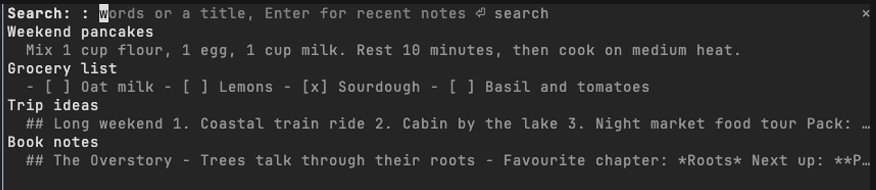
Claude Code plugin to search, read and capture InstantNotes notes from a pane in the terminal, via the InstantNotes MCP server or local `instantnotes mcp`.
jamubc/toolbox/tree/main/plugins/instantnotes
instantnotes is a Claude Code plugin by jamubc that brings the InstantNotes library into a pane beside Claude Code. Install via /plugin marketplace add jamubc/toolbox and /plugin install instantnotes@toolbox. Commands: /notes opens a pane with recent notes, /notes <words> searches the whole library, and /note <text> saves a new note (first line becomes the title). In the pane you can filter as you type, open a note as Markdown, mention a note in your prompt for Claude to read via MCP, paste or copy note text, and create new notes. It reaches InstantNotes either through a running instantnotes MCP server or by running instantnotes mcp per request, discovering the program from ~/.claude.json, .mcp.json, /Applications/InstantNotes.app, ~/Applications, or PATH. Requires InstantNotes 0.9.0+ with Access enabled in Settings › Agents; notes reach Claude only when you add them to a prompt, and the plugin talks only to the local program, never the network.
Check the author's README for the marketplace and plugin name first. Commands may change as the repository evolves.
claude plugin marketplace add jamubc/toolbox
claude plugin install instantnotes
Your InstantNotes library, directly in Claude Code. Search, read and capture notes without leaving the terminal.
Every note you have, one command away.
Add the marketplace:
/plugin marketplace add jamubc/toolbox
Install the plugin:
/plugin install instantnotes@toolbox
| Command | What it does |
| --- | --- |
| /notes | Opens a pane with your recent notes. |
| /notes <words> | Opens the pane searching for those words or a title. |
| /note <text> | Saves the text as a new note. The first line becomes the title. |
In the pane:
b goes back.u) puts a reference to the note in your prompt, so Claude can read it through the InstantNotes MCP server. paste into prompt (p) puts the note's text itself there. copy (c) copies it.r) reads one again.The plugin uses what InstantNotes › Settings › Agents sets up, in this order:
instantnotes MCP server Claude Code already runs, once you ran the claude mcp add instantnotes … command from that page. This is the fast path: the server stays up, and every request is a call to it.instantnotes mcp run by the plugin, one request at a time. It finds the program from what claude mcp add wrote in ~/.claude.json or the project's .mcp.json (the exact program and library you use), from /Applications/InstantNotes.app or ~/Applications/InstantNotes.app, or on your PATH.When none of these can start, the pane says so and lists the steps.
<details> <summary>Setup details</summary> <br>/config → InstantNotes program names the program when the plugin cannot find it. /config → Notes library names a library other than the one the app or claude mcp add uses; the attachments folder is read beside it.~/.local/share/com.instantnotes.app on Linux, ~/Library/Application Support/com.instantnotes.app on macOS.hooks/register.tsx draws the pane and answers /notes and /note.hooks/library.ts finds the program and library from your configuration, and shapes text for the pane.tools/call, through the connected server or one instantnotes mcp process, so the plugin follows the same rules as any agent./clear and /compact leave the search and the open note in the pane./note, or the field in the pane).instantnotes program or the MCP server you connected, never the network. ~/.claude.json is read only to find that server's command line.claude --plugin-dir plugins/instantnotes # load it; edits hot-reload
claude plugin validate plugins/instantnotes
claude plugin test plugins/instantnotes

Cache-aware /loop workers and CronCreate background automation. Substrate plugin for every recurring task in the ruflo family.

claude-reflect as a Claude Code mod: a model check on each short prompt finds reusable corrections (any language); a band above the prompt saves them to CLAUDE.md on one press


Early: crit inside Claude Code. Comment on the conversation, your diff or a file in a pane, send the review to Claude, and read Claude's replies in threads.