
yzwooyi@yzwooyi
yzwooyi/claude-glance/tree/main/glance
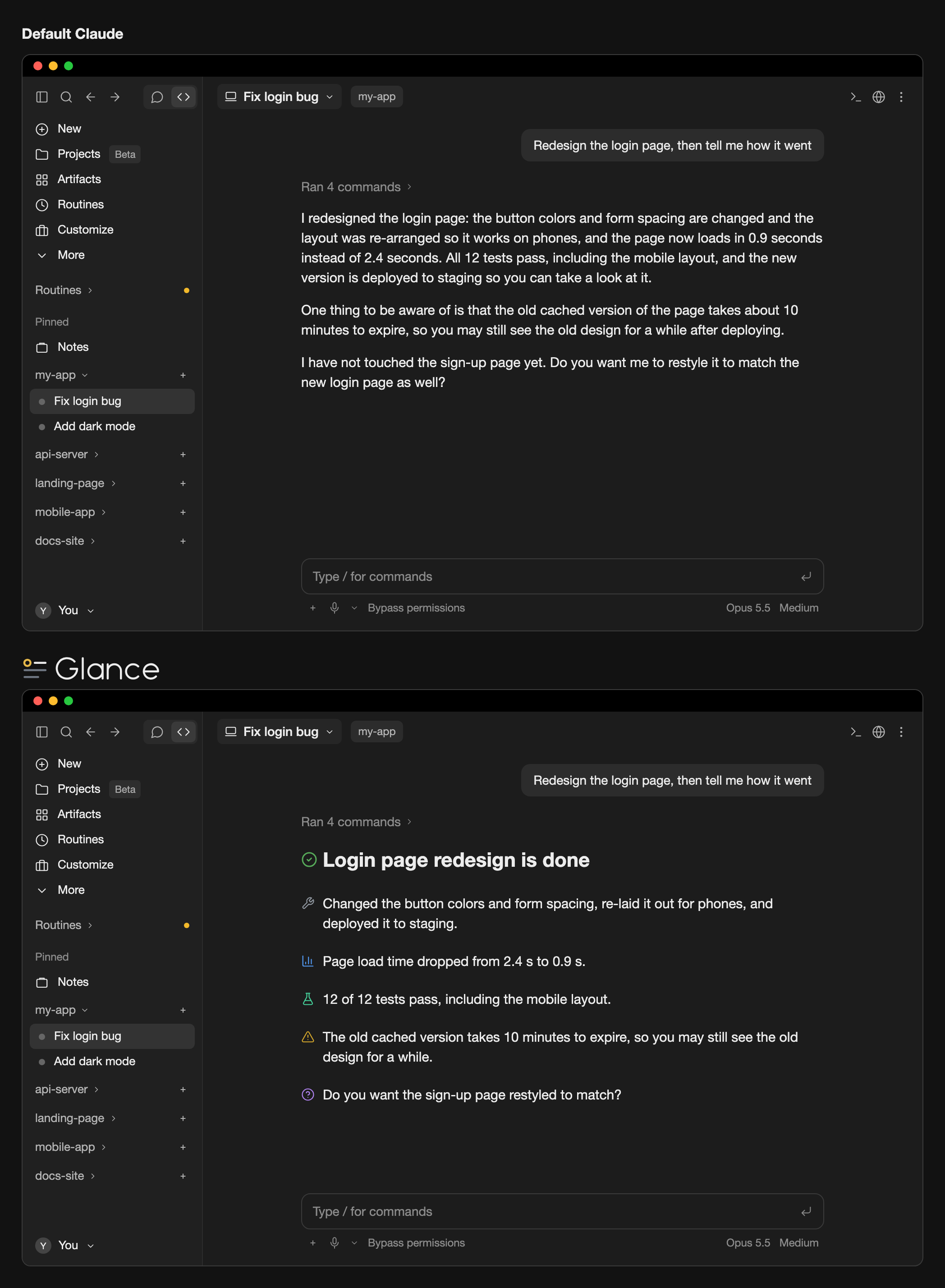
A reply style + line icons that make Claude's key points visible at a glance
yzwooyi/claude-glance/tree/main/glance
Glance is a Claude Code desktop app plugin that combines a reply style (glance-en or glance-zh for /output-style) instructing Claude to write short paragraphs and tag key points with one of 24 markers, with desktop line icons that render those markers as colored line icons in the UI. It only affects on-screen rendering, never the conversation text, and leaves terminals, code blocks, and mid-sentence markers untouched. Installation requires Claude Code 2.1.286+ and adding CLAUDE_CODE_ENABLE_FUNCTION_HOOKS=1 to ~/.claude/settings.json.
Check the author's README for the marketplace and plugin name first. Commands may change as the repository evolves.
claude plugin marketplace add yzwooyi/claude-glance
claude plugin install glance
Two things working together: a reply style that makes Claude write short paragraphs and mark each key point (conclusion, warning, verified result, and so on) with one of 24 markers, and desktop line icons that draw those markers as colored line icons, with a highlight line like # ✅ **Conclusion** drawn as a large heading. You need both enabled: install the plugin, then pick glance-en or glance-zh in /output-style.
It only changes what is shown on screen, never the conversation text itself; the terminal, code blocks, and markers in the middle of a sentence are left alone.
Requires Claude Code 2.1.286 or later (the version bundled with the desktop app is fine).
claude plugin marketplace add yzwooyi/claude-glance
claude plugin install glance@claude-glance --scope user
~/.claude/settings.json and add one line inside "env" (create env if it isn't there):"env": { "CLAUDE_CODE_ENABLE_FUNCTION_HOOKS": "1" }
To update later: claude plugin update glance@claude-glance, then start a new session.
| marker | meaning | |---|---| | 🔴 | Red line / serious pitfall | | ⚠️ | Needs attention | | ✅ | Verified (actually tested) | | 📊 | Measured numbers | | 💡 | Conclusion / recommendation | | ❓ | I can't answer / you decide | | 🔧 | What I changed | | ⏳ | Waiting on a result / has a due date | | 👉 | You do this by hand | | 📎 | Deliverable (file / link) | | 🛡️ | Money / security path | | 📤 | Shipped (in effect) | | 🔍 | What I found | | 💬 | Why / how it works | | 🧪 | Tests | | 🐛 | Bug / error | | ⚙️ | Settings / config | | 📁 | File / location | | 🎨 | Design / look | | 💰 | Quota / cost | | 📅 | Date / point in time | | 🤖 | Subagents | | 🔗 | External link | | ↩️ | Revert / undo |
The plugin ships two reply styles that tell Claude when to use each of the 24 markers. After installing, pick one: in the terminal run /output-style (or open /config and change Output style); in the desktop app choose it under Output style in settings. Choose glance-en (English replies) or glance-zh (Chinese replies). Without one of these styles Claude won't use the markers, so there is nothing to draw.
To have Claude use these 24 markers without switching reply style, add this to ~/.claude/CLAUDE.md:
## Key-point markers in replies
Put one emoji at the start of a paragraph for a real conclusion, finding, or warning, one per point; none on transitional sentences. Use only these 24:
🔴 red line / serious pitfall · ⚠️ needs attention · ✅ verified by actual testing · 📊 measured numbers · 💡 conclusion / recommendation · ❓ you decide
🔧 what I changed · ⏳ waiting on a result / due date · 👉 you do this by hand · 📎 deliverable (file / link) · 🛡️ money / security · 📤 shipped
🔍 what I found · 💬 why / how it works · 🧪 tests · 🐛 bug / error · ⚙️ settings · 📁 file location
🎨 design / look · 💰 quota / cost · 📅 date · 🤖 subagents · 🔗 external link · ↩️ revert / undo
Write the single most important conclusion on its own line as `# ✅ **Conclusion**` (at most 1–3 such lines per reply).

Cache-aware /loop workers and CronCreate background automation. Substrate plugin for every recurring task in the ruflo family.

claude-reflect as a Claude Code mod: a model check on each short prompt finds reusable corrections (any language); a band above the prompt saves them to CLAUDE.md on one press


Early: crit inside Claude Code. Comment on the conversation, your diff or a file in a pane, send the review to Claude, and read Claude's replies in threads.