
nogu66@nogu66
nogu66/claude-code/tree/main/git-ops
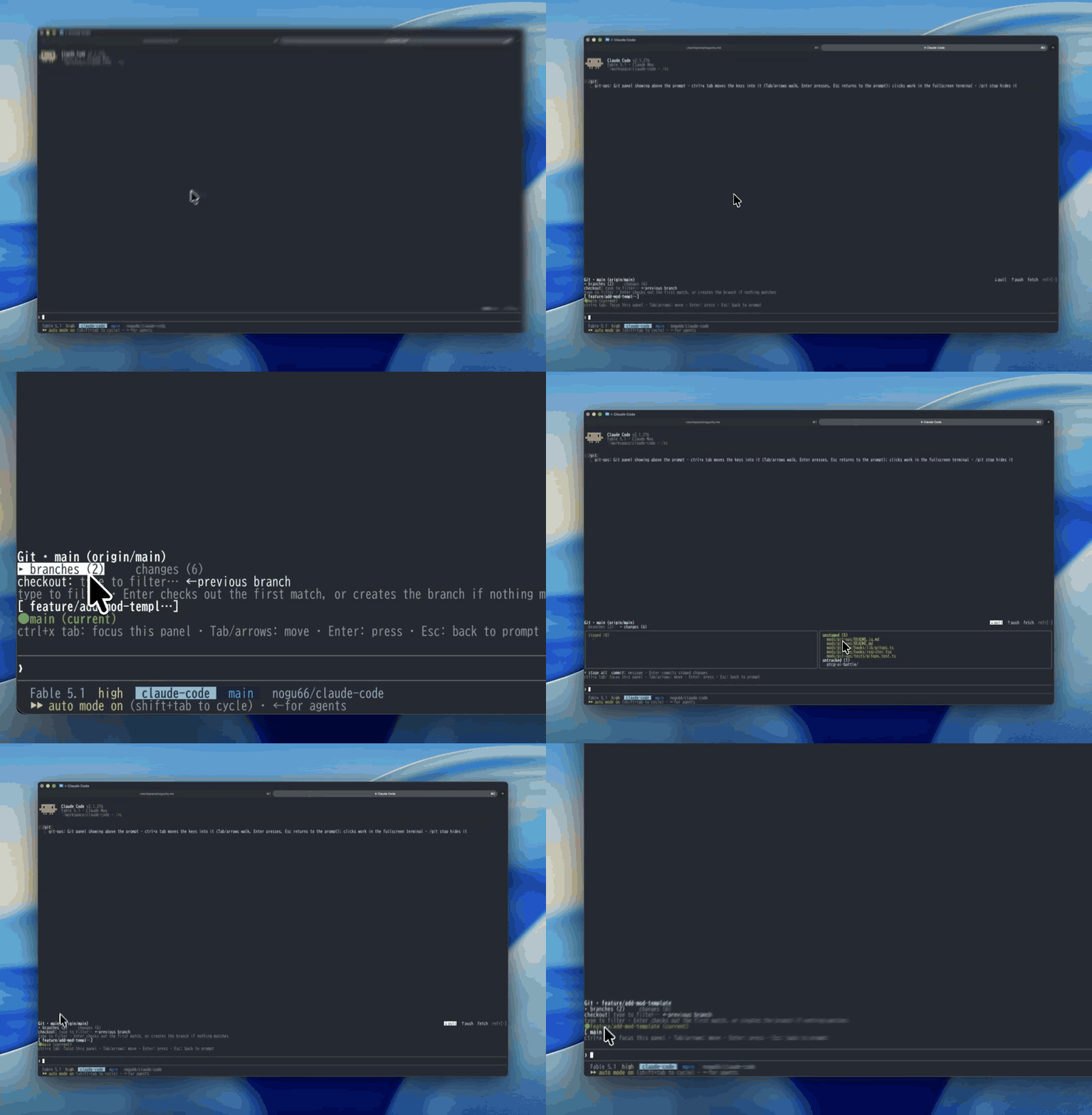
A Claude Mod (Claude Code function-hooks plugin): /git draws a clickable panel above the prompt for everyday git — pick a branch with a button (or filter + Enter, or a digit key), confirm, and it checks out; pull/push/fetch, stage-all and commit are buttons too. No force-push, reset or rebase exposed.
nogu66/claude-code/tree/main/git-ops
A Claude Mod (a Claude Code plugin built on function hooks): /git draws a clickable git
panel in the band above the prompt. Pick a branch with a button, confirm, and it checks out —
plus pull / push / fetch, stage-all and commit, without typing a git command.

Git · main (origin/main, ahead 4)              ↓ pull  ↑ push  fetch  refresh
▸ branches (12)     changes (13)
checkout: type to filter…            ← previous branch
[ feat/sandbox-rewrite ]       [ feature/seo-optimization ]
[ fix/sandbox-trailing-slash ] ● main (current)
[ feat/github-link-card ]      [ pensive-lamport ]
It shells out to plain git through $.process.run (an argv array, never a shell string), so
it needs no auth or config of its own: whatever git already resolves in the current working
directory — remotes, credentials, upstream tracking — is what runs.
Deliberately limited to safe, everyday operations: status, branch listing, checkout (existing or new branch), pull, push, fetch, stage-all, commit. No force-push, reset, rebase or clean — a panel button shouldn't put a destructive operation one click away.
CLAUDE_CODE_ENABLE_FUNCTION_HOOKS=1.
Function hooks are early-access and their API can change; builds without them simply ignore
this plugin's hooks module.git on PATH, and a git repository as the working directory./plugin marketplace add nogu66/claude-code
/plugin install git-ops@nogu-marketplace
Or try it without installing:
git clone https://github.com/nogu66/claude-code.git
cd claude-code/git-ops
claude --plugin-dir .        # .claude/settings.json here turns function hooks on
Then run /git inside any git repository.
/git (or /git show) shows the panel; /git stop hides it.
Move the keys into the panel first. Opening the panel leaves your keystrokes with the normal
prompt — text meant for the filter box, or a digit hotkey, never reaches the panel. Press
ctrl+x tab to focus it; then Tab/arrows move, Enter presses, Esc returns to the prompt.
Mouse clicks only work where the terminal reports them (the fullscreen layout).
↓ pull, ↑ push,
fetch, refresh on the right. They act on the current branch's existing upstream.branches (n) and changes (n). Only one body is drawn at a time, which keeps the
band short.branches tab — built for getting to another branch quickly:
● name (current) label instead;1–9, the
first nine switchable branches);/-segment
prefix, then substring), and the line beneath says what Enter will do —
Enter → checkout <best match>, or Enter → create new branch <name> when nothing matches;← previous branch — git checkout -;Check out <branch>? · [ OK ] / [ cancel ], hotkeys y / n), with a warning when
there are uncommitted changes.changes tab — staged (green) on the left, unstaged (yellow) and untracked on the right;
below them + stage all (git add -A) and a commit box (Enter runs git commit -m).Checkout asks first. Everything else — pull, push, fetch, stage all, commit — runs the moment
you click or press Enter, exactly as if you had typed the git command. push reaches outside
your machine.
The same argv builders, without the panel:
| Command | Runs |
|---|---|
| /git status | git status |
| /git branch | git branch |
| /git checkout <branch> | git checkout <branch> |
| /git checkout -b <branch> | git checkout -b <branch> |
| /git back | git checkout - |
| /git pull · /git push · /git fetch | the same, no flags |
| /git stage | git add -A |
| /git commit <message> | git commit -m <message> |
| /git help | prints this list |
Text subcommands run immediately, without the confirmation step.
refresh click — not when git runs elsewhere
(for instance in a Bash tool call).- and whitespace
(so a name can't be read as a git flag); git itself rejects anything else invalid.next(e) so
they stack, but that combination isn't tested.bun test # pure logic in hooks/lib/gitops.ts — no $ or UI to mock
claude plugin validate . # lists the hooked events and $ calls
hooks/register.tsx — the only file that touches $: registers /git, runs git, draws the
AbovePrompt panel, and holds its in-memory UI state.hooks/lib/gitops.ts — pure functions: command parsing, git argv builders, branch/status
output parsing, branch filtering and the Enter-target decision, column layout.tests/gitops.test.ts — tests for the above.For exact types, run /plugin-types in a session with function hooks on; it writes
.claude/types/claude-code.d.ts.
MIT
Check the author's README for the marketplace and plugin name first. Commands may change as the repository evolves.
claude plugin marketplace add nogu66/claude-code
claude plugin install git-ops
A Claude Mod (a Claude Code plugin built on function hooks): /git draws a clickable git
panel in the band above the prompt. Pick a branch with a button, confirm, and it checks out —
plus pull / push / fetch, stage-all and commit, without typing a git command.
Git · main (origin/main, ahead 4)              ↓ pull  ↑ push  fetch  refresh
▸ branches (12)     changes (13)
checkout: type to filter…            ← previous branch
[ feat/sandbox-rewrite ]       [ feature/seo-optimization ]
[ fix/sandbox-trailing-slash ] ● main (current)
[ feat/github-link-card ]      [ pensive-lamport ]
It shells out to plain git through $.process.run (an argv array, never a shell string), so
it needs no auth or config of its own: whatever git already resolves in the current working
directory — remotes, credentials, upstream tracking — is what runs.
Deliberately limited to safe, everyday operations: status, branch listing, checkout (existing or new branch), pull, push, fetch, stage-all, commit. No force-push, reset, rebase or clean — a panel button shouldn't put a destructive operation one click away.
CLAUDE_CODE_ENABLE_FUNCTION_HOOKS=1.
Function hooks are early-access and their API can change; builds without them simply ignore
this plugin's hooks module.git on PATH, and a git repository as the working directory./plugin marketplace add nogu66/claude-code
/plugin install git-ops@nogu-marketplace
Or try it without installing:
git clone https://github.com/nogu66/claude-code.git
cd claude-code/git-ops
claude --plugin-dir .        # .claude/settings.json here turns function hooks on
Then run /git inside any git repository.
/git (or /git show) shows the panel; /git stop hides it.
Move the keys into the panel first. Opening the panel leaves your keystrokes with the normal
prompt — text meant for the filter box, or a digit hotkey, never reaches the panel. Press
ctrl+x tab to focus it; then Tab/arrows move, Enter presses, Esc returns to the prompt.
Mouse clicks only work where the terminal reports them (the fullscreen layout).
↓ pull, ↑ push,
fetch, refresh on the right. They act on the current branch's existing upstream.branches (n) and changes (n). Only one body is drawn at a time, which keeps the
band short.branches tab — built for getting to another branch quickly:
● name (current) label instead;1–9, the
first nine switchable branches);/-segment
prefix, then substring), and the line beneath says what Enter will do —
Enter → checkout <best match>, or Enter → create new branch <name> when nothing matches;← previous branch — git checkout -;Check out <branch>? · [ OK ] / [ cancel ], hotkeys y / n), with a warning when
there are uncommitted changes.changes tab — staged (green) on the left, unstaged (yellow) and untracked on the right;
below them + stage all (git add -A) and a commit box (Enter runs git commit -m).Checkout asks first. Everything else — pull, push, fetch, stage all, commit — runs the moment
you click or press Enter, exactly as if you had typed the git command. push reaches outside
your machine.
The same argv builders, without the panel:
| Command | Runs |
|---|---|
| /git status | git status |
| /git branch | git branch |
| /git checkout <branch> | git checkout <branch> |
| /git checkout -b <branch> | git checkout -b <branch> |
| /git back | git checkout - |
| /git pull · /git push · /git fetch | the same, no flags |
| /git stage | git add -A |
| /git commit <message> | git commit -m <message> |
| /git help | prints this list |
Text subcommands run immediately, without the confirmation step.
refresh click — not when git runs elsewhere
(for instance in a Bash tool call).- and whitespace
(so a name can't be read as a git flag); git itself rejects anything else invalid.next(e) so
they stack, but that combination isn't tested.bun test # pure logic in hooks/lib/gitops.ts — no $ or UI to mock
claude plugin validate . # lists the hooked events and $ calls
hooks/register.tsx — the only file that touches $: registers /git, runs git, draws the
AbovePrompt panel, and holds its in-memory UI state.hooks/lib/gitops.ts — pure functions: command parsing, git argv builders, branch/status
output parsing, branch filtering and the Enter-target decision, column layout.tests/gitops.test.ts — tests for the above.For exact types, run /plugin-types in a session with function hooks on; it writes
.claude/types/claude-code.d.ts.
MIT

Cache-aware /loop workers and CronCreate background automation. Substrate plugin for every recurring task in the ruflo family.

claude-reflect as a Claude Code mod: a model check on each short prompt finds reusable corrections (any language); a band above the prompt saves them to CLAUDE.md on one press


Early: crit inside Claude Code. Comment on the conversation, your diff or a file in a pane, send the review to Claude, and read Claude's replies in threads.