
natsukium@natsukium
natsukium/claude-code-figures-plugin
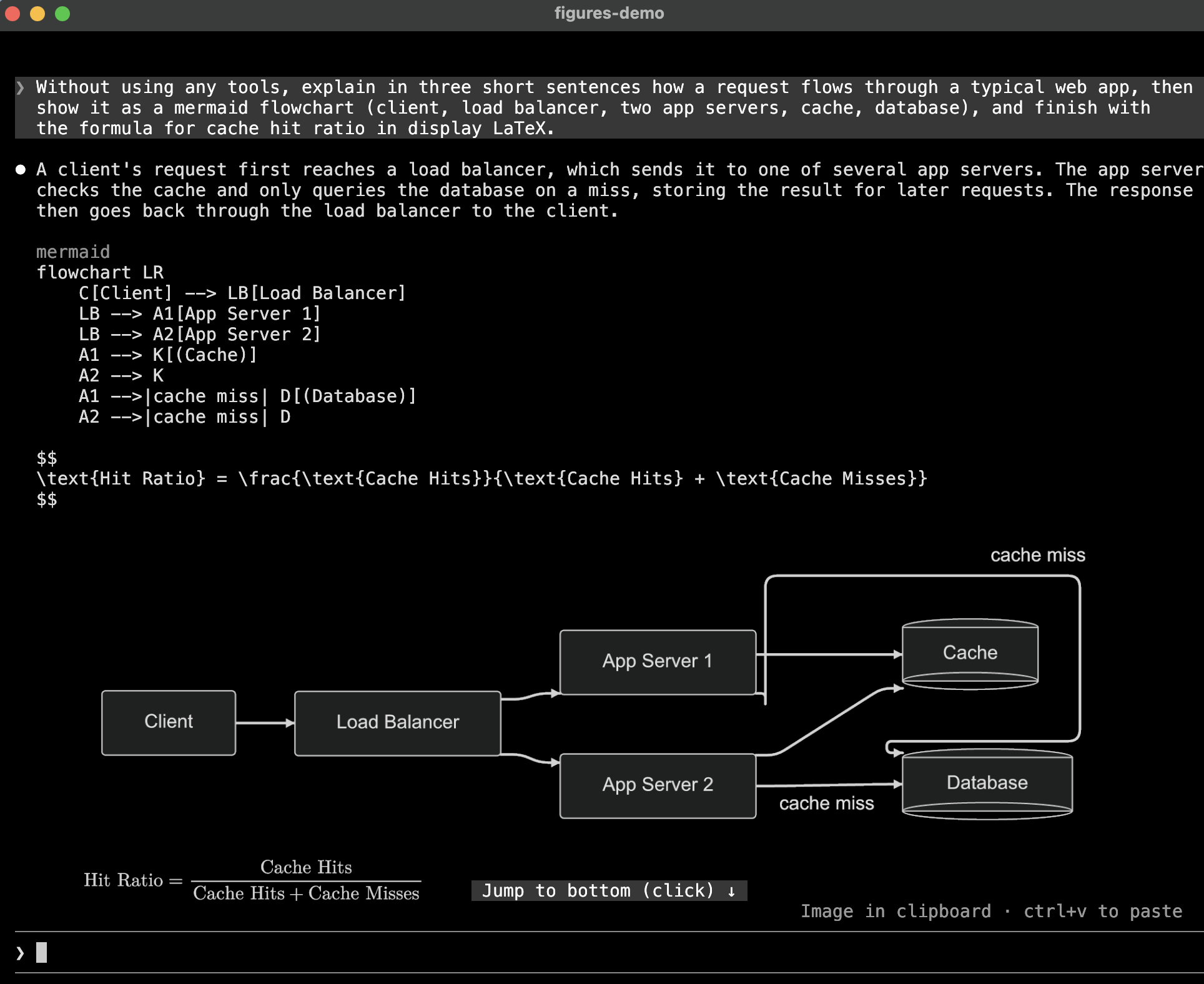
Draw diagrams, LaTeX math, and tool-result images inline in kitty-graphics terminals
natsukium/claude-code-figures-plugin
A Claude Code mod that draws diagrams, LaTeX math, and tool-result images inline in the terminal transcript, using the kitty graphics protocol.

mermaid, dot (or graphviz), d2, or svg in Claude's
reply is rendered and drawn under the reply. The code stays visible above the picture.$$ … $$, \[ … \], or a math, latex, or tex code block, is
typeset with MathJax. Inline $…$ stays text, since a picture cannot
sit inside a line, and a latex block holding a whole document (\documentclass) stays code.Read on a PNG, JPEG, GIF, WebP, or SVG file, or a screenshot an MCP
tool returns, is drawn under the tool's row, where Claude Code otherwise shows only a size line;
an SVG read only in part is left alone. In a collapsed tool group they are thumbnails; ctrl+o
unfolds the group and draws them full size. A PNG, JPEG, GIF, WebP, or SVG Claude sends to another
device with SendUserFile is drawn under its attachment line too, so it is on screen when you
come back to the terminal. It is read from disk when the row is first drawn; overwriting the file
later leaves that picture as it was.A picture the size caps would shrink below 60% of its natural size grows up to the terminal's
height, and one still smaller says so under it, such as shown at 43% · /figures to enlarge.
/figures opens a pane with the session's pictures, starting on the newest one drawn too small to
read, or else the newest. p and n step through them, o opens the current one with open
(macOS) or xdg-open, and Escape or your next prompt closes the pane.

The plugin also ships a diagrams skill, which tells Claude which languages are drawn and how to
write them so they render.
Each rendered PNG is cached under $TMPDIR/claude-figures/, named by a hash of the source and the
theme, so a resumed session draws its pictures again without re-rendering. Files older than seven
days are removed when a session starts.
Claude Code 2.1.287 or later, with mods (function-hook plugins) enabled, in a terminal it treats as
kitty-graphics capable; see Terminal support. Each kind of picture also needs
programs on PATH:
| Picture | Needs |
| -------------------------- | ---------------------------------------------------------------------------------------------------------------------------------------------------------------------------- |
| mermaid | mmdr or mmdc; resvg recommended |
| dot, graphviz | Graphviz's dot and resvg |
| d2 | d2 and resvg |
| svg, math | resvg |
| Tool images other than PNG | magick (ImageMagick) or sips (built into macOS) |
scale option.claude plugin marketplace add natsukium/claude-code-figures-plugin
claude plugin install figures@figures
Install mmdr with cargo install mermaid-rs-renderer.
Set these with /config or claude plugin configure figures.
| Option | Default | Meaning |
| --------------------- | ------------- | --------------------------------------------------------------------------------------------------------------------------------------------------------------------------------- |
| theme | auto | auto follows Claude Code's theme; or dark, default, forest, neutral, modern (mmdr only; mmdc draws it as default). Math is drawn light on dark and dark otherwise |
| background | transparent | Diagram background; transparent lets the terminal's background show through |
| scale | 2 | Pixel density of the picture; above 1 needs resvg |
| cell_width_px | 8 | Assumed width of one terminal cell, in the pixels diagrams are laid out in |
| cell_aspect | 2.1 | Assumed height-to-width ratio of one terminal cell |
| max_columns | 120 | Widest a picture may be, in cells; it is also kept inside the terminal |
| max_rows | 30 | Tallest a picture may be before it is grown for legibility, in cells |
| renderers | (empty) | Renderer ids in preference order, comma-separated; see below |
| tool_images | true | Draw images found in tool results |
| tool_image_max_rows | 12 | Tallest a tool-result thumbnail may be, in cells |
renderers picks and orders the programs that draw each language. The ids are mmdr and mmdc
(mermaid), dot, d2, svg, and mathjax. A language with any of its renderers listed uses only
those, in the listed order; the others keep the default. So mmdc draws mermaid with mmdc alone,
and mmdc,mmdr tries mmdc first. An id no renderer has is reported when a session starts.
Claude Code enables pictures only when the terminal's XTVERSION reply names kitty (0.28.0 or later)
or Ghostty. A terminal that answers the kitty graphics query correctly under any other name still
gets the alt text, such as [mermaid diagram 1]. Setting TERM or TERM_PROGRAM has no effect.
To use the plugin on such a terminal, set the override Claude Code reads:
CLAUDE_CODE_FORCE_TERMINAL_IMAGES=1 claude
This also skips Claude Code's tmux check. Inside tmux, the pictures additionally need
set -g allow-passthrough on.
To see what Claude Code decided, start it with --debug and look for the Terminal capabilities:
line in the debug log.
cell_width_px and cell_aspect, since mods are
not told the terminal's cell size in pixels. Adjust them if pictures look stretched.theme=auto follows Claude Code's own
theme (/config): a light variant draws light pictures, the others dark. When Claude Code's
theme is itself auto, its resolved value is not exposed, so COLORFGBG decides where the
terminal exports it, and dark otherwise.A --> B -->|ok| C) is misparsed; write one edge per line. Such a block renders
without an error, so it is not handed to mmdc; set renderers to mmdc to avoid mmdr.\text{日本語}, is drawn by resvg with a system
font./figures pane shares the screen with the prompt, so in a short terminal it has only a few
rows; o opens the picture at full size outside the terminal.tsconfig.json extends the engine's typings in .claude-plugin/types/, which Vite and Vitest read
as well as tsc. Claude Code writes them only when it loads the plugin from this folder, and no
command writes them alone, so pnpm types starts claude -p --plugin-dir . with a dummy API key
and ignores the failed request once the typings exist. build, test, and typecheck run it
first. Claude Code is a dev dependency, so the scripts and pnpm exec claude use the version
pinned in pnpm-lock.yaml, whatever claude is on PATH.
pnpm install
pnpm build              # regenerate hooks/vendor/
pnpm test               # unit tests (Vitest, tests/unit/*.spec.ts)
pnpm typecheck
pnpm exec claude plugin validate .
pnpm exec claude plugin test .    # hooks through the engine (tests/engine/*.test.ts)
Claude Code loads hooks/ as TypeScript source, so only third-party code is built. pnpm build
bundles MathJax and @noble/hashes with Vite into hooks/vendor/, which is committed so the
repository stays installable as is. A hooks module imports no file over 1 MiB and cannot import
modules at run time, so the build splits the bundle into chunks and writes each of the font's
glyph ranges as JSON, which the plugin reads the first time a formula uses it.
The engine refuses a module that passes $ across an import, so hooks/register.tsx wraps what
the plugin needs from $ in an Io object (hooks/io.ts), and every other module takes that.
Apache-2.0. hooks/vendor/ is built from MathJax and its
New Computer Modern font, both Apache-2.0, and
@noble/hashes, MIT.
Check the author's README for the marketplace and plugin name first. Commands may change as the repository evolves.
claude plugin marketplace add natsukium/claude-code-figures-plugin
claude plugin install figures
A Claude Code mod that draws diagrams, LaTeX math, and tool-result images inline in the terminal transcript, using the kitty graphics protocol.
mermaid, dot (or graphviz), d2, or svg in Claude's
reply is rendered and drawn under the reply. The code stays visible above the picture.$$ … $$, \[ … \], or a math, latex, or tex code block, is
typeset with MathJax. Inline $…$ stays text, since a picture cannot
sit inside a line, and a latex block holding a whole document (\documentclass) stays code.Read on a PNG, JPEG, GIF, WebP, or SVG file, or a screenshot an MCP
tool returns, is drawn under the tool's row, where Claude Code otherwise shows only a size line;
an SVG read only in part is left alone. In a collapsed tool group they are thumbnails; ctrl+o
unfolds the group and draws them full size. A PNG, JPEG, GIF, WebP, or SVG Claude sends to another
device with SendUserFile is drawn under its attachment line too, so it is on screen when you
come back to the terminal. It is read from disk when the row is first drawn; overwriting the file
later leaves that picture as it was.A picture the size caps would shrink below 60% of its natural size grows up to the terminal's
height, and one still smaller says so under it, such as shown at 43% · /figures to enlarge.
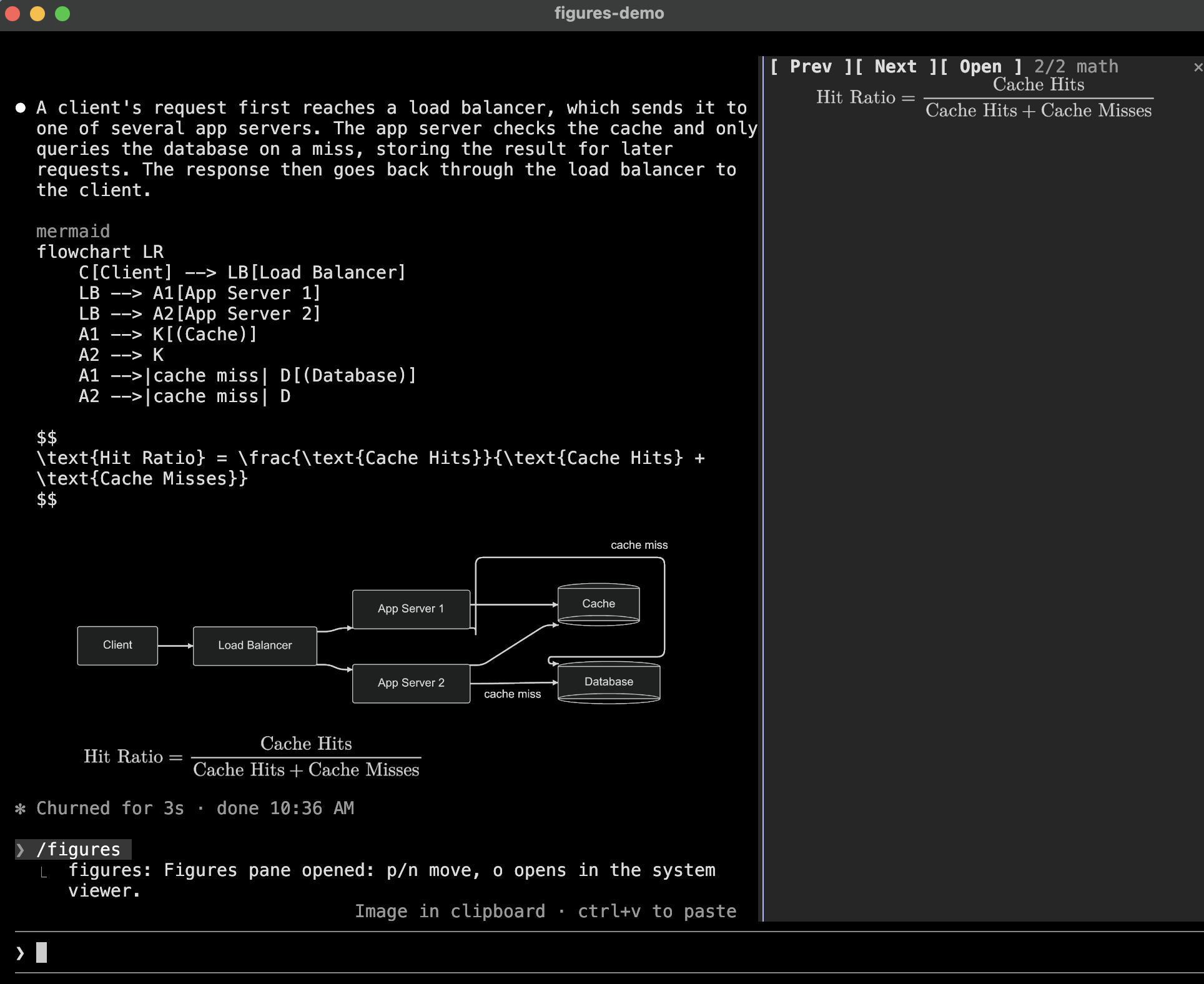
/figures opens a pane with the session's pictures, starting on the newest one drawn too small to
read, or else the newest. p and n step through them, o opens the current one with open
(macOS) or xdg-open, and Escape or your next prompt closes the pane.
The plugin also ships a diagrams skill, which tells Claude which languages are drawn and how to
write them so they render.
Each rendered PNG is cached under $TMPDIR/claude-figures/, named by a hash of the source and the
theme, so a resumed session draws its pictures again without re-rendering. Files older than seven
days are removed when a session starts.
Claude Code 2.1.287 or later, with mods (function-hook plugins) enabled, in a terminal it treats as
kitty-graphics capable; see Terminal support. Each kind of picture also needs
programs on PATH:
| Picture | Needs |
| -------------------------- | ---------------------------------------------------------------------------------------------------------------------------------------------------------------------------- |
| mermaid | mmdr or mmdc; resvg recommended |
| dot, graphviz | Graphviz's dot and resvg |
| d2 | d2 and resvg |
| svg, math | resvg |
| Tool images other than PNG | magick (ImageMagick) or sips (built into macOS) |
scale option.claude plugin marketplace add natsukium/claude-code-figures-plugin
claude plugin install figures@figures
Install mmdr with cargo install mermaid-rs-renderer.
Set these with /config or claude plugin configure figures.
| Option | Default | Meaning |
| --------------------- | ------------- | --------------------------------------------------------------------------------------------------------------------------------------------------------------------------------- |
| theme | auto | auto follows Claude Code's theme; or dark, default, forest, neutral, modern (mmdr only; mmdc draws it as default). Math is drawn light on dark and dark otherwise |
| background | transparent | Diagram background; transparent lets the terminal's background show through |
| scale | 2 | Pixel density of the picture; above 1 needs resvg |
| cell_width_px | 8 | Assumed width of one terminal cell, in the pixels diagrams are laid out in |
| cell_aspect | 2.1 | Assumed height-to-width ratio of one terminal cell |
| max_columns | 120 | Widest a picture may be, in cells; it is also kept inside the terminal |
| max_rows | 30 | Tallest a picture may be before it is grown for legibility, in cells |
| renderers | (empty) | Renderer ids in preference order, comma-separated; see below |
| tool_images | true | Draw images found in tool results |
| tool_image_max_rows | 12 | Tallest a tool-result thumbnail may be, in cells |
renderers picks and orders the programs that draw each language. The ids are mmdr and mmdc
(mermaid), dot, d2, svg, and mathjax. A language with any of its renderers listed uses only
those, in the listed order; the others keep the default. So mmdc draws mermaid with mmdc alone,
and mmdc,mmdr tries mmdc first. An id no renderer has is reported when a session starts.
Claude Code enables pictures only when the terminal's XTVERSION reply names kitty (0.28.0 or later)
or Ghostty. A terminal that answers the kitty graphics query correctly under any other name still
gets the alt text, such as [mermaid diagram 1]. Setting TERM or TERM_PROGRAM has no effect.
To use the plugin on such a terminal, set the override Claude Code reads:
CLAUDE_CODE_FORCE_TERMINAL_IMAGES=1 claude
This also skips Claude Code's tmux check. Inside tmux, the pictures additionally need
set -g allow-passthrough on.
To see what Claude Code decided, start it with --debug and look for the Terminal capabilities:
line in the debug log.
cell_width_px and cell_aspect, since mods are
not told the terminal's cell size in pixels. Adjust them if pictures look stretched.theme=auto follows Claude Code's own
theme (/config): a light variant draws light pictures, the others dark. When Claude Code's
theme is itself auto, its resolved value is not exposed, so COLORFGBG decides where the
terminal exports it, and dark otherwise.A --> B -->|ok| C) is misparsed; write one edge per line. Such a block renders
without an error, so it is not handed to mmdc; set renderers to mmdc to avoid mmdr.\text{日本語}, is drawn by resvg with a system
font./figures pane shares the screen with the prompt, so in a short terminal it has only a few
rows; o opens the picture at full size outside the terminal.tsconfig.json extends the engine's typings in .claude-plugin/types/, which Vite and Vitest read
as well as tsc. Claude Code writes them only when it loads the plugin from this folder, and no
command writes them alone, so pnpm types starts claude -p --plugin-dir . with a dummy API key
and ignores the failed request once the typings exist. build, test, and typecheck run it
first. Claude Code is a dev dependency, so the scripts and pnpm exec claude use the version
pinned in pnpm-lock.yaml, whatever claude is on PATH.
pnpm install
pnpm build              # regenerate hooks/vendor/
pnpm test               # unit tests (Vitest, tests/unit/*.spec.ts)
pnpm typecheck
pnpm exec claude plugin validate .
pnpm exec claude plugin test .    # hooks through the engine (tests/engine/*.test.ts)
Claude Code loads hooks/ as TypeScript source, so only third-party code is built. pnpm build
bundles MathJax and @noble/hashes with Vite into hooks/vendor/, which is committed so the
repository stays installable as is. A hooks module imports no file over 1 MiB and cannot import
modules at run time, so the build splits the bundle into chunks and writes each of the font's
glyph ranges as JSON, which the plugin reads the first time a formula uses it.
The engine refuses a module that passes $ across an import, so hooks/register.tsx wraps what
the plugin needs from $ in an Io object (hooks/io.ts), and every other module takes that.
Apache-2.0. hooks/vendor/ is built from MathJax and its
New Computer Modern font, both Apache-2.0, and
@noble/hashes, MIT.

Substrate plugin for Ruflo memory: AgentDB controller bridge (15 agentdb_* MCP tools), RuVector ONNX embeddings (10 embeddings_* tools incl. RaBitQ 32x quantization), and WASM HNSW pattern router (3 ruvllm_hnsw_* tools). As a mod (ADR-445): opt-in safe recall into the prompt, a write guard that keeps secrets out of memory, /agentdb, and a status file the console shows

Build, format, optimize, and review interactive Power BI reports, with a report pane that follows the pbir CLI and shows what Claude reads and changes.


Shows unread AMP messages above the prompt, in the status line and as a toast, and can wake an idle Claude Code session to read them. Needs Claude Code 2.1.287 or later.
