
KyongSik-Yoon@KyongSik-Yoon
KyongSik-Yoon/claude-mods/tree/main/desktop-look
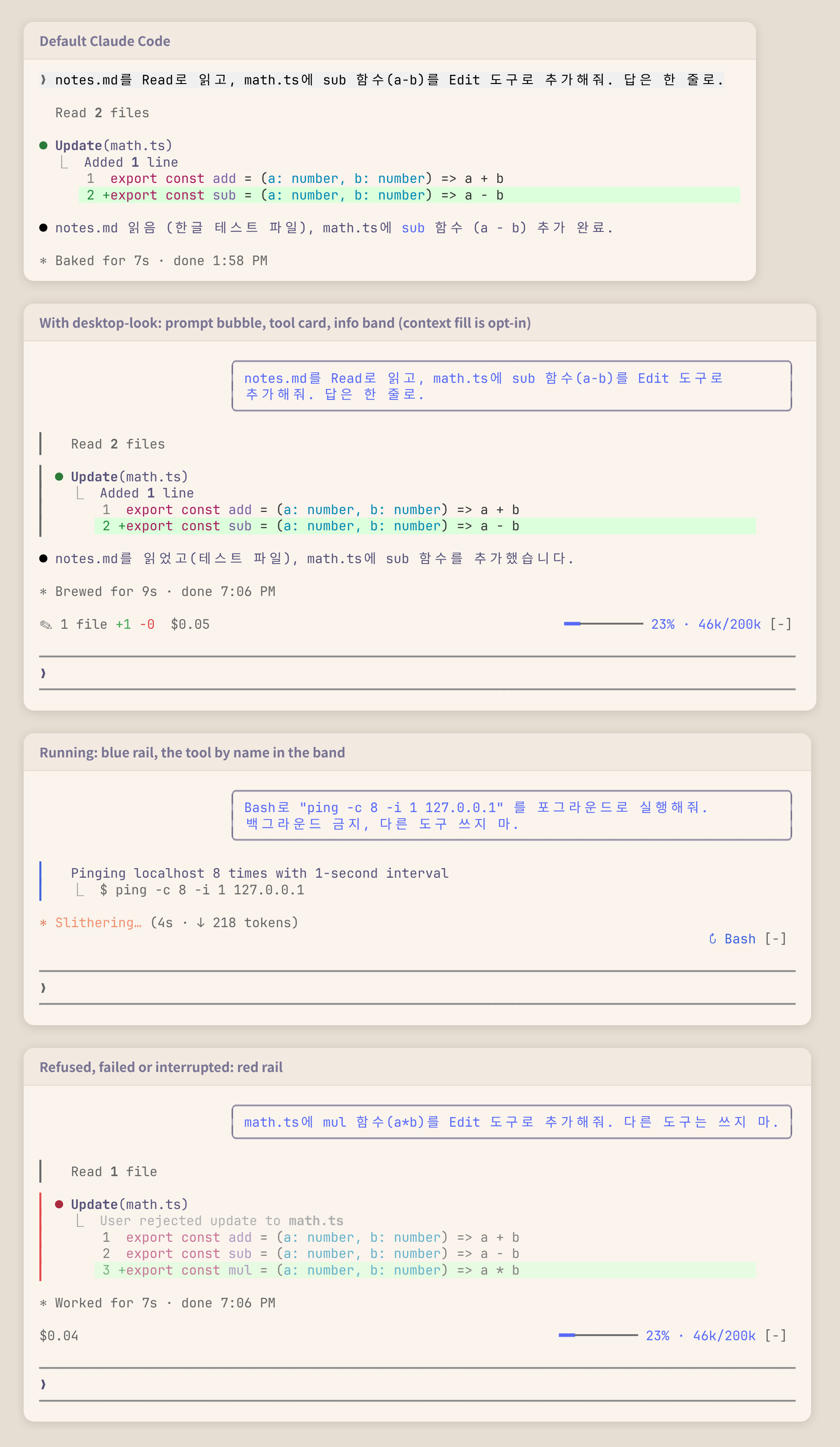
Make the terminal transcript look like the Claude Code desktop app: prompt bubbles, tool cards and an info band
KyongSik-Yoon/claude-mods/tree/main/desktop-look
A Claude Code mod that makes the terminal transcript look more like the desktop app.

✎ 2 files +7 -0) and spent ($0.05) on the left, the tools running (↻ Read ×3, Grep, or ↻ 4 running when narrow) on the right; hidden when there is nothing to showclaude plugin marketplace add KyongSik-Yoon/claude-mods
claude plugin install desktop-look@kyongsik-mods
Then run /reload-plugins or start a new session. Requires a Claude Code build with mods support (tested on 2.1.289, fullscreen and light/dark themes).
No setup needed. To change one, run /plugin configure desktop-look@kyongsik-mods (or open /config):
| Option | Default | |
| --- | --- | --- |
| Bubble width | 75% | 60%, 75% or 90% of the terminal |
| Info band | on | The band above the prompt |
| Band: model | off | Model and effort, for a status line that does not show them |
| Band: context | off | Context fill, for a status line that does not show it: blue while calm, yellow from 300k tokens or 70%, red from 500k tokens or 90%, whichever comes first |
The cost is what Claude Code computes at API prices; on a subscription it is not what you are billed.
UserMessage (your own prompts only, not task notifications or other sessions' messages) is drawn as a right-aligned Box with a round border.ToolUse, ToolGroup, ToolProgress and ToolResult are separate render sites, so one border cannot span them. Each wraps the engine's own row (await next(e)) and adds an absolutely positioned one-column rail that stretches to the row's height, skipping the blank line the engine opens a tool row with.isRunning, isErrored, isInterrupted, and the calls of a group.AbovePrompt hook reading values in $.state, written by tool.call (tools running, and the +/- lines of each Edit and Write result's patch), session.measure (cost, context) and turn.step (model). A new session (/clear) starts the tally over; a reload keeps it.claude plugin validate .
claude plugin test .
Check the author's README for the marketplace and plugin name first. Commands may change as the repository evolves.
claude plugin marketplace add KyongSik-Yoon/claude-mods
claude plugin install desktop-look
A Claude Code mod that makes the terminal transcript look more like the desktop app.
✎ 2 files +7 -0) and spent ($0.05) on the left, the tools running (↻ Read ×3, Grep, or ↻ 4 running when narrow) on the right; hidden when there is nothing to showclaude plugin marketplace add KyongSik-Yoon/claude-mods
claude plugin install desktop-look@kyongsik-mods
Then run /reload-plugins or start a new session. Requires a Claude Code build with mods support (tested on 2.1.289, fullscreen and light/dark themes).
No setup needed. To change one, run /plugin configure desktop-look@kyongsik-mods (or open /config):
| Option | Default | |
| --- | --- | --- |
| Bubble width | 75% | 60%, 75% or 90% of the terminal |
| Info band | on | The band above the prompt |
| Band: model | off | Model and effort, for a status line that does not show them |
| Band: context | off | Context fill, for a status line that does not show it: blue while calm, yellow from 300k tokens or 70%, red from 500k tokens or 90%, whichever comes first |
The cost is what Claude Code computes at API prices; on a subscription it is not what you are billed.
UserMessage (your own prompts only, not task notifications or other sessions' messages) is drawn as a right-aligned Box with a round border.ToolUse, ToolGroup, ToolProgress and ToolResult are separate render sites, so one border cannot span them. Each wraps the engine's own row (await next(e)) and adds an absolutely positioned one-column rail that stretches to the row's height, skipping the blank line the engine opens a tool row with.isRunning, isErrored, isInterrupted, and the calls of a group.AbovePrompt hook reading values in $.state, written by tool.call (tools running, and the +/- lines of each Edit and Write result's patch), session.measure (cost, context) and turn.step (model). A new session (/clear) starts the tally over; a reload keeps it.claude plugin validate .
claude plugin test .

Substrate plugin for Ruflo memory: AgentDB controller bridge (15 agentdb_* MCP tools), RuVector ONNX embeddings (10 embeddings_* tools incl. RaBitQ 32x quantization), and WASM HNSW pattern router (3 ruvllm_hnsw_* tools). As a mod (ADR-445): opt-in safe recall into the prompt, a write guard that keeps secrets out of memory, /agentdb, and a status file the console shows

Build, format, optimize, and review interactive Power BI reports, with a report pane that follows the pbir CLI and shows what Claude reads and changes.


Shows unread AMP messages above the prompt, in the status line and as a toast, and can wake an idle Claude Code session to read them. Needs Claude Code 2.1.287 or later.
