
rodbegbie@rodbegbie
rodbegbie/rod-claude-mods/tree/main/plugins/context-bar
Draws the context window as a stacked bar above the prompt, toggled with /context-bar
rodbegbie/rod-claude-mods/tree/main/plugins/context-bar
Rod Begbie's mods for Claude Code, published as a plugin marketplace.
Add the marketplace, then install the mods you want:
/plugin marketplace add rodbegbie/rod-claude-mods
/plugin install context-bar@rod-claude-mods
/plugin install pro-limits@rod-claude-mods
/plugin install sportsball@rod-claude-mods
To try the marketplace from a local checkout, point at the folder instead:
/plugin marketplace add /path/to/rod-claude-mods
| Mod | What it does | | --- | --- | | context-bar | Stacked context-window bar above the prompt | | pro-limits | 5-hour and weekly usage-limit gauges above the prompt | | sportsball | Live score of a followed team above the prompt |
Draws the context window as a stacked bar above the prompt, with one
colour per category as in /context. A legend underneath lists each
category's tokens and share of the window, then the total.
Toggle it with /context-bar. It starts on, and refreshes at session
start and after every turn.
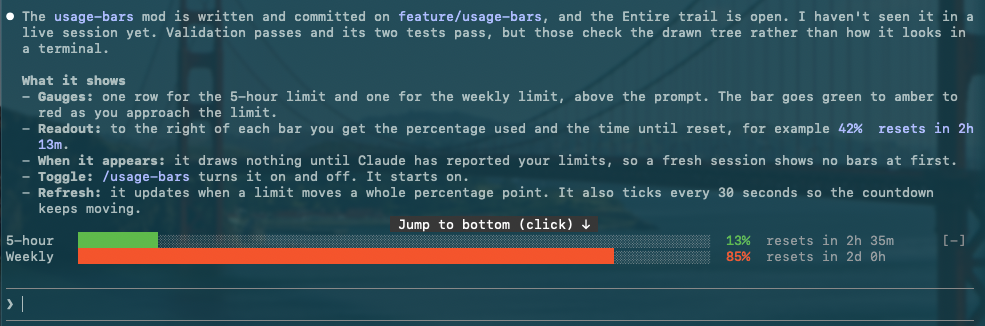
Draws one gauge per subscription limit (5-hour and weekly) above the prompt. Each bar shifts from green through amber to red as you approach the limit, followed by the percentage used and the time until that window resets. Windows only appear once Claude has reported them, so nothing shows on API-key accounts.

A toast pops up each time a window passes 20%, 40%, 60%, 80%, 90% or 95%. Hit 100% and the percentage turns into two skulls. Readings seen at session start never toast, only crossings after that.
Toggle it with /pro-limits. It starts on, refreshes whenever a limit
moves a whole point, and ticks every 30 seconds to keep the countdown
honest.
Follows one team and draws its live game above the prompt: a sport emoji, both team names, the score, the game status and the competition, on a single line. A "Powered by SportScore" credit, linking to sportscore.com, sits at the right of that row. It appears once, on the last game row, however many teams are shown, and drops to a row of its own underneath only when the terminal is too narrow for both. The band is empty when the team has no live game.
<!-- screenshot placeholder -->/follow-team <name> follows a team, for example
/follow-team golden state valkyries or /follow-team club atletico tigre. It searches basketball and football together. If the name
matches more than one team, even exactly, it asks which. Each choice
shows a sport emoji, the team name and the league of its latest game
(left off when the lookup fails or the team has no games). Up to four
teams are offered in a question dialog. More than that opens a pane
with a list, so none are cut off. Dismissing either follows nothing
and keeps your current team. A name that matches a single team is
followed straight away. A team is left out, and named in the reply,
when SportScore's lookup for it returns a different team, as it does
for Rangers F.C. (Glasgow)./unfollow-team [name] stops following./sportsball shows or hides the band. The followed team is kept
across sessions either way.A toast appears when the game moves to a new period (for example
"Half time" or "4th quarter") and at full time, each with the score.
In football, a change of score also toasts (Goal 60', or Score change
if a goal is ruled out), with the match minute when there is one.
Basketball scores change too often, so only periods toast there.
The first reading after a load is silent, so starting Claude mid-game
doesn't toast. /sportsball off mutes toasts without losing track.
Football games also show the match minute next to the status, for
example 2nd half 84'. It comes from a second request per poll, so a
failed lookup just leaves the minute off.
It polls every 30 seconds while a game is live and every 5 minutes otherwise. If a poll fails, the last score stays on screen, dimmed, for up to 10 minutes. Basketball and football are supported.
Scores come from the SportScore public API, which asks for a visible "Powered by SportScore" link, hence the credit row. Terminals without hyperlink support show the URL next to the name.
Team names are coloured from their logos. To do that the mod runs a
short Python 3 script (standard library only) on your machine, once per
logo, and caches the result. This is optional: without python3 the
names simply draw in the default colour. Two things to know about it:
On a Mac without the Command Line Tools the mod skips the script rather than trigger the install dialog.
Each mod lives in its own folder under plugins/ and is listed in
.claude-plugin/marketplace.json. Check the lot with:
claude plugin validate .
claude plugin validate plugins/<mod-name>
claude plugin test plugins/<mod-name>
Check the author's README for the marketplace and plugin name first. Commands may change as the repository evolves.
claude plugin marketplace add rodbegbie/rod-claude-mods
claude plugin install context-bar
Rod Begbie's mods for Claude Code, published as a plugin marketplace.
Add the marketplace, then install the mods you want:
/plugin marketplace add rodbegbie/rod-claude-mods
/plugin install context-bar@rod-claude-mods
/plugin install pro-limits@rod-claude-mods
/plugin install sportsball@rod-claude-mods
To try the marketplace from a local checkout, point at the folder instead:
/plugin marketplace add /path/to/rod-claude-mods
| Mod | What it does | | --- | --- | | context-bar | Stacked context-window bar above the prompt | | pro-limits | 5-hour and weekly usage-limit gauges above the prompt | | sportsball | Live score of a followed team above the prompt |
Draws the context window as a stacked bar above the prompt, with one
colour per category as in /context. A legend underneath lists each
category's tokens and share of the window, then the total.
Toggle it with /context-bar. It starts on, and refreshes at session
start and after every turn.
Draws one gauge per subscription limit (5-hour and weekly) above the prompt. Each bar shifts from green through amber to red as you approach the limit, followed by the percentage used and the time until that window resets. Windows only appear once Claude has reported them, so nothing shows on API-key accounts.
A toast pops up each time a window passes 20%, 40%, 60%, 80%, 90% or 95%. Hit 100% and the percentage turns into two skulls. Readings seen at session start never toast, only crossings after that.
Toggle it with /pro-limits. It starts on, refreshes whenever a limit
moves a whole point, and ticks every 30 seconds to keep the countdown
honest.
Follows one team and draws its live game above the prompt: a sport emoji, both team names, the score, the game status and the competition, on a single line. A "Powered by SportScore" credit, linking to sportscore.com, sits at the right of that row. It appears once, on the last game row, however many teams are shown, and drops to a row of its own underneath only when the terminal is too narrow for both. The band is empty when the team has no live game.
<!-- screenshot placeholder -->/follow-team <name> follows a team, for example
/follow-team golden state valkyries or /follow-team club atletico tigre. It searches basketball and football together. If the name
matches more than one team, even exactly, it asks which. Each choice
shows a sport emoji, the team name and the league of its latest game
(left off when the lookup fails or the team has no games). Up to four
teams are offered in a question dialog. More than that opens a pane
with a list, so none are cut off. Dismissing either follows nothing
and keeps your current team. A name that matches a single team is
followed straight away. A team is left out, and named in the reply,
when SportScore's lookup for it returns a different team, as it does
for Rangers F.C. (Glasgow)./unfollow-team [name] stops following./sportsball shows or hides the band. The followed team is kept
across sessions either way.A toast appears when the game moves to a new period (for example
"Half time" or "4th quarter") and at full time, each with the score.
In football, a change of score also toasts (Goal 60', or Score change
if a goal is ruled out), with the match minute when there is one.
Basketball scores change too often, so only periods toast there.
The first reading after a load is silent, so starting Claude mid-game
doesn't toast. /sportsball off mutes toasts without losing track.
Football games also show the match minute next to the status, for
example 2nd half 84'. It comes from a second request per poll, so a
failed lookup just leaves the minute off.
It polls every 30 seconds while a game is live and every 5 minutes otherwise. If a poll fails, the last score stays on screen, dimmed, for up to 10 minutes. Basketball and football are supported.
Scores come from the SportScore public API, which asks for a visible "Powered by SportScore" link, hence the credit row. Terminals without hyperlink support show the URL next to the name.
Team names are coloured from their logos. To do that the mod runs a
short Python 3 script (standard library only) on your machine, once per
logo, and caches the result. This is optional: without python3 the
names simply draw in the default colour. Two things to know about it:
On a Mac without the Command Line Tools the mod skips the script rather than trigger the install dialog.
Each mod lives in its own folder under plugins/ and is listed in
.claude-plugin/marketplace.json. Check the lot with:
claude plugin validate .
claude plugin validate plugins/<mod-name>
claude plugin test plugins/<mod-name>

Substrate plugin for Ruflo memory: AgentDB controller bridge (15 agentdb_* MCP tools), RuVector ONNX embeddings (10 embeddings_* tools incl. RaBitQ 32x quantization), and WASM HNSW pattern router (3 ruvllm_hnsw_* tools). As a mod (ADR-445): opt-in safe recall into the prompt, a write guard that keeps secrets out of memory, /agentdb, and a status file the console shows

Build, format, optimize, and review interactive Power BI reports, with a report pane that follows the pbir CLI and shows what Claude reads and changes.


Finish What You Start - Sessions that last, AI that learns, Features that ship. Context engineering + Theory of Mind + Knowledge Graph + Loop Mode + Task Mode. Features Project Knowledge Graph (unified search, experiential memory), unified workflow orchestration, auto-update on session start, ToM-based verification checkpoints, bilateral modeling, quality detection, enhanced context markers, and Loop Mode. 92% token reduction with proven strategies. Based on Riedl & Weidmann 2025 Human-AI Synergy research.