
uppinote20@uppinote20
uppinote20/claude-dashboard
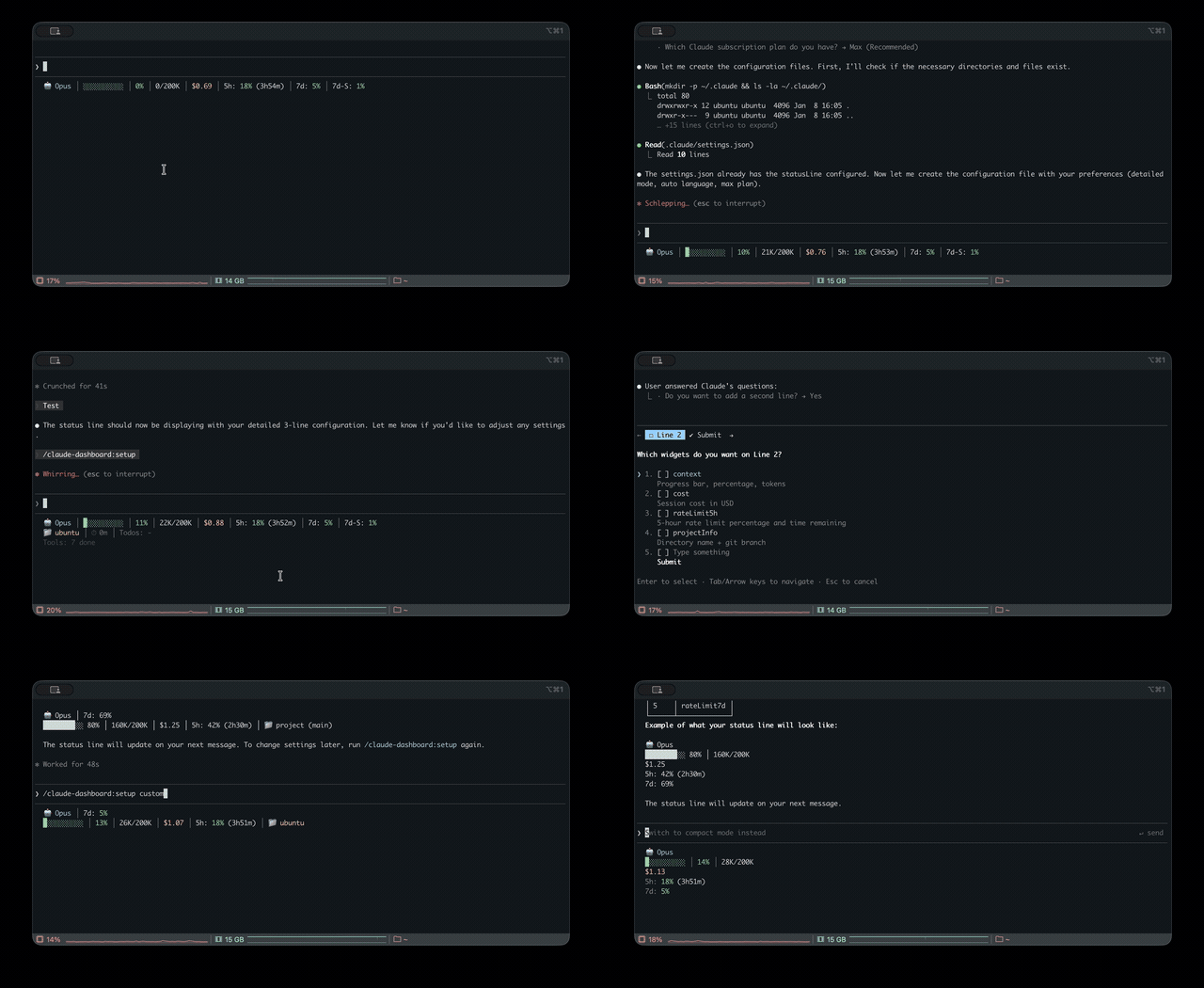
Unified status line for Claude Code with multi-CLI (Claude, Codex, Gemini, Antigravity, z.ai) usage monitoring, context, rate limits, and cost tracking
uppinote20/claude-dashboard

Comprehensive status line plugin for Claude Code — unified usage monitoring across Claude, Codex, Gemini, Antigravity, and z.ai CLIs, with context, rate limits, cost tracking, and a modular widget system.

Requirements: Claude Code v1.0.80+ / Node.js 18+
/plugin marketplace add uppinote20/claude-dashboard
/plugin install claude-dashboard
/claude-dashboard:setup
git clone https://github.com/uppinote20/claude-dashboard.git "${CLAUDE_CONFIG_DIR:-$HOME/.claude}/plugins/claude-dashboard"
/claude-dashboard:setup
/claude-dashboard:setuplooks for the plugin underplugins/cache/claude-dashboard/claude-dashboard/, which a manual clone intoplugins/claude-dashboard/does not match — the setup command's shim lookup will find nothing to copy. PointstatusLine.commandinsettings.jsondirectly at your clone'sdist/index.jsinstead (e.g.node "${CLAUDE_CONFIG_DIR:-$HOME/.claude}/plugins/claude-dashboard/dist/index.js"), and note that manual installs do not get automatic version pickup —git pulland update the path yourself after each release.
Compact (1 line) - Default:

Model, context progress bar, cost, rate limits (5h/7d) or z.ai usage (mutually exclusive by provider)
Normal (2 lines):

Adds project info, session ID, session duration, burn rate, todo progress
Detailed (6 lines):

Adds depletion time, config counts, tool/agent status, cache hit, performance badge, token breakdown, forecast, budget, Codex/Gemini/Antigravity usage
Multi-provider support: z.ai/ZHIPU, Codex, Gemini, Antigravity auto-detected when installed.
| Category | Widget | Description |
|----------|--------|-------------|
| Core | model | Model name and version with emoji (e.g. Opus 5.5), effort level for Opus/Sonnet/Fable (MAX/X/H/M/L), fast mode for Opus (↯). Reads the live effort.level / fast_mode from stdin, falling back to settings.json on older Claude Code |
| | context | Progress bar, percentage, tokens (🟢 0-50% / 🟡 51-80% / 🔴 81-100%) |
| | contextBar | Progress bar only (sub-widget of context) |
| | contextPercentage | Percentage only (sub-widget of context) |
| | contextUsage | Token count only, e.g. 42K/200K (sub-widget of context) |
| | cost | Session cost in USD |
| | projectInfo | Directory + git branch (clickable OSC8 link) + ahead/behind (↑↓), subpath from project_dir, worktree indicator (🌳) |
| Rate Limits | rateLimit5h | 5-hour rate limit with reset countdown |
| | rateLimit7d | 7-day rate limit (Pro and Max) |
| | rateLimit7dSonnet | 7-day Sonnet limit (Max only) — deprecated ~2026-06: Anthropic merged it into the unified weekly bucket at the Sonnet 5 launch, so the API returns null and the widget stays hidden until/unless the field returns |
| | rateLimit7dFable | 7-day Fable limit (Max only) |
| Session | sessionId | Session ID (short 8-char) |
| | sessionIdFull | Session ID (full UUID) |
| | sessionName | Session name from /rename command |
| | sessionDuration | Session duration |
| | lastPrompt | Last user prompt with timestamp |
| | configCounts | CLAUDE.md, AGENTS.md, rules, MCPs, hooks, +Dirs |
| Activity | toolActivity | Running/completed tools with targets (e.g., Read(app.ts)) |
| | agentStatus | Subagent progress with resolved model, e.g. Explore(Opus) (from the Agent tool's model param or CLAUDE_CODE_SUBAGENT_MODEL) |
| | todoProgress | Todo completion rate |
| Analytics | burnRate | Token consumption per minute, session average (input + cache write + output) |
| | cacheHit | Cache hit rate percentage (last request) |
| | promptCache | Session prompt-cache health: ♨️ warm with time left before it goes cold / ❄️ cold, hit ratio, miss count, e.g. ♨️ 4m 91% miss 2 (from prompt_cache, Claude Code ≥ 2.1.251). The warm→cold switch happens on its own; set statusLine.refreshInterval (e.g. 60) to keep the minute countdown ticking while idle |
| | promptCacheState | Warm/cold icon + time left only, e.g. ♨️ 4m (sub-widget of promptCache) |
| | promptCacheHit | Session cache hit ratio only, e.g. 91% (sub-widget of promptCache) |
| | promptCacheMisses | Miss count only, e.g. miss 2; hidden at 0 (sub-widget of promptCache) |
| | depletionTime | Estimated time to rate limit (approx)¹ |
| Multi-CLI | codexUsage | OpenAI Codex CLI usage (auto-hide if not installed)² |
| | geminiUsage | Google Gemini CLI - current model (auto-hide if not installed)³ |
| | geminiUsageAll | Google Gemini CLI - all models (auto-hide if not installed)³ |
| | antigravityUsage | Google Antigravity CLI - weekly quota by model family (auto-hide if not installed)⁸ |
| | antigravityUsageAll | Google Antigravity CLI - per-model quota (auto-hide if not installed)⁸ |
| | zaiUsage | z.ai/ZHIPU usage (auto-hide if not using z.ai)⁴ |
| Insights | tokenBreakdown | Input/output/cache write/read token breakdown |
| | performance | Composite efficiency badge (cache hit + output ratio) |
| | forecast | Estimated hourly cost based on session rate |
| | budget | Daily spending vs configured budget limit⁵ |
| | tokenSpeed | Output token generation speed (tok/s), session average |
| | tokenSpeedLast | Output token generation speed of the most recent response only |
| | todayCost | Total spending across all sessions today |
| Status | peakHours | Peak hours indicator with countdown (based on PeakClaude)⁶ |
| | tagStatus | Commits ahead of matched git tags (default pattern v*, customize via tagPatterns)⁷ |
| | slashCommand | Active slash command for the current turn (🎯), cleared by next plain-text message |
| | agentMode | Session agent identity: 👤 custom agent (via /agent <name>) or 🤖 subagent type |
| Info | linesChanged | Uncommitted lines added/removed, including untracked files (+N -N) |
| | outputStyle | Current output style (hidden when "default") |
| | version | Claude Code version display |
| | vimMode | Vim mode (NORMAL/INSERT), auto-hides when vim disabled |
| | apiDuration | API time as % of total session time |
¹ Assumes all utilization came from this session; improves as session runs longer. ² Auto-hides if
~/.codex/auth.jsonnot found. ³ Auto-hides if~/.gemini/oauth_creds.jsonnot found — Gemini CLI personal tiers were retired 2026-06-18 in favor of Antigravity CLI (enterprise still supported). ⁴ Auto-hides if not detected viaANTHROPIC_BASE_URL. ⁵ Requires"dailyBudget"in config. ⁶ Peak = weekdays 5-11 AM PT; shows countdown to next transition. ⁷ UsestagPatternsconfig (default["v*"]); auto-hides when no pattern matches a reachable tag. ⁸ Auto-hides if~/.gemini/antigravity-cli/antigravity-oauth-tokennot found.
i18n: English and Korean supported (auto-detect or set via setup).
# Preset modes
/claude-dashboard:setup compact             # 1 line (default)
/claude-dashboard:setup normal en pro       # 2 lines, English, Pro plan
/claude-dashboard:setup detailed ko max     # 6 lines, Korean, Max plan

# Custom mode: control widget order and line composition
# Format: "widget1,widget2,...|widget3,widget4,..." (| separates lines)
/claude-dashboard:setup custom auto max "model,context,cost|projectInfo,todoProgress"
Plan differences:
| Feature | Max | Pro | |---------|-----|-----| | 5h rate limit + countdown | ✅ | ✅ | | 7d all models | ✅ | ❌ |
<details> <summary><strong>Advanced Configuration</strong></summary>Interactive Mode: Run /claude-dashboard:setup without arguments. Best for preset selection; for full widget control, use Direct Mode or edit the JSON file directly.
Display Mode Presets (zaiUsage and rateLimit* are mutually exclusive based on provider):
| Mode | Lines | Widgets |
|------|-------|---------|
| compact | 1 | model, context, cost, rateLimit5h/7d/7dSonnet, zaiUsage |
| normal | 2 | + projectInfo, sessionId, sessionDuration, burnRate, todoProgress |
| detailed | 6 | + depletionTime, configCounts, toolActivity, agentStatus, cacheHit, promptCache, performance, tokenBreakdown, forecast, budget, codexUsage, geminiUsage, antigravityUsage, linesChanged, outputStyle, version, peakHours, lastPrompt, vimMode, apiDuration, tagStatus |
Configuration file (~/.claude/claude-dashboard.local.json):
{
  "language": "auto",
  "plan": "max",
  "displayMode": "custom",
  "lines": [
    ["model", "context", "cost", "rateLimit5h"],
    ["projectInfo", "todoProgress"]
  ],
  "theme": "default",
  "separator": "pipe",
  "dailyBudget": 15,
  "disabledWidgets": [],
  "modPane": "detailed",
  "modBand": "MC$R|BDO",
  "modBandDefault": false,
  "cache": { "ttlSeconds": 60 }
}
Or use preset shorthand for quick configuration:
{
  "preset": "MC$R|BDO",
  "theme": "tokyoNight",
  "separator": "dot"
}
Themes: default (pastel) / minimal (monochrome) / catppuccin / catppuccinLatte (light-mode) / dracula / gruvbox / nord / tokyoNight / solarized
Separators: pipe (│, default) / space / dot (·) / arrow (›)
Preset Shortcuts: Quick layout with single characters — "preset": "MC$R|BDO" (M=model, C=context, $=cost, R=rateLimit5h, etc.)
Budget Tracking: Set "dailyBudget": 15 to track daily spending. Shows ⚠️ at 80% and 🚨 at 95%.
Tag Status: Customize tagStatus patterns via "tagPatterns": ["v*", "release-*"]. Default is ["v*"]. The widget auto-hides when no pattern matches a reachable tag.
Widget Toggle: Add widget IDs to disabledWidgets to hide them from any display mode.
Mod Layouts: modPane (the /claude-dashboard-pane pane, default detailed) and modBand (the /claude-dashboard-band band, default = your status line layout) take a display mode name (compact / normal / detailed) or a preset string like "MC$R|BDO". Set "modBandDefault": true to turn the band on at session start. See Mods.
Color Legend: 🟢 0-50% Safe / 🟡 51-80% Warning / 🔴 81-100% Critical
</details>/claude-dashboard:setupConfigure the status line display mode, language, and plan. See Configuration.
/claude-dashboard:check-usageCheck usage limits for all AI CLIs (Claude, Codex, Gemini, Antigravity, z.ai) at once and get a recommendation for which CLI has the most available capacity.
/claude-dashboard:check-usage              # Interactive output with colors
/claude-dashboard:check-usage --json       # JSON output for scripting
/claude-dashboard:check-usage --lang ko    # Specify language

/claude-dashboard:setup-aliasAdd a check-ai shell alias to quickly check all AI CLI usage from your terminal. Supports macOS/Linux (zsh/bash) and Windows (PowerShell).
/claude-dashboard:setup-alias
After setup:
check-ai          # Pretty output
check-ai --json   # JSON output for scripting
/claude-dashboard:updateRepair or verify the statusLine shim. Usually unnecessary — after /plugin update, the
status line picks up the new version on its own. Use this if you have hooks disabled or the
status line stops updating.
/claude-dashboard:update
claude-dashboard also ships as a Claude Code mod (function-hook plugin, early access, tested on Claude Code 2.1.289). It is bundled in the same plugin (hooks/hooks.json → "modules": ["../dist/mod.js"]), so there is nothing extra to install. Mods are draw
Check the author's README for the marketplace and plugin name first. Commands may change as the repository evolves.
claude plugin marketplace add uppinote20/claude-dashboard
claude plugin install claude-dashboard
Comprehensive status line plugin for Claude Code — unified usage monitoring across Claude, Codex, Gemini, Antigravity, and z.ai CLIs, with context, rate limits, cost tracking, and a modular widget system.
Requirements: Claude Code v1.0.80+ / Node.js 18+
/plugin marketplace add uppinote20/claude-dashboard
/plugin install claude-dashboard
/claude-dashboard:setup
git clone https://github.com/uppinote20/claude-dashboard.git "${CLAUDE_CONFIG_DIR:-$HOME/.claude}/plugins/claude-dashboard"
/claude-dashboard:setup
/claude-dashboard:setuplooks for the plugin underplugins/cache/claude-dashboard/claude-dashboard/, which a manual clone intoplugins/claude-dashboard/does not match — the setup command's shim lookup will find nothing to copy. PointstatusLine.commandinsettings.jsondirectly at your clone'sdist/index.jsinstead (e.g.node "${CLAUDE_CONFIG_DIR:-$HOME/.claude}/plugins/claude-dashboard/dist/index.js"), and note that manual installs do not get automatic version pickup —git pulland update the path yourself after each release.
Compact (1 line) - Default:

Model, context progress bar, cost, rate limits (5h/7d) or z.ai usage (mutually exclusive by provider)
Normal (2 lines):

Adds project info, session ID, session duration, burn rate, todo progress
Detailed (6 lines):

Adds depletion time, config counts, tool/agent status, cache hit, performance badge, token breakdown, forecast, budget, Codex/Gemini/Antigravity usage
Multi-provider support: z.ai/ZHIPU, Codex, Gemini, Antigravity auto-detected when installed.
| Category | Widget | Description |
|----------|--------|-------------|
| Core | model | Model name and version with emoji (e.g. Opus 5.5), effort level for Opus/Sonnet/Fable (MAX/X/H/M/L), fast mode for Opus (↯). Reads the live effort.level / fast_mode from stdin, falling back to settings.json on older Claude Code |
| | context | Progress bar, percentage, tokens (🟢 0-50% / 🟡 51-80% / 🔴 81-100%) |
| | contextBar | Progress bar only (sub-widget of context) |
| | contextPercentage | Percentage only (sub-widget of context) |
| | contextUsage | Token count only, e.g. 42K/200K (sub-widget of context) |
| | cost | Session cost in USD |
| | projectInfo | Directory + git branch (clickable OSC8 link) + ahead/behind (↑↓), subpath from project_dir, worktree indicator (🌳) |
| Rate Limits | rateLimit5h | 5-hour rate limit with reset countdown |
| | rateLimit7d | 7-day rate limit (Pro and Max) |
| | rateLimit7dSonnet | 7-day Sonnet limit (Max only) — deprecated ~2026-06: Anthropic merged it into the unified weekly bucket at the Sonnet 5 launch, so the API returns null and the widget stays hidden until/unless the field returns |
| | rateLimit7dFable | 7-day Fable limit (Max only) |
| Session | sessionId | Session ID (short 8-char) |
| | sessionIdFull | Session ID (full UUID) |
| | sessionName | Session name from /rename command |
| | sessionDuration | Session duration |
| | lastPrompt | Last user prompt with timestamp |
| | configCounts | CLAUDE.md, AGENTS.md, rules, MCPs, hooks, +Dirs |
| Activity | toolActivity | Running/completed tools with targets (e.g., Read(app.ts)) |
| | agentStatus | Subagent progress with resolved model, e.g. Explore(Opus) (from the Agent tool's model param or CLAUDE_CODE_SUBAGENT_MODEL) |
| | todoProgress | Todo completion rate |
| Analytics | burnRate | Token consumption per minute, session average (input + cache write + output) |
| | cacheHit | Cache hit rate percentage (last request) |
| | promptCache | Session prompt-cache health: ♨️ warm with time left before it goes cold / ❄️ cold, hit ratio, miss count, e.g. ♨️ 4m 91% miss 2 (from prompt_cache, Claude Code ≥ 2.1.251). The warm→cold switch happens on its own; set statusLine.refreshInterval (e.g. 60) to keep the minute countdown ticking while idle |
| | promptCacheState | Warm/cold icon + time left only, e.g. ♨️ 4m (sub-widget of promptCache) |
| | promptCacheHit | Session cache hit ratio only, e.g. 91% (sub-widget of promptCache) |
| | promptCacheMisses | Miss count only, e.g. miss 2; hidden at 0 (sub-widget of promptCache) |
| | depletionTime | Estimated time to rate limit (approx)¹ |
| Multi-CLI | codexUsage | OpenAI Codex CLI usage (auto-hide if not installed)² |
| | geminiUsage | Google Gemini CLI - current model (auto-hide if not installed)³ |
| | geminiUsageAll | Google Gemini CLI - all models (auto-hide if not installed)³ |
| | antigravityUsage | Google Antigravity CLI - weekly quota by model family (auto-hide if not installed)⁸ |
| | antigravityUsageAll | Google Antigravity CLI - per-model quota (auto-hide if not installed)⁸ |
| | zaiUsage | z.ai/ZHIPU usage (auto-hide if not using z.ai)⁴ |
| Insights | tokenBreakdown | Input/output/cache write/read token breakdown |
| | performance | Composite efficiency badge (cache hit + output ratio) |
| | forecast | Estimated hourly cost based on session rate |
| | budget | Daily spending vs configured budget limit⁵ |
| | tokenSpeed | Output token generation speed (tok/s), session average |
| | tokenSpeedLast | Output token generation speed of the most recent response only |
| | todayCost | Total spending across all sessions today |
| Status | peakHours | Peak hours indicator with countdown (based on PeakClaude)⁶ |
| | tagStatus | Commits ahead of matched git tags (default pattern v*, customize via tagPatterns)⁷ |
| | slashCommand | Active slash command for the current turn (🎯), cleared by next plain-text message |
| | agentMode | Session agent identity: 👤 custom agent (via /agent <name>) or 🤖 subagent type |
| Info | linesChanged | Uncommitted lines added/removed, including untracked files (+N -N) |
| | outputStyle | Current output style (hidden when "default") |
| | version | Claude Code version display |
| | vimMode | Vim mode (NORMAL/INSERT), auto-hides when vim disabled |
| | apiDuration | API time as % of total session time |
¹ Assumes all utilization came from this session; improves as session runs longer. ² Auto-hides if
~/.codex/auth.jsonnot found. ³ Auto-hides if~/.gemini/oauth_creds.jsonnot found — Gemini CLI personal tiers were retired 2026-06-18 in favor of Antigravity CLI (enterprise still supported). ⁴ Auto-hides if not detected viaANTHROPIC_BASE_URL. ⁵ Requires"dailyBudget"in config. ⁶ Peak = weekdays 5-11 AM PT; shows countdown to next transition. ⁷ UsestagPatternsconfig (default["v*"]); auto-hides when no pattern matches a reachable tag. ⁸ Auto-hides if~/.gemini/antigravity-cli/antigravity-oauth-tokennot found.
i18n: English and Korean supported (auto-detect or set via setup).
# Preset modes
/claude-dashboard:setup compact             # 1 line (default)
/claude-dashboard:setup normal en pro       # 2 lines, English, Pro plan
/claude-dashboard:setup detailed ko max     # 6 lines, Korean, Max plan

# Custom mode: control widget order and line composition
# Format: "widget1,widget2,...|widget3,widget4,..." (| separates lines)
/claude-dashboard:setup custom auto max "model,context,cost|projectInfo,todoProgress"
Plan differences:
| Feature | Max | Pro | |---------|-----|-----| | 5h rate limit + countdown | ✅ | ✅ | | 7d all models | ✅ | ❌ |
<details> <summary><strong>Advanced Configuration</strong></summary>Interactive Mode: Run /claude-dashboard:setup without arguments. Best for preset selection; for full widget control, use Direct Mode or edit the JSON file directly.
Display Mode Presets (zaiUsage and rateLimit* are mutually exclusive based on provider):
| Mode | Lines | Widgets |
|------|-------|---------|
| compact | 1 | model, context, cost, rateLimit5h/7d/7dSonnet, zaiUsage |
| normal | 2 | + projectInfo, sessionId, sessionDuration, burnRate, todoProgress |
| detailed | 6 | + depletionTime, configCounts, toolActivity, agentStatus, cacheHit, promptCache, performance, tokenBreakdown, forecast, budget, codexUsage, geminiUsage, antigravityUsage, linesChanged, outputStyle, version, peakHours, lastPrompt, vimMode, apiDuration, tagStatus |
Configuration file (~/.claude/claude-dashboard.local.json):
{
  "language": "auto",
  "plan": "max",
  "displayMode": "custom",
  "lines": [
    ["model", "context", "cost", "rateLimit5h"],
    ["projectInfo", "todoProgress"]
  ],
  "theme": "default",
  "separator": "pipe",
  "dailyBudget": 15,
  "disabledWidgets": [],
  "modPane": "detailed",
  "modBand": "MC$R|BDO",
  "modBandDefault": false,
  "cache": { "ttlSeconds": 60 }
}
Or use preset shorthand for quick configuration:
{
  "preset": "MC$R|BDO",
  "theme": "tokyoNight",
  "separator": "dot"
}
Themes: default (pastel) / minimal (monochrome) / catppuccin / catppuccinLatte (light-mode) / dracula / gruvbox / nord / tokyoNight / solarized
Separators: pipe (│, default) / space / dot (·) / arrow (›)
Preset Shortcuts: Quick layout with single characters — "preset": "MC$R|BDO" (M=model, C=context, $=cost, R=rateLimit5h, etc.)
Budget Tracking: Set "dailyBudget": 15 to track daily spending. Shows ⚠️ at 80% and 🚨 at 95%.
Tag Status: Customize tagStatus patterns via "tagPatterns": ["v*", "release-*"]. Default is ["v*"]. The widget auto-hides when no pattern matches a reachable tag.
Widget Toggle: Add widget IDs to disabledWidgets to hide them from any display mode.
Mod Layouts: modPane (the /claude-dashboard-pane pane, default detailed) and modBand (the /claude-dashboard-band band, default = your status line layout) take a display mode name (compact / normal / detailed) or a preset string like "MC$R|BDO". Set "modBandDefault": true to turn the band on at session start. See Mods.
Color Legend: 🟢 0-50% Safe / 🟡 51-80% Warning / 🔴 81-100% Critical
</details>/claude-dashboard:setupConfigure the status line display mode, language, and plan. See Configuration.
/claude-dashboard:check-usageCheck usage limits for all AI CLIs (Claude, Codex, Gemini, Antigravity, z.ai) at once and get a recommendation for which CLI has the most available capacity.
/claude-dashboard:check-usage              # Interactive output with colors
/claude-dashboard:check-usage --json       # JSON output for scripting
/claude-dashboard:check-usage --lang ko    # Specify language
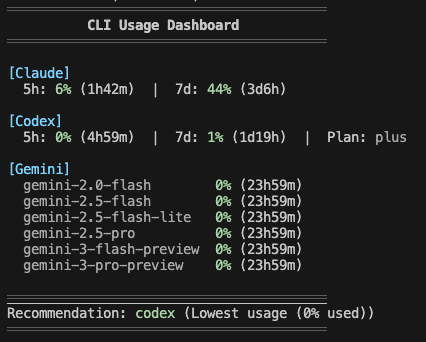
/claude-dashboard:setup-aliasAdd a check-ai shell alias to quickly check all AI CLI usage from your terminal. Supports macOS/Linux (zsh/bash) and Windows (PowerShell).
/claude-dashboard:setup-alias
After setup:
check-ai          # Pretty output
check-ai --json   # JSON output for scripting
/claude-dashboard:updateRepair or verify the statusLine shim. Usually unnecessary — after /plugin update, the
status line picks up the new version on its own. Use this if you have hooks disabled or the
status line stops updating.
/claude-dashboard:update
claude-dashboard also ships as a Claude Code mod (function-hook plugin, early access, tested on Claude Code 2.1.289). It is bundled in the same plugin (hooks/hooks.json → "modules": ["../dist/mod.js"]), so there is nothing extra to install. Mods are drawn only in the terminal and the desktop Code tab (not the VS Code panel, not claude -p).
| Command | What it does |
|---------|--------------|
| /claude-dashboard-pane [on\|off] | Open or close a dashboard pane beside the transcript (no argument flips it). Layout from modPane (default detailed). |
| /claude-dashboard-band [on\|off] | Draw the dashboard above the prompt and hide the status line for this session only (settings.json is untouched). Layout from modBand (default = your status line layout). |
{
  "modPane": "detailed",
  "modBand": "MC$R|BDO",
  "modBandDefault": true
}
modPane / modBand accept a display mode name (compact / normal / detailed) or a preset string. modBandDefault: true turns the band on at session start./claude-dashboard:setup asks how you want to use the mod dashboard (status line only, peek with pane, replace with band, or both) and writes these keys; rerunning setup keeps keys it does not ask about.~/.cache/claude-dashboard/band-<sessionId>), refreshed on every render (at most every 60s) and ignored after 180s. It is deleted on off and at session end, so if the mod stops the status line comes back by itself within 3 minutes.disabledWidgets follow your normal config. cacheHit, tokenBreakdown, and performance are hidden in the pane and band (the mod API has no per-request cache usage).dist/index.js, run as a subprocess./plugin listsettings.json has a statusLine entry pointing at
plugins/data/claude-dashboard-claude-dashboard/statusline.mjscache.ttlSeconds, default 300 seconds)Claude Code relocates its whole config directory — credentials, settings, and history — when CLAUDE_CONFIG_DIR is set. That is how two accounts run side by side:
# Personal Max account, kept separate from the default ~/.claude
CLAUDE_CONFIG_DIR=~/.claude-max claude
The status line follows the same variable, so each session reports the account that is actually rendering it. Leave it unset and the default ~/.claude is used, as before.
Notes:
CLAUDE_CONFIG_DIR separates settings.json and history.jsonl reads, but rate-limit API calls use whichever OAuth token the Keychain holds./claude-dashboard:setup and /claude-dashboard:update register the status line into the session's config dir ($CLAUDE_CONFIG_DIR if set, ~/.claude otherwise) — run them once per account. The dashboard's own display config ~/.claude/claude-dashboard.local.json is intentionally shared across accounts.Run setup with explicit language:
/claude-dashboard:setup normal ko  # Korean
/claude-dashboard:setup normal en  # English
API response cache is stored in ~/.cache/claude-dashboard/. To clear:
rm -rf ~/.cache/claude-dashboard/
Cache files are automatically cleaned up after 1 hour.
</details>npm install && npm run build
See CONTRIBUTING.md for details.
If you find this plugin useful, support development:
<div style="display: flex; gap: 20px; align-items: center;"> <a href="https://ko-fi.com/uppinote" target="_blank"> <img src="https://storage.ko-fi.com/cdn/kofi5.png" alt="Buy Me a Coffee at ko-fi.com" style="height:60px; width:217px;"> </a> <a href="https://www.buymeacoffee.com/uppinote" target="_blank"> <img src="https://cdn.buymeacoffee.com/buttons/v2/default-yellow.png" alt="Buy Me A Coffee" style="height:60px; width:217px;"> </a> </div>MIT

Substrate plugin for Ruflo memory: AgentDB controller bridge (15 agentdb_* MCP tools), RuVector ONNX embeddings (10 embeddings_* tools incl. RaBitQ 32x quantization), and WASM HNSW pattern router (3 ruvllm_hnsw_* tools). As a mod (ADR-445): opt-in safe recall into the prompt, a write guard that keeps secrets out of memory, /agentdb, and a status file the console shows

Build, format, optimize, and review interactive Power BI reports, with a report pane that follows the pbir CLI and shows what Claude reads and changes.


Shows unread AMP messages above the prompt, in the status line and as a toast, and can wake an idle Claude Code session to read them. Needs Claude Code 2.1.287 or later.

