
theonly1me@theonly1me
theonly1me/claude-code-mods/tree/main/plugins/change-journal
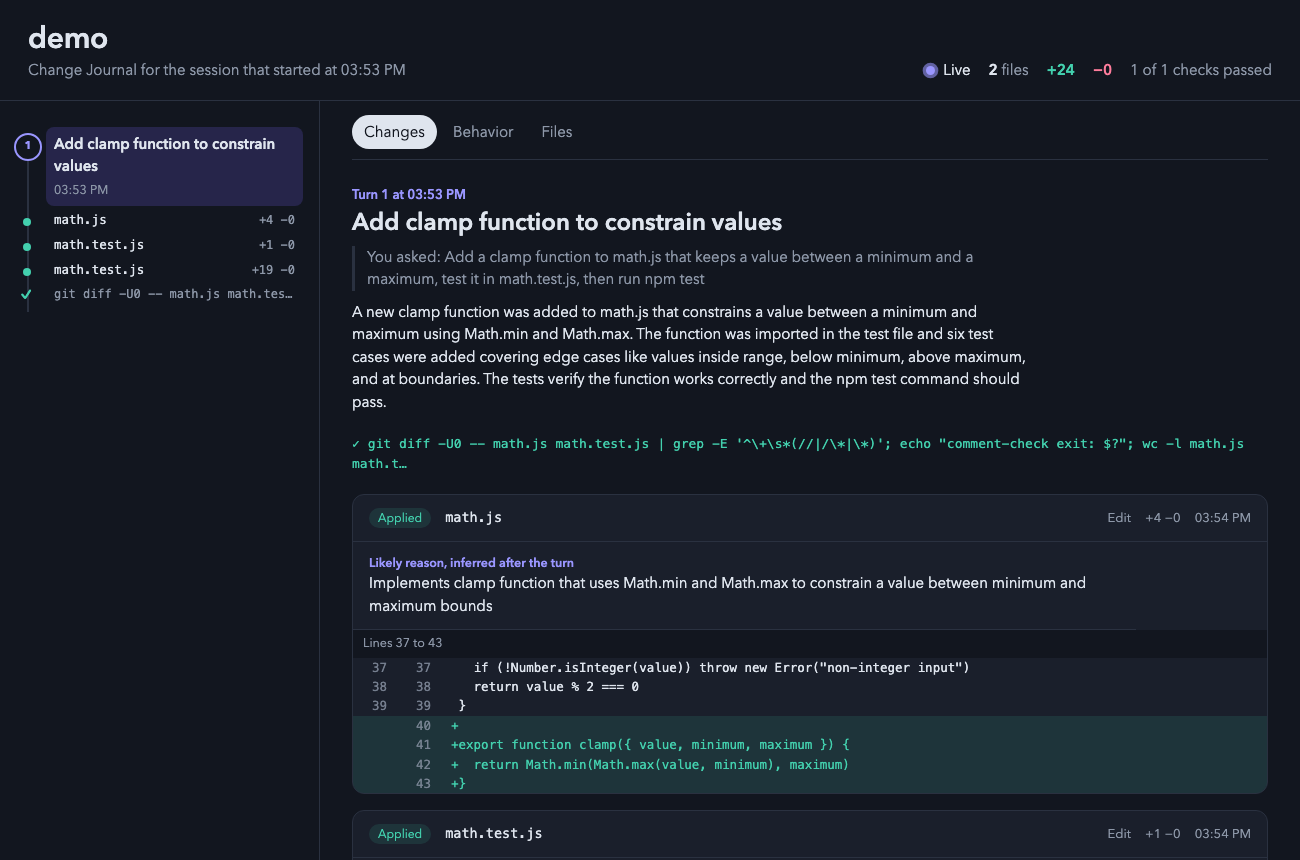
A Claude Code plugin that opens a live local HTML page showing every change Claude makes, including diffs, edit reasons, checks, and before/after behavior flows.
theonly1me/claude-code-mods/tree/main/plugins/change-journal
A live page in your browser that shows every change Claude makes while it works: the diff, the reason for each edit, the checks it ran, and how the code behaved before and after each turn.

claude plugin marketplace add theonly1me/claude-code-mods
claude plugin install change-journal@claude-code-mods
Register the marketplace once. Run /reload-plugins in an open session after installing. Requires Claude Code 2.1.289 or later; no build step or runtime dependencies.
The page opens in your browser on the first edit of a session and updates itself every second and a half. It needs no server.
The page follows new changes as they happen. When you select something, it stops following until you press "Follow new changes".
Changes made outside Edit and Write (a sed command, a formatter, or your own edits) show up after each turn as outside changes. Test commands appear with a pass or fail mark.
✎ 3 files +40 −12./changes to see the latest turns in the terminal. The pane opens with the keys.o to open the page.Commands:
/changes: open the pane with the latest four turns and their edits./changes open: open the page in your browser./changes path: print where the page lives.
The hint row under the title always names the keys that work now.
| Key | What it does |
| --- | --- |
| 1 to 9 | Show that edit under the list: its reason and its first changed lines. Press the number again to hide it. |
| o | Open the page. With an edit shown, the page opens on that edit's turn. |
| c | Copy the page path. |
| x | Close the pane. |
| Tab, Enter | Move to the next row or button, and press it. |
| Esc | Give the keys back to the prompt. The pane stays open. |
| ctrl+x tab | Give the keys to the pane again. |
On the page, click a ring or a dot on the rail to jump to a turn or an edit. Press "Follow new changes" to go back to the newest change.
Change these in /plugin:
autoOpen (on): open the page on the first edit of a session.liveSummaries (on): after each turn with edits, ask the helper model for a title, an explanation, the behavior flows, and missing reasons. This uses extra tokens.helperModel (claude-sonnet-5-5): the model for those summaries.helperEffort (medium): how hard the helper model thinks (low, medium, or high).The page and its data stay on your machine in ~/.claude/change-journal/<project>/<session>/. Files that look like secrets (.env, keys, credentials) are listed without their content, and tokens in diffs are redacted. When summaries are on, a short excerpt of each diff goes to your configured Claude provider.
See the marketplace README for configuration, privacy, updates, and removal.
Check the author's README for the marketplace and plugin name first. Commands may change as the repository evolves.
claude plugin marketplace add theonly1me/claude-code-mods
claude plugin install change-journal
A live page in your browser that shows every change Claude makes while it works: the diff, the reason for each edit, the checks it ran, and how the code behaved before and after each turn.
claude plugin marketplace add theonly1me/claude-code-mods
claude plugin install change-journal@claude-code-mods
Register the marketplace once. Run /reload-plugins in an open session after installing. Requires Claude Code 2.1.289 or later; no build step or runtime dependencies.
The page opens in your browser on the first edit of a session and updates itself every second and a half. It needs no server.
The page follows new changes as they happen. When you select something, it stops following until you press "Follow new changes".
Changes made outside Edit and Write (a sed command, a formatter, or your own edits) show up after each turn as outside changes. Test commands appear with a pass or fail mark.
✎ 3 files +40 −12./changes to see the latest turns in the terminal. The pane opens with the keys.o to open the page.Commands:
/changes: open the pane with the latest four turns and their edits./changes open: open the page in your browser./changes path: print where the page lives.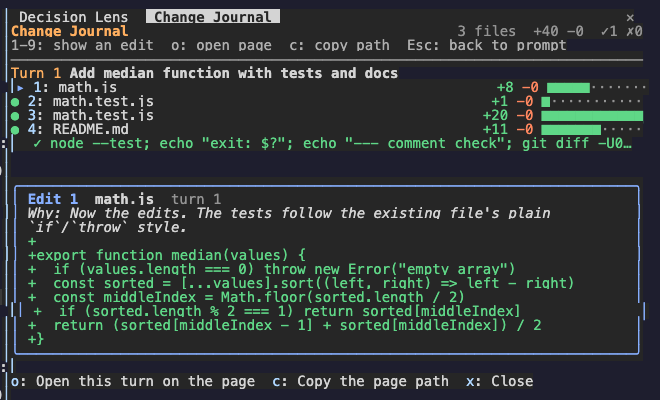
The hint row under the title always names the keys that work now.
| Key | What it does |
| --- | --- |
| 1 to 9 | Show that edit under the list: its reason and its first changed lines. Press the number again to hide it. |
| o | Open the page. With an edit shown, the page opens on that edit's turn. |
| c | Copy the page path. |
| x | Close the pane. |
| Tab, Enter | Move to the next row or button, and press it. |
| Esc | Give the keys back to the prompt. The pane stays open. |
| ctrl+x tab | Give the keys to the pane again. |
On the page, click a ring or a dot on the rail to jump to a turn or an edit. Press "Follow new changes" to go back to the newest change.
Change these in /plugin:
autoOpen (on): open the page on the first edit of a session.liveSummaries (on): after each turn with edits, ask the helper model for a title, an explanation, the behavior flows, and missing reasons. This uses extra tokens.helperModel (claude-sonnet-5-5): the model for those summaries.helperEffort (medium): how hard the helper model thinks (low, medium, or high).The page and its data stay on your machine in ~/.claude/change-journal/<project>/<session>/. Files that look like secrets (.env, keys, credentials) are listed without their content, and tokens in diffs are redacted. When summaries are on, a short excerpt of each diff goes to your configured Claude provider.
See the marketplace README for configuration, privacy, updates, and removal.

thimble thimble's analysis guidance in a plain Claude Code session, as a [mod](https://code.claude.com/docs/en/plugins/mods/overview).

A Claude Code mod that fingerprints the working tree and remembers which tests passed and failed on the same code, so the model re-runs a flaky test instead of changing working code.

Claude Code mod that records tool calls like a blackbox: replays recent actions before errors or denials via /blackbox, and masks tokens and passwords in the log.