
jamubc@jamubc
jamubc/toolbox/tree/main/plugins/browse
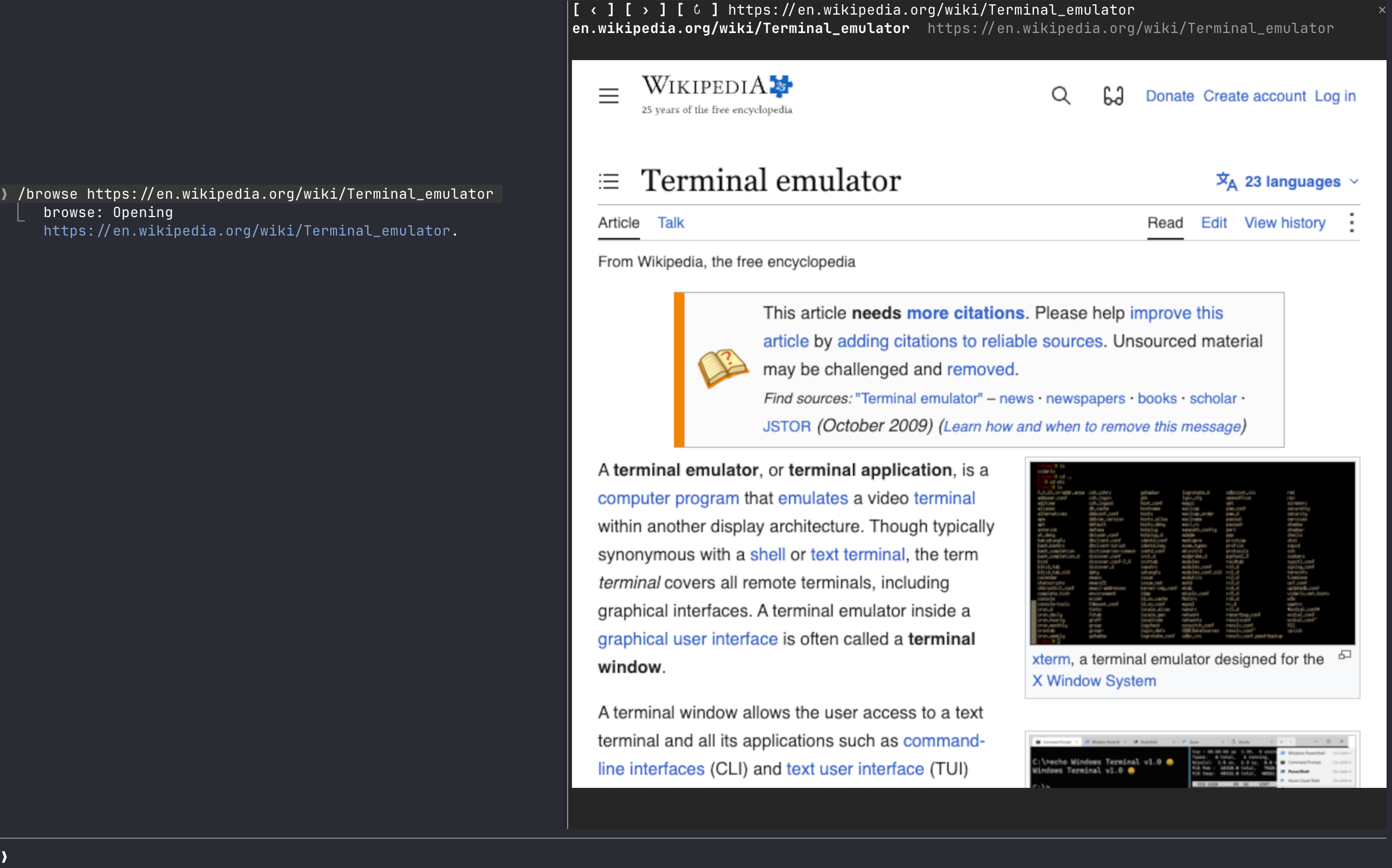
A Claude Code plugin that adds /browse, a web browser in a pane beside the prompt, driven by headless Chrome over the DevTools protocol.
jamubc/toolbox/tree/main/plugins/browse
browse is a Claude Code plugin (from the jamubc/toolbox marketplace) that opens a web browser in a pane beside the prompt. Install with /plugin marketplace add jamubc/toolbox then /plugin install browse@toolbox. Use /browse to open a start page, /browse <address or words> to navigate or search DuckDuckGo, and /browse close to stop it. Real-pixel rendering uses the kitty graphics protocol (kitty or Ghostty); other terminals fall back to colored half-blocks, and the Claude desktop app, VS Code extension and mobile show nothing. It requires Chrome/Chromium/Brave/Edge and Node.js 18+ on PATH, supports macOS (tested) and Linux (untested), not yet Windows, and keeps its own Chrome profile in ~/.cache/claude-browse/chrome-profile.
Check the author's README for the marketplace and plugin name first. Commands may change as the repository evolves.
claude plugin marketplace add jamubc/toolbox
claude plugin install browse
A Claude Code web browser.
Add the marketplace:
/plugin marketplace add jamubc/toolbox
Install the plugin:
/plugin install browse@toolbox
| Command | What it does |
| --- | --- |
| /browse | Opens the browser on a start page: type an address or a search and press Enter, or pick YouTube, DuckDuckGo, Wikipedia, Hacker News or GitHub. |
| /browse <address or words> | Opens the address, or searches DuckDuckGo. |
| /browse close, or the pane's ✕ | Closes the pane and stops the browser and its sound. |
| The address bar | Type an address or words and press Enter. It has the keys when the start page opens. |
| Click the page | Clicks there. Your keys then go to the page; Esc gives them back to the prompt. |
| Mouse wheel over the page | Scrolls the page. |
| /config → How the page is drawn | auto, always real pixels (kitty or Ghostty only) or always colored blocks (any terminal). |
| Where you run Claude Code | Picture | Sound | | --- | --- | --- | | kitty, Ghostty | Real pixels (kitty graphics protocol). Untested so far. | Yes | | Any other terminal: Terminal.app, iTerm2, Zed, VS Code's terminal, WezTerm, tmux, or over ssh | Colored half-blocks, two pixels per character. Video is recognizable but chunky, and small text cannot be read. | Yes, on the machine running Claude Code | | Claude desktop app, VS Code extension, mobile | Nothing. The pane says the browser only draws in the terminal, and no browser starts. | No |
| System | Status | | --- | --- | | macOS | Tested: YouTube with sound, clicks, keys, the wheel, closing. | | Linux | Should work; untested. Chrome is looked up on your PATH. | | Windows | Not supported yet. The pane says so. |
/config → Browser to draw in and Node.js 18+ to run it./config → How the page is drawn back to auto or colored blocks./browse says so.browser/browser.mjs runs Chrome headless and drives it over the DevTools protocol, with no dependencies.
hooks/register.tsx draws the pane, answers /browse, and forwards the wheel.hooks/pointer.tsx lies over the picture and passes on clicks and keys./clear and /compact leave the page up: /clear starts a new session in the same process, so the pane keeps what it was showing and writes it into the new one./browse <address> shows in the conversation as the command's reply, so Claude can read it. Pages, frames and what you type into the page stay between the pane and the local Chrome.~/.cache/claude-browse/chrome-profile: cookies and logins persist there between sessions, apart from your everyday Chrome profile. Delete that folder to forget them.
Neural trading strategies powered by neural-trader (v2.7+): self-learning LSTM/Transformer/N-BEATS models, Rust/NAPI backtesting, 112+ MCP tools, swarm coordination, and portfolio optimization.

An optional mods companion for claude-seo. It runs inside Claude Code as a mod (a function-hook plugin), so it can enforce things a skill can only ask for.

Repowise Plugin for Claude Code — provides five layers of code intelligence: Graph, Git, Docs, Decisions, and Code Health. It gives Claude architecture, ownership, hotspots, and defect risk through MCP tools, slash commands, and automatic skills. It also includes Lens, a Claude Code mod with spinner hints, margin notes, change review, and a /lens panel.