
sivori@sivori
sivori/claude-mods/tree/main/plugins/backlog-band
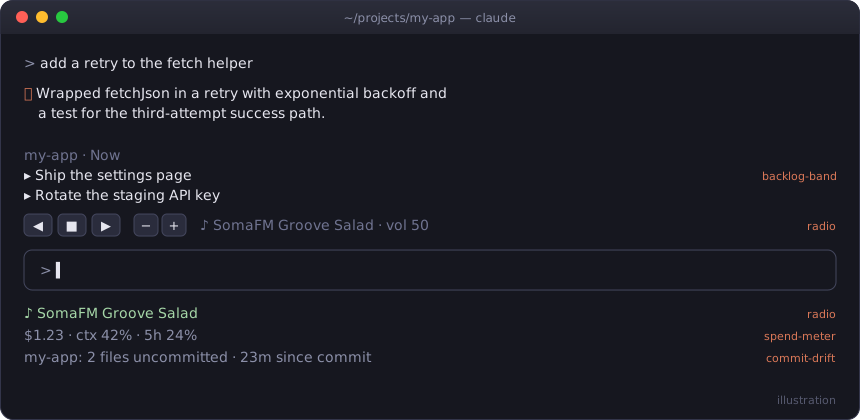
A Claude Code plugin that shows the active project's open BACKLOG.md Now items above the prompt, with a /later command to queue items into Next and a toggle to hide or show the band.
sivori/claude-mods/tree/main/plugins/backlog-band
backlog-band 是 sivori/claude-mods 裡的其中一個 Claude Code 外掛,會在提示列上方顯示目前專案 BACKLOG.md 的 ## Now 未完成項目。它預期 BACKLOG.md 具有 ## Now、## Next、## Someday、## Done 等區段格式;/later <item> 會把項目附加到 ## Next,/backlog-band 則可隱藏或顯示這個區塊。外掛透過 hooks/register.tsx 監聽 Edit 與 Write 工具呼叫並讀寫本機 BACKLOG.md,不涉及網路存取。可透過 claude plugin marketplace add sivori/claude-mods 與 claude plugin install backlog-band@claude-mods 安裝,或以 claude --plugin-dir ./plugins/backlog-band 直接測試。
Check the author's README for the marketplace and plugin name first. Commands may change as the repository evolves.
claude plugin marketplace add sivori/claude-mods
claude plugin install backlog-band
Small mods for Claude Code: status lines, a band above the prompt, a docked pane, and a radio. Each one is a plugin of function hooks.
claude plugin marketplace add sivori/claude-mods
claude plugin install radio@claude-mods        # or any mod below
Update later with claude plugin marketplace update claude-mods.
To try one without installing, clone the repo and run claude --plugin-dir ./plugins/<mod>.
/tune streams internet radio inside Claude Code: SomaFM, lo-fi, classical and choral. (The command is /tune because Claude Code has a built-in /radio.) All your sessions share one player, so music started in two sessions never plays twice. Switching stations in any session replaces the current stream, and the status line shows what's playing everywhere. While something plays, a row of buttons sits above the prompt: ◀ ■ ▶ to change or stop, − + for volume. Stopping keeps the row, with a play button that resumes the last station.
/tune              toggle (resumes the last station); /tune listen just plays
/tune groove       pick by name, genre ("jazz", "choral") or number
/tune next | prev | stop | list
/tune vol 30       also vol +10 / vol -10
/tune band         hide or show the buttons
Plays through mpv (brew install mpv), which changes volume without a gap; otherwise ffplay from ffmpeg, which restarts the stream on each volume change.
By default the music keeps playing after you close Claude Code, until /tune stop. Turn on stopWithLastSession in /config to have it stop once no session is open; a watchdog catches a crashed session too, within about a minute.
Session cost, context fill and 5-hour rate-limit use in the status line ($1.23 · ctx 42% · 5h 24%). It toasts once as spend passes $5, $10, $25, $50 and $100.
Uncommitted file count and time since the last commit in the status line, for whichever repo you're editing. After an editing turn on a tree that hasn't been committed for 30+ minutes, it nudges you (at most every 10 minutes).
Shows the open ## Now items of the active repo's BACKLOG.md above the prompt. /later <item> appends to ## Next, and /backlog-band hides or shows the band. It expects this format:
## Now
- [ ] Blocking or imminent work

## Next
- [ ] The normal queue

## Someday
- [ ] Ideas

## Done
- [x] 2026-08-01 Completed
So you never start cold. While you work it records your prompts, the files edited and the commits made. Once the session has been quiet for 10 minutes, it asks the model for a two-line recap (what got done, the next step) and saves it per repo. When you next open Claude Code in that repo, the recap sits above the prompt until your first message:
↩ Last time in dash · yesterday 5:12pm
  Done: Added the spend chart and matched its colors.
  Next: Write a test for the empty-data case.
/recap writes it now, and /recap last brings back the one from last time. A session that did nothing leaves the earlier recap in place. If you quit before the recap is written, the next session writes it from the recorded activity with Haiku.
Three daily quests in a pane, drawn from the active repo: a TODO/FIXME comment to resolve, an open GitHub issue to close (needs gh), and a test command that failed to get passing. It picks one of each kind when it can, keeps the same board all day, and draws a new one tomorrow. A quest clears by itself when the TODO line is gone, the issue is closed or the test command passes. Each cleared quest gets a toast, and clearing all three gets a bigger one. The status line shows ⚔ quests 1/3.
/quests             open the board
/quests reroll      swap the unfinished quests for new ones
/quests check       re-check the issues now (otherwise every 10 minutes)
A docked pane of public-domain paintings from the Art Institute of Chicago. Its "weather" follows your repo: calm landscapes while the tree is clean, overcast as changes pile up or commands fail, shipwrecks in a storm. The painting rotates every 20 minutes, and /commonplace next hangs a new one.
The images need a terminal with the kitty graphics protocol (kitty, Ghostty); elsewhere the pane shows the title and artist. It uses macOS sips to convert images. Paintings are cached in ~/.cache/commonplace-pane/, which keeps the newest 30 and deletes the rest after each new painting. Two optional settings live in /config:
AIC-User-Agent header, as the Art Institute asks of API clients.seed-*.jpg paintings to fall back on when the museum is unreachable.Each mod is plugins/<name>/ with .claude-plugin/plugin.json, hooks/hooks.json and a hooks/register.ts(x) module. To check one:
claude plugin validate plugins/<name>
claude plugin test plugins/<name>
MIT

Cache-aware /loop workers and CronCreate background automation. Substrate plugin for every recurring task in the ruflo family.

claude-reflect as a Claude Code mod: a model check on each short prompt finds reusable corrections (any language); a band above the prompt saves them to CLAUDE.md on one press


Early: crit inside Claude Code. Comment on the conversation, your diff or a file in a pane, send the review to Claude, and read Claude's replies in threads.