ersinkoc@ersinkoc
ersinkoc/claude-usage-band-cli
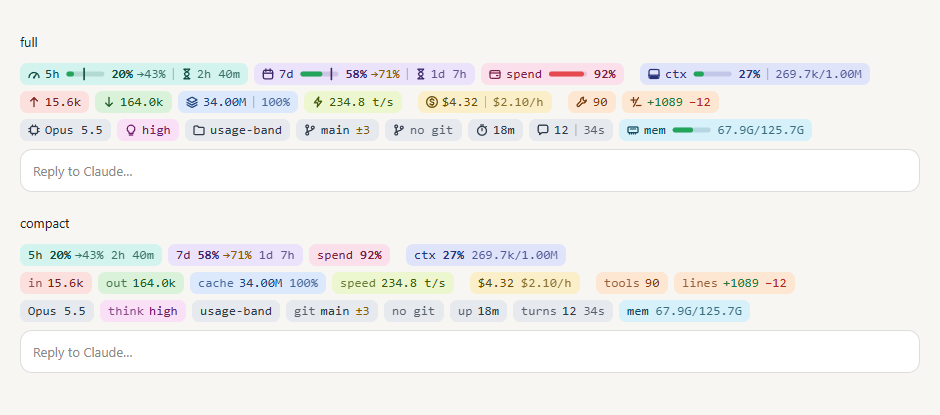
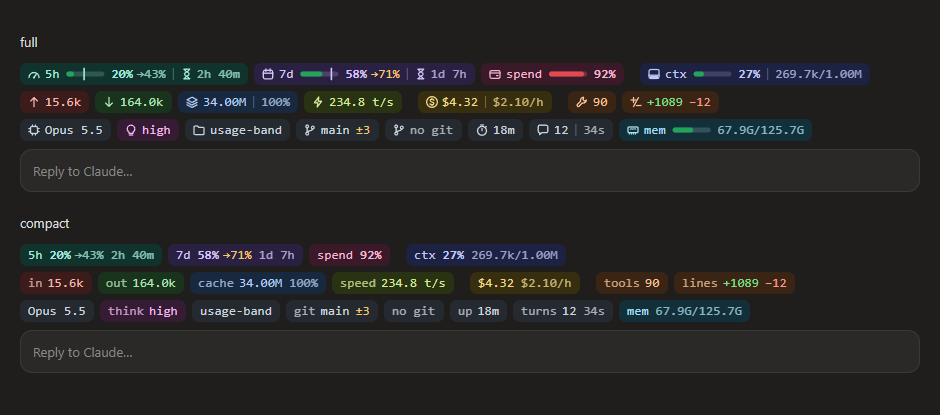
畫在提示列正上方的 Claude Code 使用量狀態列:速率限制、內容脈絡、權杖、速度、成本、工具呼叫、變動與工作階段詳細資訊一目了然。這是 Claude Code mod(function hooks 外掛):終端機中以 Nerd Font 圖示繪製三條 powerline 列;桌面應用程式的 Code 分頁中,則繪製會隨淺色與深色主題調整的圓角 SVG 膠囊。
ersinkoc/claude-usage-band-cli
提示列上方的 Claude Code 使用量狀態列:限制、內容脈絡、權杖、速度、成本、工具、變動、模型、資料夾、git、記憶體與時間
請先查看作者 README,確認 marketplace 與外掛名稱;指令可能隨儲存庫結構而變動。
claude plugin marketplace add ersinkoc/claude-usage-band-cli
claude plugin install usage-band
A usage band for Claude Code, drawn right above the prompt: rate limits, context, tokens, speed, cost, tool calls, churn and session details at a glance. It's a Claude Code mod (a plugin of function hooks): in the terminal it draws three powerline lines with Nerd Font icons; in the desktop app's Code tab, rounded SVG pills that follow the light and dark theme.
WrongStack is a free, open-source AI coding agent with a Brain, a Memory, and a full toolbox. It reads your code, edits files, runs commands, and coordinates specialist agents — across six surfaces, from a plain terminal REPL to a cross-machine HQ dashboard. No subscription required, and you keep your hand on every permission.


curl -fsSL https://wrongstack.com/install.sh | sh # macOS / Linux — self-contained binary
irm https://wrongstack.com/install.ps1 | iex # Windows (PowerShell) — no Node.js needed
| | What you get |
|---|---|
| 🌐 200+ LLM providers | Catalog pulled live from models.dev — Anthropic, OpenAI, Google, plus OAuth sign-in for Claude Pro/Max, ChatGPT and Copilot, and any OpenAI-compatible endpoint (Ollama, vLLM, LM Studio) |
| 🛠️ 67 built-in tools | Edits, lint/typecheck/test, execution, git, web, browser/E2E and a SQLite codebase index — every call gated by per-tool permissions |
| 🧠 SAGE memory | Project-wide long-term memory in SQLite/FTS5, anchored to files, symbols and commits — it gets better at your codebase over time |
| 🖥️ Six surfaces | Readline REPL · Ink/React TUI (--tui) · WebUI · SimpleUI · Desktop · cross-machine HQ (--hq) |
| 🤖 Fleet orchestration | A Director fans out specialist subagents over a project mailbox; eternal & parallel goal loops run until the contract verifies |
| 🔍 Chimera & Kanban | Auto-review agents that critique your diffs with severity-ranked findings, plus durable Kanban boards with atomic verification |
| 🔐 Secure by default | Encrypted secrets at rest, project-root containment, opt-in YOLO mode — MIT licensed, TypeScript-strict |
<div align="center">📊 The perfect pairing: This band tells you exactly where your Claude limits stand — and WrongStack keeps you moving when they close in. It reads plan windows for Claude, ChatGPT, Copilot, Z.AI and more right in its own statusline and quota page, and when one provider runs dry, fallback chains rotate you onto the next model automatically. Watch the band, dodge the wall.
🔗 wrongstack.com · github.com/WrongStack/WrongStack · ⭐ Star it on GitHub
</div>| Line | Pills |
| --- | --- |
| 1 | 5h and 7d limits (bar, a marker for how much of the window has passed, → the projected usage at reset if the pace holds, reset countdown) · spend limit (gateways) · ctx context fill · session cost (and cost per hour) |
| 2 | input (uncached + cache writes) · output · cache reads (and hit rate) · output speed in t/s · tool calls · lines changed (+/−) |
| 3 | model · thinking effort · folder · git branch and changed files · session duration · turns (and the last turn's length) · machine memory |
PATH (or at /usr/local/bin/node, /opt/homebrew/bin/node), used by the token and memory scripts.git on PATH for the git pill.nerdFont to false (text labels) or terminalStyle to plain.Clone it anywhere, then load it as a plugin folder.
git clone https://github.com/ersinkoc/claude-usage-band-cli.git
For one session:
claude --plugin-dir /path/to/claude-usage-band-cli
For every session (the desktop app included), add it to the env block of ~/.claude/settings.json:
{
  "env": {
    "CLAUDE_CODE_PLUGIN_DIRS": "/path/to/claude-usage-band-cli",
    "CLAUDE_CODE_ENABLE_FUNCTION_HOOKS": "1"
  }
}
If CLAUDE_CODE_PLUGIN_DIRS already has folders, append this one with the platform's path-list separator (: on macOS/Linux, ; on Windows). Start a new session after the change.
The plugin is named
usage-band. Don't load it together with anotherusage-bandplugin: they'd claim the same command and state.
| Command | Does |
| --- | --- |
| /usage-band | Refreshes everything and prints a one-line summary |
| /usage-band hide · /usage-band show | Hides or shows the band |
| /usage-band settings | Lists every setting with its current value |
| /usage-band on <name…> · /usage-band off <name…> | Turns pills on or off (all for every one) |
| /usage-band set layout full\|compact | Icons and bars, or text only |
| /usage-band set style powerline\|plain | Terminal style |
| /usage-band set warn <1-100> · set hot <1-100> | Yellow and red thresholds |
| /usage-band set refresh <10-600> | Refresh interval in seconds |
Names for on/off: 5h, 7d, spend, pace, context, input, output, cache, hit, speed, cost, burn, tools, churn, model, effort, folder, git, memory, duration, turns, terminal, nerd, alerts (aliases: ctx, in, out, tps, lines, thinking, cwd, branch, mem, time, weekly).
All settings are also rows in /config (search "Usage band"), stored under pluginConfigs["usage-band"].options in ~/.claude/settings.json. Changing one reloads the mod with the new value.
| Setting | Type | Default | What it does |
| --- | --- | --- | --- |
| show5h | boolean | true | Pill with the 5-hour window's usage, elapsed marker and reset countdown |
| show7d | boolean | true | Pill with the 7-day window's usage, elapsed marker and reset countdown |
| showSpendLimit | boolean | true | Pill for a gateway's spend limit, when the account reports one |
| showPace | boolean | true | On limit pills, where usage lands at reset if the current pace holds |
| showContext | boolean | true | Pill with the context window's fill |
| showInput | boolean | true | Uncached input + cache writes |
| showOutput | boolean | true | Tokens the model generated |
| showCacheRead | boolean | true | Input tokens served from the prompt cache |
| showCacheHit | boolean | true | On the cache pill, the share of input served from the cache |
| showSpeed | boolean | true | Tokens per second of the last response (hover for the average) |
| showCost | boolean | true | Session cost at API list prices |
| showBurnRate | boolean | true | On the cost pill, the session's cost per hour so far |
| showTools | boolean | true | Pill with the number of tool calls (hover for the top tools) |
| showChurn | boolean | true | Lines added and removed by Edit, MultiEdit and Write |
| showModel | boolean | true | Pill with the model that answered last |
| showEffort | boolean | true | The thinking effort of the last request (low … max) |
| showFolder | boolean | true | The working directory's name (hover for the full path) |
| showGit | boolean | true | The current branch and how many files changed |
| showMemory | boolean | true | This machine's memory in use |
| showDuration | boolean | true | Pill with how long the session has run |
| showTurns | boolean | true | Pill with the number of turns and the last turn's length |
| showInTerminal | boolean | true | Off to show the band only in the desktop app (when a status line already covers the terminal) |
| terminalStyle | powerline / plain | powerline | Colored powerline segments, or colored text |
| nerdFont | boolean | true | Icons and rounded powerline caps from a Nerd Font; off for text labels |
| layout | full / compact | full | Icons and bars, or text only |
| warnAt | number | 70 | Bars turn yellow at this percent |
| hotAt | number | 90 | Bars turn red at this percent |
| alerts | boolean | true | A toast when a limit crosses the yellow or red threshold |
| refreshSeconds | number | 30 | How often countdowns and totals refresh |
$.session.usage() and the session.measure event Claude Code raises after each turn.scripts/tokens.mjs reads the session's transcript (~/.claude/projects/*/<session-id>.jsonl) and its subagents' transcripts. Each API response is written once per content block, so it counts each (message.id, requestId) once, taking the largest value of every usage field. It is re-run only when the transcript's size or modification time changes. If it can't run, the band falls back to the per-turn usage Claude Code reports and marks those numbers with ~.git rev-parse, git branch --show-current and git status --porcelain in the session's directory.scripts/sysinfo.mjs (os.totalmem() and os.freemem())..claude-plugin/plugin.json manifest and userConfig (the settings)
hooks/hooks.json names the hooks module
hooks/register.tsx hooks, state, settings, command, terminal drawing
hooks/pills.ts formatting and the SVG pills (no engine calls)
scripts/tokens.mjs transcript totals
scripts/sysinfo.mjs machine memory
types/index.d.ts the $.state contract
tests/band.test.tsx claude plugin test suite
claude plugin validate .      # what the engine would load or refuse
claude plugin test .          # tests/band.test.tsx against the engine
Once Claude Code has loaded the folder it lays the API types into .claude-plugin/types/ (git-ignored), and npx -p typescript tsc -p . type-checks the mod.

文件產生、漂移偵測與 API 文件自動化外掛程式,同時作為 function-hook 防護,拒絕含有機密的文件寫入或 worker 派送。

Claude 桌面應用程式的狀態列。它顯示在提示列上方,呈現工作階段品質、內容脈絡填充量、快取倒數,以及 5 小時與每週限額,並讓 Clawd 演出工作階段正在做什麼。

一個 Claude Code 外掛 mod,提供 /databricks-pane:依照 databricks CLI,以樹狀結構呈現 Databricks 工作區、Unity Catalog、計算資源、工作、管線、應用程式和儀表板,並支援即時醒目顯示、設定檔切換和複製 CLI 參數。