
mikhin@mikhin
mikhin/claude-iphone-cam
mikhin/claude-iphone-cam
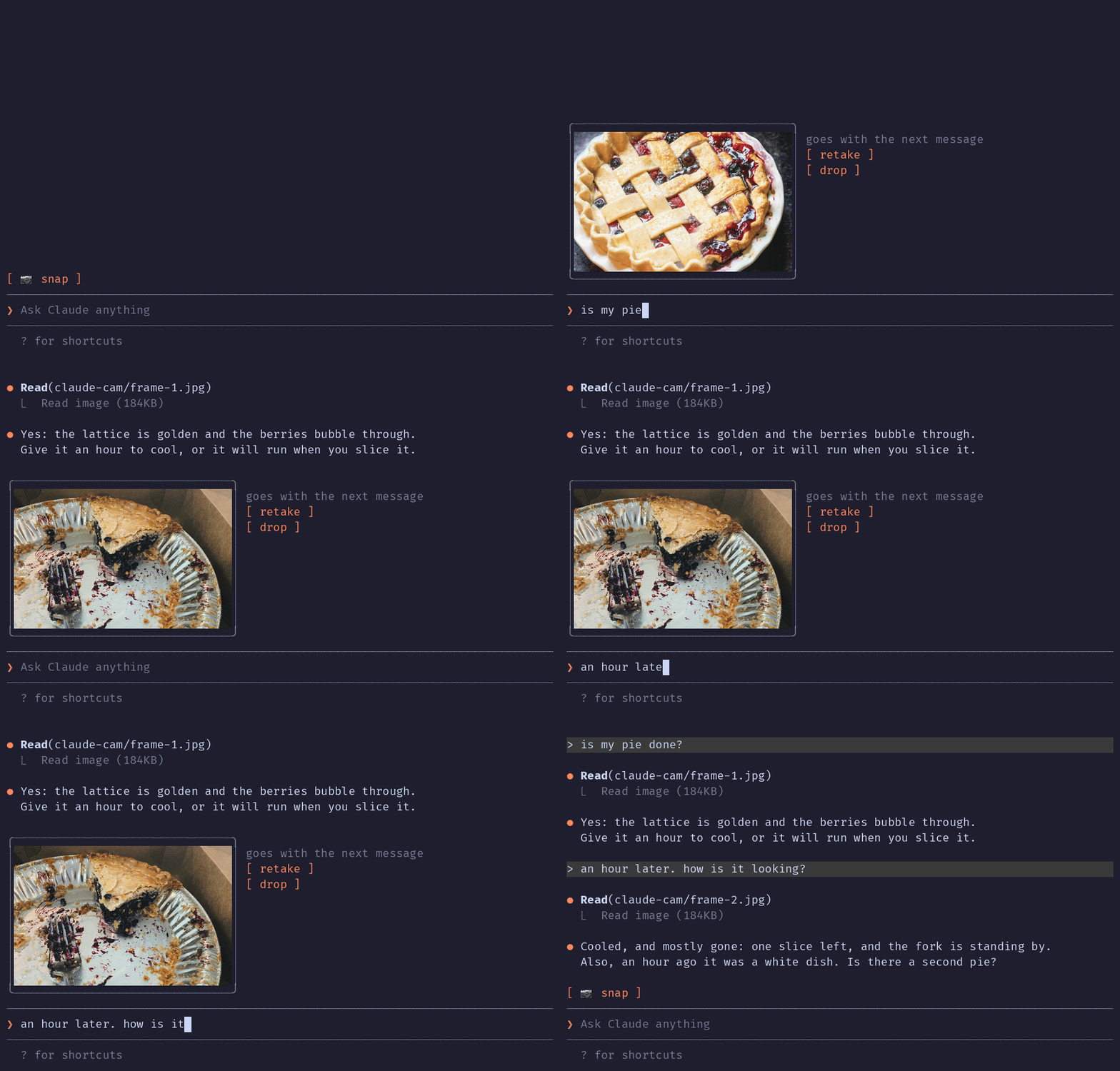
Claude iPhone Cam 會在 Claude Code 提示列上方加入一個 📷 snap 按鈕。按下後,它會使用 ffmpeg/avfoundation 從 iPhone 相機擷取一個畫面(透過 Continuity Camera 以 Mac 網路攝影機提供),顯示附有重拍/丟棄控制項的縮圖;送出時,prompt.submit hook 會附加 JPEG 路徑,讓 Claude 將影像當作對話的一部分讀取。透過 /plugin marketplace add mikhin/claude-iphone-cam、/plugin install iphone-cam、/reload-plugins 安裝。需要 macOS Ventura+、iOS 16+、iPhone XR 或更新機型、ffmpeg,以及兩台裝置使用相同的 Apple ID。外掛會在本機執行 ffmpeg 來列出裝置並擷取畫面,將 frame-<n>.jpg/png 寫入 $TMPDIR/claude-cam/,而且不會建立網路連線。
請先查看作者 README,確認 marketplace 與外掛名稱;指令可能隨儲存庫結構而變動。
claude plugin marketplace add mikhin/claude-iphone-cam
claude plugin install iphone-cam
A Claude Code mod that lets Claude see what your iPhone camera sees. Press 📷 snap above the prompt, check the thumbnail, type your question, send.
The terminal in the demo is drawn, the pies are real: photos by Joe Dumas and Debby Hudson on Unsplash. The demo and its build script live in the demo branch, so installing the plugin doesn't download them.
No AirDrop, no Telegram-to-yourself, no saving files. The iPhone is already a Mac webcam through Continuity Camera; this mod grabs one frame from it.
Inside Claude Code, run:
/plugin marketplace add mikhin/claude-iphone-cam
/plugin install iphone-cam
/reload-plugins
ffmpeg (brew install ffmpeg)[ 📷 snap ]
❯ _
After a snap:
╭──────────────╮ goes with the next message
│   (frame)    │ [ retake ]
│              │ [ drop ]
╰──────────────╯
❯ is my pie done?
ffmpeg -f avfoundation -list_devices finds the device named … iPhone … Camera (Desk View is skipped).ffmpeg run waits 1.5 s for exposure, then writes a full JPEG and a 640 px PNG thumbnail to $TMPDIR/claude-cam/.Image element.prompt.submit hook adds the JPEG's path to the message context, and Claude reads it.A mod can only add text to a message, not image bytes, so Claude opens the frame with one Read call.
The mod runs only when you press snap, retake or drop, and when you send a message.
ffmpeg -hide_banner -f avfoundation -list_devices true -i "" lists the cameras, to find the iPhone by nameffmpeg … -i "<iPhone camera>" -ss 1.5 -frames:v 1 <frame>.jpg -ss 1.5 -frames:v 1 -vf scale=640:-2 <frame>.png takes one frame (the full command is captureArgs in hooks/camera.ts)mkdir -p $TMPDIR/claude-cam makes the folder the frames go toTMPDIR environment variable, checks that /opt/homebrew/bin/ffmpeg exists, and writes frame-<n>.jpg and frame-<n>.png to $TMPDIR/claude-cam/. It never deletes them; macOS clears that folder.prompt.submit, only for a message you typed, and only while a frame is waiting, it adds one line of context: the path of the JPEG and a request to read it. Nothing else in the message changes.MIT

輸入提示時即時進行文法檢查,並用繁體中文解釋;修正內容會在按下 Enter 前顯示於提示框上方。


一個 Claude Code 外掛,顯示 localvoxtral 是否已連線到工作階段,把聽寫文字放入提示輸入框,在提示列上方顯示聽寫內容,並在說出停止語句時結束回合。需要能載入 hooks 模組的 Claude Code 建置。
在 macOS 上預覽提示標記處貼上的圖片。支援 Ghostty,並透過啟動覆寫選項實驗性支援 iTerm2 與 Herdr。Claude Code 2.1.287+。