karanb192@karanb192
karanb192/claude-code-mods/tree/main/plugins/image-peek
在 macOS 上預覽提示標記處貼上的圖片。支援 Ghostty,並透過啟動覆寫選項實驗性支援 iTerm2 與 Herdr。Claude Code 2.1.287+。
karanb192/claude-code-mods/tree/main/plugins/image-peek
將文字游標移到已貼上的 [Image #1] 標記上即可查看圖片,移開後隱藏。寬視窗會顯示較大的預覽窗格,圖片置中放在深色畫布上;窄視窗則使用提示列上方的區域。鍵盤焦點仍留在提示列。
這個初版以 macOS 和 Ghostty 為目標,需求是 Claude Code 2.1.287 或更新版本。我們已在實際 Claude CLI 中測試游標選取、原生貼上、重新載入與清理。一張使用者提供的 Ghostty 螢幕擷取畫面確認了大圖和深色預覽畫布。
iTerm2 和本機 Herdr 工作階段也能辨識,並可使用下方的啟動覆寫。它們的影像像素仍需要端到端視覺檢查。
在 shell 中執行,接著在 Ghostty 啟動新的 Claude 工作階段:
claude plugin marketplace add karanb192/claude-code-mods
claude plugin install image-peek@claude-code-mods
如果已經加入市集,請先用 claude plugin marketplace update claude-code-mods 更新,再進行安裝。Image Peek 的變更合併到市集的 main 分支後,這個項目才會提供使用。
不需要瀏覽器、編譯器、獨立的 Mac App 或 API 金鑰。Claude 會載入外掛,macOS 提供剪貼簿讀取器。Claude Code 2.1.287+ 預設啟用外掛。
若要不安裝就嘗試本機檢出版本,請從儲存庫根目錄執行:
claude --plugin-dir ./plugins/image-peek
在 Ghostty 內使用 iTerm2 3.7.3+ 或 Herdr 0.9.1+。啟用影像轉譯器後啟動新的 Claude 程序:
CLAUDE_CODE_FORCE_TERMINAL_IMAGES=1 claude
若是本機檢出版本,請從儲存庫根目錄執行:
CLAUDE_CODE_FORCE_TERMINAL_IMAGES=1 claude --plugin-dir ./plugins/image-peek
Claude Code 2.1.287 的轉譯器會將終端機回報的名稱與 Kitty 和 Ghostty 比對,即使圖形查詢已收到回覆也是如此。iTerm2 和 Herdr 可能無法通過這項名稱檢查。這個每程序覆寫會略過名稱檢查與影像檔案能力探測,不會改變 shell 設定,也不會安裝其他應用程式。只重新載入外掛並不足夠,因為 Claude 會在外掛啟動前初始化這些能力。
iTerm2 3.7.3 修正了 Claude 使用的 Unicode 圖片佔位符轉譯問題。Herdr 0.9.1 支援檔案提供的 Kitty 圖片和 Unicode 位置。它的 terminal.kitty_graphics 設定預設為 true;若曾停用,請重新啟用,並依照 Herdr 的重新啟動/重新連線說明操作。這條預覽路徑需要本機 Mac 工作階段,以及具備圖形能力的外層終端機。覆寫無法為不相容的終端機或傳輸方式增加圖形支援。
預覽跟隨文字游標,不是滑鼠懸停。對話會顯示在預覽旁邊或上方。完整圖片會放進可用的寬度和高度,並為標籤保留一列。窗格最多要求視窗寬度約 72%,再依圖片比例調整。Claude 可能保留你之前選擇的寬度;如果窗格太窄,請拖曳分隔線。
內嵌備援預覽較小,因為 Claude 將提示列上方的區域限制在終端機高度約一半,還要包含提示列和其他底部內容。沒有縮放或浮動覆蓋層。關閉窗格後,它會持續隱藏,直到游標離開標記。
Claude 使用自己的佈景主題繪製窗格外框。深色終端機搭配淺色 Claude 主題時,深色畫布周圍會留下明亮色帶。請在 Claude 的 /theme 選單選擇 Dark,讓周圍外框也變暗;這會改變 Claude 的所有介面色彩。Image Peek 不會改變你的主題。
/image-peek off 會停止新的擷取並隱藏預覽。/image-peek on 會恢復擷取新貼上的圖片。/image-peek 會回報目前設定。這些指令不會呼叫模型。
Claude 的提示 API 會公開標記和游標,卻不會提供草稿附件的位元組。因此,Image Peek 偵測到新的原生圖片標記時會讀取 Mac 剪貼簿。它每 120 ms 檢查一次草稿,並儲存當時的剪貼簿圖片。
從儲存庫根目錄執行:
claude plugin validate plugins/image-peek --strict
claude plugin test plugins/image-peek
Claude Code 2.1.287 的嚴格驗證器回報:
  ❯ types ./types/index.d.ts declares on $: nothing (no EngineInterface member)
  ❯ types ./types/index.d.ts declares state: image-peek.session
  ❯ ./register.ts hooks: session.start, prompt.edit, prompt.fill, command.run{command=image-peek}, session.end, session.compact, ui.render{component=AbovePrompt}, ui.render{component=Pane, requestId=image-peek}, ui.close{id=image-peek}
  ❯ ./register.ts calls: $.clock.every, $.command.register, $.env.get, $.process.run, $.prompt.read, $.session.id, $.state.get, $.state.set (via save), $.ui.close, $.ui.invalidate, $.ui.log, $.ui.open (via update), $.ui.panes, $.ui.resolve
  ❯ ./register.ts env writes: nothing
  ❯ ./register.ts env reads: CLAUDE_CODE_FORCE_TERMINAL_IMAGES, GHOSTTY_RESOURCES_DIR, HERDR_ENV, TERM_PROGRAM
  ❯ ./register.ts state writes: image-peek.session
  ❯ ./register.ts state reads: image-peek.session
測試涵蓋游標邊界、分開擷取、模糊貼上、輸入的標記替代內容、不支援的終端機、啟用/停用、擷取失敗、快取淘汰與清理失敗。實際 CLI 檢查也測試了原生圖片貼上、離開再回到標記、熱載入和正常結束清理。該終端機轉譯了 Image 元素的替代文字,因此沒有驗證圖片像素。這些檢查期間沒有提交模型工作階段。
實際 CLI 中的受控版面探測對兩種表面使用同一個 180-column、48-row 終端機。內嵌區域穩定為 15 rows,並將橫向圖片放入 50 by 14 cells。要求 128-column 窗格提供 128 by 40 cell body,並將該圖片放入 126 by 34 cells。這驗證了可用版面空間,不代表已驗證轉譯像素或色彩。
要進行完整互動檢查,請在 Ghostty 貼上兩張不同圖片,選取每個標記、調整視窗大小,確認較大的深色預覽會出現和消失,同時鍵盤焦點不移動。再讓對話輸出位於提示列上方重複測試。重新載入時,外掛會關閉之前版面留下的任何窗格。
達到 L2:啟動本機程序並寫入暫存圖片檔案。
請先查看作者 README,確認 marketplace 與外掛名稱;指令可能隨儲存庫結構而變動。
claude plugin marketplace add karanb192/claude-code-mods
claude plugin install image-peek
Move the text cursor onto a pasted [Image #1] marker to see its image. Move away to hide it. Wide windows get a large preview pane with the image centered on a dark canvas. Narrow windows use the area above the prompt. Keyboard focus stays in the prompt.
This first version targets macOS and Ghostty with Claude Code 2.1.287 or later. Cursor selection, native paste, reload and cleanup have been exercised in the actual Claude CLI. A user-provided Ghostty screenshot confirms the large image and dark preview canvas.
iTerm2 and local Herdr sessions are also recognized, with the startup override below. Their image pixels still need an end-to-end visual check.
Run in your shell, then start a new Claude session in Ghostty:
claude plugin marketplace add karanb192/claude-code-mods
claude plugin install image-peek@claude-code-mods
If you already added the marketplace, update it with claude plugin marketplace update claude-code-mods before installing. This entry becomes available when the Image Peek change is merged into the marketplace's main branch.
No browser, compiler, separate Mac app or API key is needed. Claude loads the mod and macOS supplies the clipboard reader. Mods are enabled by default in Claude Code 2.1.287+.
To try a local checkout without installing, run from the repository root:
claude --plugin-dir ./plugins/image-peek
Use iTerm2 3.7.3+ or Herdr 0.9.1+ inside Ghostty. Start a new Claude process with the image renderer enabled:
CLAUDE_CODE_FORCE_TERMINAL_IMAGES=1 claude
For a local checkout, from the repository root:
CLAUDE_CODE_FORCE_TERMINAL_IMAGES=1 claude --plugin-dir ./plugins/image-peek
Claude Code 2.1.287's renderer checks the terminal's reported name against Kitty and Ghostty even after a graphics query receives a reply. iTerm2 and Herdr can fail this name check. This per-process override bypasses that check and the image-file capability probe. It does not change your shell settings or install another application. A mod reload is insufficient because Claude initializes these capabilities before the mod starts.
iTerm2 3.7.3 fixes rendering of the Unicode image placeholders that Claude uses. Herdr 0.9.1 supports file-backed Kitty images and Unicode placements. Its terminal.kitty_graphics setting defaults to true; if you disabled it, enable it and follow Herdr's restart/reattach instructions. This preview route requires a local Mac session and a graphics-capable outer terminal. The override cannot add graphics support to an incompatible terminal or transport.
[Image #N] marker. The preview appears automatically.This follows the text cursor, not mouse hover. The conversation remains visible beside or above the preview. The whole image fits within the available width and height, reserving one row for its label. The pane requests up to about 72% of the window's width, adjusted for the image's proportions. Claude may retain a width you previously chose; drag the divider if that makes the pane too narrow.
The inline fallback is smaller because Claude limits the above-prompt area to roughly half the terminal height, including the prompt and other bottom content. There is no zoom or floating overlay. Closing the pane dismisses it until the cursor leaves the marker.
Claude draws the pane's outer frame using its own theme. A Light Claude theme in a dark terminal leaves bright strips around the dark canvas. Choose Dark in Claude's /theme menu to make the surrounding frame dark too; this changes all Claude UI colors. Image Peek does not change your theme.
/image-peek off stops new captures and hides the preview. /image-peek on resumes capture for new pastes. /image-peek reports the current setting. These commands do not call a model.
Claude's prompt API exposes the marker and cursor but does not provide the draft attachment bytes. Image Peek therefore reads the Mac clipboard when it detects a new native image marker. It checks the draft every 120 ms and saves that clipboard image once.
claude-image-peek/.Run from the repository root:
claude plugin validate plugins/image-peek --strict
claude plugin test plugins/image-peek
The strict validator on Claude Code 2.1.287 reported:
  ❯ types ./types/index.d.ts declares on $: nothing (no EngineInterface member)
  ❯ types ./types/index.d.ts declares state: image-peek.session
  ❯ ./register.ts hooks: session.start, prompt.edit, prompt.fill, command.run{command=image-peek}, session.end, session.compact, ui.render{component=AbovePrompt}, ui.render{component=Pane, requestId=image-peek}, ui.close{id=image-peek}
  ❯ ./register.ts calls: $.clock.every, $.command.register, $.env.get, $.process.run, $.prompt.read, $.session.id, $.state.get, $.state.set (via save), $.ui.close, $.ui.invalidate, $.ui.log, $.ui.open (via update), $.ui.panes, $.ui.resolve
  ❯ ./register.ts env writes: nothing
  ❯ ./register.ts env reads: CLAUDE_CODE_FORCE_TERMINAL_IMAGES, GHOSTTY_RESOURCES_DIR, HERDR_ENV, TERM_PROGRAM
  ❯ ./register.ts state writes: image-peek.session
  ❯ ./register.ts state reads: image-peek.session
Tests cover cursor boundaries, separate captures, ambiguous pastes, typed marker substitutes, unsupported terminals, enable/disable, failed capture, cache eviction and cleanup failure. A live CLI check also exercised native image paste, leaving and returning to the marker, hot reload and normal-exit cleanup. That terminal rendered the Image element's alternative text, so it did not verify image pixels. No model turn was submitted during these checks.
A controlled layout probe in the actual CLI used the same 180-column, 48-row terminal for both surfaces. The inline area settled at 15 rows and fitted a landscape image into 50 by 14 cells. A requested 128-column pane provided a 128 by 40 cell body and fitted that image into 126 by 34 cells. This verifies available layout space, not rendered pixels or colors.
For a full interaction check, paste two distinct images in Ghostty, select each marker, resize the window, and confirm the larger dark preview appears and disappears without moving keyboard focus. Repeat with conversation output above the prompt. On reload, the plugin closes any pane left from its earlier layout.
Reach L2: starts local processes and writes temporary image files.
/usr/bin/uname -s to check the platform and /usr/bin/osascript -l JavaScript with the bundled clipboard helper. Fixed argument arrays are used; prompt text never becomes a shell command.$.process.run, so review the helper as well as the hooks module.hooks/register.ts: detects marker selection, captures new images and draws the preview.hooks/clipboard.js: macOS clipboard capture and temporary-file cleanup.hooks/selection.ts: marker boundaries and image sizing.types/index.d.ts: the plugin's session-state shape.tests/register.test.ts: Claude's native mod tests.The implementation uses Claude's engine interface and native interface elements. Generated engine declarations are local development files and are not shipped.

輸入提示時即時進行文法檢查,並用繁體中文解釋;修正內容會在按下 Enter 前顯示於提示框上方。


一個 Claude Code 外掛,顯示 localvoxtral 是否已連線到工作階段,把聽寫文字放入提示輸入框,在提示列上方顯示聽寫內容,並在說出停止語句時結束回合。需要能載入 hooks 模組的 Claude Code 建置。

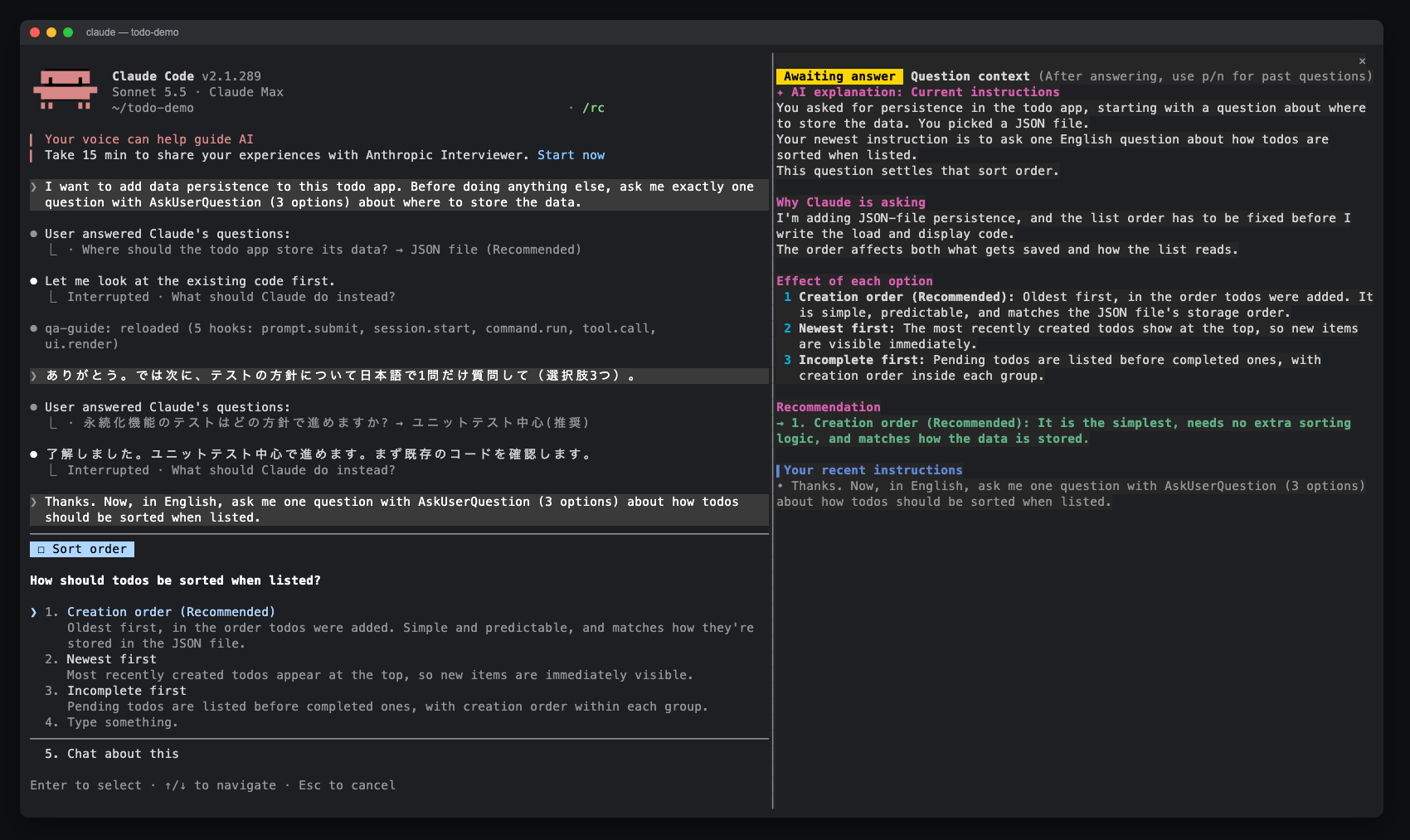
一個 Claude Code 模組,為 AskUserQuestion 提示開啟一個側邊窗格,顯示 AI 解釋、選項效果、最近指令和回答歷史。可透過 claude-qamods 市集安裝;需要 Claude Code 2.1.286+ 和早期存取的 function-hooks 外掛程式 API。