
Vortitron@Vortitron
Vortitron/home-assistant-mcp/tree/main/claude-plugin/vome-health
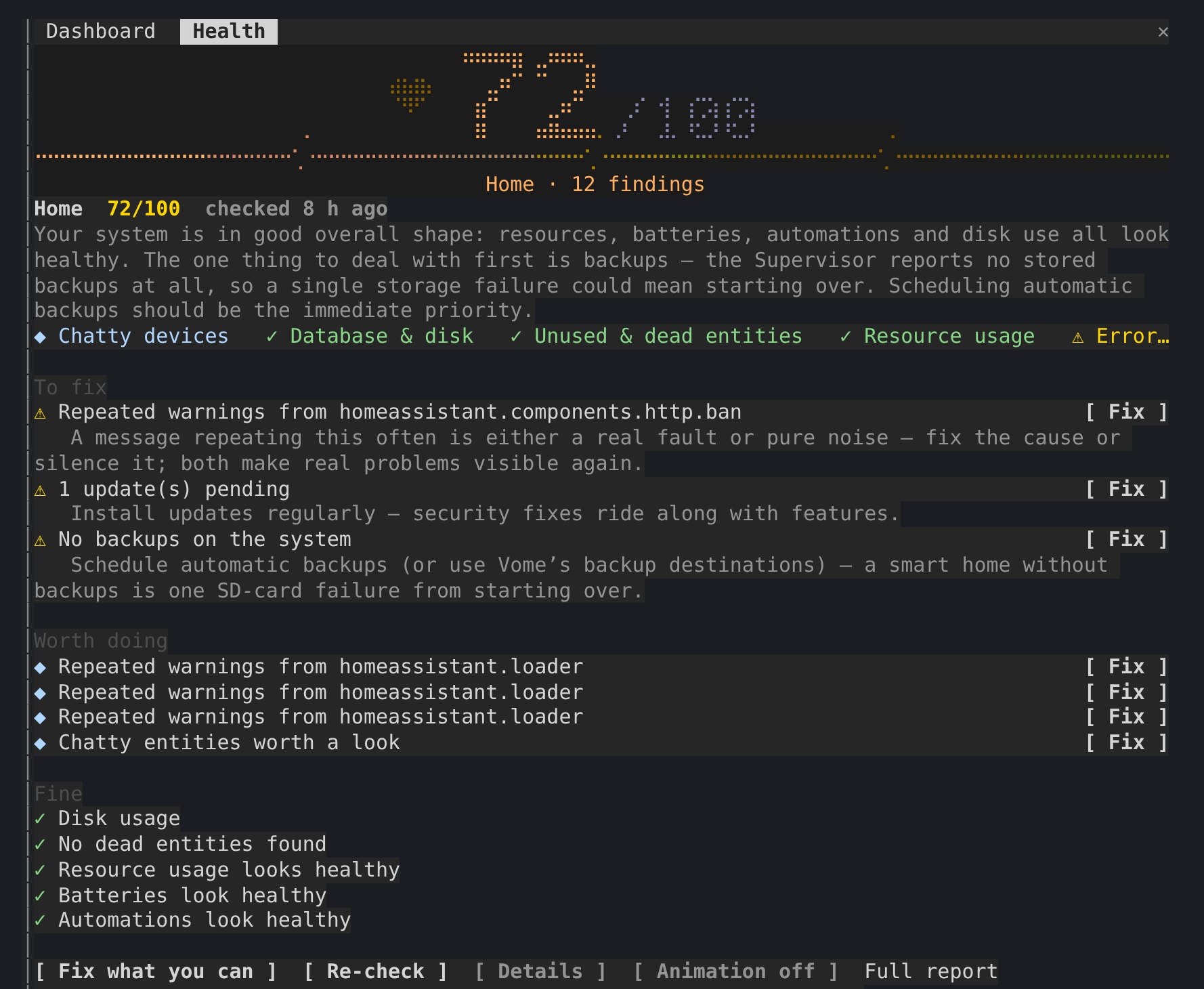
一个显示 Home Assistant 健康评分的侧边面板,满分 100,并在 Claude 处理问题时将检查发现的所有内容放在对话旁边。
Vortitron/home-assistant-mcp/tree/main/claude-plugin/vome-health
一个显示 Home Assistant 健康评分的侧边面板,满分 100, 并在 Claude 处理问题时将检查发现的所有内容放在对话旁边。
通过 /plugin install vome-health --marketplace Vortitron/home-assistant-mcp 安装。
请先查看作者 README 确认 marketplace 和插件名称;命令可能随仓库结构改变。
claude plugin marketplace add Vortitron/home-assistant-mcp
claude plugin install vome-health
A side pane with Vome's health score for your Home Assistant, out of 100, and everything its check found, kept beside the conversation while Claude works through it.
The pane never fixes anything itself: Claude does, with its own tool calls, which you approve as usual. r only asks Vome for a fresh check.
1. Add the Vome app to Home Assistant, then get a key from it. No sign-up needed.

The button opens your own Home Assistant and adds the app's repository. Pick Vome and Install, open it, and on the Agent tab create a key.
2. Paste these into Claude Code, in a terminal (version 2.1.275 or newer):
/plugin install vome-connect --marketplace Vortitron/home-assistant-mcp
It asks for the key from step 1. Then:
/plugin install vome-health --marketplace Vortitron/home-assistant-mcp
/reload-plugins
Or all four Vome panes at once (automations, ESPHome, health and a working dashboard):
/plugin install vome-panes --marketplace Vortitron/home-assistant-mcp.
3. Ask Claude "How healthy is my Home Assistant? Fix what you can." The pane opens with the score. No score yet? Claude runs the first check, which takes a couple of minutes.
The pane reads the report in the background while a check runs, with the
MCP's read-only vome_health_report; r calls vome_health_check. In auto
mode, Claude Code refuses background calls that no request of yours is behind
unless they're allowed by name, and the pane then shows the exact line. With
vome-connect:
{ "permissions": { "allow": ["mcp__plugin_vome-connect_vome__vome_health_report"] } }
| | |
| --- | --- |
| /health | open the pane and read the latest report |
| r | run a fresh check |
| d | each finding's evidence, not just its title |
| b | the animation off or on (remembered) |
The report is Vome's health check of your own Home Assistant, read from the
sensor the Vome integration keeps it on (sensor.vome_health_score or
similar). The pane reads it through the connection Claude Code already has;
nothing is sent anywhere else.

文档生成、漂移检测和 API 文档自动化插件,同时作为 function-hook 防护,拒绝包含机密的文档写入或 worker 调度。

Claude 桌面应用的状态栏。它显示在提示符上方,展示会话质量、上下文填充量、缓存倒计时,以及 5 小时和每周限额,并让 Clawd 演示会话正在进行的操作。

一个 Claude Code 插件 mod,提供 /databricks-pane:按照 databricks CLI,以树状结构展示 Databricks 工作区、Unity Catalog、计算资源、作业、管道、应用和仪表板,并支持实时高亮、配置文件切换和复制 CLI 参数。
