
andrej-kolic@andrej-kolic
andrej-kolic/claude-mods/tree/main/plugins/usage-bar
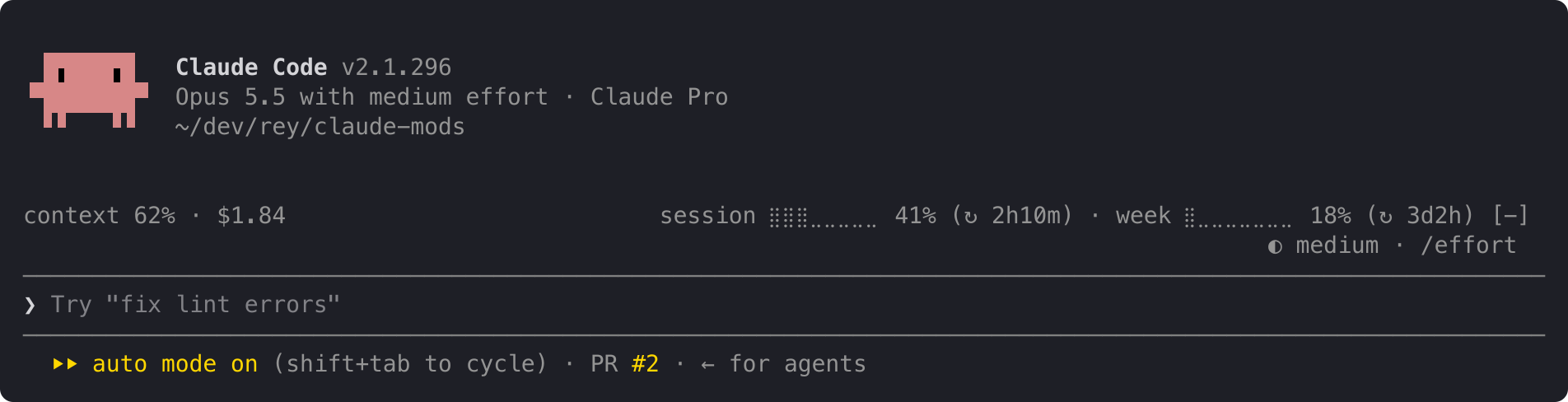
Claude Code 插件,在提示符上方以一行安静的信息显示套餐用量限制、上下文填充和会话费用,并在 50%、80% 和 95% 处提供黄色/红色阈值提醒,每个限制周期重置。
andrej-kolic/claude-mods/tree/main/plugins/usage-bar
usage-bar 在 Claude Code 的提示符上方添加一行紧凑的信息,是对状态行的补充而非替代。左侧显示当前对话的上下文窗口填充情况和会话费用;右侧显示账户的 5 小时会话和每周限制用量以及距重置的时间。限制百分比在 50% 时变为黄色,在 95% 时变为红色,并在 50%、80% 和 95% 阈值处显示提醒,每个限制周期仅显示一次,并在重启和不同项目之间保持。当空间紧张时,该行会逐步缩短而不是换行,在首次读取之前或登出状态下显示 "usage: no data yet"。
它只读取 Claude Code 已提供的数字,不向任何地方发送任何内容,也不发起网络请求,仅在本地保存已显示提醒的小记录。使用 /plugin install usage-bar --marketplace andrej-kolic/claude-mods 安装;需要 Claude Code 2.1.275 或更高版本,并增加约 0 个 token 的上下文。用量限制需要 Claude 订阅;使用 API 密钥时仅显示上下文和费用。它适用于终端和桌面应用的 Code 标签页,不适用于 claude.ai 或 Cowork。
请先查看作者 README 确认 marketplace 和插件名称;命令可能随仓库结构改变。
claude plugin marketplace add andrej-kolic/claude-mods
claude plugin install usage-bar@claude-mods
Your plan's usage limits, context and cost on one quiet line above the prompt, with an alert before you run out. It doesn't replace your status line: it sits above the prompt, so the two work side by side.
On the left, this conversation:
context: how full the context window is.$: what this session has cost.On the right, your account's limits:
session and week: how much of your 5-hour and weekly limits you've used, and after ↻, how long until each resets: 2h10m, 3d2h, or now once it has reset.A limit's percent turns yellow at 50% and red at 95%; the rest of the line stays grey. An alert with the limit and its percent appears at the top right at 50%, 80% and 95%:
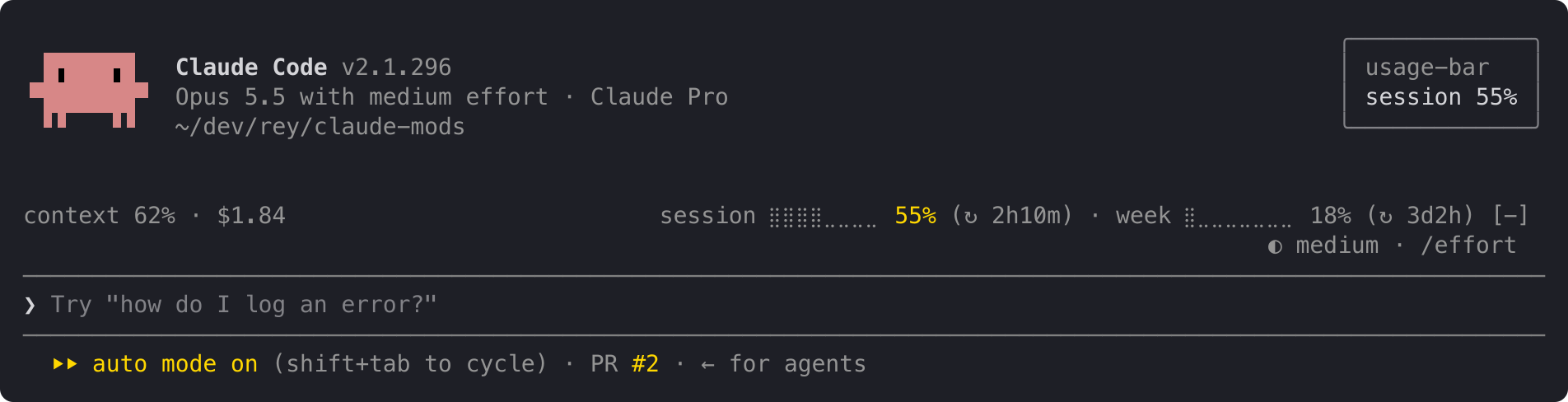
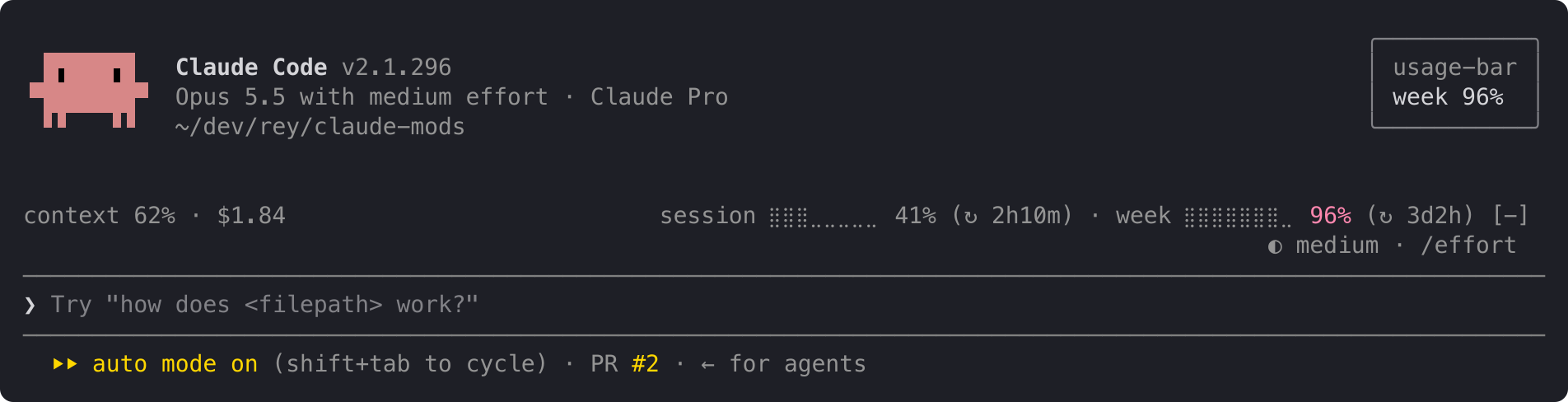
When both limits cross at once, one alert names both: session 62% · week 97%. Each alert shows once per limit period, even across restarts and projects. When a limit resets, its alerts start over.
The line at the top is the full layout. When it doesn't fit, it shortens instead of wrapping, one step at a time:
ctx 62% · $1.84 s ⣿⣿⣿⣀⣀⣀⣀⣀ 41% (↻ 2h10m) · w ⣿⣀⣀⣀⣀⣀⣀⣀ 18% (↻ 3d2h)
ctx 62% · $1.84 s 41% (↻ 2h10m) · w 18% (↻ 3d2h)
ctx 62% · $1.84 s 41% · w 18%
For a few seconds after startup, and for as long as you're not logged in, the line reads:
usage: no data yet
The context shows – until your first reply, because Claude Code measures the context only when it answers.
usage-bar reads only figures Claude Code already has: context fill, session cost and your plan's limits. It sends nothing anywhere and makes no network requests. It stores one small record per limit on your machine, listing the alerts already shown in the current period, so a restart doesn't repeat them.
In Claude Code:
/plugin install usage-bar --marketplace andrej-kolic/claude-mods
The desktop app's Code tab doesn't offer /plugin install: run it once in a terminal, at the user scope, and the line shows in the desktop app's local sessions too.
$, and no alerts.The screenshots use sample readings. The yellow and red follow your Claude Code theme.
The spec has every rule: rounding, colours, widths, and when alerts repeat.

文档生成、漂移检测和 API 文档自动化插件,同时作为 function-hook 防护,拒绝包含机密的文档写入或 worker 调度。
Repowise 推出 Lens,这是一个能实时可视化已索引代码库的 Claude Code mod:Claude 搜索、读取和编辑文件时,文件会亮起,导入方和反向依赖也会高亮。它还包含一个显示受影响文件和覆盖测试的 Flow 标签页,以及一个带健康度变化和运行建议测试按钮的审查行。


Claude 桌面应用的状态栏。它显示在提示符上方,展示会话质量、上下文填充量、缓存倒计时,以及 5 小时和每周限额,并让 Clawd 演示会话正在进行的操作。