
victor-falcon@victor-falcon
victor-falcon/claude-status-bar

一款 Claude Code 外挂,在提示列下方添加彩色状态列,并保留引擎自己的提示行(`? for shortcuts`、`esc to interrupt`……):
victor-falcon/claude-status-bar
一个 Claude Code 外挂,会在提示列下方添加彩色状态列,并保留引擎自己的提示行(? for shortcuts、esc to interrupt……):

| 分段 | 显示内容 | 颜色 |
| --- | --- | --- |
| 分支 | 当前分支;如果 HEAD 已分离,则显示短 SHA | 分支图标颜色 |
| 差异 | 相对于默认分支合并基点新增和删除的行,包含未提交的工作 | +N 为绿色,-N 为红色 |
| 拉取请求 | 分支的 PR 编号和状态,格式为 #42 (Open),并链接到该 PR。状态可以是 Merged、Closed、Draft 或 Open | 紫色、红色、灰色、绿色 |
| CI | 已通过的检查数和总数,并在全部通过、存在失败或仍在运行时显示相应图标 | 全部通过时通过数为绿色,任一失败时为红色 |
| 用量 | 方案的 5 小时工作阶段用量和每周用量 | 从 65% 开始为橙色,从 75% 开始为红色(取更接近上限的时间窗口) |
没有可显示内容的分段会被省略:在 git 仓库外没有 git 部分,没有 PR 时没有 PR 或 CI 部分,不使用 Claude 订阅时没有用量部分。
git,以及已登录的 GitHub CLI(gh),用于 PR 和 CI 分段。claude plugin marketplace add victor-falcon/claude-status-bar
claude plugin install status-bar@claude-status-bar
启动新工作阶段,或者在正在运行的工作阶段中执行 /reload-plugins。
如果设置中有 statusLine 命令,可以移除它:此外挂会替代该命令。
gh pr、git push、git checkout 或 git switch 后也会立即刷新。可以在 /config 中关闭每个分段,也可以更改每个图标;每个选项都是一行。Claude Code 会把它们存储在 settings.json 的 pluginConfigs 下,其中任何一项发生变化后,外挂都会立即重新加载。

| 选项 | 默认值 | 作用 |
| --- | --- | --- |
| showBranch | true | 显示分支 |
| showDiff | true | 显示新增和删除的行(关闭后,外挂会跳过 git diff) |
| showPullRequest | true | 显示已链接的拉取请求编号及其状态 |
| showChecks | true | 显示 CI 检查(同时关闭拉取请求后,外挂也不会调用 gh) |
| showUsage | true | 显示方案用量 |
| iconBranch | Nerd Font 分支 | 绘制在分支名称前 |
| iconDiff | 无 | 绘制在新增和删除的行前 |
| iconPullRequest | Nerd Font GitHub | 绘制在拉取请求编号前 |
| iconChecksPassed | Nerd Font check | 所有检查通过时绘制在检查前 |
| iconChecksFailed | Nerd Font cross | 任一检查失败时绘制在检查前 |
| iconChecksPending | Nerd Font hourglass | 有些检查仍在运行时绘制在检查前 |
| iconUsage | 无 | 绘制在方案用量前 |
图标会按原样使用,包括空格。留空一个字段即可使用默认值,写入 none 则不绘制图标。Claude Code 在安装时打开的对话框会将所有图标字段留空,因为它不会把默认值填入文本字段;保持原样保存即可继续使用默认图标。
默认图标、颜色和阈值是 hooks/format.ts 顶部的常量(DEFAULT_ICONS、COLOR_*、PULL_REQUEST_COLORS、USAGE_WARNING_PERCENT、USAGE_CRITICAL_PERCENT)。颜色可以是 Claude Code 主题键,也可以是原始颜色(green、#ff8700)。
要运行自己的副本,请克隆此仓库,然后从磁盘加载,而不是安装它:
claude --plugin-dir /path/to/claude-status-bar
或者,为每个工作阶段在 ~/.claude/settings.json 的 env 区块中将 CLAUDE_CODE_PLUGIN_DIRS 设置为该路径。此文件夹会被监视,因此保存文件后外挂会重新加载。
claude plugin validate .
claude plugin test .
请先查看作者 README 确认 marketplace 和插件名称;命令可能随仓库结构改变。
claude plugin marketplace add victor-falcon/claude-status-bar
claude plugin install status-bar
A Claude Code mod that adds a colored status line under the prompt, with the
engine's own hint line (? for shortcuts, esc to interrupt…):
| Segment | What it shows | Color |
| --- | --- | --- |
| Branch | Current branch, or the short SHA on a detached HEAD | Branch icon colored |
| Diff | Lines added and removed against the merge base with the default branch, uncommitted work included | +N green, -N red |
| Pull request | The branch's PR number and state, as #42 (Open), linked to the PR. The state is Merged, Closed, Draft or Open | Purple, red, gray, green |
| CI | Passed checks out of the total, with an icon for all passed, any failed, or still running | Passed count green when all passed, red when any failed |
| Usage | Your plan's 5-hour session usage and weekly usage | Orange from 65%, red from 75% (whichever window is fuller) |
Segments with nothing to show are left out: outside a git repository there is no git part, without a PR there is no PR or CI part, and off a Claude subscription there is no usage part.
git, and the GitHub CLI (gh) logged in for the PR and CI segments.claude plugin marketplace add victor-falcon/claude-status-bar
claude plugin install status-bar@claude-status-bar
Start a new session, or run /reload-plugins in a running one.
If you had a statusLine command in your settings, you can remove it: this mod replaces it.
gh pr, git push, git checkout or git switch run by
Claude.Every section can be switched off and every icon changed from /config, where each option is a row. Claude Code
stores them in settings.json under pluginConfigs, and the mod reloads as soon as one changes.
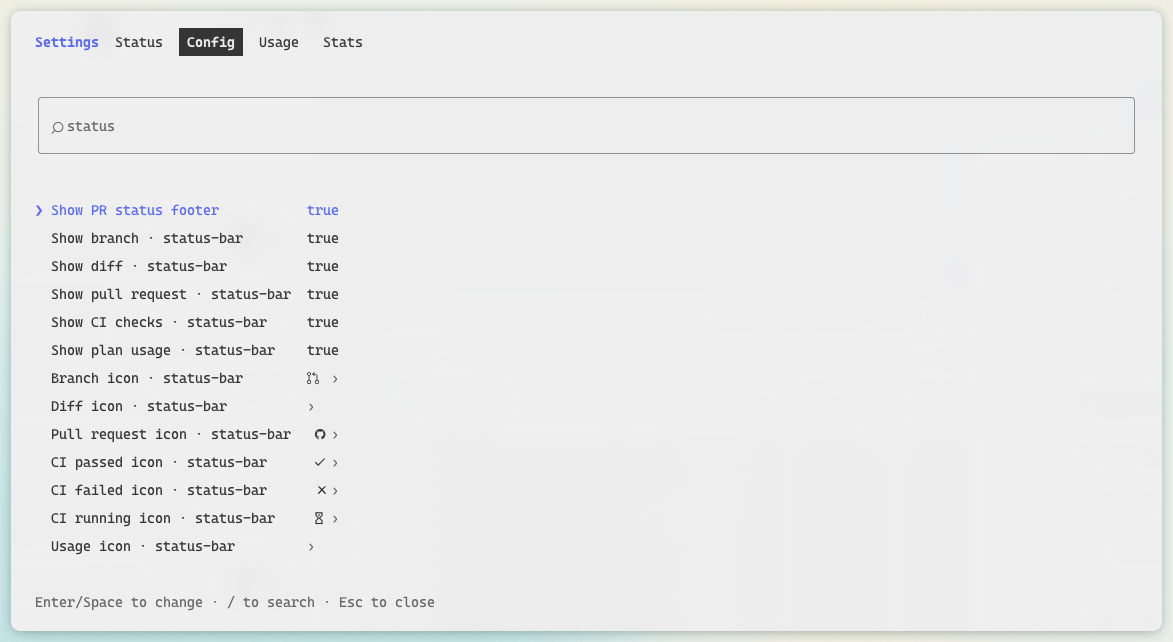
| Option | Default | What it does |
| --- | --- | --- |
| showBranch | true | Show the branch |
| showDiff | true | Show the lines added and removed (off, the mod skips git diff) |
| showPullRequest | true | Show the pull request number, linked, and its state |
| showChecks | true | Show the CI checks (with the pull request off too, the mod never calls gh) |
| showUsage | true | Show the plan usage |
| iconBranch | Nerd Font branch | Drawn before the branch name |
| iconDiff | none | Drawn before the added and removed lines |
| iconPullRequest | Nerd Font GitHub | Drawn before the pull request number |
| iconChecksPassed | Nerd Font check | Drawn before the checks when every one passed |
| iconChecksFailed | Nerd Font cross | Drawn before the checks when any failed |
| iconChecksPending | Nerd Font hourglass | Drawn before the checks while some are still running |
| iconUsage | none | Drawn before the plan usage |
Icons are used as written, spaces included. Leave one empty for its default, or write none to draw no icon. The
dialog Claude Code opens on install shows every icon field empty, as it never fills a text field with its default:
save it as it is to keep the default icons.
Default icons, colors and thresholds are constants at the top of hooks/format.ts (DEFAULT_ICONS,
COLOR_*, PULL_REQUEST_COLORS, USAGE_WARNING_PERCENT, USAGE_CRITICAL_PERCENT). Colors are a Claude Code theme
key or a raw color (green, #ff8700).
To run your own copy, clone this repository and load it from disk instead of installing it:
claude --plugin-dir /path/to/claude-status-bar
or, for every session, set CLAUDE_CODE_PLUGIN_DIRS to that path in the env block of ~/.claude/settings.json. The
folder is watched, so saving a file reloads the mod.
claude plugin validate .
claude plugin test .

文档生成、漂移检测和 API 文档自动化插件,同时作为 function-hook 防护,拒绝包含机密的文档写入或 worker 调度。

Claude 桌面应用的状态栏。它显示在提示符上方,展示会话质量、上下文填充量、缓存倒计时,以及 5 小时和每周限额,并让 Clawd 演示会话正在进行的操作。

一个 Claude Code 插件 mod,提供 /databricks-pane:按照 databricks CLI,以树状结构展示 Databricks 工作区、Unity Catalog、计算资源、作业、管道、应用和仪表板,并支持实时高亮、配置文件切换和复制 CLI 参数。
