
LorcanChinnock@LorcanChinnock
LorcanChinnock/claude-desk-neighbours/tree/main/plugins/show-and-tell
LorcanChinnock/claude-desk-neighbours/tree/main/plugins/show-and-tell
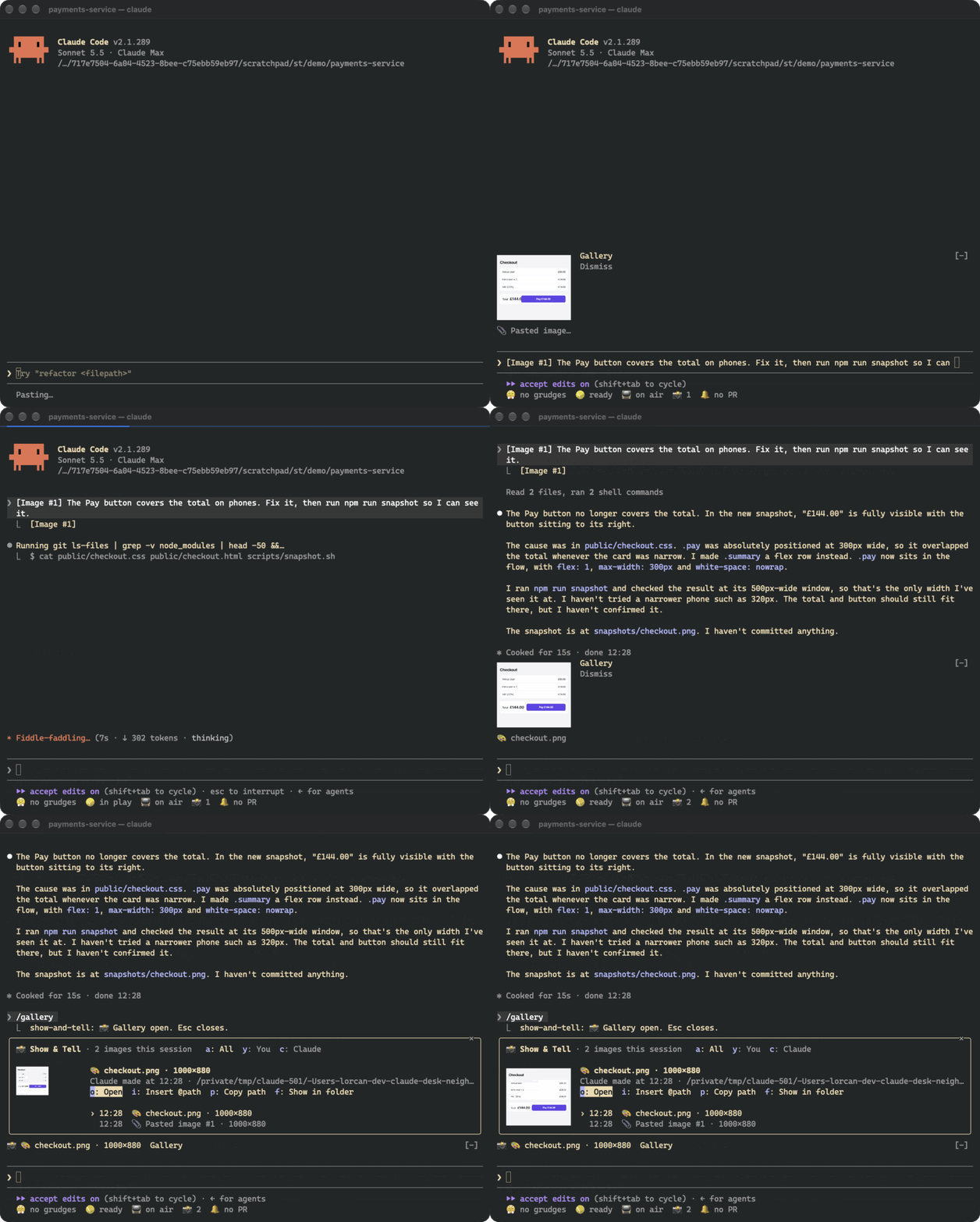
Show & Tell 会监视草稿中的 Claude Code [Image #N] 标记并复制对应图片,因此粘贴后约四分之一秒内、发送之前,提示列上方就会出现缩略图。它也会接收 Claude 读取、写入或编辑的图片,以及 browser/MCP 截图和 shell 命令等工具在工作目录中创建的图片。提示列上方的横条显示最新缩略图,并提供 Gallery 和 Dismiss 按钮;/gallery(或状态列中的 📸 计数器)会打开工作阶段中每张图片的完整图库,可预览、筛选你的图片与 Claude 的图片,并执行打开、重新附加(@path)、复制路径或显示文件等操作。图片通过 kitty graphics protocol(Ghostty、kitty)渲染;其他终端会退回到文字占位符。非 PNG 格式会使用 sips、ImageMagick 或 qlmanage 转换一次。不调用模型;副本位于 ~/.claude/show-and-tell/<session>/,manifest.json 会在 /resume 后恢复图库,超过 7 天的副本会在工作阶段开始时清理。安装:/plugin install show-and-tell@claude-desk-neighbours
请先查看作者 README 确认 marketplace 和插件名称;命令可能随仓库结构改变。
claude plugin marketplace add LorcanChinnock/claude-desk-neighbours
claude plugin install show-and-tell
Shows a thumbnail as soon as you paste a screenshot, and keeps a gallery of every image in the session.
/plugin install show-and-tell@claude-desk-neighbours
Hit ctrl+v with an image on your clipboard and a thumbnail appears above the prompt within about a quarter of a
second, before you've sent anything. Show & Tell watches your draft for Claude Code's [Image #1] and copies the
image Claude Code saved for it. If that file isn't where it expects, it reads the clipboard itself (osascript
on macOS, wl-paste or xclip on Linux, PowerShell on Windows). If that doesn't work either, it grabs the image
when you send the prompt.
Claude's pictures get picked up the same way. That covers images Claude opens with Read, screenshots returned by
browser or MCP tools, pictures Claude writes or edits, and images a shell command creates in the working
directory or one level down (playwright screenshot, a chart script).
The band above the prompt shows the newest thumbnails, with Gallery and Dismiss buttons. A pasted thumbnail goes
away when you send it. Everything else disappears after 20 seconds, which you can change in /config.
Click 📸 4 in the status row, or run /gallery, to see every image from this session, newest first, with a big
preview of whichever one you select. a, y and c filter to all images, yours, or Claude's. o opens the
image in your viewer, i puts @path in your prompt so Claude can look at it again, p copies the path, and
f shows it in its folder. Tab moves through the list. This is after Claude fixed the checkout and took a
snapshot:
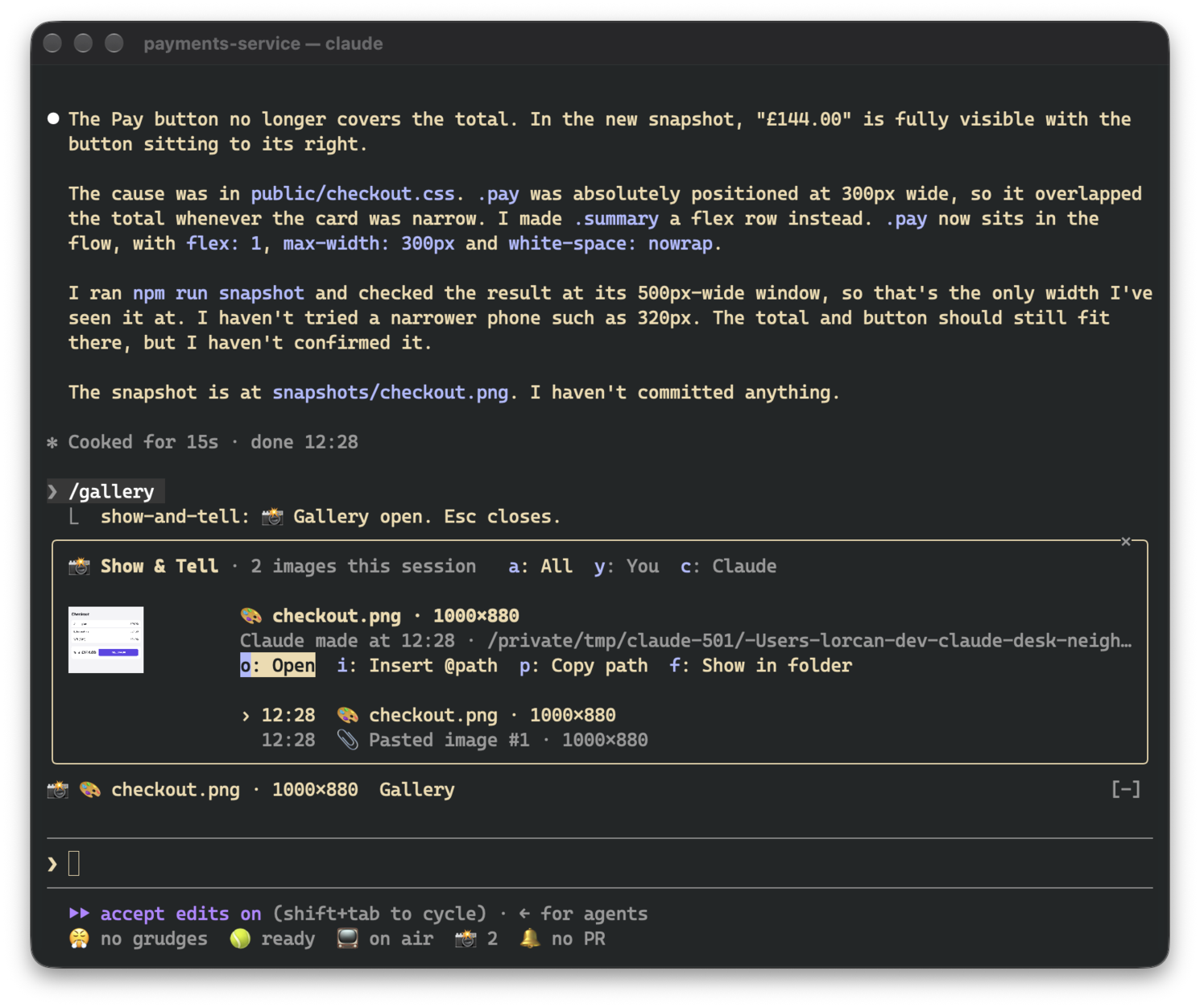
The gallery asks for enough room to show a picture. If it doesn't get it (say, an inline pane in a small terminal), the picture shrinks to fit and the footer is hidden so the header, actions and list stay visible.
Pictures only render in terminals that support the kitty graphics protocol, which means Ghostty and kitty. In
other terminals, in tmux and in the desktop app, the band and gallery show the same thing as text
(📎 Pasted image #1 · 200×120), and all the buttons still work.
Thumbnails have to be PNGs, so other formats get converted once: with sips on macOS and ImageMagick (magick or
convert) elsewhere. On macOS, qlmanage handles SVG and PDF. If there's no converter, the image is still
listed, just without a picture.
There are no model calls. Pasted images, and images that only exist inside a tool's result, are copied to
~/.claude/show-and-tell/<session>/ next to a manifest.json that restores the gallery after /resume. Files
Claude read or created stay where they are. Copies older than seven days are deleted when a session starts. The
cleanup uses find, so on Windows they stick around until you delete them yourself.
While a session is open, the draft is checked four times a second. That's just a read of the prompt box, and
nothing runs unless a new [Image #N] shows up. Where Claude Code saves pastes (/tmp/claude-<uid>/…/images/)
isn't part of the plugin API, so a future version of Claude Code might move it. If that happens, Show & Tell
falls back to reading the clipboard.

文档生成、漂移检测和 API 文档自动化插件,同时作为 function-hook 防护,拒绝包含机密的文档写入或 worker 调度。

Claude 桌面应用的状态栏。它显示在提示符上方,展示会话质量、上下文填充量、缓存倒计时,以及 5 小时和每周限额,并让 Clawd 演示会话正在进行的操作。

一个 Claude Code 插件 mod,提供 /databricks-pane:按照 databricks CLI,以树状结构展示 Databricks 工作区、Unity Catalog、计算资源、作业、管道、应用和仪表板,并支持实时高亮、配置文件切换和复制 CLI 参数。
