
Turbo-Thorschten@Turbo-Thorschten
Turbo-Thorschten/shell-highlight
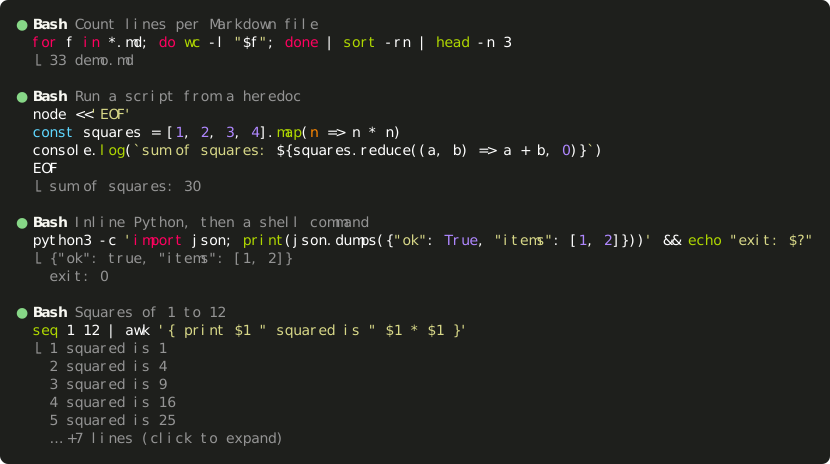
一个 Claude Code mod,用语法高亮显示 ⟦Bash 和 ⟦PowerShell 工具调用中的命令。
Turbo-Thorschten/shell-highlight
一个 Claude Code mod,用语法高亮显示 Bash 和 PowerShell 工具调用中的命令。
它使用 Claude Code 自带的高亮器为每次 shell 调用着色,在 heredoc、here-string 和带引号的参数中识别嵌入的语言(JavaScript/TypeScript、Python、Ruby、Perl、PHP、SQL、bash、PowerShell、batch),并在每次调用下方显示输出的前几行。连续调用默认折叠,单击即可展开;悬停时高亮单次调用;状态点显示运行中、成功、失败或中断状态。需要 Claude Code 2.1.287 或更新版本。克隆仓库并运行 claude --plugin-dir ./shell-highlight 安装,或者将文件夹加入 CLAUDE_CODE_PLUGIN_DIRS。这个 mod 不保存状态,不读取文件,不启动进程,也不进行网络调用。
请先查看作者 README 确认 marketplace 和插件名称;命令可能随仓库结构改变。
claude plugin marketplace add Turbo-Thorschten/shell-highlight
claude plugin install shell-highlight
A Claude Code mod that draws Bash and PowerShell tool calls with syntax-highlighted commands.
Claude Code prints a shell command in one colour and folds a run of them into a count line (Ran 4 shell commands). This mod draws each call as its command, coloured by Claude Code's own highlighter, with the first lines of its output underneath.
Highlighted commands. Bash calls are coloured as bash, PowerShell calls as PowerShell.
Embedded languages. A script handed to an interpreter is coloured in its own language, whether it sits in a heredoc, a PowerShell here-string or a quoted argument:
| Written as | Coloured as |
| --- | --- |
| node -e '…', node <<'EOF', bun, deno, tsx | JavaScript / TypeScript |
| python -c '…', python3 <<'EOF', py | Python |
| ruby -e, perl -e, php -r | Ruby, Perl, PHP |
| psql, sqlite3, mysql with a heredoc | SQL |
| bash -c '…', sh -c, zsh -ic '…' | bash |
| pwsh -Command '…', powershell -c | PowerShell |
| cmd /c "…" | batch |
| cat > script.py <<'EOF', @'…'@ \| Set-Content data.json | by the file's extension |
Folded by default, one click to unfold. A call shows up to 10 lines of its command and 5 lines of its output, then … +N lines (click to expand). A click anywhere on the run of calls unfolds every command and every line of output; a second click folds them again.
Hover per call. The pointer lights up the description and output of the call under it, not the whole run.
Wrapping that keeps the colours. An inline script wider than the terminal is wrapped at a space outside string literals, so every wrapped line is still highlighted. Wide characters (CJK, emoji) count as two cells.
Status at a glance. The dot is dim while a call runs, green when it succeeded, red when it failed or was interrupted. A running call says Running…, an interrupted one Interrupted, a silent one (no output).
Clean output. Colour codes and control characters are removed from the output; in a command they are shown as visible symbols (␛).
Everything else stays native. Other tools keep Claude Code's rows. A run that mixes shell calls with other tools keeps its count line (Read 1 file, ran 2 shell commands) above the shell calls and unfolds into the engine's own rows.
| View | Command | Output |
| --- | --- | --- |
| Fullscreen transcript, folded | this mod | this mod, 5 lines |
| Fullscreen transcript, unfolded by a click | this mod | this mod, all lines |
| Detailed transcript (ctrl+o) | this mod | Claude Code, all lines (this mod for a run unfolded before) |
| Classic (non-fullscreen) transcript | this mod | Claude Code, folded, ctrl+o to expand |
The fold belongs to Claude Code: a click unfolds the run of consecutive calls it sits in, and the state lasts as long as Claude Code keeps it.
Claude Code 2.1.287 or newer, the first version with mods (function hooks). The mods API is early access and may change between releases.
git clone https://github.com/Turbo-Thorschten/shell-highlight.git
claude --plugin-dir ./shell-highlight
To load it in every session, name the folder in CLAUDE_CODE_PLUGIN_DIRS, either in your environment or in the env block of ~/.claude/settings.json:
{
  "env": {
    "CLAUDE_CODE_PLUGIN_DIRS": "~/path/to/shell-highlight"
  }
}
The variable is a list. To keep other mods, append the folder with your platform's path-list separator: ; on Windows, : on Linux and macOS.
Open /plugin to check: the header reads N mods active · shell-highlight, ….
Two files: hooks/text.ts splits a command into pieces and their languages, and hooks/register.ts draws them from three ui.render hooks.
ToolGroup, a run of calls. Folded, the hook draws each shell call itself. Unfolded, it hands the run to Claude Code, which draws every call as a row.ToolUse, one row. For a shell call the hook draws the highlighted command. A row of an unfolded run also draws its output, because Claude Code draws none there.ToolResult, the result block under a row. Left to Claude Code, except where the row already drew the output.The mod changes how rows are drawn and nothing else: the command that runs, its permission prompt and its result are untouched. It keeps no state, reads no files, starts no processes and makes no network calls. claude plugin validate reports one engine call, $.ui.resolve.
It runs next to other mods. For a shell row it returns its own drawing, so a mod loaded beneath it does not draw that row.
Every behaviour above was checked on a real screen, on Claude Code 2.1.287:
Bash and PowerShell toolsctrl+o transcript, a running, a failed, an interrupted and a not yet approved call, 3,000 lines of output, a second mod loaded alongsideclaude plugin test runs 57 tests of the splitting, wrapping and drawing on the terminal and desktop surfaces.
claude plugin validate .    # what the module hooks and calls, and anything the engine would refuse
claude plugin test .        # runs tests/*.test.ts
npx -p typescript tsc -p .  # type-check; needs .claude-plugin/types/, which Claude Code writes when it loads the mod

文档生成、漂移检测和 API 文档自动化插件,同时作为 function-hook 防护,拒绝包含机密的文档写入或 worker 调度。

Claude 桌面应用的状态栏。它显示在提示符上方,展示会话质量、上下文填充量、缓存倒计时,以及 5 小时和每周限额,并让 Clawd 演示会话正在进行的操作。

一个 Claude Code 插件 mod,提供 /databricks-pane:按照 databricks CLI,以树状结构展示 Databricks 工作区、Unity Catalog、计算资源、作业、管道、应用和仪表板,并支持实时高亮、配置文件切换和复制 CLI 参数。
