
Telefaxnix@Telefaxnix
Telefaxnix/ROQAM/tree/main/roqam
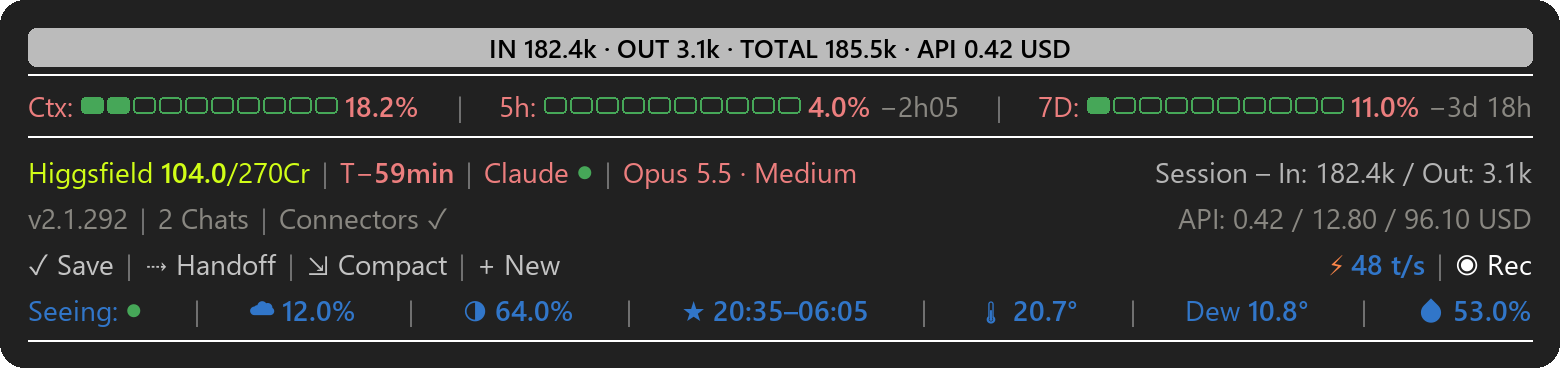
Claude Code 的状态栏。它位于终端和桌面应用(Windows 11)中提示符的上方,让您一目了然地看到上下文有多满、已使用了多少计划限制、提示缓存何时过期以及 Anthropic 的服务是否正常。几个按钮可一键处理日常步骤,底部一行显示今晚的星空和您所在位置的天气。
Telefaxnix/ROQAM/tree/main/roqam
Claude Code 的状态栏。它位于终端和桌面应用(Windows 11)中提示符的上方, 让您一目了然地看到上下文有多满、已使用了多少计划限制、提示缓存 何时过期以及 Anthropic 的服务是否正常。几个按钮可一键处理日常步骤, 底部一行显示今晚的星空和您所在位置的天气。

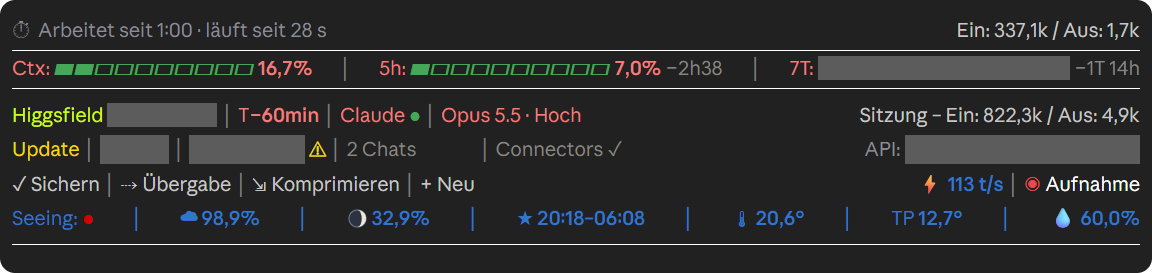
在桌面应用中,当 Claude 正在工作时(德语版本)。录制模式已开启,因此私人值会变灰。

有两个版本:标签为英文的 roqam 和标签为德文的 roqam-de。它们的工作方式相同,
但德语版本使用德语设置名称并以 CHF 显示 API 成本(参见 Settings)。德语指南是 ANLEITUNG.md。
ROQAM 是一个独立项目。Anthropic 没有制作它,也不为其背书。
有三种方式。只使用其中一种并且只安装一个版本,否则会运行两个状态栏。
在此页面上,点击 Code → Download ZIP,解压文件并双击 Install.bat。安装程序会询问
标签的语言(它建议使用 Windows 的语言)以及您的位置,即用于星空
和天气的城镇。它将 mod 复制到 C:\Users\YOURNAME\.claude\mods\ 并将其添加到 settings.json。在此之前,它
会将您的 settings.json 副本、mod 的较旧副本和另一语言版本放入
C:\Users\YOURNAME\.claude\backups\;不会删除任何内容。然后完全退出 Claude Code 并再次启动它。如果
Windows SmartScreen 警告您,请选择“更多信息”,然后选择“仍要运行”。
在终端中:
claude plugin marketplace add Telefaxnix/ROQAM
claude plugin install roqam@roqam --config location=London
把你自己的城镇替换掉 London,或者如果你不想要天空和天气,就省略 --config location=London。
想要德语标签,请改为安装 roqam-de@roqam --config ort=Bern;德语版把这个设置称为
ort。然后完全退出 Claude Code 并重新启动。桌面应用读取同一个 settings.json,所以那里也会显示状态栏。
用 claude plugin marketplace update roqam 更新,然后用 claude plugin update roqam@roqam。用
claude plugin uninstall roqam@roqam 卸载。
按上面的说明下载 ZIP 并解压。
把文件夹 roqam 复制到 C:\Users\YOURNAME\.claude\mods\roqam(如果需要就创建 mods 文件夹)。
打开 C:\Users\YOURNAME\.claude\settings.json(如果需要就创建它)并添加下面两个块。替换
YOURNAME 和 London;如果你不想要天空和天气,就把 location 留空。
{
  "env": {
    "CLAUDE_CODE_PLUGIN_DIRS": "C:\\Users\\YOURNAME\\.claude\\mods\\roqam"
  },
  "pluginConfigs": {
    "roqam": {
      "options": {
        "location": "London",
        "apiCost": true,
        "higgsfield": true,
        "promotions": true
      }
    }
  }
}
如果文件里已经有内容,就把这些块合并进去,注意逗号。如果 CLAUDE_CODE_PLUGIN_DIRS
已经列出了其他文件夹,就把新路径加在末尾,用 ; 分隔。
完全退出 Claude Code 并重新启动。
用插件管理器的话,见上文。否则从 settings.json 中的 CLAUDE_CODE_PLUGIN_DIRS 里删除该 mod 的路径,然后重启 Claude Code。
| 项目 | 含义 |
|---|---|
| Top band | Claude 工作时:显示你请求的简短摘要,如果 Claude 维护任务列表,还会显示其进度(▰▰▰▱▱ 3/5)。使用 /goal … 时则改为显示你的目标。Claude 完成后:显示自你上一条消息以来的输入和输出 token 数,以及这些工作按 API 价格计算的费用(IN 182.4k · OUT 3.1k · TOTAL 185.5k · API 0.42 USD)。 |
| ⏱ Working for … | Claude 工作时:显示已运行时长、最后一步以及目前的 token 数。如果某一步超过 4 分钟,或 Claude 重复同一调用三次,它会询问是否继续。 |
| Ctx | 聊天上下文的占用程度。达到 75% 以及再次达到 90% 时,会提示建议使用 /compact。 |
| 5h / 7D | 你的套餐五小时和七天限额已使用多少,以及各自何时重置。 |
| Higgsfield 104.0/270Cr | 你的 Higgsfield 积分。一旦连接 claude.ai 连接器 "Higgsfield",它们就会自动出现,即使你稍后才连接。 |
| T− | 提示缓存距过期还有多少分钟,从 Claude 最后一次请求算起,生存期为 60 分钟(T−55min;灰色 T−0 表示已过期)。此后,你的下一条消息必须重新读取整个聊天,这会消耗更多限额。 |
| Claude ● | Anthropic 状态:绿色表示你使用的服务正常,黄色表示性能下降,红色表示宕机,灰色表示无法连接状态页面。点击 "Claude" 查看详情;每个事件(↗)会打开其在 status.claude.com 上的页面。 |
| Opus 5.5 · Medium | 此聊天的模型和投入级别。 |
| Session – In / Out | 此聊天迄今已读取和写入的 token 数。 |
| v2.1.292 / Update | 你的 Claude Code 版本。黄色 "Update" 表示有新版本可用;点击可查看是哪个版本。 |
| 2 Chats | 在此 PC 上运行的 Claude 会话。点击查看列表;应用聊天(↗)点击即可打开。 |
| Connectors | 此聊天的 MCP 服务器、claude.ai 连接器和本地连接器;其中一个断开时变为黄色。 |
| ⚑ New promotion | 仅在 Anthropic 更改促销时显示,例如云积分、访客通行证、折扣或使用限额通知。点击可查看更改内容。 |
| API: | 此聊天、此项目以及当前套餐月份按 API 标价计算的费用。 |
| ✓ Save | 将一条请求放入提示框:Claude 会浏览聊天,自动将缺失的内容添加到项目笔记及其记忆中,无需询问,提交已更改的项目文件,并在项目有在线副本时推送它们。由你自己发送。 |
| ⇢ Handoff | 如果你有 /handoff 技能,则运行它。否则,它会将一条简短交接请求放入提示框。 |
| ⇲ Compact | 询问后压缩聊天(/compact)。 |
| + New | 在同一文件夹中打开新聊天(桌面应用:新聊天;终端:新窗口)。 |
| ⚡ … t/s | 上一个回答的流式传输速度,以每秒 token 数计。 |
| ◉ Rec | 录制模式:隐藏所有打开聊天中的路径、费用、账户、七天百分比、你的请求摘要和步骤文本,用于屏幕录制。白色为关闭,红色为开启。当 OBS、Streamlabs、Bandicam 或 Camtasia 运行时,它会自动开启。 |
| Seeing: ● | 你所在位置今晚的天空,以十一个步骤从绿色到红色。绿色:晴朗稳定,值得出去看看。趋向红色:多云、空气不稳定、月光过亮或空气潮湿。灰色:无数据。 |
| ☁ / moon / ★ | 天黑后的云量、月相,以及天文黑暗的开始和结束时间。 |
| 🌡 / Dew / 💧 | 温度、露点和湿度,每 10 分钟更新一次。 |
在聊天本身中,ROQAM 用灰色“CLAUDE READY”条带标记每个回答的结尾。当 Claude 在任务进行中 向你询问某事时,问题上方会出现一条金色条带,表示你的回答将继续当前 任务。
点击 Claude ●、版本、Chats、Connectors、⚑、API: 或 ⚡ 可查看详情。再次点击,或等待 30 秒,即可 关闭卡片。
/stars 会隐藏天空和天气并停止天气请求;再次运行即可恢复。该设置
适用于所有聊天,并在重启后保留。在无法点击推广通知的地方,/promo-seen 可将其关闭
(德语版本:/aktion-gesehen)。
Claude Code 不会向模组告知云积分或免费重置。如果你仍想看到它们,请保留一个文件
~\.claude\statusleiste-guthaben.json,其中包含条目列表,例如
[{"name": "Cloud credits", "kurz": "Cloud $", "rest": 40, "total": 50, "einheit": "USD", "ablauf": "2026-12-31"}]。
该栏会显示每个条目及其剩余天数,当剩余少于 7 天时显示 ⚠;"verbraucht": true 会隐藏某个条目。
只有当你自己写的同步脚本写入 ~\.claude\github-abgleich.json 时,才会出现“⚠ GitHub”警告。没有
这些文件,则什么都不会出现。
设置位于 settings.json 中的 pluginConfigs → roqam → options。如果你使用了插件管理器,
它们位于 pluginConfigs → roqam@roqam → options,并且 claude plugin configure roqam@roqam 会显示它们。
更改后请重启 Claude Code。
| 设置 | 德语版本 | 默认值 | 作用 |
|---|---|---|---|
| location | ort | 空 | 用于天空和天气的城镇,例如 "London"。空:不显示天空和天气。 |
| apiCost | apiKosten | true | 显示此聊天、此项目和套餐月通过 API 本应花费的金额,以 USD 计(德语版本:CHF)。 |
| higgsfield | higgsfield | true | 当 claude.ai 连接器“Higgsfield”已连接时,显示你的 Higgsfield 积分。false 会将其隐藏。 |
| higgsfieldMax | higgsfieldMax | 270 | 你的 Higgsfield 套餐中每月的积分。 |
| promotions | aktionen | true | 当 Anthropic 更改推广时显示“⚑ New promotion”。 |
| weatherUrl | wetterUrl | 空 | 你自己的气象站 API 地址。仅与 location 一起使用才有效。空:温度、露点和湿度来自 Open-Meteo。 |
| newChatFolder | neuOrdner | 空 | “+ New”在其中打开新聊天的文件夹。空:当前聊天的文件夹。 |
状态栏存储的所有内容都留在你的电脑上。它只联系无需账户的公共服务:
| 服务 | 用途 |
|---|---|
| Open-Meteo(api.open-meteo.com、geocoding-api.open-meteo.com) | 天气、云量、查找你所在的城镇 |
| 7Timer(www.7timer.info) | 查看预报 |
| status.claude.com | 故障事件 |
| npm 注册表(registry.npmjs.org) | 最新的 Claude Code 版本 |
| 你自己的气象站(weatherUrl) | 仅当你设置了它 |
| Frankfurter(api.frankfurter.app) | 美元兑瑞士法郎汇率(仅德语版,且开启 API 费用时) |
在你的电脑上,它会读取 Claude Code 自己的文件:~\.claude.json(推广信息以及你套餐的开始日期)、
~\.claude\sessions(正在运行的对话)以及当前对话的记录(用于 T−)。对于 API 费用,它还会
读取你的其他记录,并在 ~\.claude\ 中保存一份带有备份副本的费用日志。它会运行 tasklist、
PowerShell、rundll32 和 wt.exe。对于顶部栏中的摘要,它通过你自己的 Claude
Code 会话请求 Claude Haiku,这会使用你套餐的一小部分。详情:PRIVACY.md。
claude --debug 启动 Claude Code;带有 roqam 的行会显示哪里出了问题。settings.json 的
"permissions": { "allow": [ … ] } 下允许连接器的 balance 工具。/compact 之后的上下文数值可能会滞后,
直到下一次更新。天气和云数据来自 Open-Meteo.com(CC BY 4.0;非商业用途免费)。 视宁度预报来自 7Timer(非商业用途免费)。
Copyright 2026 Dominik Sieber。根据 MIT 许可证(LICENSE-MIT)或 Apache 许可证 2.0(LICENSE-APACHE)授权,由你选择。
请先查看作者 README 确认 marketplace 和插件名称;命令可能随仓库结构改变。
claude plugin marketplace add Telefaxnix/ROQAM
claude plugin install roqam@roqam
A status bar for Claude Code. It sits above the prompt in the terminal and in the desktop app (Windows 11) and shows at a glance how full your context is, how much of your plan limits you have used, when the prompt cache expires and whether Anthropic's services are up. A few buttons handle everyday steps with one click, and the bottom line shows tonight's sky and the weather where you are.
In the desktop app while Claude is working (German version). Recording mode is on, so private values are greyed out.
There are two versions: roqam with English labels and roqam-de with German labels. They work the same way,
but the German version uses German setting names and shows API costs in CHF (see Settings). The German guide is ANLEITUNG.md.
ROQAM is an independent project. Anthropic did not make it and does not endorse it.
There are three ways. Use only one of them and install only one version, otherwise two bars will run.
On this page, click Code → Download ZIP, unzip the file and double-click Install.bat. The installer asks
for the language of the labels (it suggests the language of Windows) and for your location, the town used for sky
and weather. It copies the mod to C:\Users\YOURNAME\.claude\mods\ and adds it to settings.json. Before that it
puts a copy of your settings.json, an older copy of the mod and the other language version into
C:\Users\YOURNAME\.claude\backups\; nothing is deleted. Then quit Claude Code completely and start it again. If
Windows SmartScreen warns you, choose "More info" and then "Run anyway".
In a terminal:
claude plugin marketplace add Telefaxnix/ROQAM
claude plugin install roqam@roqam --config location=London
Use your own town instead of London, or leave out --config location=London if you don't want sky and weather.
For German labels, install roqam-de@roqam --config ort=Bern instead; the German version calls the setting
ort. Then quit Claude Code completely and start it again. The desktop app reads
the same settings.json, so the bar shows up there too.
Update with claude plugin marketplace update roqam and then claude plugin update roqam@roqam. Remove it with
claude plugin uninstall roqam@roqam.
Download the ZIP as described above and unzip it.
Copy the folder roqam to C:\Users\YOURNAME\.claude\mods\roqam (create the mods folder if needed).
Open C:\Users\YOURNAME\.claude\settings.json (create it if needed) and add these two blocks. Replace
YOURNAME and London; leave location empty if you don't want sky and weather.
{
  "env": {
    "CLAUDE_CODE_PLUGIN_DIRS": "C:\\Users\\YOURNAME\\.claude\\mods\\roqam"
  },
  "pluginConfigs": {
    "roqam": {
      "options": {
        "location": "London",
        "apiCost": true,
        "higgsfield": true,
        "promotions": true
      }
    }
  }
}
If the file already has content, merge the blocks into it and mind the commas. If CLAUDE_CODE_PLUGIN_DIRS
already lists other folders, add the new path at the end, separated by ;.
Quit Claude Code completely and start it again.
With the plugin manager, see above. Otherwise remove the mod's path from CLAUDE_CODE_PLUGIN_DIRS in
settings.json and restart Claude Code.
| Item | Meaning |
|---|---|
| Top band | While Claude works: a short summary of your request and, if Claude keeps a task list, its progress (▰▰▰▱▱ 3/5). With /goal … it shows your goal instead. When Claude is done: tokens in and out since your last message and what that work would have cost at API prices (IN 182.4k · OUT 3.1k · TOTAL 185.5k · API 0.42 USD). |
| ⏱ Working for … | While Claude works: how long it has been running, the last step, and the tokens so far. If a step takes more than 4 minutes, or Claude repeats the same call three times, it asks whether to continue. |
| Ctx | How full the chat's context is. At 75% and again at 90% a hint suggests /compact. |
| 5h / 7D | How much of your plan's five-hour and seven-day limits you have used, and when each resets. |
| Higgsfield 104.0/270Cr | Your Higgsfield credits. They appear by themselves once the claude.ai connector "Higgsfield" is connected, even if you connect it later. |
| T− | Minutes until the prompt cache expires, counted from Claude's last request with a lifetime of 60 minutes (T−55min; grey T−0 means expired). After that, your next message has to read the whole chat again, which costs more of your limit. |
| Claude ● | Anthropic status: green means the services you use are up, yellow degraded, red down, grey no connection to the status page. Click "Claude" for details; each incident (↗) opens its page on status.claude.com. |
| Opus 5.5 · Medium | Model and effort level of this chat. |
| Session – In / Out | Tokens this chat has read and written so far. |
| v2.1.292 / Update | Your Claude Code version. A yellow "Update" means a newer version is out; click it to see which. |
| 2 Chats | Claude sessions running on this PC. Click for the list; app chats (↗) open on click. |
| Connectors | The MCP servers of this chat, claude.ai connectors and local ones; turns yellow when one drops. |
| ⚑ New promotion | Shows up only when Anthropic changes a promotion, such as cloud credits, guest passes, discounts or usage-limit notices. Click it to see what changed. |
| API: | What this chat, this project and the current plan month would have cost at API list prices. |
| ✓ Save | Puts a request into the prompt box: Claude goes through the chat, adds what is missing to the project notes and its memory without asking, commits the changed project files and pushes them if the project has an online copy. You send it yourself. |
| ⇢ Handoff | Runs your /handoff skill if you have one. Otherwise it puts a request for a short handoff into the prompt box. |
| ⇲ Compact | Compacts the chat (/compact) after asking. |
| + New | Opens a new chat in the same folder (desktop app: new chat; terminal: new window). |
| ⚡ … t/s | How fast the last answer streamed, in tokens per second. |
| ◉ Rec | Recording mode: hides paths, costs, accounts, the seven-day percentage, the summary of your request and the step text in all open chats, for screen recordings. White is off, red is on. It turns on by itself while OBS, Streamlabs, Bandicam or Camtasia runs. |
| Seeing: ● | Tonight's sky where you are, in eleven steps from green to red. Green: clear and steady, worth a look outside. Towards red: clouds, unsteady air, bright moon or damp air. Grey: no data. |
| ☁ / moon / ★ | Cloud cover after dark, moon phase, and the start and end of astronomical darkness. |
| 🌡 / Dew / 💧 | Temperature, dew point and humidity, updated every 10 minutes. |
In the chat itself, ROQAM marks the end of each answer with a grey "CLAUDE READY" band. When Claude asks you something in the middle of a task, a gold band above the question says that your answer continues the current task.
Click Claude ●, the version, Chats, Connectors, ⚑, API: or ⚡ for details. Click again, or wait 30 seconds, to close the card.
/stars hides sky and weather and stops the weather requests; run it again to bring them back. The setting
applies to all chats and survives restarts. Where the promotion notice can't be clicked, /promo-seen dismisses
it (German version: /aktion-gesehen).
Claude Code doesn't tell mods about cloud credits or free resets. If you want to see them anyway, keep a file
~\.claude\statusleiste-guthaben.json with a list of entries such as
[{"name": "Cloud credits", "kurz": "Cloud $", "rest": 40, "total": 50, "einheit": "USD", "ablauf": "2026-12-31"}].
The bar shows each entry with the days left and a ⚠ when fewer than 7 remain; "verbraucht": true hides one.
A "⚠ GitHub" warning appears only if a sync script of your own writes ~\.claude\github-abgleich.json. Without
these files, nothing appears.
The settings live in settings.json under pluginConfigs → roqam → options. If you used the plugin manager,
they are under pluginConfigs → roqam@roqam → options, and claude plugin configure roqam@roqam shows them.
Restart Claude Code after a change.
| Setting | German version | Default | What it does |
|---|---|---|---|
| location | ort | empty | Town for sky and weather, e.g. "London". Empty: no sky and weather. |
| apiCost | apiKosten | true | Shows what this chat, this project and the plan month would have cost via the API, in USD (German version: CHF). |
| higgsfield | higgsfield | true | Shows your Higgsfield credits whenever the claude.ai connector "Higgsfield" is connected. false hides them. |
| higgsfieldMax | higgsfieldMax | 270 | Credits per month in your Higgsfield plan. |
| promotions | aktionen | true | Shows "⚑ New promotion" when Anthropic changes a promotion. |
| weatherUrl | wetterUrl | empty | Address of your own weather station's API. Works only together with location. Empty: temperature, dew point and humidity come from Open-Meteo. |
| newChatFolder | neuOrdner | empty | Folder in which "+ New" opens the new chat. Empty: the folder of the current chat. |
Everything the bar stores stays on your PC. It only contacts public services that need no account:
| Service | What for |
|---|---|
| Open-Meteo (api.open-meteo.com, geocoding-api.open-meteo.com) | Weather, cloud cover, finding your town |
| 7Timer (www.7timer.info) | Seeing forecast |
| status.claude.com | Incidents |
| npm registry (registry.npmjs.org) | Latest Claude Code version |
| Your own weather station (weatherUrl) | Only if you set it |
| Frankfurter (api.frankfurter.app) | USD to CHF rate (German version only, with API costs on) |
On your PC it reads Claude Code's own files: ~\.claude.json (promotions and the start date of your plan),
~\.claude\sessions (running chats) and the transcript of the current chat (for T−). For the API costs it also
reads your other transcripts and keeps a cost log with a backup copy in ~\.claude\. It runs tasklist,
PowerShell, rundll32 and wt.exe. For the summary in the top band it asks Claude Haiku through your own Claude
Code session, which uses a small part of your plan. Details: PRIVACY.md.
claude --debug; lines with roqam show what goes wrong.balance tool under
"permissions": { "allow": [ … ] } in settings.json./compact may lag until
the next update.Weather and cloud data from Open-Meteo.com (CC BY 4.0; free for non-commercial use). Seeing forecasts from 7Timer (free for non-commercial use).
Copyright 2026 Dominik Sieber. Licensed under either the MIT License (LICENSE-MIT) or the Apache License 2.0 (LICENSE-APACHE), at your option.

文档生成、漂移检测和 API 文档自动化插件,同时作为 function-hook 防护,拒绝包含机密的文档写入或 worker 调度。
Repowise 推出 Lens,这是一个能实时可视化已索引代码库的 Claude Code mod:Claude 搜索、读取和编辑文件时,文件会亮起,导入方和反向依赖也会高亮。它还包含一个显示受影响文件和覆盖测试的 Flow 标签页,以及一个带健康度变化和运行建议测试按钮的审查行。


Claude 桌面应用的状态栏。它显示在提示符上方,展示会话质量、上下文填充量、缓存倒计时,以及 5 小时和每周限额,并让 Clawd 演示会话正在进行的操作。